
The futile quest for the last cheap laptop with enough RAM
In a previous post, in the chapter “On RAM prices because of the AI madness,” I explored the possibility of purchasing a cheap laptop with 24 GB or 32 GB of RAM, either DDR5 or LPDDR5X, but not DDR4. This quest was triggered by the sudden disappearance of decently priced RAM, SSDs, and laptops, and the arrival of higher priced devices. In the two countries that I can rely on, Germany and Romania, the situation is dire. The SSDs are already more expensive: most “old-priced” external SSDs went out of stock in Germany in the week that soon ends, and in Romania all cheap stocks are gone. As I don’t care about PC RAM but only laptop RAM (SO-DIMM), I explored the remaining stocks of decent laptops, while remaining on the cheap side: non-gaming, non-Nvidia, as affordable as possible.
As I continued the exploration, I decided to move the ad hoc analysis from that post to this one and to overhaul it.
1. Acer’s best deal isn’t what it seems to be
Prices in Europe for low-end computers should seem unreasonably high to American readers, and they’re probably right: even if you remove the VAT (which is obviously already included in the end price), laptops are more expensive here than in the States. And so many cheap configurations aren’t available here at all.
But I was curious to see whether something interesting was still in stores before the apocalypse shipped from China hits our shelves.
When I first noticed this laptop on Amazon Deutschland, it was sold by Amazon itself for €686.65 (including the German 19% VAT). As I am writing this, it went up to €691.88, which is still ok for 32 GB of RAM and 1 TB of PCIe Gen4 NVMe SSD: 💰Acer Aspire Go 15 (AG15-42P-R5ZD), featuring an AMD Ryzen 7 5825U, 32 GB RAM, 1 TB SSD, Win11 Home DEU, QWERTZ keyboard.
The problem is that those 32 GB are DDR4 of unspecified speed! Acer never mentions the speed of its DDR4 and DDR5 modules! DD4 should mean DDR4-3200, though.
A second issue is the screen. My 2016 Acer TravelMate P645-S-5505 has slow DDR3-1600 and a pathetic i5-5200U, not to mention that its primary SSD, despite having an M.2 2280 format, is SATA, hence slow (max. 550 MB/s in read); but its IPS screen is superb, having a near-full 90% sRGB gamut. The “P” in the name means “professional,” and the build quality is very much above what’s usually expected from an Acer: magnesium alloy top, and a plastic bottom. But newer Acer laptops from various series (Aspire 3, Aspire 5, Aspire Go, Aspire Lite, Extensa) have washed-out colors, and the official specs only mention “ComfyView” (Acer’s term for a matte, anti-glare display)! This almost always means a 45% NTSC color gamut (~62.5% sRGB). Some Aspire 5 laptops might have better screens, but a potential customer should examine the desired model in a brick-and-mortar store first! My Acer Aspire 3 (A315-59-32MA) from 2023 has pathetic colors. It’s good for coding, but subpar for videos, and totally not recommendable for graphics. The DDR4-3200 (16 GB) is OK, and the storage is satisfactory (on 256 GB NVMe on Gen. 3 + 1 TB on Gen. 4, max. 3500 MB/s in read).
So that shit on Amazon Deutschland is OK for coding, but the RAM is still DDR4, and the screen is undoubtedly pathetic, even if the viewing angles are wide (IPS oblige).
But it’s even worse. Nowadays, the most prominent weakness of Acer is the use of MediaTek Wi-Fi/BT combos. Linux doesn’t always love some such chips. After the BT functionality in MT7663 stopped being supported in newer Linux kernels, I had to replace it with an Intel AX210. I hate opening laptops, but it can be done. This shouldn’t be the norm, though. So I needed to know what Wi-Fi/BT combo is used in this laptop.
As AG15-42P-R5ZD is too specific a code (German keyboard and whatnot), what I searched for was the base code AG15-42P. Note the “42P” part. Here’s an Italian disassembly of an Acer Aspire Go 15 AG15-42P. Right at minute 1:14, we see the truth: a MediaTek MT7921.
So the question is this one: Is MT7921 better and more reliably supported than MT7663 by Linux, especially with regard to BT, not just Wi-Fi?
Apparently, the answer is YES. The MT7921 seems to be significantly better supported than the MT7663, especially for Bluetooth. The mt7921e driver has been in the mainline kernel since around 5.12. The BT probably uses btusb and it certainly needs a firmware blob, but so far it hasn’t been dropped from newer kernels the way MT7663’s BT support was.
But MediaTek still isn’t Intel. So it’s not completely risk-free. Intel’s AX210 is reliable, but there isn’t any cheap laptop to use it, despite not being expensive!
This said, since I can “hop” between two countries, Germany and Romania (except that in Romania most keyboards are US ANSI), I searched for similar offers in my “country of origin,” despite its higher VAT (21% vs. 19%). And I found a model with 32 GB of DDR5 RAM! 💰Here or 💰here, for 3500 lei or about €699.99 (for those who find such cheating more pleasant than €700): Acer Aspire Go 15 (AG15-71P-72WU), i7-13620H, 32 GB DDR5, 1 TB on PCIe Gen. 4, FreeDOS, US ANSI keyboard.
This video disassembly of an Acer Aspire Go 15 (AG15-71P), as well as my visit to an Altex store that had it on display with Linux Mint installed on it confirmed that this specific model uses an Intel AX101 Wi-Fi/BT combo! This is much worse than AX210, and it requires hardware CNVio2 extensions (it couldn’t be used on an AMD system), but it’s better than MediaTek!
The colors seemed as unspectacular as on my laptop. Sure thing, Linux Mint’s color palettes invite to suicide, but I’m pretty sure that screen was nothing to write home about.
2. Moving on to Lenovo
Apparently, my long-time preference for non-gaming Acer models, paired with stinginess, led to questionable choices. But in 2012 I had an atrociously fucked-up Lenovo, with a pathetic screen and screws that would unscrew on their own, and I lost my faith in Lenovo (only the keyboard was great). I suppose I should reconsider, eh? I don’t like ASUS (despite their VivoBook models that come with OLED touchscreens having fabulous colors!), and HP and Dell are crap at this price level (under €700).
Lenovo doesn’t have anything dirt cheap with more than 16 GB of RAM on Amazon Germany. 💰This guy (83K100B4GE) at €549.99 or, until Feb. 9, at €499.99 (including the German VAT) only has 16 GB: Lenovo IdeaPad Slim 3 15IRH10 (i5-13420H, 16 GB DDR5-4800, 512 GB SSD, Win11 Home DEU, QWERTZ keyboard). This very similar one (83K00019GE) is €529.99: IdeaPad Slim 3 14IRH10 (i5-13420H, 16 GB DDR5-4800, 512 GB SSD, Win11 Home DEU, QWERTZ keyboard).
Both have a pathetic gamut à la Acer: 45% NTSC.
Both have a Gen. 4 PCIe NVMe SSD, with a second available slot (I’ve learned that only 13-inch Idea Pad Slim models have a unique M.2 SSD slot), but… not in the M.2 2280 format! Lenovo uses the M.2 2242 form size exclusively!
This Lenovo IdeaPad Slim 3 15IRH10 Disassembly & Teardown video, paired with a detailed article, reveal some interesting facts, despite being for a very specific configuration that features a different CPU.
The Wi-Fi/BT combo is Intel AX203. While the Intel AX203 has good but recent Linux support through the standard iwlwifi driver, there are some caveats. Linux 6.14+ is generally required, though Intel’s documentation mentions 6.18+ for optimal compatibility. Funny thing, I wasn’t aware that even my AX210 has the same official recommendations, although I know from Xebian (“trixie” not “unstable”) that it works just fine with Linux 6.12. Maybe it only works in Wi-Fi 6, not Wi-Fi 6E mode.

The problem is that I’m not sure I trust the Linux kernel and the distros regarding the AX203.
- Wi-Fi in AX203 requires recent firmware. Arch forums: [SOLVED] Intel AX203 not detected after Kernel 6.15.4 update.
- BT in AX203 also requires firmware that could be missing. Ubuntu’s Launchpad: Bug #2118886 reported on 2025-07-28: Bluetooth firmware is missing for Intel AX203 card. A fix was released for Ubuntu 24.04 LTS in September 2025.
The second bad news is even worse. The teardown shows this SSD: WD SN5000S 512 GB PYRITE SDEPMSJ-512G = M.2 2242, which is difficult to find. The 2242 variant is essentially “unobtainium” for retail consumers. For consumers, this SSD exists as:

- SDEPTSJ-512G = M.2 2230
- SDEPNSJ-512G = M.2 2280
So you have the standard M.2 2280, the much shorter M.2 2230, but not the intermediate M.2 2242!
I asked Kimi to search for possible replacements. What can one do if such an SSD dies? Or, as long as these laptops come with two Gen 4 2242 M.2 slots, where could I find a second SSD? And it was Kimi who told me this is “unobtainium”! The 2242 form factor is the “phantom” SKU that WD (SanDisk, actually) primarily sells to OEMs like Lenovo, not consumers. One can generally only find specialty, rather expensive 2242 retail SSDs. What a PITA!
Note that most if not all IdeaPad models are limited to 24 GB of DDR5:
- Those coming with 16 GB have 8 GB soldered + 8 GB in the slot.
- Those coming with 24 GB have 8 GB soldered + 16 GB in the slot.
Those using LPDDR5x-6400 (some Slim 5 models) are limited to the soldered 16 GB.
Not an optimal design by any means.
3. Lenovo in Romania—while stocks last
Funny thing, while I was able to find residual stocks of external SSDs at decent prices in Germany (Samsung T7 at 2 TB; Crucial X9, X9 Pro, and X10 at 2 TB and 4 TB; and WD_BLACK P40 at 2 TB) but not in Romania, the situation is different for cheap Lenovo laptops: Romania seems to have stocks at decent prices, should you be OK with US ANSI for a keyboard.
I explored, and I investigated, and I pondered until I came up with the following synopsis. All systems are without an OS (or with FreeDOS, which is bogus).
IdeaPad Slim 3 • 24 GB DDR5 & 1 TB SSD
| RON | EUR | Model | CPU | RAM | DDR5 | SSD | ☀️ | Gamut | WiFi | BT | Chip | Battery | Backlit | Webcam | Buy |
|---|---|---|---|---|---|---|---|---|---|---|---|---|---|---|---|
| 2600 | 520 | 83K7007MRM | Ryzen 5 7535HS | 24GB | 4800 | 1TB | 300 nits | 45% NTSC | 6 | 5.3 | MT7921 | 60 Wh | No | 720p | PCG |
| 2800 | 560 | 83K10094RM | i5-13420H | 24GB | 4800 | 1TB | 300 nits | 45% NTSC | 6 | 5.2 | AX203 | 50 Wh | No | 720p | PCG |
| 2950 | 590 | 83K2003NRM | i5-13420H | 24GB | 4800 | 1TB | 300 nits | 45% NTSC | 6 | 5.2 | AX203 | 60 Wh | Yes | 1080p | PCG |
| 2900 | 580 | 83K8004HRM | Ryzen 7 7735HS | 24GB | 4800 | 1TB | 300 nits | 45% NTSC | 6 | 5.3 | MT7921 | 50 Wh | No | 1080p | PCG |
| 3250 | 650 | 83K100CVRM | i7-13620H | 24GB | 4800 | 1TB | 300 nits | 45% NTSC | 6 | 5.2 | AX203 | 50 Wh | Yes | 720p | PCG |
The 3rd model went up 50 lei (€10) hours after I made this table, so I updated it.
IdeaPad Slim 3 • 16 GB DDR5
| RON | EUR | Model | CPU | RAM | DDR5 | SSD | ☀️ | Gamut | WiFi | BT | Chip | Battery | Backlit | Webcam | Buy |
|---|---|---|---|---|---|---|---|---|---|---|---|---|---|---|---|
| 2250 | 450 | 83K2003LRM | i5-13420H | 16GB | 4800 | 512GB | 300 nits | 45% NTSC | 6 | 5.2 | AX203 | 50 Wh | No | 720p | ALT, MGY |
| 2700 | 540 | 83KB0019RM | Ryzen 7 8840HS | 16GB | 5600 | 512GB | 300 nits | 45% NTSC | 6 | 5.3 | MT7921 | 50 Wh | No | 720p | ALT, MGY |
| 3000 | 600 | 83K100CSRM | i7-13620H | 16GB | 4800 | 1TB | 300 nits | 45% NTSC | 6 | 5.2 | AX203 | 50 Wh | Yes | 720p | ALT, MGY |
| 3000 | 600 | 83K100RTRM | i7-13620H | 16GB | 4800 | 1TB | 300 nits | 45% NTSC | 6 | 5.2 | AX203 | 50 Wh | Yes | 720p | ALT, MGY |
IdeaPad Slim 5 • 24 GB DDR5
| RON | EUR | Model | CPU | RAM | DDR5 | SSD | ☀️ | Gamut | WiFi | BT | Chip | Battery | Backlit | Webcam | Buy |
|---|---|---|---|---|---|---|---|---|---|---|---|---|---|---|---|
| 3250 | 650 | 83J0003RRM | Core 5 210H | 24GB | 4800 | 512GB | 400 nits | 100% DCI-P3 OLED | 7 | 5.4 | BE200 | 60 Wh | Yes | 1080p | PCG |
IdeaPad Slim 5 • 16 GB DDR5
| RON | EUR | Model | CPU | RAM | DDR5 | SSD | ☀️ | Gamut | WiFi | BT | Chip | Battery | Backlit | Webcam | Buy |
|---|---|---|---|---|---|---|---|---|---|---|---|---|---|---|---|
| 2650 | 530 | 83HT0026RM | Ryzen 5 7535HS | 16GB | 4800 | 512GB | 300 nits | 45% NTSC | 6 | 5.2 | MT7921K (RZ608) | 60 Wh | Yes | 1080p | PCG |
| 2750 | 550 | 83HR003CRM | i5-13420H | 16GB | 5600 | 1TB | 300 nits | 45% NTSC | 6 | 5.2 | AX203 | 60 Wh | Yes | 1080p | ALT, MGY |
| 2800 | 560 | 83HR0036RM | i5-13420H | 16GB | 5600 | 512GB | 300 nits | 45% NTSC | 6 | 5.2 | AX203 | 60 Wh | Yes | 1080p | PCG |
| 2800 | 560 | 83J2002SRM | Ryzen 7 7735HS | 16GB | 6400 | 512GB | 400 nits | 100% sRGB | 6E | 5.3 | RTL8852CE | 55 Wh | Yes | 1080p | ALT, MGY |
| 2850 | 570 | 83J20041RM | Ryzen 5 7535HS | 16GB | 6400 | 512GB | 400 nits | 100% sRGB | 6E | 5.3 | RTL8852CE | 55 Wh | Yes | 1080p | PCG |
| 2900 | 580 | 83J30038RM | Ryzen 7 7735HS | 16GB | 6400 | 1TB | 300 nits | 45% NTSC | 6 | 5.3 | RTL8852BE | 70 Wh | Yes | 1080p | ALT, MGY |
| 2900 | 580 | 83HR003ARM | i5-13420H | 16GB | 5600 | 1TB | 300 nits | 45% NTSC | 6 | 5.2 | AX203 | 60 Wh | Yes | 1080p | PCG |
| 3000 | 600 | 83J3005QRM | Ryzen 7 7735HS | 16GB | 6400 | 1TB | 300 nits | 45% NTSC | 6 | 5.3 | RTL8852BE | 70 Wh | Yes | 1080p | ALT, MGY |
Discussion on sensible components
❶ The Wi-Fi/BT chip is the most delicate issue with most laptops, and Lenovo’s low-to-medium-priced IdeaPad Slim range makes no exception. Not a single model uses Intel’s AX210, which is one of the most reliable and well-supported Wi-Fi chips, with a solid BT, too! The safest choice for Linux is to select a model that uses AX201.
I’ve seen in person laptops that use RTL8852BE and RTL8852CE with Linux Mint installed and running, but I could test neither the stability of their Wi-Fi nor whether the BT actually worked. Moreover, I don’t know if 3rd-party drivers have been added to Mint. Webcams? Not tested. Even when a laptop is showcased to run Linux Mint (in Carrefour they usually install Ubuntu), this is not a guarantee of anything as long as you can’t tinker with it long enough.
❷ Of the 18 listed models, only a single one has a 14″ OLED with a 100% DCI-P3 gamut! Thankfully, it also features 24 GB DDR5 but only 512 GB of storage, and at €650, it’s the most expensive of all. The Wi-Fi/BT chip is not guaranteed to be Intel’s BE200, but the chances are over 80%, IMHO.
To escape the 45% NTSC cesspool, two 13-inch models offer 100% sRGB at €560-570: both are AMD-based and use RTL8852CE, and they feature 16 GB of soldered LPDDR5x-6400 and only 512 GB of SSD (a second slot is not present in 13-inch laptops). But RTL8852CE is catastrophic under Linux (it’s dogshit under Win11, too). Using rtw89 might help, but until you build it, you’re completely without network. (This driver is already in the kernel lately, though.)
❸ Is videoconferencing important to you? 11 of the 18 models have 1080p webcams, 8 of which are IdeaPad Slim 5s.
The 3 models with full gamut screens have 1080p webcams.
❹ If 24 GB of DDR5 is the most important aspect for you (this is how I started digging for such shit!), the choices are IdeaPad Slim 3 models with low-grade screens if you must have 1 TB of SSD and the OLED model if you can live with 512 GB.
Note that 24 GB are only available at 4800 MT/s.
❺ 5 models don’t have a backlit keyboard. I don’t need such a luxury (despite having it on my 2016 Acer), and they say the non-lit keyboards are slightly more comfortable.
❻ There are also differences in the capacity of the included batteries. There is no logic in that: the batteries are what they are.
❼ To decide on a satisfactory model, I’m not sure what matrix or what decision tool might help. I’m already disgusted by this chasing of Fata Morgana, especially as the Wi-Fi/BT chip and the quality of the screen are such severe limitations.
❽ Thermal talk: I’m worried that the heat from CPUs with relatively high TDP won’t be properly evacuated and that the laptop will run very hot. This is how ASUS VivoBooks usually run. At least my 2023 Acer has a CPU with a default TDP of 15 W.
In theory, an AMD CPU should run slightly colder than its Intel equivalent in performance. For instance, a Ryzen 5 7535HS should be preferred over an i5-13420H, but once you consider the risk of a MediaTek Wi-Fi/BT chip, you might want to stick to Intel.
❾ Finally, I’m not happy with Intel’s stupid architectures that mix Performance-cores (P-cores) and Efficient-cores (E-cores). The problem goes this way:
- E-cores only have one thread, not two.
- E-cores have a lower maximum frequency than P-cores.
- Both Windows and Linux would favor E-cores over P-cores. And schedulers can be so stupid as not to know to spread the processes optimally among E-cores and P-cores. I’ve seen reports that only E-cores were utilized when all cores should have been put to work or that CPU-intensive processes were left to E-cores. This is why I find AMD’s Zen architecture much more reliable, as it uses identical cores, which simplifies scheduling and ensures predictable performance. Who was the retard at Intel who designed such crap? I know the answer: it was Raja Koduri, who was Intel’s Chief Architect and Senior Vice President of the Core and Visual Computing Group during the development of Alder Lake (12th Gen Core).
This whole shit is a nightmare.
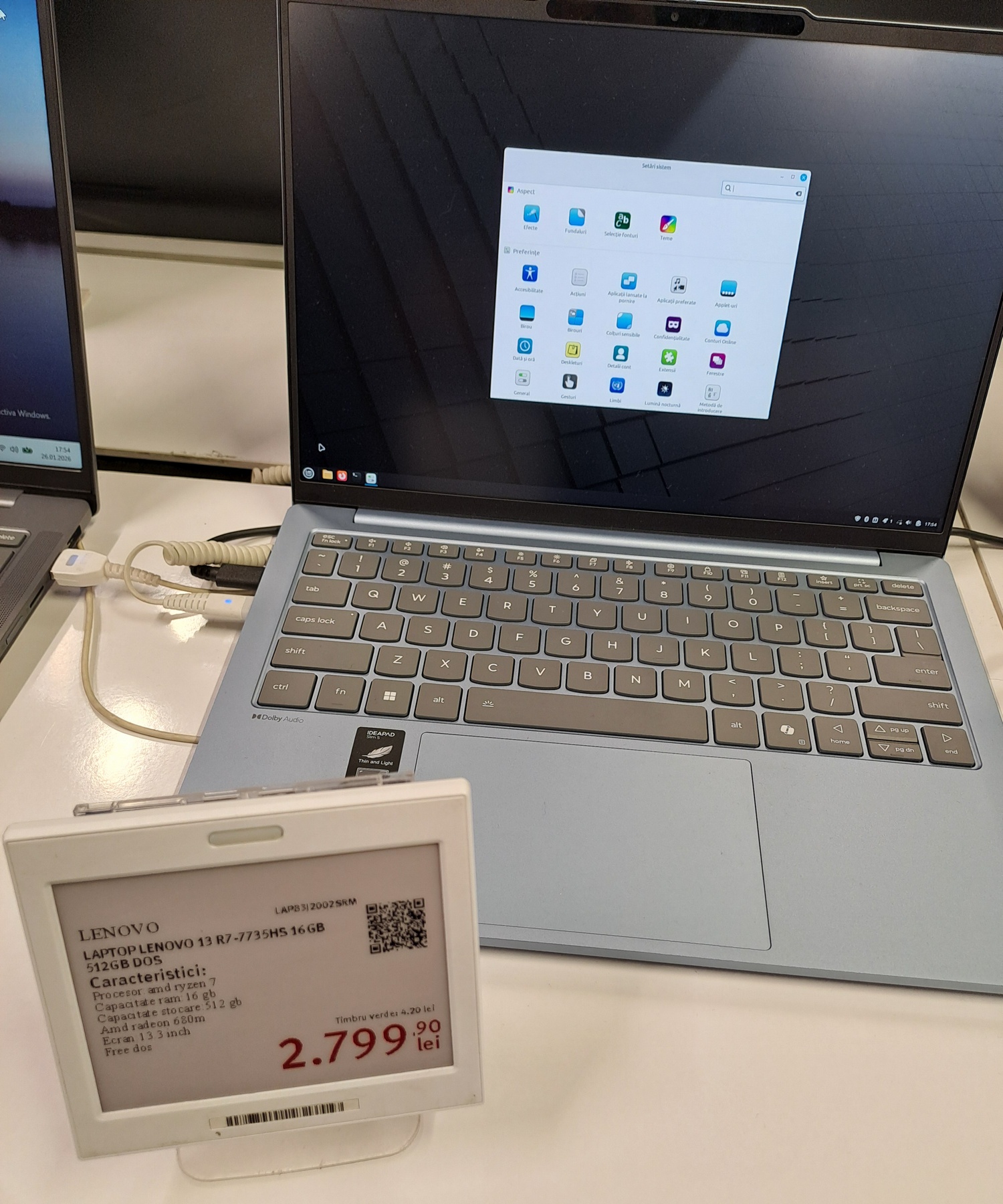
The IdeaPad Slim 5 13ARP10 83J2002SRM in Altex AFI Brașov, running Linux Mint:
How about running a small LLM locally?
Eyeing the 83HT0026RM device, I then asked Claude to evaluate the performance difference between my Acer (i3-1215U with DDR4-3200) and that Lenovo (Ryzen 5 7535HS with DDR5-4800) in running a local 7B (Q4) LLM with only RAM and no GPU. It made these estimations:
- Acer: ~3-5 tokens/s
- Lenovo: ~7-12 tokens/s
It wasn’t only about the RAM speed. The Ryzen has more threads (all full-power ones) and a larger L3 cache. Moreover, it can sustain performance for longer (TDP of 35 W vs. 15 W with a non-permanent boost to 55 W). So the Lenovo could run even 13B LLMs, and 7B models are more usable than on Acer.
OTOH, with 35 W sustained TDP, the Lenovo requires better cooling, and it would still run hotter. Unless, of course, it throttles down.
Cooler, more modest Ryzen CPUs suggested by Claude: 7735U (15-28W) or 7530U (15W, basically a rebranded 5625U).
For LLM inference, while limiting the TDP to 15 W and assuming DDR5-4800 in both cases (hypothetically, because Acer doesn’t support DDR5 at this price level), the Ryzen 5 7530U is ~30-40% faster than the i3-1215U, thanks to more threads and cache.
4. Scenarios and decisions
The original scenario was something like this: I wanted a cheap-but-good-enough laptop, considering that:
- In the next ~2 years, I expect RAM and SSD prices to skyrocket because of the AI hysteria that pushes the hardware manufacturers to shift their production to fulfill data center orders. Scarcity in the consumer-grade components market will make prices explode. So I thought, maybe I’d catch the last boat or, like they say in some cultures, to jump into the last car of the departing train.
- My 14-inch Acer laptop from 2016 is really, really, really too slow for today’s software. It would certainly run Linux faster than any Windows version; it was happy enough with Win7, but it’s not just the OS that became heavier over time. Its main asset being the quality of the image, it would be perfect for watching movies and reading stuff, but not for any serious activity.
But then, decisions need to be taken:
- Do I really need a display with good colors at this price range, or do I relegate this task exclusively to the almost 10-year-old laptop, as long as it’s not dead yet? Its USB connectors are extremely picky, but I’m used to them.
- Supposing I don’t consider the gamut to be that important, but rather the RAM, how do I spread the OSes among the newer laptops?
Knowing that this laptop would come without an OS, I’m free to choose:
- I keep the 2023 Acer running Debian, and I install Win11 on the new Lenovo (Win10 IoT would almost certainly lack one driver or another).
- I install Win11 (I could also try Win10 IoT) on the 2023 Acer, and I try my chances with Debian on the new Lenovo. (Would I start distro-hopping again?)
Choosing from the above list of 18 devices is painful. I definitely want too much for this price range, but €600 is a psychological threshold for me. To get a great screen with powerful hardware while completely ignoring the Linux compatibility can easily be obtained by spending north of €2,000 on a gaming laptop with 32 GB DDR5, 2 TB SSD, and a GeForce RTX 5070 Ti 12 GB! (I’m not going to do that.)
I should update this post if I reach a conclusion.
The follow-up is here: I did say I’ll be back, didn’t I?
I’ve always bought new laptops with minimal RAM & storage amounts, the upgraded them myself later. It was cheaper that way – don’t know if this still holds up today, with the crazy current prices.
I did that with the previous laptop in 2023. I’m not doing that again. Not these days, when you can’t find anymore what you need. Besides, I don’t want to open this laptop. It feels sturdier, so I prefer to keep it virgin.