
I did say I’ll be back, didn’t I?
After the last iteration through my tables from The futile quest for the last cheap laptop with enough RAM, I concocted another table, meant to help me really take a decision on this matter.
Intel-only, mind you. All with illuminated keyboards, although this isn’t a must-have for me.
| Model | Screen | RAM | SSD | 2nd M.2 | Plusses | lei/€ | Source |
|---|---|---|---|---|---|---|---|
| 83HR003CRM | 14″ | 16 GB | 1 TB | 2280 | Slim 5, 60W, 1080p | 2750/550 | brick-and-mortar |
| 83K2003NRM | 16″ | 24 GB | 1 TB | 2242 | 60W, 1080p | 2950/590 | online |
| 83J0003RRM | 14″ OLED | 24 GB | 512 GB | 2280 | Slim 5, 60W, 1080p, gamut | 3250/650 | online, 3 left |
| 83K100CSRM | 15″ | 16 GB | 1 TB | 2242 | 3000/600 | brick-and-mortar | |
| 83HR003ARM | 14″ | 16 GB | 1 TB | 2280 | Slim 5, 60W, 1080p | 2900/580 | online |
But I couldn’t make up my mind. None seemed satisfactory enough.
Wanderings
So I decided to go to a mall and reexamine those laptops that I already visited before. Once there, I assessed EVERYTHING they had on display! Most of the laptops had Linux Mint 22.3 installed, but some had Win11.
I touched, pressed, and examined everything, including pathetic Dell and HP failures, but also a few gaming laptops. The gaming laptops were mostly Acer Nitro or Lenovo LOQ (I avoided MSI), and they were all using AMD CPUs (hence also MT7921), but also the GeForce RTX 3050 6 GB. 144 Hz displays, whee! But only 512 GB of storage, WTF.
I was surprised to see that all the Wi-Fi/BT combos I wanted to avoid, including MT7921, RTL8852BE and RTL8852CE, seemed to work just fine with Mint 22.3 with official repos only. I couldn’t assess the stability of the connection, and I’m cautious on that one because there are reports of people having issues in various distros.
Overall, I was overwhelmed by the number of crappy laptops on the market. Ridiculously weak and flimsy casings on almost all cheap models. Whether you pressed the keyboard or the touchpad or randomly tapped the case, your finger would sink into the material, and the case would bend and flex. Truly horrendous.
Regarding the OLED display of some ASUS VivoBook models, I decided that shiny screens aren’t for me. A laptop isn’t a smartphone or a tablet, and I don’t want to hunt for an angle that wouldn’t produce reflections.
I also decided that I don’t like 16″ screens in a laptop. I can see the pixels if the resolution is only 1080p or 1200p. My use case scenarios don’t include the need to see individual pixels, especially if I’ll settle with Linux on this laptop.
In the process, I noticed a few other models that I didn’t include in my analysis, but they have proven to be irrelevant. Too many only had 512 GB of storage, and many were not guaranteed to support a second M.2 2280 SSD. You see, in my last table I included the criterion of taking into consideration the possibility of expanding a system with a normal M.2 2280 second SSD. That’s because 512 GB is too little for these days.
I even searched on the Internet one more time, including for reviews. I spent 4 hours in that mall! That’s because I can’t decide to just go and purchase a technology item! Oh, the simple life of MacBook fans… if their budget is consistent, that is.
Guess what I discovered? Well, the “professional” Acer TravelMate range still exists! Take for instance the TravelMate P2 TMP216-51-TCO-57EM (NX.BTWEX.005), here and here, coming with i3-1315U, 16 GB DDR4, 512 GB SSD. Yeah, DDR4-3200, because… it’s a non-gaming Acer! FFS! A second SSD might or might not be supported on this model. Acer is notoriously bad at specifications (Lenovo’s PSREF isn’t perfect, but it’s light-years ahead).
But it seems that the TravelMate P2 is less premium than the old TravelMate P (what a surprise!). Disappointing, all those manufacturers.
Even the IdeaPad Slim 3 range is a bit too flimsy to my taste. Fortunately, the Slim 5 line is better, offering a more premium feeling. Think of Aspire 5 vs. Aspire 3 in Acer’s terms, only adapted to Lenovo.
The heck with my dreams of 24 GB or 32 GB of RAM! Running small LLMs locally is futile. It’s time to get real!
As for the CPU, Kimi advised me to prefer the i5-13420H over the i7-13620H and the Ryzen 5 7535HS over the Ryzen 7 7735HS because of the limited cooling capabilities of IdeaPad Slim laptops. It was actually I who expressed doubts about using high-TDP CPUs in slim laptops.
In the end, I opted for the first laptop in the above table! It also happened to be the cheapest of the five. The 14-inch form factor is more portable, and I have good glasses anyway.
About the device
The feeling is surprisingly premium for a €550 laptop (no Microsoft tax!). Once the overwhelming stimuli were gone, as I unpacked the device, I found it to be not such a bad choice.
UPDATE: Speaking of the superior sturdiness of the Slim 5 line over Slim 3, let’s quote from the specs for 83HR003CRM:
- Case Material: Aluminium (Top), Aluminium (Bottom)
- Surface Treatment: Anodizing Sandblasting
- Mil-Spec Test: MIL-STD-810H military test passed (21 test items)
The keyboard is slightly better than expected, anyway. Its backlighting has two levels, plus OFF. Note that I don’t need a numpad on laptops (although my 2023 Acer has one): I have external keyboards for that, with both German and US (ISO, not ANSI) layouts. But even my external keyboards don’t all have a numpad! I got used to living without one, especially as the German keyboard has a comma instead of a dot.
The display itself, while not having a “premium” gamut, has better colors than the one used in my 2023 Acer. (Even as a cheap brand, Acer isn’t what it used to be. But I’ve just seen Dell and HP laptops with still worse screens and build quality.)
Since I had them on a Ventoy flash drive, I tried the live sessions of the following: xebian-trixie-amd64.hybrid.iso, mx-25-respin-xfce-nonfree-amd64-20251122_1900.iso, DESERT_5.0.1_amd64.iso.
The first one should have been enough, especially as I praised it as a debloated version of the official Debian Live ISOs and also a way to avoid the bugs added by MX’s too many configuration tools. But what I never tested in the live Xebian session is BT audio.
Unfortunately, Xebian doesn’t include anything BT out of the box. Installing bluemon (which requires bluez) adds BT capabilities for mice and keyboards, but not audio.
The way they keep screwing Linux is disgusting, so I never cared to understand the transition from PulseAudio to PipeWire. I thought that pavucontrol requires PulseAudio, and noticing that both PulseAudio and PipeWire are present in the repos, I somehow installed both of them. It looks like pavucontrol can use the pipewire-pulse compatibility layer. Either way, the laptop would connect to BT speakers or headphones, but no audio was routed to BT. Especially as Debian 13 and Ubuntu 24.04 are the first versions to have switched to PipeWire, it’s a crime not to offer ISOs and installers that would preconfigure such shit. Back in the day, there was only ALSA, without extra PipeWire/PulseAudio crap. No layers, no audio daemons, no systemd.
So I tried the slimmer respin of MX, and BT audio worked by default. The same for the Ubuntu-based DESERT.
On the Wi-Fi side, no issues whatsoever (I repeated the test):
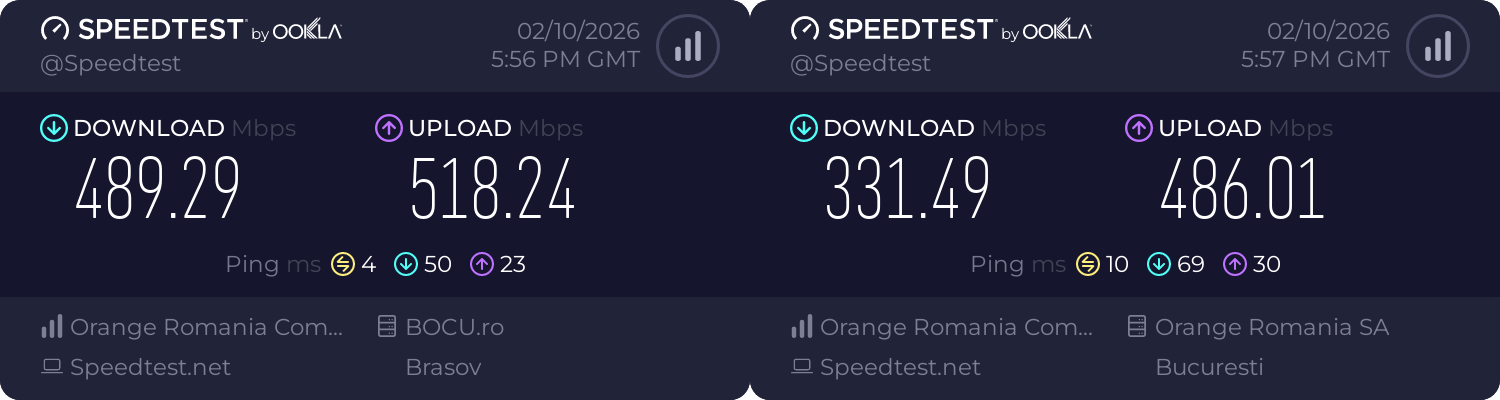
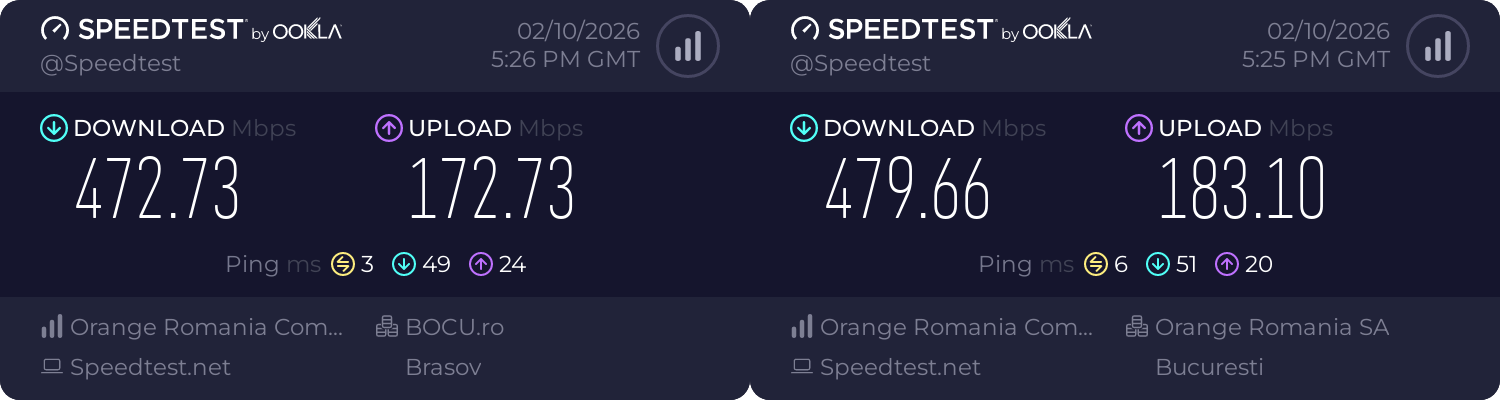
Strange thing, AX203 seems to favor the upload over the download. On the same AP, the laptop with AX210 had lower upload speeds:
If the installed system disconnects from the Wi-Fi by itself, it’s usually because of a too extreme power management policy (wifi.powersave defaults to 3 and should be set to 2).
So it does work. Now what?
For now, there is a 99% chance of this new setup:
- This Lenovo (i5-13420H, 16 GB DDR5-5600, 1 TB NVMe Gen. 4) will run Linux.
- The 2023 Acer (i3-1215U, 16 GB DDR4-3200, 256 GB NVMe Gen. 3 + 1 TB NVMe Gen. 4) will be “upgraded” from Debian 13 (MX 25) to Win11 IoT. Its i3-1215U is not officially supported by Win10 IoT Enterprise LTSC 2021, and for a good reason: Win10 IoT Enterprise LTSC 2021 does not properly differentiate P-cores from E-cores in the way Win11 does.
- The 2016 Acer, with its severely outdated hardware (i5-5200U, 8 GB DDR3-1600, 240 GB + 1 TB SATA SSDs), should receive some Linux distro and will primarily be used to watch movies or maybe to read PDFs and similar modest tasks. The last OS it could run decently was Win7.
CPU PassMark scores:
- 2016: 1493 ST, 2503 MT.
- 2026: 3376 ST, 17117 MT.
- 2023: 3151 ST, 10245 MT.
I already checked that the newer Acer can run the version of Win11 IoT that I experimentally installed on the old Acer. I made an image on an external SSD, and it worked!
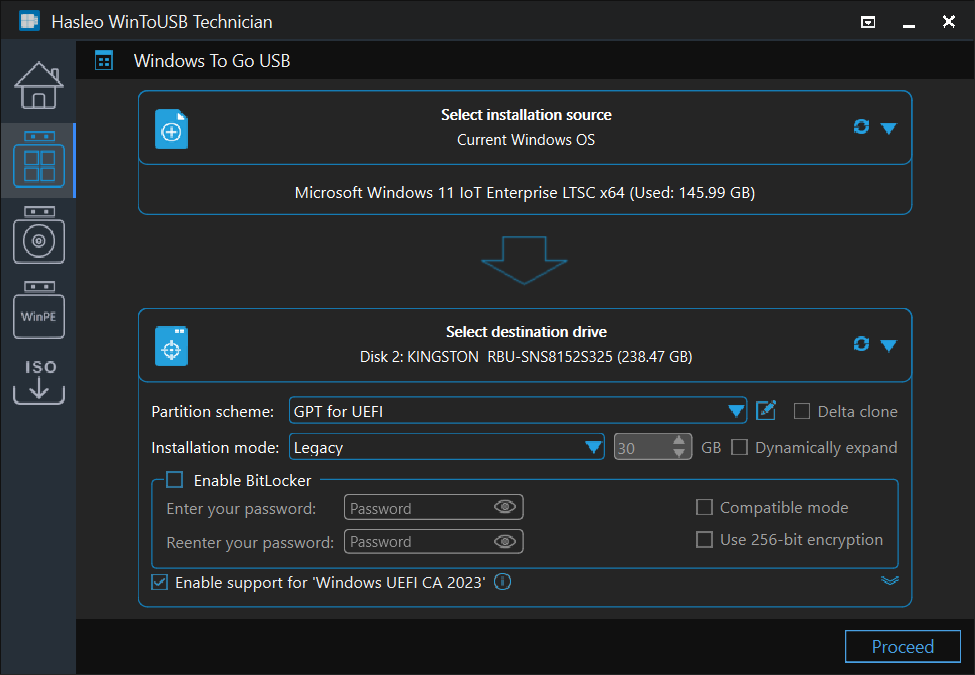
The only hiccups involved the need for a newer audio driver (it was a small download) and a newer VGA_Intel_31.0.101.4032_W11x64_A.zip (a 1.3 GB download!). A newer version exists, and for some reason it’s much smaller (584 MB): VGA_Intel_31.0.101.4146_W11x64_A.zip. Windows drivers have always been a mess: there are versions offered by Intel, versions offered by Microsoft, and versions offered by the OEM, all different! On the old Acer, I actually installed a Win10 driver (by Acer), and it worked under Win11, but the i3-1215U’s GPU wasn’t fully supported. First, the brightness couldn’t be adjusted. Secondly, the windows had square corners, not rounded. While I preferred them square, I had to install the proper driver.
Now I’m discombobulated with regard to which distro to install on this Lenovo. I could try to install Debian using the text installer if the Wi-Fi is supported. But what if I need to configure too many things by hand, like I used to do for Slackware? I’m too old for this shit!
I could as well give a second chance to Soplos (Debian testing), despite my previous mishap with it. That bug can’t possibly happen in the installed system! I just watched a very informative review of Soplos (select the original Spanish audio track, as the autogenerated English one is horrendous!), and there are arguments for it.
What I don’t like at Soplos is how they created 3 SourceForge projects, one for each desktop:
- Tyson XFCE soplos-linux-tyron-beta-1.0.3.iso is here:
https://sourceforge.net/projects/soplos-linux/files/ - Tyson KDE soplos-linux-tyson-beta-1.0.3.iso is here:
https://sourceforge.net/projects/soplos-linux-tyson/files/ - Boro GNOME soplos-linux-boro-alpha-1.0.1.iso is here:
https://sourceforge.net/projects/soplos-linux-boro/files/
Well, TBD.
Oh, and I need 1200p (WUXGA) wallpapers, because all my wallpapers are 1080p (FHD) or anything 16:9 that scales down graciously! For starters, I made two 1200p wallpapers out of lofi-late-night-cats-iz.jpg and cat-lofi-looking-outside-xx.jpg.


Quick notes:
- Some retards complained on the Internet that their IdeaPads start automatically upon the opening of the lid. Well, that setting can be overridden in the BIOS (UEFI). Just hit F2 on boot before the Lenovo logo shows up. Alternatively, stick a needle into the Novo hole (the IdeaPad name for the emergency-reset hole). The Novo buttonhole is fucking depicted in the fliers that come with the laptop!
- Also in the BIOS (I can’t say UEFI), one can disable the always-on power on one of the two USB-A connectors. It’s probably meant to wake up the laptop using an external keyboard.
- The USB-C used by the power adaptor works as a normal USB-C connector when running on battery. Also, both USB-C ports are DisplayPort™ 1.4 capable.
- The plastic bag that holds the laptop reads, “Contains 90% Ocean Bound Plastic by weight.” This is ridiculous. It should have said, “90% Ocean Bound Plastic Certified” or “90% Pre-Ocean Recycled Plastic” because this is about plastic collected from coastal areas or regions and recycled so that it doesn’t reach the ocean! The wording can be interpreted as “ocean bound” (somehow connected to the ocean: plankton-enhanced plastic!) or a misspelling of “ocean-bound” plastic, i.e., which is bound or heading towards the ocean, which is the opposite of what they mean!

This has never happened to me. In all these years, I have never experienced a Wi-Fi disconnection on any distro I have used/tried, on either desktop or laptop.
Not all distros are born equal.
Maybe you shouldn’t permanently rule out Win10 LTSC for your 2023 Acer. Support for hybrid CPUs is certainly more advanced in Win11 LTSC, however some configurations are possible in Win10, based on what is described in Hybrid CPU Performance on Windows 10 and 11. Considering that Win10 LTSC is much lighter than Win11 LTSC, especially on older hardware, it would be worth testing.
I’m using Win10 IoT LTSC on hardware newer than yours (Asus Vivobook V16 – Intel Core 5 210H, 4 P-cores and 4 E-cores) with excellent performance.
Too long, and I have no desire to tweak Windows’ scheduler!
I had a not-entirely-relevant chat with Claude on the matter.
Hybrid CPUs are, in my opinion, an immensely stupid design decision and a good reason to opt for AMD instead. However, OEMs usually pair AMD CPUs with MediaTek Wi-Fi/BT, which should be avoided for Linux.
I will give the matter a second thought, though. Thanks for not letting me sleep serenely 🙂
Another interesting possibility to test would be Server 2022. It appears (though I couldn’t be entirely sure) that Intel Thread Director support in the Server 2022 kernel might be more advanced than in Win10 LTSC. Worth checking.
Does Windows Server 2022 include better support for hybrid CPUs?
Well, I asked the same question to Claude Haiku 4.5 (duck.ai), and this was the answer:
You didn’t fucking read my chat with Claude Sonnet 4.6 Extended!
Yes, Windows 10 and therefore Windows Server 2022 can tell P-cores from E-cores! However, they lack Intel’s Thread Director, which is meant to make scheduling far more reliable and consistent.
In Windows 10 and therefore in Windows Server 2022, the hybrid CPU works with proper identification of E-cores and P-cores, but scheduling is heuristic and sometimes buggy, as the article’s measurements showed.
Windows 11 and therefore in Windows Server 2025, the Thread Director is fully integrated, so scheduling is hardware-informed and far more robust. Intel designed Thread Director as part of the Alder Lake architecture specifically to work hand-in-hand with Windows 11’s scheduler.
Go stick something in your ass!
I apologize for bothering you with my suggestions and questions. You can rest easy — this is the final comment I’ll be leaving on your blog.