
SPECIAL: It’s distro-hopping time! (Is this a happy ending?)
In my various rants about Linux, I leaned towards Debian, as described for instance here. After I purchased another cheap but very decent laptop, I declared that it will be dedicated to Linux (the previous laptop that currently runs MX Linux, or “Debian, only nicer but with extra bugs,” will receive Windows 11 IoT). But since this is a brand-new laptop, why not experiment a bit with it, too, before settling down?
- 1. MX, Xebian, or Debian?
- 2. Exploring the Fedora ecosystem
- 3. Nobara, a short assessment
- 4. Ultramarine Linux, the contender
- 5. And now, which way?
- 6. UPDATE: It should be Fedora!
MX, Xebian, or Debian?
Running MX 25 XFCE instead of pure Debian 13 has its good parts. No, not the newer kernel, because the newer Liquorix kernel isn’t necessary to support my hardware (I checked with the new Lenovo: everything was fully supported by all the tested distros), and it’s quite a large kernel, too (initrd.img-6.18.10-1-liquorix-amd64 has 272.9 MB, while initrd.img-6.12.69-1+deb13-amd64 weighs only 143.0 MB). It’s rather that many things are preconfigured and work out of the box, my only major concern being to adjust the layout, the theming, and the fonts, then to add the extra repos required for specific software that’s not in the repos or that’s too old in Debian.
But MX adds too many tools to Debian, and many of them are terribly buggy (if I added extra keyboard layouts in XFCE’s native tool, MX’s tool couldn’t see them). And MX’s repos are hugely unreliable and out of sync, short of saying they’re the crappiest possible crap.
I strongly considered Xebian, but not its advertised xebian-unstable-amd64.hybrid.iso. The stable xebian-trixie-amd64.hybrid.iso was my focus. Xebian seemed no-frills and without any bloat, and it just worked in the live session. Kinda.
The explanation of this “kinda” is that I discovered that I never tested the BT audio in the live Xebian session. Not a mouse or a keyboard, but a speaker or headphones.
Xebian is so bare-bones that it doesn’t include anything BT out of the box. Installing bluemon (which requires bluez) added BT capabilities, but audio wasn’t working with BT. Hasty tinkering didn’t provide any good results, so I later made a second attempt.
This time I tried the sid-based “unstable” Xebian. And guess what? After having installed bluemon and its dependencies, my BT speaker and headphones worked!
So what I needed to find out was this: Is Debian 13 broken by default with regard to BT audio, so that derivatives (MX, Sparky, others) need to fix it, or Xebian was at fault? Note again that the build based on Debian unstable didn’t have this issue.
Since debian-live-13.3.0-amd64-xfce.iso is notoriously bloated, I performed an install from debian-13.3.0-amd64-DVD-1.iso. Since my Wi-Fi was supported, I could have used debian-13.3.0-amd64-netinst.iso as well, but I wanted to stay on the safer side. MARCH 14 UPDATE: Current versions: debian-live-13.4.0-amd64-xfce.iso; debian-13.4.0-amd64-DVD-1.iso; debian-13.4.0-amd64-netinst.iso.
The guided partitioning wanted 1 GB for ESP, which I found ridiculous:
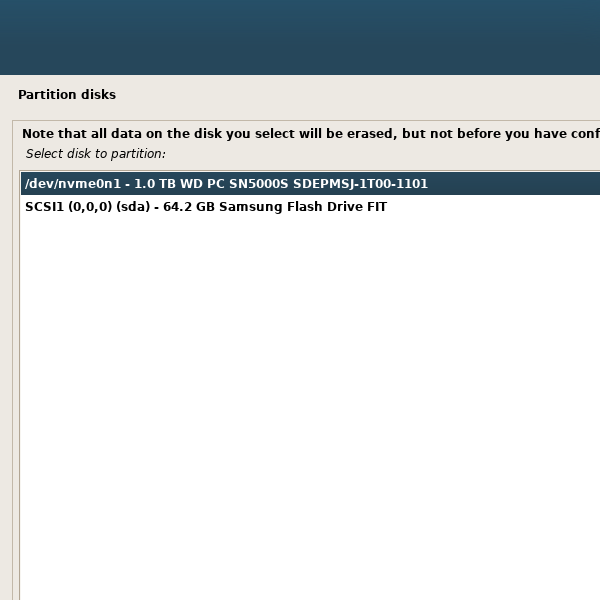
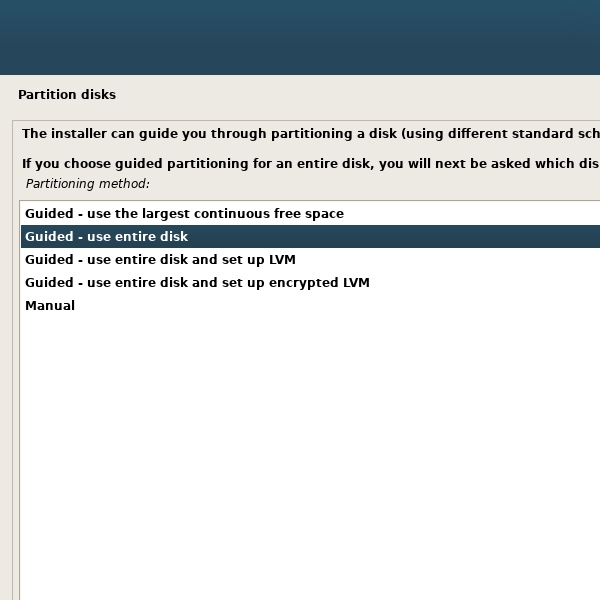
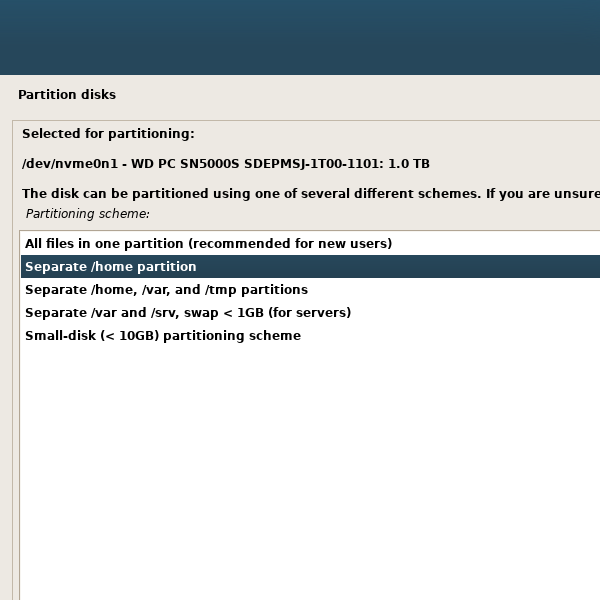
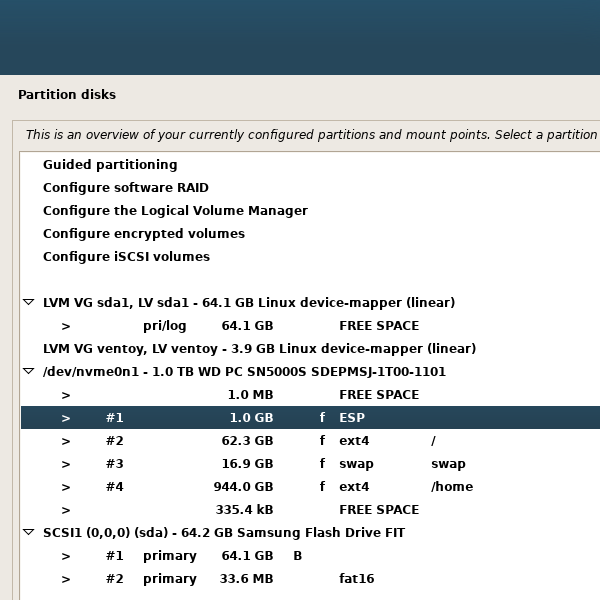
Other than the need to manually redefine the partitions, I had no other troubles with Debian’s graphic installer. (I haven’t used the text one since the times when I was installing Slackware or FreeBSD in the late 1990s!)
Debian’s defaults for an XFCE desktop are imbecile.
- No
blueman(hence nobluezeither). - No
xfce4-panel-profiles. - Even with ristretto installed, images open by default with Firefox ESR. It could have asked what image viewer to use, but it wasn’t configured this way.
Now I understand what this old joke meant: “Ubuntu is an ancient African word meaning I can’t configure Debian.” What it meant is this: “Even in fucking 2026 Debian won’t have sane defaults.” Just like Arch, for instance. Even Fedora’s XFCE spin offers a much better out-of-the-box experience! OK, maybe Debian’s Live XFCE ISO has better defaults, but it installs too much crap.
Say I install the Bluetooth stack. The error is the same as in the Trixie-based Xebian:
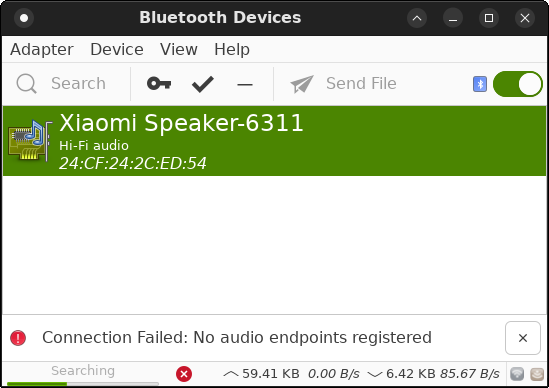
For fuck’s sake! We’re in 2026, not in 1996!
This aside, I was browsing the net with the ultra-stable Firefox ESR, when this happened:
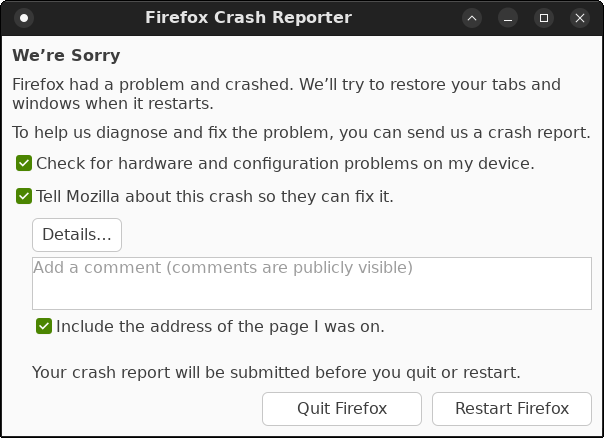
What the fuck is this fucking shit? This was supposed to be Debian 13 STABLE using an ESR build of Firefox “for stability reasons”!
The details included this line:
MozCrashReason: Shutdown hanging at step XPCOMShutdownThreads. Something is blocking the main-thread.How was Debian able to include such a shitty Firefox? I had ZERO crashes with the “normal” Firefox in the last year or so, no matter the distro or the OS!
First, Bluetooth doesn’t work for audio in Debian 13, but it works when configured by MX, and it works in Debian sid (possibly in Debian testing, too).
Then, Firefox ESR crashes under light conditions (maybe 2-3 tabs and plenty of free RAM).
This is unacceptable. Maybe, after all, Ubuntu was necessary. At least, it patches and rebuilds the packages imported from Debian. (This reminds me of Manjaro rebuilding Arch’s packages.)
Even if nothing crashed on me under MX Linux, and everything just worked and still works (on the other laptop), I have a certain disgust towards MX. They try too hard, and the whole thing is a huge mess. Not to mention again their repos that have completely skipped an entire version of Firefox and how many major repos are constantly out of sync, including most of those in Germany and France. And that’s because the retards didn’t add the official Mozilla repo! No, sir, they wanted to build Firefox themselves!
I can’t use a distro made by people with extremely poor judgment. It’s one thing to have different tastes and preferences (hence the need to move panels and change the theme or the fonts), and another thing to be a dumbo.
So the answer to the question, “MX, Xebian, or Debian?” is “None.” I need to move on.
Exploring the Fedora ecosystem
This might sound illogical. Fedora belongs to Red Hat. Red Hat are those retards who broke GNOME and castrated Nautilus. (Let’s not talk about systemd.) They are also the ones who definitely don’t care about “Linux on the desktop” because in RHEL 10 they stopped building major desktop apps, forcing people to install Flatpaks instead. Moreover, EPEL for EL 10 offers a much smaller set of packages compared to EPEL for EL 9. (This makes AlmaLinux and Rocky Linux even less suitable for desktop or laptop usage in version 10 than they already were in version 9.) And EPEL is built by Fedora.
What am I supposed to say? All major distros either suck or are made by people who suck. And by “major” I mean first-level, not derivatives. Despite DistroWatch’s opinions, Linux Mint is not a major distro—it’s a parasite of Ubuntu. Debian is a first-level distro. Fedora is a first-level distro. Arch is a first-level distro. While also being a parasite (of Debian), Ubuntu is a major distro, after all (Debian lacks any commercial support). Manjaro, through its rebuild of Arch, is worthwhile parasite. MX Linux is a parasite of Debian. Gentoo is as good as dead. Slackware is as good as dead, too. With openSUSE, I’d say that Tumbleweed is the “root distro,” not Leap. RHEL, as well as SLES, are commercial, and they never target the desktop—they just happen to be able to run to a certain extent on supermarket-grade hardware. So AlmaLinux and Rocky Linux only pretend to be for us—they’re for servers, containers, and other enterprise uses.
But I have used Fedora in the past, especially after the demise of GNOME 2 and later of CentOS. Mostly with XFCE, but also with KDE. Now that KDE is an official flavor of Fedora, I could give it a try, but I’d rather stick to their XFCE spin.
Or I could explore some derivatives, and only two of them are worth being considered: Nobara and Ultramarine. Both are praised by the public. Obviously, not by the same public who swears by Mint, Zorin, or Elementary OS. Not those tards.
Nobara, a short assessment
At first sight, there isn’t anything wrong with Nobara. Gamers love it. It’s not a bad distro. They offer 5 flavors: “Official” is a themed KDE; GNOME; unthemed KDE; and two Steam versions, one optimized for TVs and one for handhelds, both being KDE-based.
I’m totally not a fan of the Brave browser, and I can’t understand some people’s enthusiasm for this browser that loves cryptoshit, but in the end it’s just a browser that can be replaced.
I was surprised to see that KDE runs perfectly with Wayland on both laptops! Maybe Wayland finally reached maturity, at least as far as KDE is concerned.
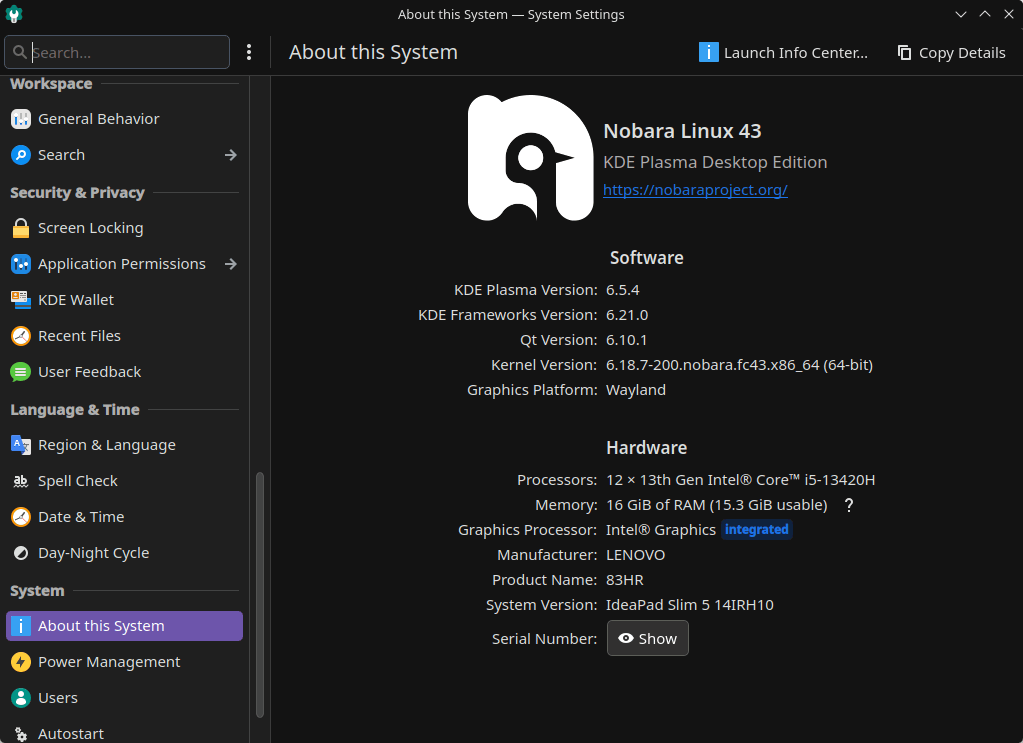
This keyboard has two brightness levels, and while it’s easier to adjust them from the keyboard itself, it’s a good thing that everything’s supported:
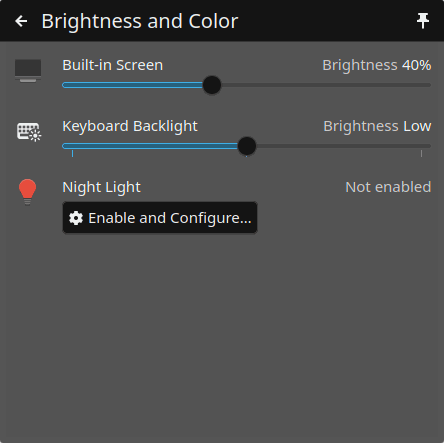
To my great surprise and pleasure, yumex-ng (running as yumex) is included by default!
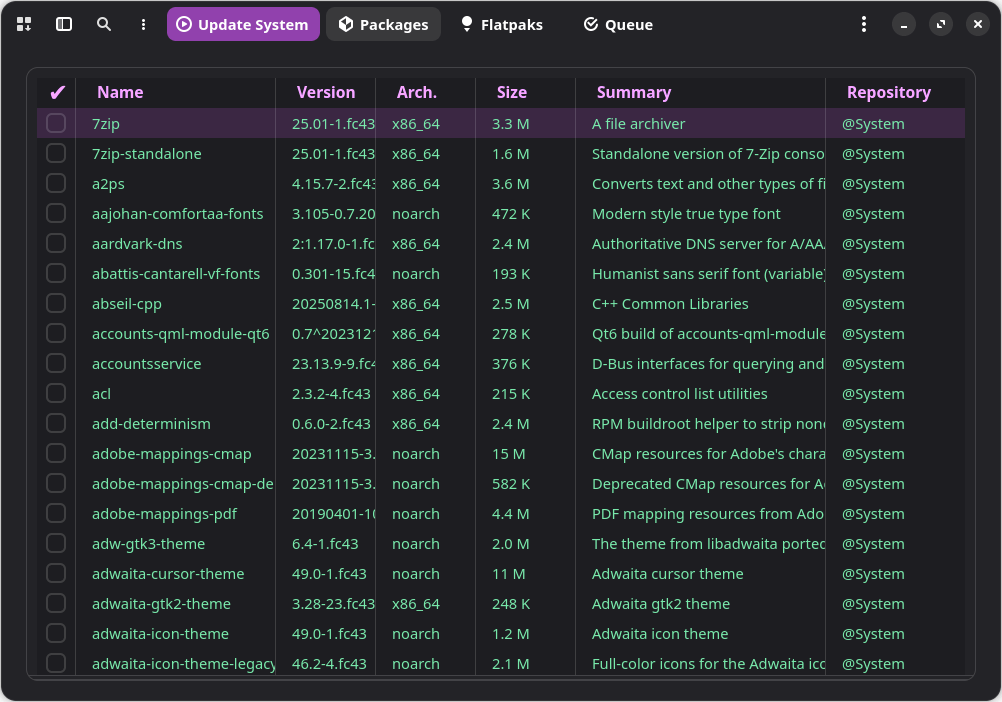
This is extremely important for power users, as dnfdragora is completely unusable, and both Discover and GNOME Software only list GUI packages. Solely relying on dnf at the CLI is limiting.
By the way, Tim Lauridsen (timlau), the author of yumex and yumex-ng, submitted a request for inclusion in Fedora (Bug 2362270) on 2025-04-25, and the last comment from 2025-10-16 was asking Neal Gompa (ngompa13) to fix things. But Neal Gompa couldn’t care less. OK, he’s a very busy, high-profile maintainer: he maintains a ton of packages, sits on the Fedora Engineering Steering Committee and on the AlmaLinux Engineering Steering Committee, and contributes to Asahi Linux, CentOS SIGs, openSUSE, Mageia, and whatnot. Why is this guy assuming so many responsibilities when he’s physically unable to honor them?
The folder /etc/yum.repos.d does include the following repos (nv stands for nvidia)…
fedora-cisco-openh264.repo
fedora-updates-testing.repo
fedora-updates.repo
fedora.repo
nobara-pikaos-additional.repo
nobara.repo
nv-nvb.repo
nv-nvnf.repo
nv-nvp.repo
rpmfusion-free-updates-testing.repo
rpmfusion-free-updates.repo
rpmfusion-free.repo
rpmfusion-nonfree-updates-testing.repo
rpmfusion-nonfree-updates.repo
rpmfusion-nonfree.repo
…but Fedora’s repos are not enabled!
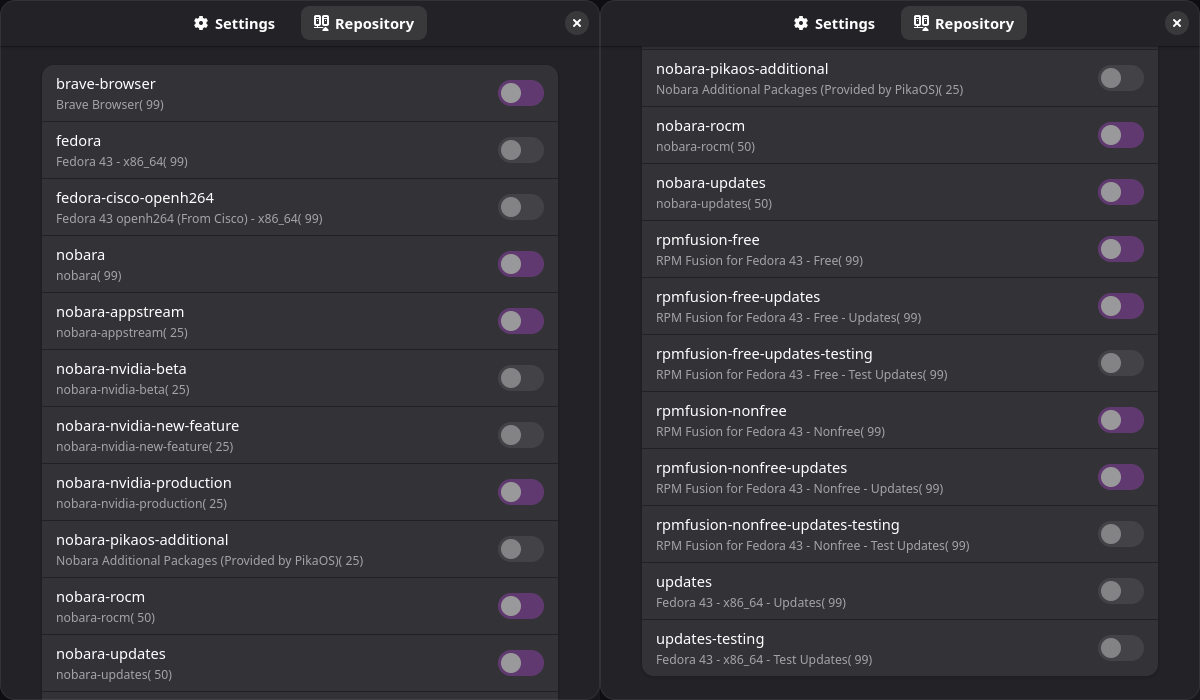
I wasn’t aware of it, but Nobara is to Fedora what Manjaro is to Arch. That is, Nobara doesn’t use Fedora’s packages directly, but its own rebuilds of them! This might be a good thing if Nobara delays non-security updates until they’re positive that they don’t break anything. But if security updates are also delayed, or if Nobara’s repos are unreliable, this becomes a bad thing.
Without installing it, what else was I able to gather from Nobara’s live session?
- Codecs and whatnot, checked.
- Obviously, Firefox is not preinstalled.
- It wants to open images with Brave Browser because there is no image viewer! WTF.
The really bad things are yet to come. On Nobara’s wiki, from Fedora repositories on Nobara:
Nobara, as of version 41, does not have
plasma-workstation-x11or other X11 session packages in the Fedora repository snapshots due to no longer desiring to maintain or support X11 sessions. This means you cannot use desktop environments with X11 sessions on Nobara like you can on Fedora.
Ouch.
Some X11 only desktop environments may be installable, but they are not supported and you most likely will not receive help with these. It is advised to choose another Linux distro if you require X11.
Unsupported desktop environments, window managers, or sessions relying on X11 packages include (note: Nobara only officially supports GNOME and KDE Plasma):
- KDE Plasma X11 (mentioned above)
- XFCE
- Cinnamon
- MATE
- Budgie
- LXDE
- i3
Re-ouch. So it’s KDE Wayland or nothing.
Also from their wiki, which hasn’t been updated since version 41:
The majority of Nobara’s packages come from upstream Fedora. Once a month (and occasionally for security vulnerabilities) we take a snapshot of Fedora’s upstream repositories and upload them to our mirrors, which are then provided to our users.
…
Packages coming from Fedora and Fedora Updates are snapshotted once a month (and occasionally more for security vulnerabilities).
…
BaseOS packages are packages that came from Fedora, which Nobara has modified, OR packages that Nobara has created which are safe to build on COPR.
…
AppStream packages are usually packages that cannot be built on COPR. This includes nvidia drivers and obs-studio, as well as mesa-freeworld codec packages.
Hum. Is it serious, Doctor?
For now, Nobara is something to sleep on.
Ultramarine Linux, the contender
The website of Ultramarine has been revamped since my previous visit, and their offering is more complex: KDE, XFCE, Budgie, GNOME, then WSL, and preinstalled images for RasPi and Pinebook Pro. The normal ISOs can be found here, and they have been refreshed on Feb. 6. Each of the four desktops has x86_64 and ARM versions, with special Surface editions, and the normal (non-Surface) editions come in either Anaconda and Readymade flavors. I tested both installers, and they both suck, by the way.
The Ultramarine ecosystem
According to DistroWatch, Ultramarine Linux originates from Thailand. I am pretty sure they’re based in the US, and for several reasons. Ultramarine is a project of Fyra Labs, whose X account is also US-based. From the 14 members of Fyra’s team, the founder and CEO Lleyton “Lea” Gray is based in Los Angeles, and Jaiden Riordan, the COO, lives in the state capital of Minnesota. Some other members might have been from Thailand, if I were to take a hint from their edurom wiki page.
By the way, the team seems quite diverse, to the point of stating this:
if we were in a wokest and gayest contest we’d win
— Ultramarine Linux (@UltramarineProj) February 11, 2026
So those avatars chosen by some members of the team were illustrative, so to speak. Well, maybe that’s better than a macho team, eh?
The same guys are the creators, owners, and maintainers of the Terra repo, “The 2,000+ packages Fedora doesn’t ship.”
This is great, except that I’m not a fan of their choice of packages. And they don’t offer a web interface that lists all the packages! The most practical way is to parse fedora.pkgs.org/rawhide/terra/ (3 long pages). Alternatively, go to repos.fyralabs.com and explore um43, terra43, terra43-extras, terra43-mesa, terra43-multimedia (what about RPM Fusion?), terra43-nvidia.
OK, I noticed several ms-core-*-fonts, but no yumex, and no fsearch. So Terra isn’t of much use to me.
The importance of Bluetooth
This comment on Reddit blew my mind:
I run Ultramarine with Xfce as my desktop environment. I spent some real time with KDE Plasma in the past and approached it in good faith. In the end Xfce simply fits the way I work and think.
…
After my own experience I found it to be a better daily system than MX Linux which I had used on a laptop for several years and on my main desktop for about six months.What ultimately pushed me to switch was Bluetooth reliability. On Debian based systems including MX I found Bluetooth to be inconsistent and sometimes frustrating. On Ultramarine it simply works. Pairing is straightforward. Trusting a device sticks. Once a device is set up it reconnects automatically every time. I can lead from earbuds to a speaker without thinking about it and the system responds instantly. That kind of quiet reliability is exactly what I want from a daily operating system.
You don’t know what this guy is talking about, but I do!
See, I have this Bluetooth speaker (the same phenomenon happened to some headphones, too, but let’s stick to the speaker). I pair it and then trust it with a Linux distro. Then, I connect it to Windows, to Android, or to another Linux distro (in a live session). When going back to the original Linux distro I first paired it with, it can happen that it refuses to connect! The only fix is to delete (forget) it, then add it again. But why are Android and Windows more reliable than Linux? This shit happened to me with Ubuntu MATE 24.04 and MX Linux 25. So yeah, the big Debian family…
And why does this happen? I know that Bluetooth is the most retarded communication protocol ever designed, but what’s wrong with those keys, and why is Linux prone to screwing them up? If Ultramarine (the XFCE edition, no less!) is rock-solid BT-wise, that’s HUGE NEWS!
Nonetheless, is this Ultramarine-specific, or is it inherited from Fedora? By default, Debian doesn’t care much about BT, but derivatives configure it, and Ubuntu also has it preinstalled in all flavors (I guess), but is it really buggier there than here?
The improbable Budgie session
I could never understand the raison d’être of Budgie, so even less its appeal. It’s a highly incomplete desktop environment, to start with! It doesn’t have its own file manager, text editor, image viewer, and (un)archiver.
XFCE is also incomplete, but to a lesser extent. All it needs is a PDF viewer and an (un)archiver, which are usually borrowed from MATE.
People don’t realize, but Cinnamon is also incomplete. Clem made the text editor, the image viewer, and the PDF viewer Mint-dependent (XApps), so Cinnamon per se is “bobtailed” in other distros. This is morally abject: why didn’t Clem integrate those accessories in Cinnamon? (Because he’s an asshole, that’s why.)
Oh, and did you know that Nemo was the last file manager to add pause on file operations? It only added this capability in version 6.6, in December 2025. To add insult to injury, Nemo 6.4.5 had a disabled start/resume button that made no sense! Read more about this shit.
If Clem had opted to fork MATE, whose Caja inherited this feature from GNOME 2.32 (and the porting to GTK3 preserved it), instead of forking a GNOME 3 version older than GNOME 3.8 (GNOME 3 removed features from Nautilus), Nemo would have had this pause capability from day one! The last-but-one to the show, Thunar, got this feature 5 years before Nemo!
So the fact that Budgie had to typically rely on Nemo all this time is grotesque. (Of course, any other file manager can be used instead.)
But I only met Budgie years ago, in Solus. I found both the distro and the desktop environment pointless. And yet, today, Ultramarine’s Budgie seems interesting!
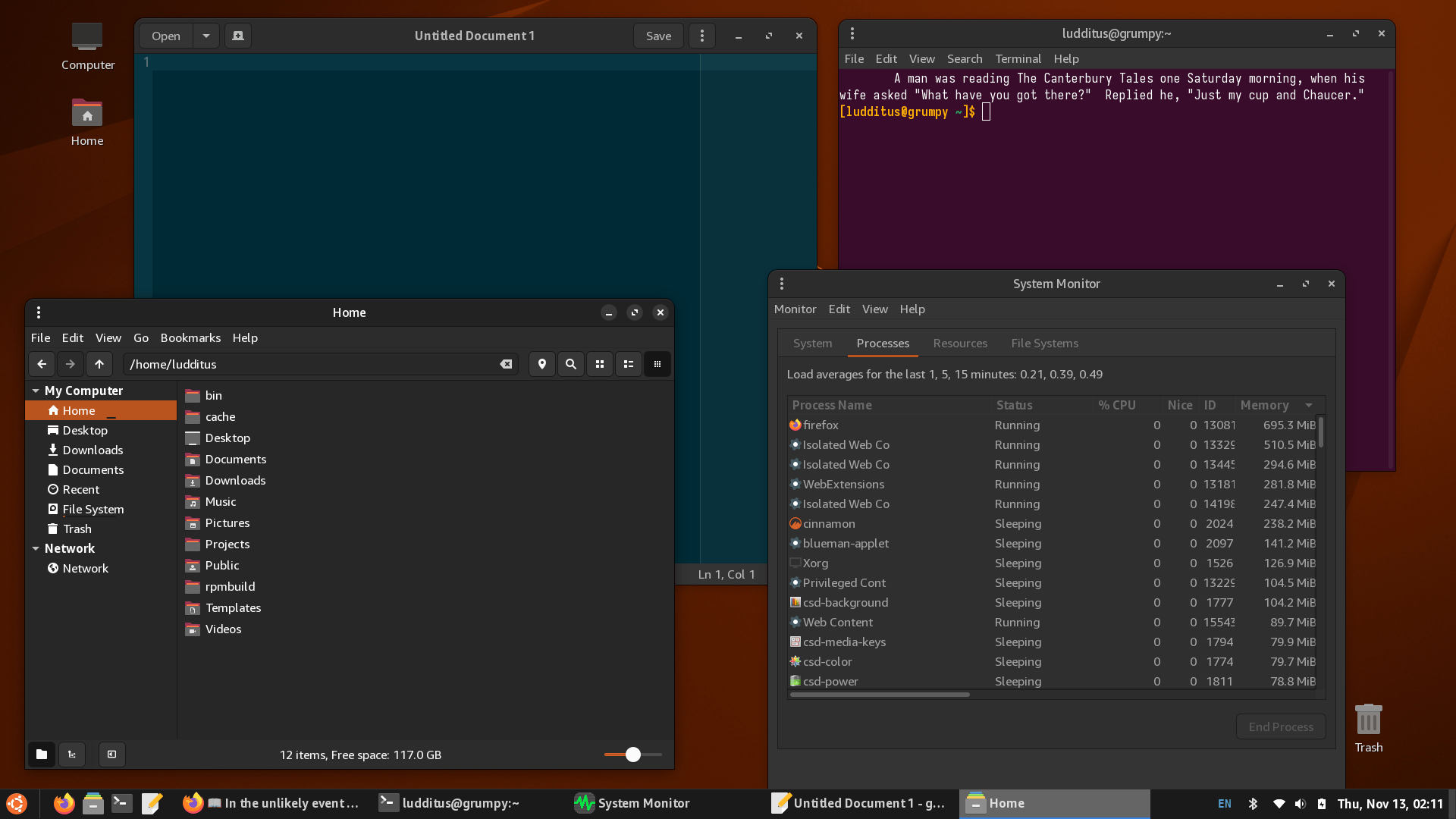
Look, by adding a “Task List” applet and by making the “Icon Task List” only show the “favorited” icons, the taskbar looks like the traditional Windows one! Yay! (Sorry, I need a tissue for the cum.)
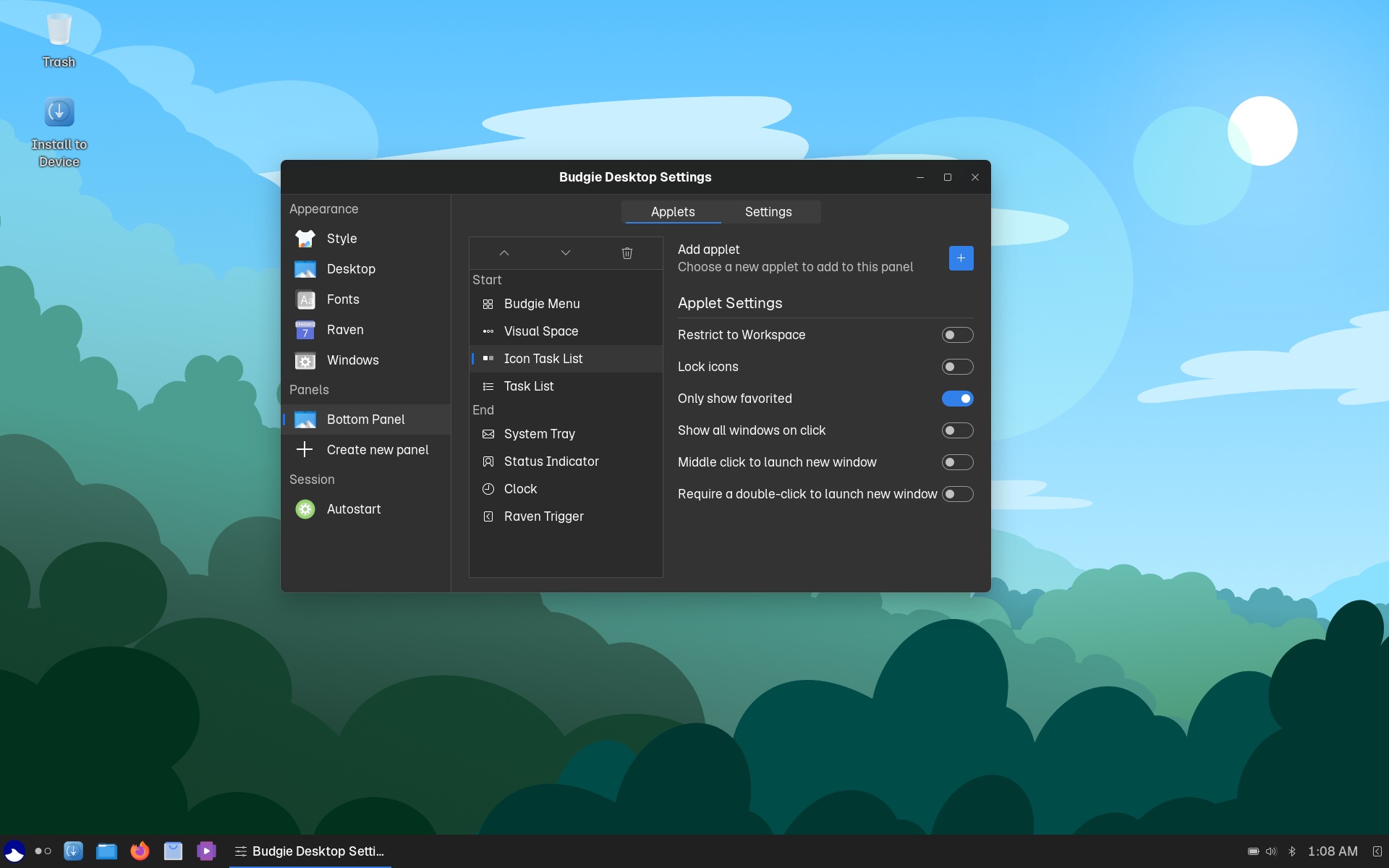
The session is X11-based, and the control center is minimalistic but decent:
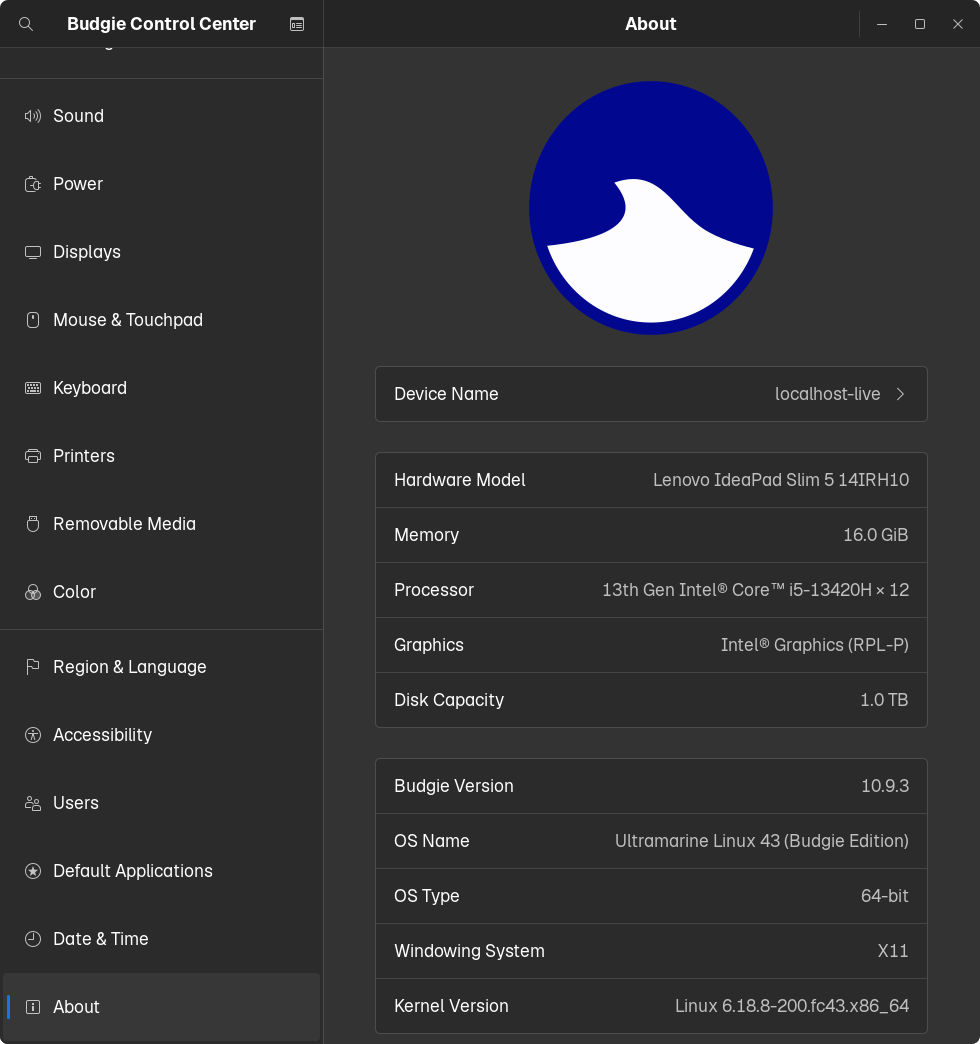
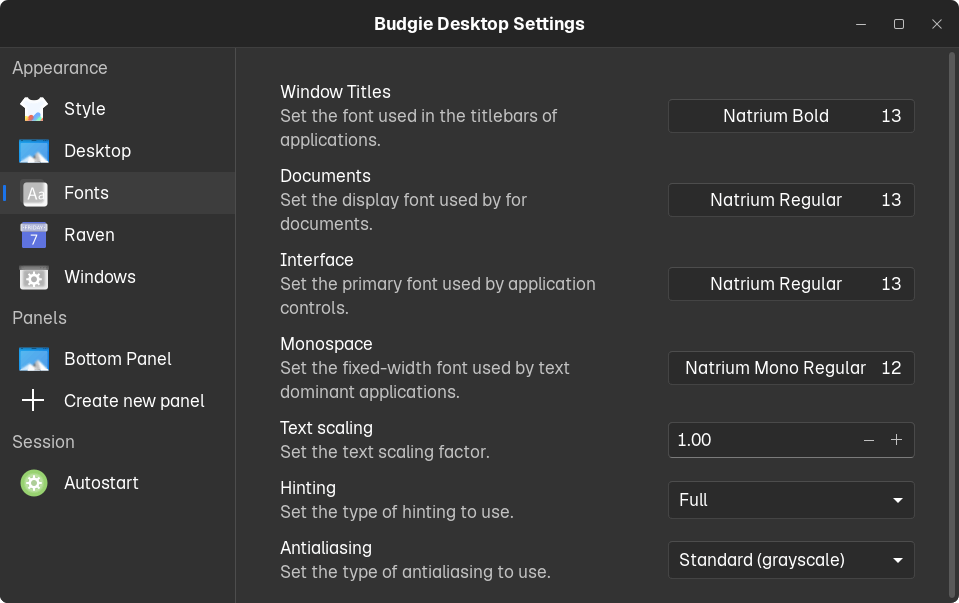
Unlike the fucking stupid GNOME, the font and its rendering can easily be changed in a single place:
Obviously, one cannot set each individual LC_* value independently (this is not KDE!), but my Windows-style hack is two clicks away: “English (United States)” for the OS language, and “Ireland (English)” for currency, SI units, and so on. Marvelous.
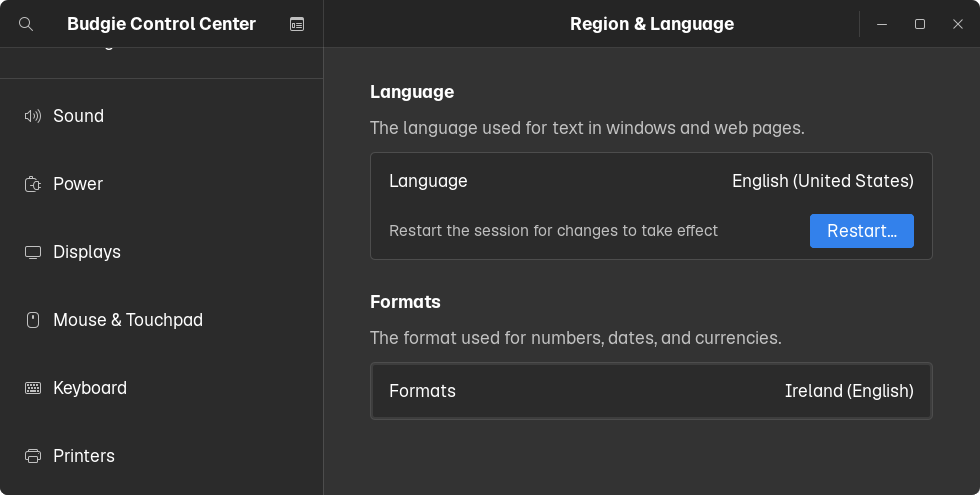
There is a bug in the above screen: what I did change was the locale for formats, not the language! But the “Restart” button is shown as if I changed the language… Is anyone on this planet really testing their software?!
So, for Ultramarine’s Budgie:
- Easily customizable.
- Interesting fonts.
- Choice of apps:
- Nemo (from Cinnamon)
- Both Discover and GNOME Software (why both?)
- gedit
- Eye of GNOME
- Evince
- File Roller
- Lollypop (music player)
- Parole Media Player (from XFCE)
- Ptyxis for a terminal (from GNOME)
Not bad! But I’d replace Nemo with Thunar or Caja.
As I was trying to learn what Budgie looks like in other distros, these three reviews by Jack Wallen caught my eye:
- Ubuntu Budgie 25.04: One of the Best Desktops on the Market
- Linux Budgie Desktop: A Perfect Blend of Aesthetics and Power
- elementary OS vs. Ubuntu Budgie: Two beautiful Linux distros, but which is right for you?
The answer is “none.” But OK, I needed the screenshots and the choice of apps. Other than that, I never trust Jack Wallen; he’s always enthusiastic about everything.
However, the Budgie team seems keen to screw it up, somewhat following COSMIC’s crazy and extremely disruptive path of FUCKING EVERYTHING THAT WORKED!
How so? Budgie is a desktop environment based on GTK, but Budgie 11 will be based on Qt6 with KDE Frameworks, and it will be Wayland-only, using the Mir-based Magpie compositor.
From the horse’s mouth:
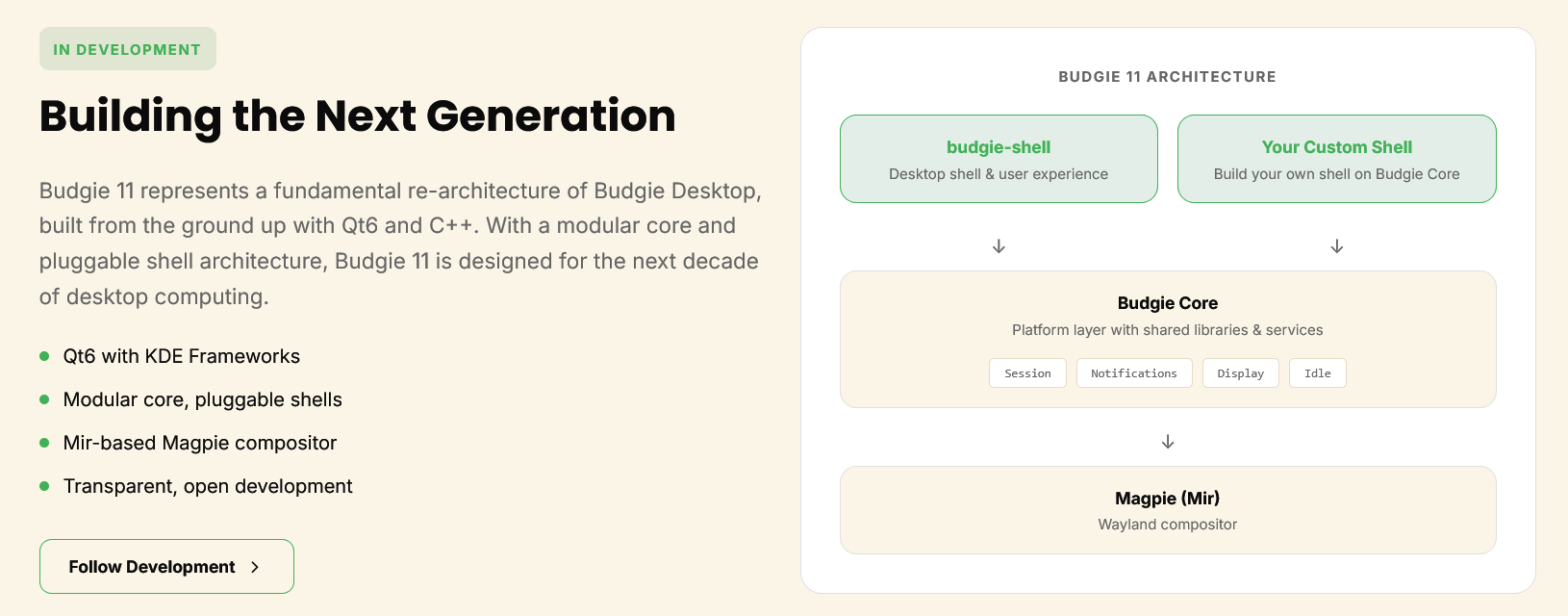
Read about Budgie 11, including this post:
A little over a decade ago, Budgie 10 was released into the world. The landscape was quite different back then. GTK3 and Qt5 were only a few years old, Proton for Linux didn’t even exist, and Wayland was not yet the default in popular distributions like Fedora and Ubuntu.
Budgie Desktop itself matured significantly with that release. We rewrote most of it in Vala and introduced our handy widget and notification center, Raven (if you can believe it, back then the settings for Budgie itself were actually inside Raven), and we finally gained support for multiple panels.
A lot has changed since that first release: we have seen new features, new toolkit iterations, and the creation of our Buddies of Budgie organization. With shipping Budgie 10.10, the tenth feature series of Budgie 10, closing out ten years of Budgie 10 development, we are also closing this chapter in Budgie’s history. This release marks the transition of the Budgie 10 into maintenance mode. By shipping a Wayland-only version of our current desktop, we are delivering an experience that should serve our users well while we put our full focus, dedication, and passion into Budgie 11.
Now, I know a lot of you have been wondering what the heck Budgie 11 is going to be written in. After all, that’s certainly changed over the years, and keeping track of our toolkit choices has practically been a community pastime. Whether it was the move to Qt5 what feels like eons ago and was quickly abandoned in favor of just sticking with GTK3, the plans for GTK4 back in 2018 before GTK4 had even been released, or even EFL before we formed the new organization.
Well, we have been teasing it a fair bit (if you call actually writing code and shipping things “teasing”). It is going to be impossible to keep it under wraps while we talk shop and show it off in the open, so we might as well just get it out of the way…
It is Qt6.
Unlike many previous instances where we announced a toolkit change, this time we actually have functional code running in production. This exists today as Budgie Desktop Services, the beating heart of Budgie 11. In our Budgie 10.10 release, it is already responsible for our Wayland output management and persistent configuration. In Budgie 11, we will pair this with our Budgie Display Configurator, in one form or another, which is also being written in Qt6 and Kirigami.
But this choice of toolkit is only one piece of the puzzle. With Budgie 11, our goal is not just to port the desktop to a new toolkit. This is our opportunity for a fundamental re-architecture. We are making Budgie more modular, not only to allow for better personalization for distributions and users, but to pave the way for new form factors, input devices, and workflows.
Some of that work will live in a new organization, providing generic apps as well as more under-the-hood desktop components / infrastructure like an XDG portal, pluggable in nature. This gives us the opportunity to work more closely with the wider ecosystem and support more of it, not just by using fantastic libraries like those in KDE Frameworks (great community to collaborate with as well), but by contributing something we hope will be useful back to the community. We want to make it easier for others to bootstrap new desktop environments, ecosystems, or even port their existing ones to Qt and Wayland.
For the first time in a long time, the path forward is not just a plan on a roadmap; our path forward is code in our repositories, hosted in our own software forge, being validated by our own CI / CD. We want to build this next era of Budgie together with the community, and we are looking for more folks to join us in shaping what a modern, modular desktop can be.
FFS. What is wrong with these people? Is the task of creating and managing a software project mentally debilitating to such a degree? Let’s just break everything and write it differently! It ran on gas; now it’s going to be electric!
So, if today’s users of Budgie settled for GTK-based apps, they’ll have to change to using Qt6 and even KDE apps! Well, “have to” is an overstatement: everyone can use, like I do, apps based on whatever framework, as long as they fit the bill. But for visual consistency, many (if not most people) prefer to stay within the respective framework, which is either GTK or Qt.
Buggie 10.10 is the last GTK-based release and the last one to support X11. All of this because Joshua Strobl’s nuts became gigantic, and he can’t stop “innovating.” His fucking desktop environment doesn’t even have a file manager, but he’s rewriting it from zero! If Budgie 11 will logically use Dolphin, then why doesn’t he clearly state the rationale?
- Budgie was a lighter GNOME with many missing apps that people can “borrow” from Cinnamon, GNOME, XFCE, and MATE.
- Budgie 11 is going to be a lighter KDE with many missing apps that people can “borrow” from KDE.
Every time when I find something that “looks nice,” I should know that there is no future for that thing!When you think that everything started as a useless half-clone of GNOME with a useless Raven panel at the right!
As for the impact on other distros, the Ubuntu Budgie 25.10 release notes already had this mention:
In Ubuntu Budgie 25.10,
budgie-desktop10.9.3 defaults to X11, but in Ubuntu Budgie 26.04 version 10.10 ofbudgie-desktopwill be Wayland-only.
At least 26.04 is LTS, so the last GTK-based Budgie will survive for some time—but Wayland-only!
Ultramarine KDE vs. Ultramarine XFCE
Very quick assessments.
Ultramarine KDE:
- Pretty much like Nobara, but with a nicer wallpaper.
- The same netto GUI network applet as in Budgie. It wasn’t necessary in KDE, but they added it nonetheless.
- Otherwise, a good choice of apps (if you like KMail).
- KJournald Browser is included.
Ultramarine XFCE:
- Highlights:
- MATE User Manager
- netto (GUI Network Applet)
firewall-config(present in all flavors)- Eye of GNOME instead of Ristretto
- Evince (I prefer Atril)
- Geary
- Xarchiver (I prefer Engrampa)
- GNOME Software
xfce4-panel-profilesis preinstalled!
Ultramarine seems to be trying too much
Ultramarine is not “yet another derivative of Fedora with added repos, video drivers, and customizations.” It’s not a different product the way Nobara is one (by rebuilding Fedora’s packages); it’s a different product in many other ways.
❶ From an older review of Ultramarine 39 KDE, I learned a few things:
Ultramarine also deviates from Fedora in its incorporation of the System76 Scheduler, a utility provided by Ultramarine’s own Terra repository, that modifies the Linux CPU scheduler behavior by modifying process priorities to provide a more responsive system. This is even integrated in the Plasma desktop, which includes a setting to allow Plasma’s window manager, KWin to communicate with System76 Scheduler to notify it which window has focus so that the application displayed in the focused window is prioritized.
Another performance optimization included in Ultramarine Linux, which may also be included in Fedora since it is installed from Fedora’s official repositories is uresourced, which prioritizes memory resources for local users logged in with graphical sessions.
The feature that impressed me most, as mentioned above, is the Flatpack integration in Discover, as well as the availability of a large number of applications as Flatpacks, not commonly found as RPM packages.
In addition to the non-typical shell (Ultramarine uses zsh as the user’s login and interactive shell) with an improved interactive experience, Ultramarine enhances the interactive shell experience with a customized command prompt provided by Starship.
System76 Scheduler
This program, which prioritizes certain processes in order to increase responsiveness for users, was originally developed by System76 for use with its Pop Shell. It is installed from the Terra repository package,
system76-scheduler.
Nice, but frightening.
And I don’t like zsh. I also hate the prompt.
❷ Now, some insights from their wiki:
- Switching Desktop Editions can be done using
hop, which is a very nice idea! - But: “Ultramarine Hop (our tool for adding/removing/switching editions and desktop environments) may not work. The new version is blocked by an upstream bug from
dnf5.” umclican be used for things such as:cleanup-old-kernels: Remove all but the 2 most recent kernelscachyos-kernel: Install the CachyOS kernel via the COPR, and enable as default kernel entry- Additional Broadcom or Realtek drivers (
kmod-wl broadcom-wl kmod-wl): “We can’t include these by default as they may break other WiFi devices.” Really? - Differences with Fedora (I suppose they mean “Differences from Fedora”):
- Taidan, their “out-of-box experience” or post-install greeter.
- The “Readymade preview images” is their simplified installer.
- 📦 NVIDIA drivers shipped in Terra
- 📦 Codecs shipped in Terra
- 🛳️ XFCE Edition
- Out of box repositories: Terra, full set of RPM Fusion, Flathub
❸ Bits from reviews on DistroWatch:
The only cons are not having a configured WINE setup on a fresh install, which is something distros like Nobara have done and it is very useful.
…
And though it is almost double the size of my debian buster install it also very fast to use and bluetooth headphones work better.
Snappy response on internet for instance simply stunned me, it still does.
Whatever the system developers are doing, YAY, keep it up.
I’m pretty sure the Bluetooth guy is the same one as before. But indeed, no WINE by default.
❹ On Reddit, What do you want to see in 44?
That’s called WINE. With or without Winetricks, Lutris, PlayOnLinux, Bottles, or whatever else helps.
❺ Unfortunately, Ultramarine’s developers failed to understand the use case of yumex, its role, and its utility. I suggested they add it, both in the above thread regarding version 44 and in this thread where someone said, “it would be awesome if the team provided a solid, distro-consistent GUI package manager — something independent of GNOME Software or KDE Discover.”
This guy wanted a PACKAGE MANAGER, not an app manager. So the only possible replacement for dnfdragora is yumex. Here’s the answer:
we don’t intend to switch to yumex, it doesn’t provide the app store experience we’re looking for
Someone must be retarded. My reply remained unanswered:
This is not about SWITCHING as much as it is about COMPLEMENTING. As long as dnfdragora is a PITA, the only decent GUI alternative to dnf and dnf only is Yumex-NG.
❻ Then, while Fedora defaults to Btrfs, other filesystems remain supported. It is my firm convinction that defaulting to Btrfs is plain stupid. Nobody needs snapshots on a laptop (unless that laptop is a MacBook running macOS), and, no matter what they say, a CoW filesystem, regardless of all improvements and mitigations,
- is slower than the non-CoW filesystems (ext4, xfs);
- will produce more wear and tear to SSDs!
While some people will irrationally still prefer Btrfs on their laptops and desktops (the hype and the propaganda prevail), it’s idiotic to never care about other filesystems.
Can you have the ext4 filesystem be installed instead of the btrfs filesystem?
I recall the old anaconda installer allowed the selection of file systems in custom installation mode. The new web installer may or may not have such mode, but in any case the option is probably limited by Fedora.
They don’t know shit and could not be bothered to care.
Speaking of this marvelous piece of shit: BTRFS bug bites a bunch of Fedora users. The makers of Ultramarine were prompt to react on July 8, 2025: Critical Advisory: Btrfs Corruption Issues:
If you’re on kernel 6.15.3 or 6.15.4, you may be at risk of data loss. A bug has been introduced that may corrupt the Btrfs filesystem used by default in Ultramarine Linux.
❼ Other incidents include this episode of Issues with new kernel versions:
The latest kernels (starting from at least
6.16.4) could make your system unbootable. If you have updated, select the kernel right above the rescue kernel to boot up your system instead. In any case, it is recommended to pin the version of the kernel for now. For me the last known good version is6.16.3.If your computer immediately shuts itself down, it’s most likely this issue.
Also, this happens with any kernels, even CachyOS.
We have figured out the issue!
The issue seems to stem from the new
dracutversion. To fix the newer kernels, first downgrade yourdracutpackage:
sudo dnf downgrade dracutThen, regenerate all kernel initramfs’ and replace the faulty ones:
sudo dracut --force --hostonly --strip --aggressive-strip --regenerate-all --parallelThen, if you version locked the new kernel versions, unlock them with:
sudo dnf versionlock delete kernel-coreWe will let you know when upgrading
dracutis safe.
Cute, eh? Maybe Nobara is safer to such incidents.
❽ Finally, on June 28, 2025: FFmpeg, RPM Fusion, and Upgrades to F42:
FFmpeg was mistakenly added to the main Terra repo instead of Extras, causing it to be installed on systems during the F42 and UM42 upgrades. It has since been moved to Extras. RPM Fusion uses the same package name, so if you had this package installed accidentally, and also have RPM Fusion, it causes the conflict we’re seeing now.
I installed Ultramarine XFCE!
The above considerations have been collected after I installed Ultramarine XFCE on the new laptop. It’s a test, not a definitive installation.
The laptop still had a Debian installation, with a separate /home partition. I thought of trying their new “Readymade” (still in “preview”) simplified installer. What a mistake!
It detected Debian and proposed to replace it. Now, any half-witted software should have noticed the separate /home partition and reused it, only replacing, literally, Debian.
This shit deleted EVERYTHING, created a stupid partition layout (with Btrfs, what else?), and… failed to properly configure GRUB, so I was left with a non-bootable system!
So I had to try again, this time using ultramarine-xfce-43-live-anaconda-x86_64.iso.
The last time I used Anaconda, it was stupid, but at least it was the classic Anaconda I was familiar with. The new Anaconda WebUI did not solve any flaws of the original Anaconda; quite the contrary.
Suppose you choose to manually partition your disk. Yes, it allows you to create and use ext4 or xfs partitions, but you can only add existing partitions in the installer! To create or delete partitions, you need to use an external app!
Being nervous, I forgot to create a swap partition!
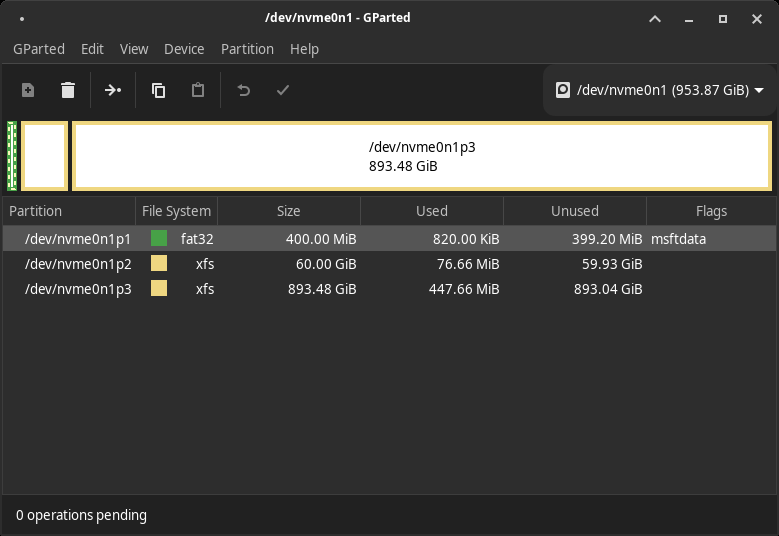
Note that I opted for xfs partitions, which allocate upfront some space for their internals, but in the end xfs is more economical than ext4, which by default reserves 5%… for nothing.
Then, it will exhibit the traditional idiotic bug that nobody ever bothered to fix. It says this way:
“If a partition is formatted as fat32 (aka vfat) but has the default msftdata flag instead of boot and esp, we’ll pretend it’s not a usable partition.”
But Anaconda WebUI is even more stupid than that:
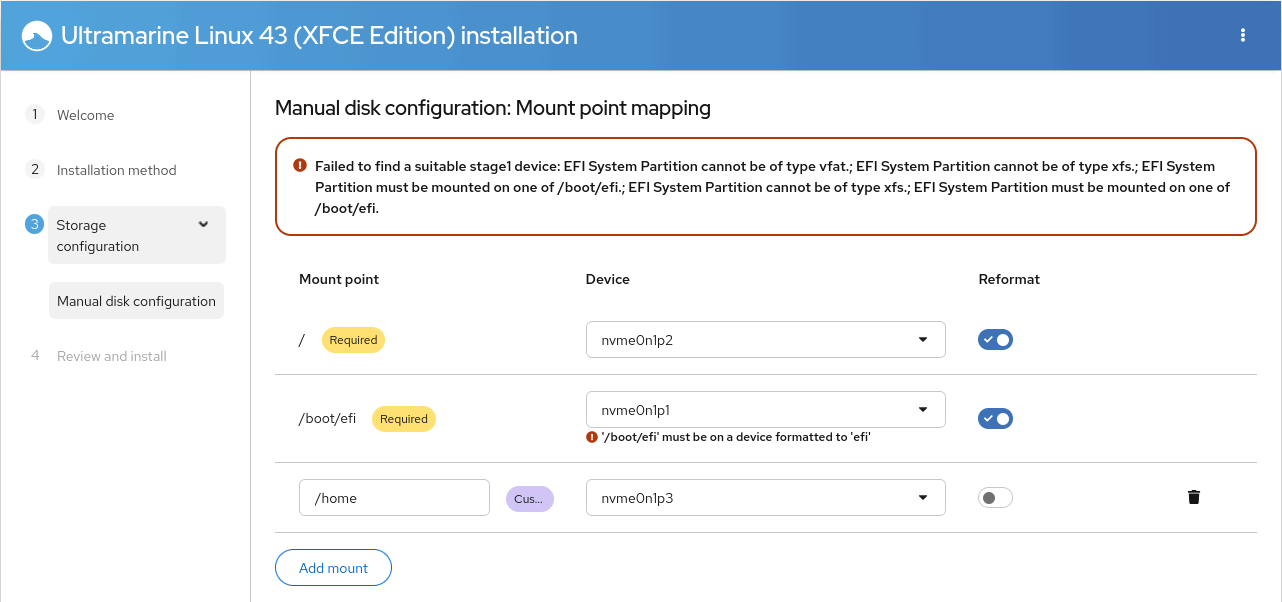
The fix is to set those fucking bloody flags that Anaconda cannot and would not set for you on a fucking correctly formatted /boot/efi partition! Outside Anaconda, for sure:
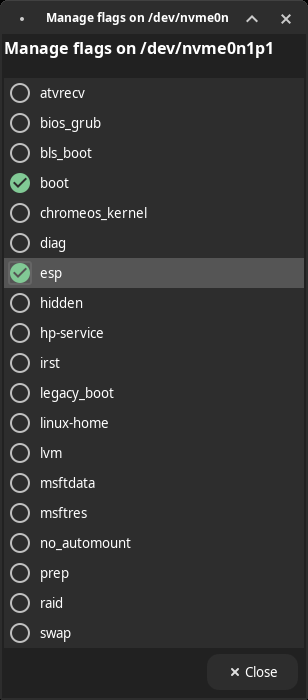
This is why most people prefer Calamares.
Running the installed Ultramarine XFCE
As I wasn’t asked about a host name (the old Anaconda had this option, I believe), my laptop had the host name of my router (openSUSE behaves identically):
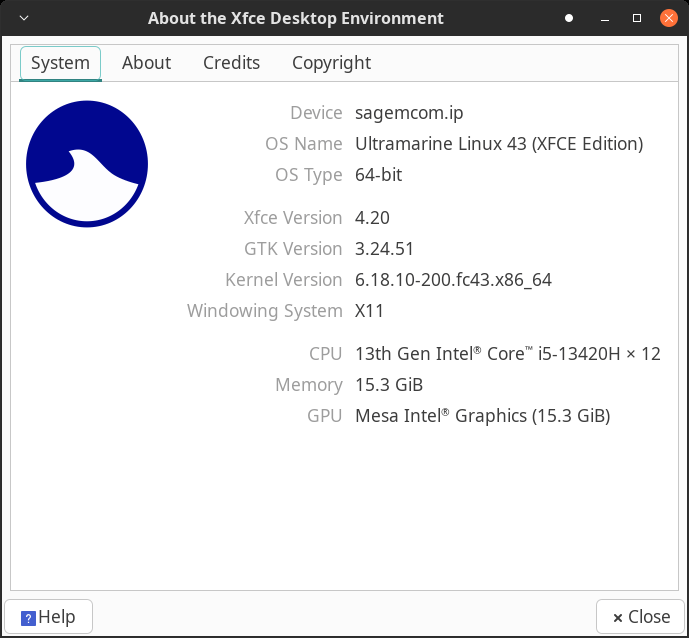
I had to fix it, as per the documentation:
sudo hostnamectl set-hostname --static gargamelThe list of repos:
fedora-cisco-openh264.repo
fedora-updates-testing.repo
fedora-updates.repo
fedora.repo
rpmfusion-free-updates-testing.repo
rpmfusion-free-updates.repo
rpmfusion-free.repo
rpmfusion-nonfree-updates-testing.repo
rpmfusion-nonfree-updates.repo
rpmfusion-nonfree.repo
terra-extras.repo
terra-mesa.repo
terra.repo
ultramarine.repo
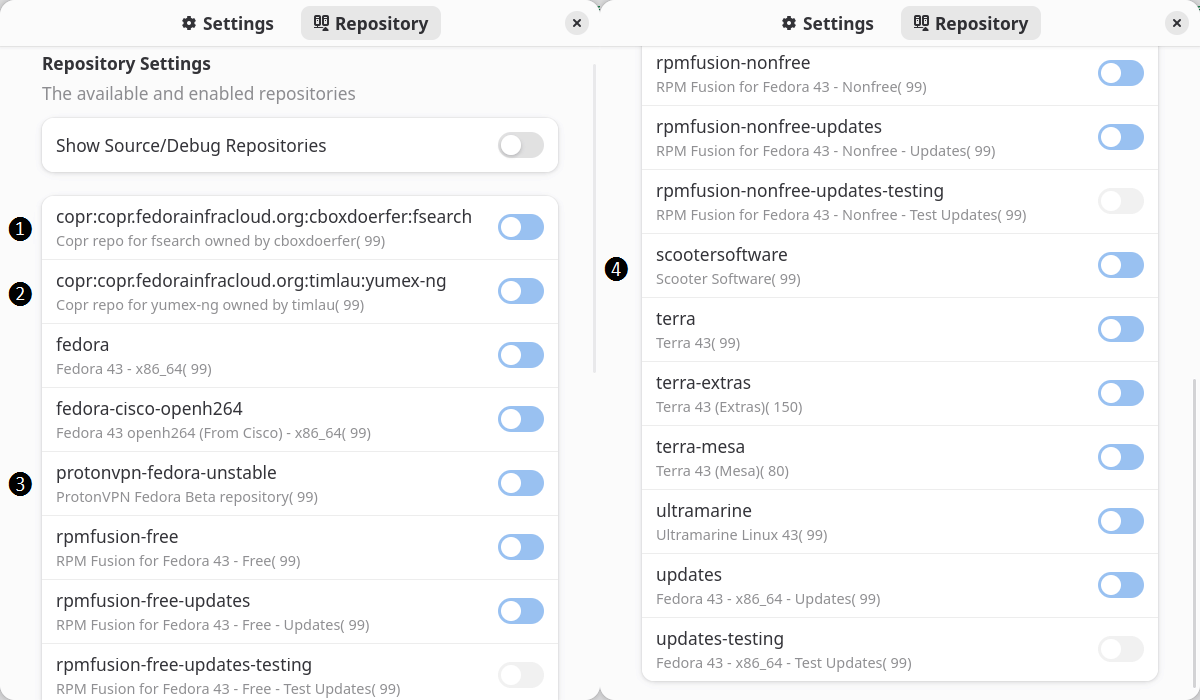
All but the testing ones were enabled by default. I had to add 2 COPRs and 2 extra repos, and this also allowed me to use yumex:
I couldn’t care less about their OOBE greeter. If you want a list of the apps it suggests, look into /etc/com.fyralabs.Taidan/catalogue/*.yml. OK, here’s a list:
- Browsers: Firefox, Edge (Stable, Dev, Beta), Chrome, Chromium, Zen Browser, Vivaldi.
- Development: Visual Studio Code, Zed, GNOME Builder, Kate, virt-manager, Tailscale, Docker, Godot, Dev Toolbox, KDE Toolchain, Helium Toolchain, Ultramarine Toolchain, Packaging Toolchain, Rust Toolchain, NodeJS Toolchain, Vala Toolchain, Nim Language.
- Gaming: Steam, Minecraft (Prism Launcher), Heroic Games Launcher, itch, Bottles, Lutris.
- Making: KiCad, UltiMaker Cura, FreeCAD, Raspberry Pi Imager, Raspberry Pi Tools, Thonny.
- Media Production: Kdenlive, Blender, GIMP, Audacity, LMMS, FreeCAD, HandBrake, MusE.
- Photography and Art: GIMP, Darktable, RawTherapee, Krita, Inkscape, Photoflare, KolourPaint.
- Productivity: LibreOffice, OnlyOffice, Thunderbird, Notejot, Rnote, Folio, Foliate, PDF Arranger.
It can enable repos as required, and it can install Flatpaks (Zen Browser, Vivaldi, Kdenlive, Blender, GIMP, Krita, Inkscape, Audacity, LibreOffice, OnlyOffice, Thunderbird, Foliate, and many more are installed as Flatpaks by Taidan). Questionable or not a choice, it might help some people. But Flatseal and Warehouse are not proposed. And what’s the purpose of Terra if most major apps are installed as Flatpaks?!
Speaking of Flatpaks, why is such shit preinstalled as Flatpaks?
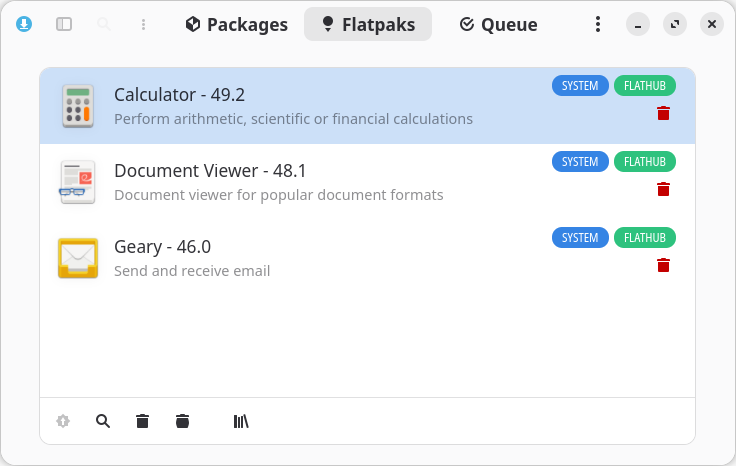
Now, for GNOME Software, which is the software management app of choice in this world of retarded morons, it believes some apps are installed both as packages and Flatpaks! Or maybe they are?!
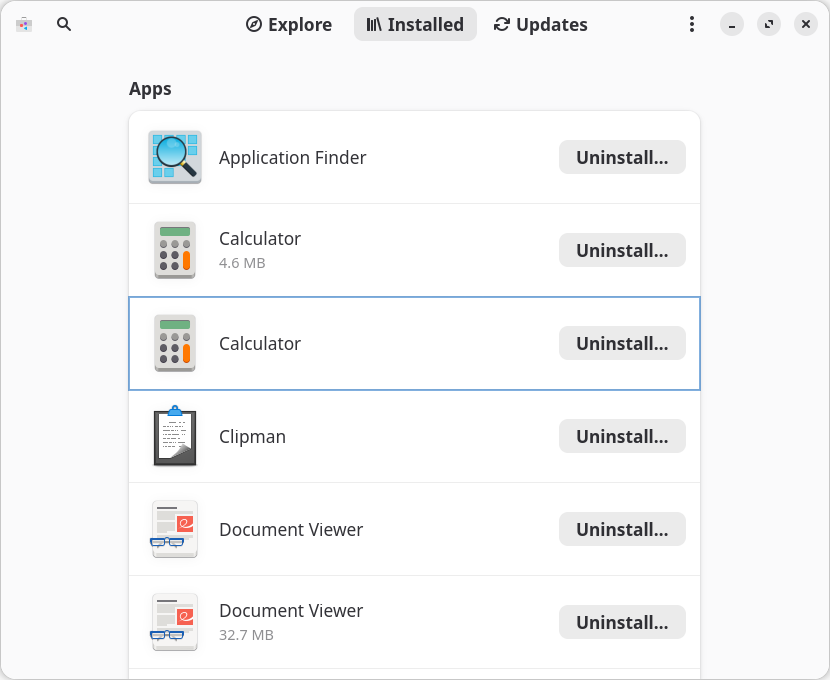


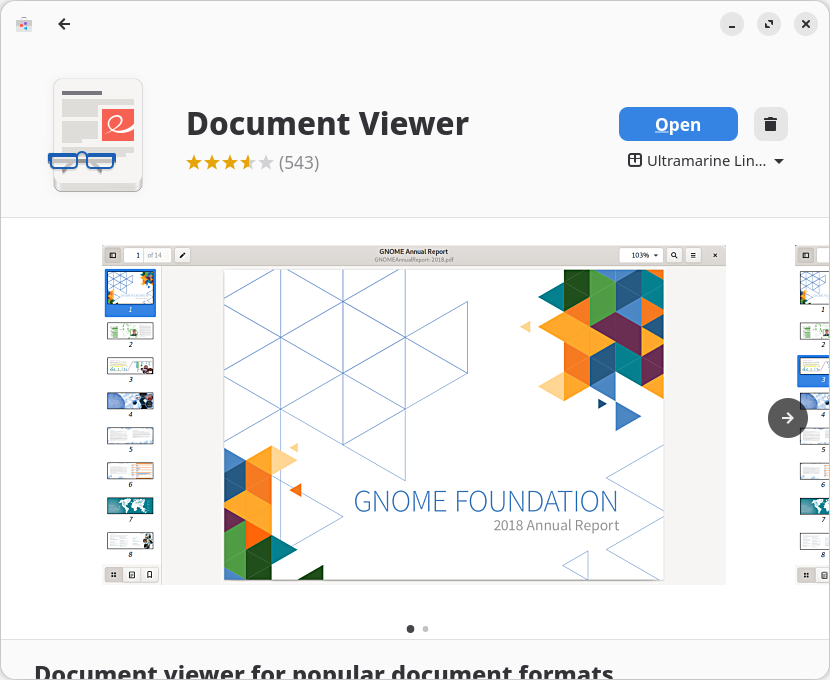
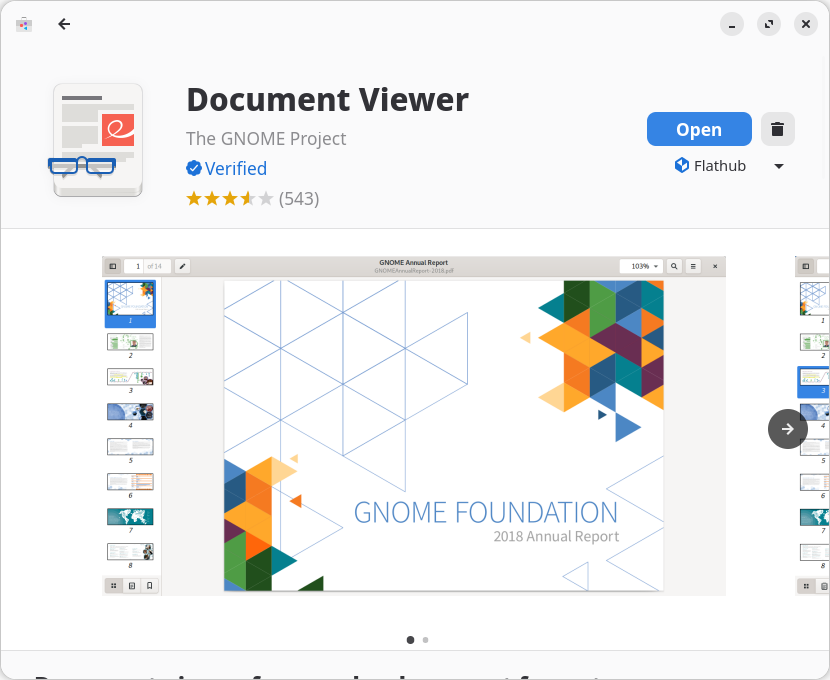
Let me tell you the correct approach:
- Don’t use GNOME Software.
- If you’re using Discover, disable the Flatpak integration.
- Visit Flathub to explore apps and install them by using the commands provided there.
- Use Flatseal and Warehouse to manage Flatpaks.
The installed Ultramarine XFCE was running smoothly when, after some updates that required a reboot, the prompt in xfce4-terminal got screwed:
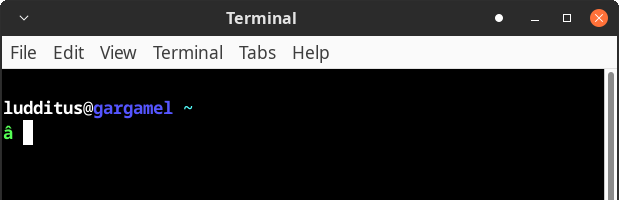
I installed mate-terminal, which behaved as expected:
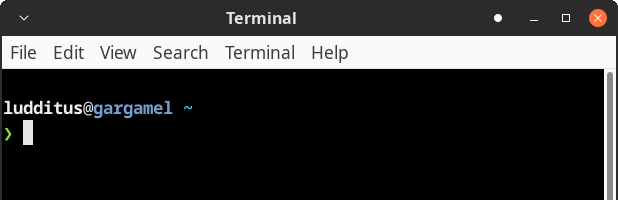
How the fuck did Ultramarine manage to break its own custom prompt in the XFCE Terminal? I didn’t do anything! Update, reboot, enjoy. (Lather, rinse, repeat.)
As a last resort, I tried to see if I can switch the DE to something else. But Ultramarine Hop, as warned, didn’t work:
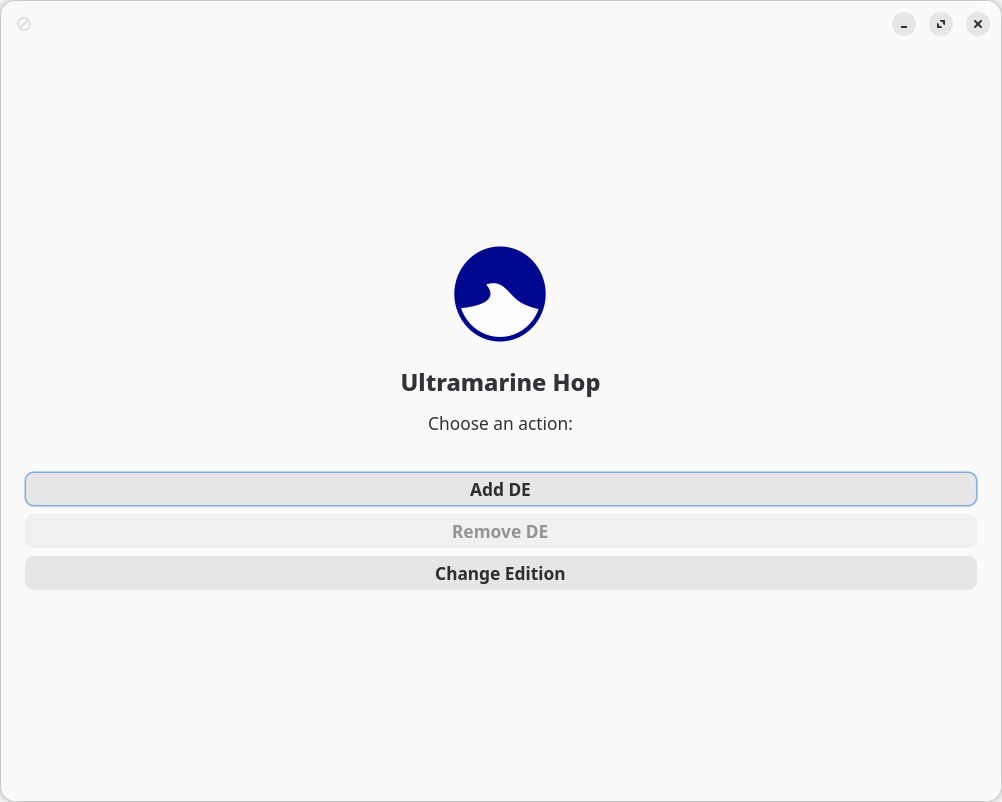
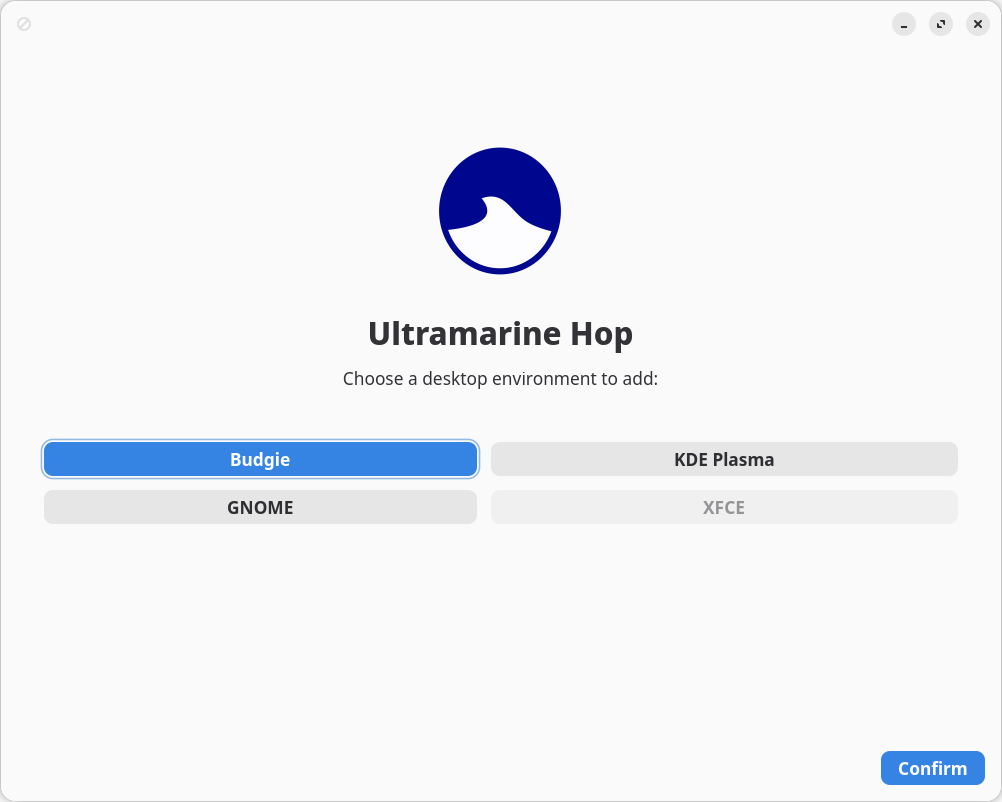
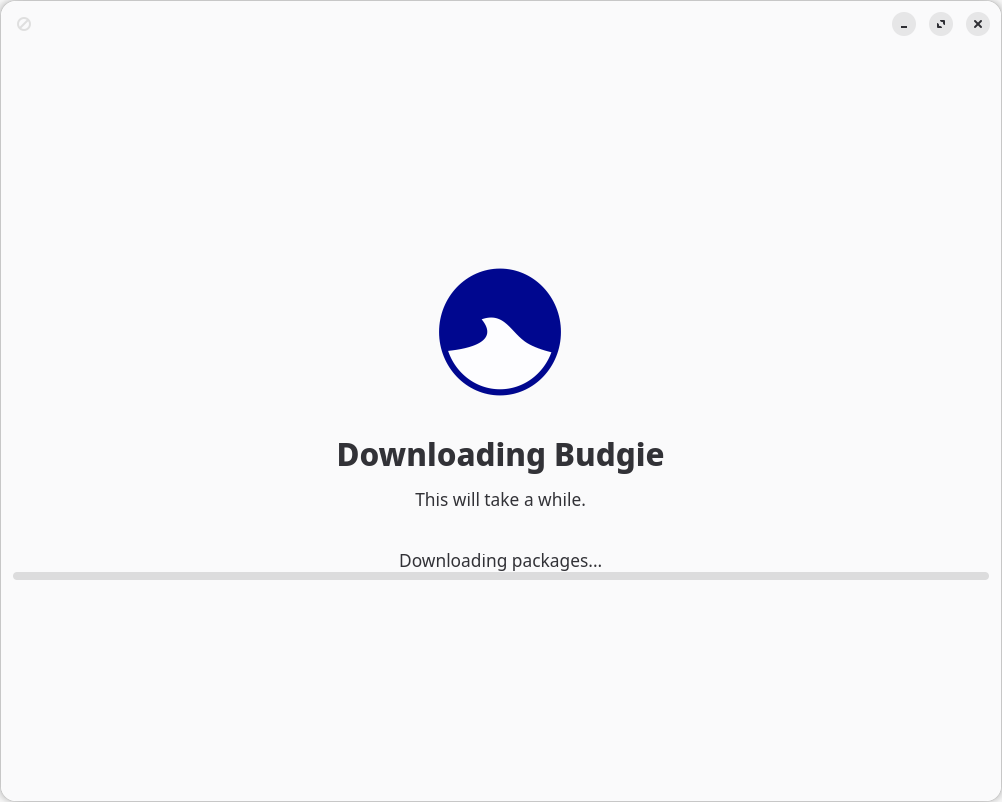
It stays indefinitely on “Downloading packages…” without doing anything.
Bottom line
Ultramarine Linux, with its specific tools, several desktop flavors, the Terra repository, and the immense amount of work necessary to glue them all together, could have been a tremendous distro. Instead, it’s a huge flop, mainly because ❶ they tried too much, but ❷ they lacked common sense, and ❸ they made some wrong decisions, not to mention ❹ the extra bugs they added to Fedora.
And now, which way?
The madhouse could be a valid destination. But I’m still looking for better alternatives.
It’s really irritating and wearisome to navigate through the too many bugs of the so many Linux distros. “Linux on the desktop” is a masochistic choice. Linux should have remained for servers, containers, and whatever shit it’s legitimately used for. There isn’t anything in Linux as robust as the experiences I had with WinXP SP3 and Win7 SP1. Nothing.
I could go the Dedoimedo way
That doesn’t necessarily mean Kubuntu, but at least KDE. Why am I sticking to “lighter” desktop environments? Maybe I’m too conservative.
I have used Kubuntu in the past, and I experienced occasional breakages that I didn’t document because, unlike Dedoimedo, such incidents were, to me, reasons for distro-hopping.
But even if Kubuntu 26.04 LTS will seem a tremendous release, could I really trust Canonical? Judging by Dedoimedo’s latest post, Canonical cannot be trusted to maintain the original (non-HWE) kernel 6.8 in Ubuntu 24.04 LTS. (But what does he do with “roughly two dozen Linux virtual machines”?!)
When I constantly went back to Ubuntu, I targeted Ubuntu MATE because MATE basically means GNOME 2 ported to GTK3 and because MATE looks at its best in Ubuntu MATE. All other distros either use a completely unthemed MATE, only using the defaults, or don’t make it look elegant in any way. Moreover, the Fedora MATE spin pairs it with Compiz, whereas Ubuntu MATE uses Marco. Compiz was famous for its 3D wobbly effects that I found childish and stupid. I could never stand such a disgusting shit.
But Ubuntu MATE is dying. 26.04 won’t be LTS for it, because Ubuntu MATE doesn’t have a formal team anymore, and Martin Wimpress (“Wimpy”) doesn’t do anything these days. I suspect Ubuntu MATE only exists through automated building and a functional CI/CD pipeline.
The same way these days I tried Ultramarine Budgie and managed to configure it to my taste in 5 minutes, I’ve been tempted in the past by other improbable choices that featured elegant looks, as was the case with Ubuntu Cinnamon 25.10. Then, too, the customization was easy (there is a screenshot); unfortunately, that instance of an installed Ubuntu Cinnamon suddenly broke! Even before the breakage, it couldn’t reconnect a Bluetooth mouse after a sleep unless, you guessed it, the device was deleted and added again.
In the end, I don’t care that much about the desktop environment, as long as:
- It’s not GNOME.
- It doesn’t use Files/Nautilus from GNOME.
- It can easily be made to look nice and to behave like I want it to. That includes a taskbar with icons and titles for the active windows.
- It displays reasonably well (theming-wise) both GTK-based and Qt-based apps.
- It doesn’t stay in my way.
- It’s a real desktop environment, not a crappy tiling window manager.
- It doesn’t mimic macOS. (If I can change that in 2-5 minutes, then this isn’t an issue.)
For instance, if Budgie’s developer(s) hadn’t decided to abandon GTK post-10.10 and switch to Qt, this minimalistic DE would have been a better choice than Cinnamon.
This said, maybe the distro is more important than the DE. Incidentally, let’s note that KDE is the only DE that looks decent even with the default theme. And KDE has been promoted in Fedora from a spin to an official edition!
Considerations on Fedora
OK, Fedora doesn’t have LTS releases. And the RHEL clones aren’t suitable anymore for “Linux on the desktop.” But I had more troubles in the past with openSUSE Tumbleweed than with Fedora, regardless of the DE (XFCE or KDE). So, if it’s not Debian or Ubuntu, it’s likely to be Fedora or a derivative.
So Fedora is worth considering as a possible new “home.” Most likely, the KDE editions, as the spins lack any visual appeal, with their default layouts and theming that are depressing. (Other distros don’t always look exactly as I’d want them to look, but themes are more easily available, some decent ones being usually preinstalled. Not so in Fedora.)
Even if I decide to go for Nobara “Official” (the slightly themed KDE), this is based on Fedora.
There are some tiny advantages of Fedora that most people miss.
❶ The tiniest of all regards KDE itself! It was Fedora who added to Plasma the option to open a terminal (Konsole) upon right-clicking on the desktop. To date, only Fedora (and its derivatives) ships with this option enabled! All other distros seem maintained by grumpy retards (unlike grumpy Ludditus) who stubbornly refuse to enable it!
The fix: Right-click on the desktop, choose “Desktop and Wallpaper,” then “Mouse Actions,” click on the cog at the right of “Right-Button, Standard Menu,” and enable “Open Terminal.”
❷ dnf isn’t either that bad or as slow as the adepts of apt claim it is. And it has a feature that apt lacks: reversing transactions. I have used in the past such commands that don’t have equivalents in Debian/Ubuntu:
sudo dnf history undo <ID>
sudo dnf history rollback <ID>
❸ The updates on reboot isn’t such a bad idea, either. Read my older chapter, “The Arch way in Manjaro: replacing the kernel under my ass.” It also mentions the middle path used by Debian and Ubuntu (via needrestart), but Fedora’s way is sane and the safest of all. OK, I complained that in Fedora 37 uBlock Origin was a package and that the system absurdly wanted to reboot to update it, but the Arch/Manjaro way is the worst. If the running kernel is replaced, it’s not actually replaced yet, but the system thinks the newer kernel is current, so if a kernel module needs to be loaded, it would fail because of version mismatch. Other damage can happen if libraries are partly replaced while being used by the desktop environment, for instance.
❹ DistroWatch’s Jesse Smith reviewed Fedora 43 KDE in November 2025. I disagree with many of his negative statements, but I want to highlight this assertion:
On the positive side of things, the Plasma desktop was faster and its Wayland session was more polished on Fedora than when running Kubuntu on the same hardware.
I’d comment more on that review. For instance, I consider Jesse a bit thick on this matter:
There were a few quirks in the distribution’s handling of my hardware. For example, my laptop’s screen was set to a dim brightness level (17%), making it difficult to read. Usually I would use the laptop’s shortcut keys (for adjusting brightness, volume, and media playing) to fix this, but they did not work. With some experimenting I found these shortcut keys would work if I held down the function (Fn) key at the same time. This behaviour is reversed in Fedora compared to every other distribution I have used.
What happened is that Fedora didn’t know enough about his HP DY2048CA laptop. You see, there are laptops that have the hardware adjusting functionalities (brightness, sound volume, etc.) as primary functions and laptops that have the actual F1-F12 keys as primary functions, so Fn is required to get the secondary meaning of such keys. And Fedora didn’t know in which category this laptop falls.
My Acer A315-59-342MA requires Fn to adjust hardware parameters. Fedora 43 KDE knew that.
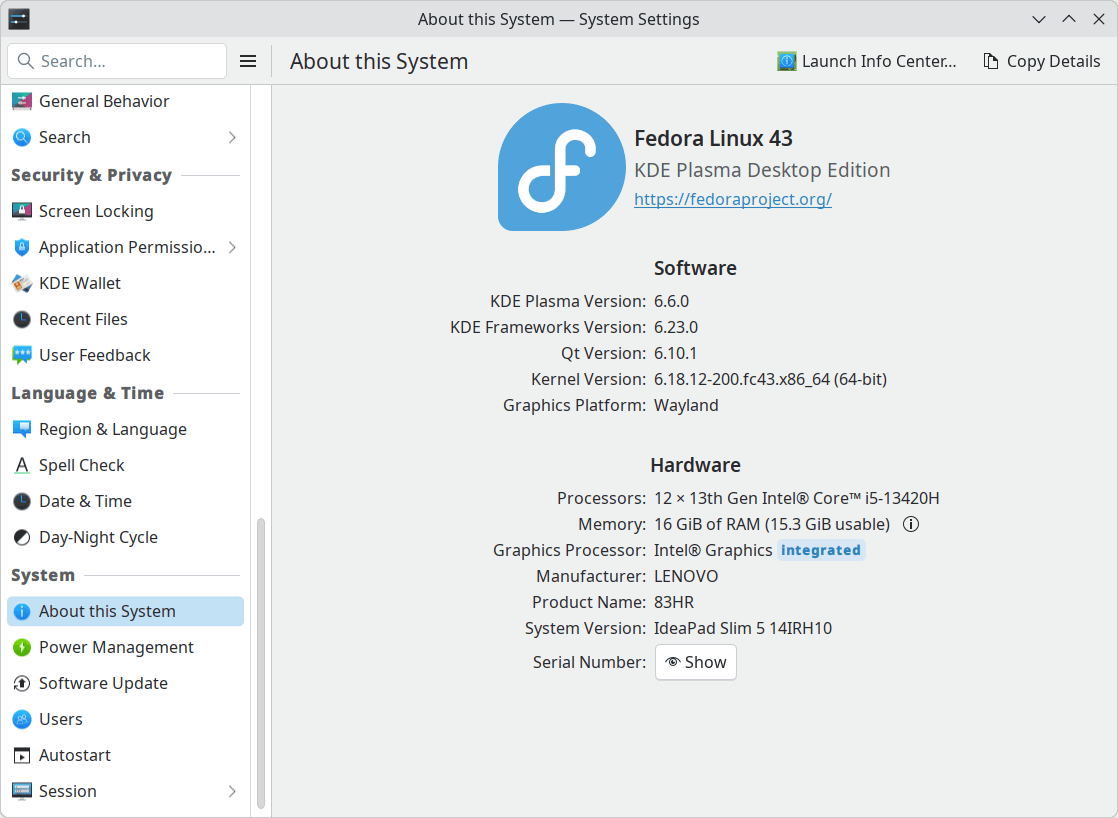
My Lenovo 83HR003CRM (14IRH10) doesn’t require Fn to adjust hardware parameters. Fedora 43 KDE knew that.
I selected a few comments from that week’s DWW, all regarding the said review:
Comment n°2:
This is one of those times (and I’ve seen a few over time) when my experiences with a reviewed distro are nothing at all as reported in the review.
Installing and running Fedora 43 has been nothing but (cool) joy, and it’s going to remain on this machine for the foreseeable future (which often means the next 6 month update… hopefully not this time)… hoping that 44 does not mess things up.
Comment n°7:
Despite fact I started with Red Hat Linux 4.2 Biltmore way back in 1996, nothing could be more distant to my current taste than Red Hat and Fedora.
In fact, in my eyes, Red Hat is Microsoft of Linux world as they violitating it, taylor making for their own purpuse and needs and stealing it off from Linux community.
Comment n°13:
Rebooting after updates is technical the right thing to do (TM). To the best of my knowledge, there is no Linux system on the market which restarts the correct services/applications after an update.
Knowing above, it does not mean that I will reboot my system after non-kernel updates, or that I often run into trouble by not rebooting my system, but I am at least aware enough to restart my browsers or webservers/firewalls, if a component of them is updated.
Comment n°26:
There is a package for this purpose called “
needrestart“, it is used by default at least on Ubuntu Server AFAIK, it runs after update via a hook mechanism indpkgor APT. There is also an older utility “checkrestart” in the “debian-goodies” package which can be run manually.
Comment n°20:
Fortunately the “Everything ISO netinstaller” still has the old anaconda and it allows you to choose any of the available desktop environments.
Comment n°47:
I tried Fedora 43 after it came out but I chose the Fedora Everything iso. I have come to do this with Fedora and its last couple versions for the last few times I’ve installed and tried it out. With Fedora 43 Everything, there is NO new installer. It still installed with Anaconda (which was fine by me). I have installed Fedora enough times I breeze through Anaconda quite fast including customizing my petitions. So I personally do not mind Anaconda at all. Plus the Everything ISO really allows the maximum software customizing in my opinion, regardless of desktop. Now, lastly one thing that keeps me from sticking with Fedora is that ever since Fedora 42, the program Dnfdragora behaves differently. Specifically, it requires wildcard (i.e. the * symbol) in the front or behind a package name if you don’t know the exact wording for a package but at least know some or most of just any of the keywords. It used to be I could just type “Libre” and it would list everything with those letters in its software name. If you do that since version 42, it will return no results. Thus you instead must type the wildcard * so Libre* will then list all the results. And the same for knowing the back half of the title and needing to put the * in the front of the partial or only word you know of the software for it to list it. Never before did you have to do this and Dnfdragora was and can be a great GUI for software, instead of Discover. So I just end up abandoning it and prefer openSUSE nowadays. And even openSUSE has the new Merlyn software GUI and it is just as good as YaST Software so that’s good of them to retain that user friendly element. Thank you and have a great day.
Comment n°56:
Fedora Security Lab is improving – it has SElinux running OTB in live mode (via ventoy) to stop pesky intruders. Nice to see, since most security distros want you to install before all security software is working.
Comment n°57:
for those that may not know, on Debian if a reboot is required after an update, a file called
reboot-requiredwill appear magically in/run(or look in symlinked/var/run).
Comment n°58:
Yes, Debian (Gnome) says “Reboot and Update” or words to that effect.Siduction suggests/requires dropping out of
init 5(GUI) to update.Fedora has a CLI alternative:
dnf update. No reboot is required. But if the GUI update method is used, then the user will be prompted to reboot.All of these situations suggest to me that there is some reason that a reboot is prudent even if it is not required.
It’s not the end of the world. But the guy with those “pesky intruders” is either paranoid or retarded. Oh, and switching from Fedora to openSUSE because of dnfdragora is also dumb.
On the other hand…
❶ Still to explore:
- Hibernation. For hibernation, Zswap should be preferred to ZRAM. As a starting point, this bookmark. For Zswap, also this one.
- Nobara or Fedora?
❷ Petty things that piss me off:
- KDE System Settings is nauseatingly complex. I’d have to learn to ignore it.
- Why Plasma? Why does KDE keep insisting on the name “KDE Plasma” or even “Plasma”? It’s still KDE, regardless of the plasmoids added since version 4! It’s a “KDE desktop,” and it always has been, right? Nobody thinks of “KDE e.V.”! Furthermore, the split between “KDE Frameworks” and “KDE Gear” overcomplicates things in a totally unnecessary manner. I believe it creates confusion, and it might even drive away some potential users. Frankly, it sounds more like a logistics company than a desktop.
- Why
dnf? Why couldn’t the name ofyumbe preserved? Currently, one can still invokeyum, and they’d rundnfinstead. Butyumhas such a long history!dnfsounds bland and stupid. And the name of the folder that stores the repos is stillyum.repos.d!
Or I could keep trying!
Based on “the appeal of elegance” or some other naive criterion, I could keep exploring for a while before I decide. It would be a shame to install Win11 on this Lenovo, and Win10 IoT, I checked, doesn’t know how to properly balance tasks on CPUs that mix E-cores with P-cores.
I’ve been lured and duped by various Linux distros, and now I’m the sucker and their victim.


UPDATE: It should be Fedora!
I installed Nobara using its Calamares installer. With xfs partitions, because I wanted it this way.
GRUB failed to boot in the exact same way it failed when I installed Ultramarine XFCE using the “Readymade” simplified installer, which, however, used Btrfs without asking first!
But the new Anaconda in Ultramarine XFCE performed a correct installation, even with xfs.
So I installed Fedora KDE, which uses the new Anaconda. Also with xfs.
It worked!
So, as a general rule, derivatives seem to be a bad idea. But Fedora will require a lot of customization, adding RPM Fusion, and so on. I even had to set the host name, because Anaconda didn’t handle it. Sigh.
Oh, there is more. When installing Fedora using the new Anaconda WebUI, the password needs to be at least 6 characters long. But passwd at the CLI requires at least 8 characters. To force a shorter password, there are several options.
I survived the first system update of 5.5 GB 🙂
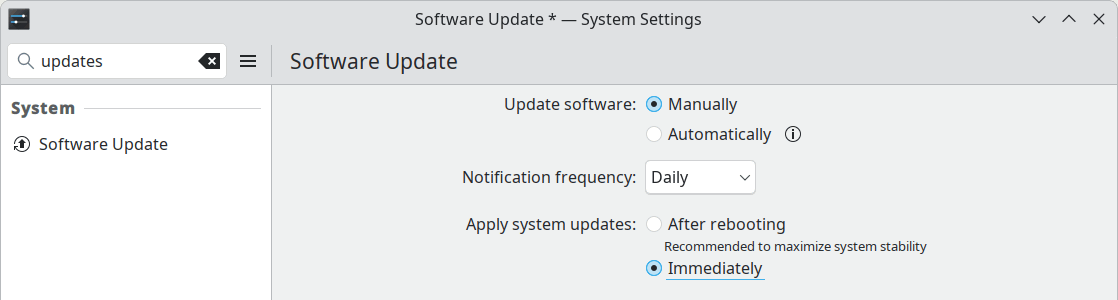
Then, guess what? There is an option to apply the system updates immediately, not after a reboot! It’s said to be, basically, the same as running sudo dnf upgrade in the terminal. Kernels are still updated after a reboot, though.
RE-UPDATE: This was a bad decision!
FURTHER UPDATES: How I chose to become Dumbo and Dumbo goes on: 26.04 Beta is solid, but not Kubuntu. Follow the Dumbo tag!
Barely posted, and already updated!
Debian 13 xfce with newer kernel from backports/testing, Worth a shot?
Package:
linux-image-amd64(6.18.5-1~bpo13+1)The kernel was not the problem.
Testing has
bluez(5.84-1) with identical requirements as per Trixie 13.It would be interesting to see the result if you could test it.
It would be, but it won’t happen. I won’t be the one to solve the mystery of BT in Debian.
Believe it or not — I ran into the same BT error when running Debian 13 live XFCE ISO and found an easy fix.
I installed
bluemanwithout recommends deps (the mistake). It seems thatpulseaudio-module-bluetoothis what was missing…Restarted BT +
pulseaudioand my BT JBL 520 connected!Didn’t you leave Linux? 😛
Gentoo has been ‘as good as dead’ for the last 20 years, yet it’s still rocking and actually in a very stable, sane, and healthy state. I don’t consider it a sane choice for a desktop anymore, but that isn’t Gentoo’s fault.
On the other hand, Slackware has been sort of dead for the last 20 years. It’s a prime example of what happens to a great project when leadership is too stubborn and short-sighted.
At the risk of being called a retard — without Ubuntu’s presence and influence, Debian would be a marginal distribution today. Ubuntu stopped being a ‘parasite’ quite some time ago.
The only distros (for a home [power]user) that matter today are Fedora, Ubuntu, Arch, and maybe (a very big ‘maybe’) openSUSE. I admire your patience, but these derivatives and ‘two-teenage-hobbyist’ distros are short-term crapware and weekend projects. I could never trust any of them on my machine(s).
Looking forward to the new Linux rants. 🙂
If they aren’t parasites anymore, why are they using Debian’s source packages?
OK, Canonical does a lot, and I mean a lot, to have a sound offering for enterprise users, but as far as the home/desktop user is concerned, despite the so many official flavors, only the main GNOME desktop image is supported by Canonical. All other flavors are maintained by volunteers.
My main criticism is that Canonical wants to compete with Red Hat on the enterprise front and doesn’t care anymore about “Linux on the desktop.”
Maybe this explains the reliance on Debian as a source. Those other desktops and apps that aren’t that relevant for the enterprise have to come from somewhere, as long as unpaid volunteers maintain them.
And yet, if Debian died tomorrow, Ubuntu would be in trouble.
What is your take on Tuxedo OS? I put it a year ago in my kids’ devices and never had a single issue! I don’t know how to evaluate on safety but having a stable Ubuntu with rather current kernel and KDE make it a sweet spot for them an seriously considering it for me too (although I ideologically prefer a volunteer). Maybe the fact that someone is being paid to maintain it maybe makes it a notch apart from the exclusively vonlunteer based distros like MX and Kubuntu…
There are 2 KDE distros that I tried years ago, both promoted by laptop brands, and which, for one reason or another, I didn’t like enough to install them:
● TUXEDO OS, which is basically:
– Based on Ubuntu LTS but with KDE (NOT based on Kubuntu LTS!)
– With a newer KDE than Kubuntu (sometimes the latest one, mostly like KDE neon)
– Without snaps
– With custom kernels, tools (TUXEDO Control Center) and extra drivers for their TUXEDO laptops
Currently, TUXEDO OS has KDE 6.5.1, newer than any Kubuntu release! Not the latest 6.6.0, though, and not the latest kernel, either.
I didn’t like something, but I don’t remember what. Their tools, maybe? The fact that, just like Mint, they’re slow to rebase on a newly released LTS?
In theory, it should be a good choice. In practice, it couldn’t seduce me.
More recently, it looks like they also offer automated installations (for OEMs?) for “Debian 13, as well as Xubuntu, Ubuntu MATE, and Linux Mint”; I find this confusing, as details aren’t provided.
● Kubuntu Focus, which seems to be missing from DistroWatch, which is:
– Based on Kubuntu LTS
– With custom tools, tweaks and drivers for their FOCUS laptops
– “Kubuntu 24.04 LTS with KFS”: “Kubuntu Focus Suite (KFS) adds convenience and reliability with graphical tools, hardware optimizations, curated apps, and extensive documentation.”
Here, too, I don’t remember what I didn’t like. The huge Conky-like Hint Widget wasn’t to my taste, but other than that…
The Frequency Profile tool, optimized for their laptops, is interesting.
The Clean Install guide is funny: “We optimize KFS for Kubuntu Focus hardware and validate updates on all Focus models sold within the last 3 years. If you have different hardware, these optimizations and validated updates may not apply.”
I like that the recommended size for
/boot/efiis 300 MiB. I don’t like that they recommend a separate/bootpartition (4 GiB), and that this one, as well as/, is supposed to use BTRFS. Funny enough, the Manual Partitioning screenshot (Step 4b) shows an/homeasext4!This is because Focus preconfigures the system for Back In Time snapshots as part of the readiness for recovery that includes system rollback. Not a bad idea, but relying on Btrfs is a no-go for me. And the choice for Back in Time is strange, as it’s better suited for
/homebackup, whereas here/homeis excluded from snapshots! Why specifically leaving/homeasext4?! Either way, why not use Timeshift, then, like Mint does?! I suppose Back in Time feels similar to Apple’s Time Machine.Current ISO: kubuntu-focus-24.04.3-2026-01-14-desktop-amd64.iso.
Dedoimedo should try both of them! 😉
Augsburg, Bavaria, versus Traverse City, Michigan.
He should.
I don’t like the Tuxedo OS preposition either, although different rationale than you. Yet, if they are preparing the distro decently and, based on my family’s experience with it, is as stable as Mint, it deserves to considered more.
Kubuntu had given me so much trouble 1yr ago, maybe and probably on my hardware setup though so I bypass it since. I should give it a try again.
Preposition?! Proposition?
You could try Kubuntu Focus 🙂 But the D/L is soo slow. I’ll try the live edition, just out of curiosity.
That is embarrassing… I’d been using Preposition/Proposition a lot as meaning “choice”… my gosh!!! I am done for today… need to reflect on life a bit.
From proponer, right?
Proponer… You are right! Well, that is better than when I did not want to do a presentation in the US and I gave the excuse in front of 30 people that I had a cold that brilliantly I translated ‘estoy constipado’ as “I am constipated”.
At least, you cannot be embarazada 😉
It was easy to dismiss Kubuntu Focus: with both Firefox and Chrome installed by default, and Chrome being set as the default web browser, clicking on “Curated Apps” displays a “Default browser not found” error, and nothing happens.
Nobody seems to be testing anything these days.
I don’t think I’ll ever be able to take opensuse seriously. They decided to blacklist rndis ffs. How am I supposed to use internet when one day my wifi driver gets messed up?
My distro choice usually has been Fedora. It might not be the best option out there but it feels somehow sane to me mainly because unlike opensuse I don’t need to install my regional languages just so they are visible correctly on google india homepage.
Apart from this, I liked my stay on endeavouros, cachyos, Tuxedo os and Kubuntu. You won’t find me using arch/arch based distro for longer than a week though.
On my Acer from 2023, CachyOS isn’t even able to boot. The ever famous distro has a highly praised kernel that in fact is complete piece of shit.
As for RNDIS, Greg Kroah-Hartman advocated against it. A complete moron that will one day make Linux unusable. (Linux, as in the kernel.)
gregkh:
Reality:
They’re not intelligent; they’re highly functional retards. We’d better replace such shitheads with Claude Code.
5g plans are cheap here in India so I mostly use usb tethering only since it kills my battery less than using hotspot constantly. Anyone who removes this completely is a piece of shit in my opinion.
OpenSuse spearheaded this bullshit decision and proactively disabled it in their OS was even more stupid.
I’m using Windows 11 pro (installed with unattended xml) right now against my will since my partitions are ntfs mostly and linux still doesn’t know how to deal with them properly and corrupted few of my files in 2025.
Also because of some obscure shit that I had faced – for an example – I have few pdfs that are image heavy – they are just scanned pages of my notebook. If I try to annotate these large pdfs on my pc with evince, okular, they will end up corrupting my pdf – rendering it useless. Here’s the twist, it only happens in flatpak versions of these apps -_-
How tf am I supposed to know it will happen with flatpaks only?
Just… So much obscure shit happening.. ugh! F flatpaks I guess? But the only distro that I somehow can endure loves them.
I am a student and I just didn’t want my system to mess up my pdfs, that’s it.
On cachy os kernel, I didn’t even care about their heavy marketing on their kernel. I just wanted to try something arch based but there are so many issues reported in their subreddit that it deterred me eventually.
I don’t even like linux kernel these days in general. It keeps messing up my bluetooth every 4-5 months.
Hear, hear, younger bro.