
Zooming out (not zoning out!) on some Linux & IT idiocies
① Someone felt contemplative…
I was looking for a review of Argent Linux and I noticed this ad hoc philosophy at the end of a review of it in DistroWatch Weekly, Issue 1165, March 23, 2026:
Zooming out
I want to put aside the specifics of my time with Argent to talk about something which crossed my mind a few times this week while using this distribution (and while finishing up my notes from my previous trial).
At this point, I have been running Linux distributions for over 25 years. During the vast majority of that time I have felt it was clear that Linux was evolving and improving. It has typically been safe to say, in my opinion, that the Linux experience (hardware support, desktop options, application capabilities, gaming options, and features) would be better next year than they were last year. With a few minor stumbles here or there, the experience Linux has offered has almost universally improved over time.
There was one exception to this general rule. There was a time, around 2008 to 2010, when several changes were rumbling through the Linux ecosystem. That was the period in which several distributions traded KDE version 3 for version 4, long before it was ready for public use. It was also the period in which PulseAudio was adopted by several distributions, again long before it was ready for the public. While both technologies eventually matured, there were a few years in that era where it was common for people to run into issues with their desktop (if it was in the KDE family) and to not have a working sound system. It was a dark time if you were providing desktop Linux support.
Fortunately, the distributions which had forsaken reason in their rush to adopt half-baked KDE releases and an untested sound system seemed to come to their senses and the migrations to GNOME 3 and
systemdtended to go smoothly for most distributions. The community appeared to have learned its lesson and moved on, with evolutionary progress once again becoming the norm.This year is the only other time, in the past 25 years, that I have felt the Linux ecosystem as a whole is regressing instead of progressing. For the first time in over a decade, I am looking at my recent experiences with Linux distributions and feeling like the experiences are getting worse rather than better.
For the first time in over a decade multiple distributions are failing to even detect my audio hardware. For the first time since about 2011 I’m noticing desktop performance getting worse instead of better (largely due to projects adopting Wayland as the primary display software and some inefficient defaults which often accompany it). This year I’m encountering more issues with package managers than I’ve seen in quite a while, often due to new, untested software managers being pushed out to users. For the first time in over a dozen years I’m having trouble with resume-from-suspend, thanks to issues I’ve traced back to systemd.
A year ago, around the time I was reviewing projects such as MX Linux 25 and Linux Mint Debian Edition 7, I would have said Linux was at the top of its game, with hardly an issue in sight. After the past month though, I’m left with the impression there are too many people experimenting with new ideas and features while not enough people are working on quality control and fixing bugs. There are some great advancements and wonderful experiences coming out of the Linux community, I still think many projects (both distributions and upstream software developers) are doing some great work. But there are also cracks in the hull of the Linux ship and problems are leaking in, faster than they are being patched. It is my hope this is addressed before we end up with another Heartbleed-style bug or another farce like the PulseAudio migration.
② XFCE wasn’t broken—now it is!
There is a regression in XFCE 4.20 that nobody talks about. I wasn’t aware of it until today.
As I was browsing the forum of SolydXK, I noticed this issue reported one year ago, in May 2025: fresh installations of SolydX (the XFCE version of the distro; SolydK is the KDE build) were no longer able to default to displaying the wallpaper set by the distro, displaying the XFCE-provided “mouse” wallpaper.
A script that used xfconf-query to set the default desktop did set it, but the setting was ignored.
At the time, the bug had been noticed and reported as follows:
- In Debian: Bug #1110124 — Default wallpaper does not respect update-alternatives.
- In Ubuntu: Bug #2092806 — Xubuntu default wallpaper not respected by Xfdesktop 4.20, reported by Sean Davis.
- in XFCE: Work item #364 — Xubuntu default wallpaper not respected by Xfdesktop 4.20, reported by Sean Davis.
Brian Tarricone, XFCE developer, proved that he was completely unaware of how Xfdesktop works!
I don’t believe this method has worked since 4.18. You need to pass a configure option to set the default at build time.
Sean Davis:
Bummer. It did work on
xfdesktop4.19.3, which we shipped on Xubuntu 24.10. It does feel like a regression though, or perhaps a separate bug, since the desktop has one wallpaper and the preferences dialog has another.Is there any chance you could take a look or offer an alternative to rebuilding
xfdesktop? This can be limiting for distributions, especially those with downstreams. Debian > Xubuntu > Mint or Debian > Xubuntu > Linux Lite are a few examples of needing to rebuildxfdesktopdue to this regression.
Brian Tarricone:
Sorry, but that won’t be possible.
Then he closed the bug report and marked it as 3. Not a Bug!
Someone else insisted:
We are having the same issue in Kali Linux, and it was working in the latest Xfce 4.18 updates.
We would love to have a way to set the default background viaxdgsetting files, orxfconf, instead of having to patch and rebuild the package. We get thexfdesktoppackage from Debian, and having to fork it is time-consuming.
One more person complained that “this is a feature that’s a shame to lose.” Then, Sean Davis resurfaced:
Even if you will not support this request, there is still a bug. The preferences dialog shows the Xubuntu wallpaper as the selected wallpaper while the desktop renders a different image.
That was end-February 2025. A couple of comments and several months later, on August 22, Brian Tarricone removed the 3. Not a Bug label and added the 1. Regression and 5. Background labels.
That said, Brian declined to take any further action:
I’m unfortunately busy with “real life” stuff these days, so if someone needs this, they’ll have to build it and submit an MR.
Why the fucking fuck are they “improving” XFCE if they don’t have the time to fix the new bugs?! If it ain’t broke, don’t fix it! They really want to kill XFCE, or what?!
Now, I recall having noticed that xebian-trixie-amd64.hybrid.iso didn’t display the Xebian-branded wallpaper by default, and I wondered why. As I wanted to also give a try to xebian-unstable-amd64.hybrid.iso, I checked the status of this regression: it’s still there!
To the point:
- Despite the correct (reddish) wallpaper being selected, the displayed wallpaper was upstream’s default. In this case, Debian’s default wallpaper, not XFCE’s default one. (I suspect Debian has rebuilt
xfdesktopto force a different default wallpaper.) - To have the correct wallpaper displayed, click on any other image, then click back on the one that was already selected.
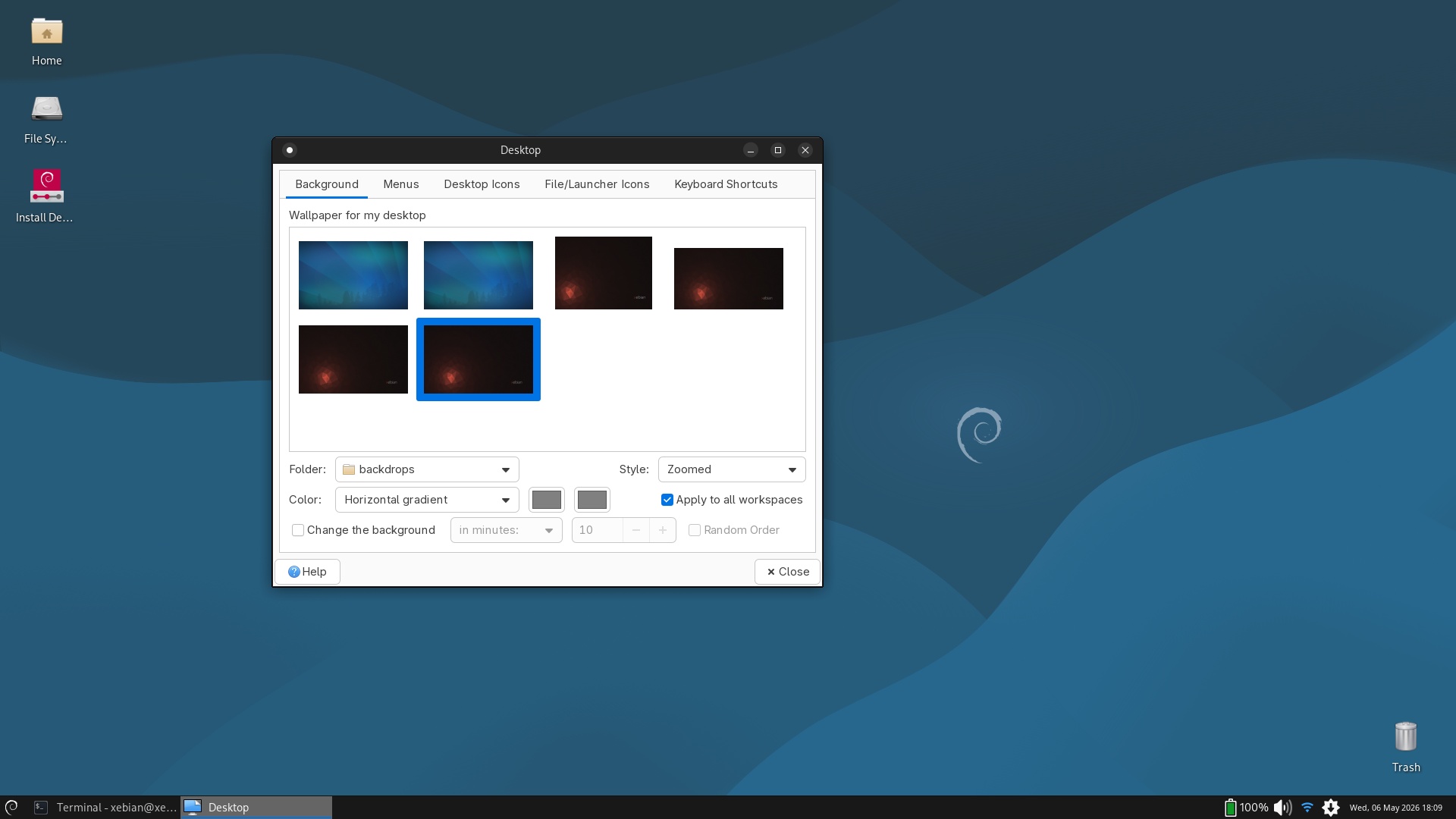
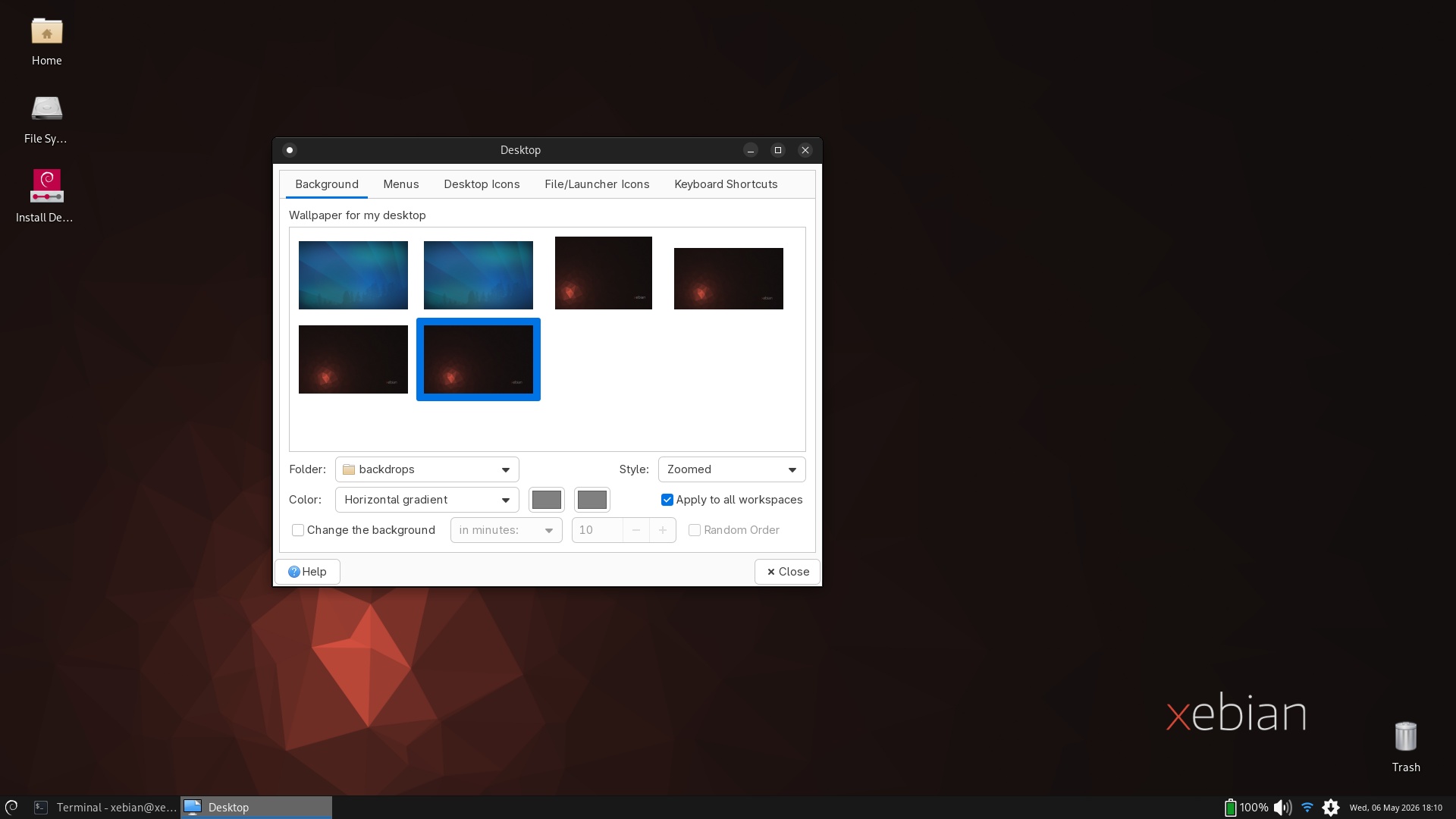
Yes, they are breaking XFCE, one step at a time. I can’t even think about how catastrophic XFCE on Wayland is going to be!
③ NVIDIA, what else?
Didn’t I say that NVIDIA and Linux are a no-go, unless you enjoy having trouble? It was in the context of GNOME/Wayland. Well, I just ran over another complaint on Reddit about Ubuntu 26.04 being completely unusable, given how much it crashes. The system was using a GeForce RTX 3080, which is probably high in the mid-tier. The instability went away after switching from the nouveau driver to the proprietary driver. So much for open source, eh?
Liam Proven himself commented in this Reddit thread! The relevant part:
I guessed it would be nVidia. Top tip: for a good experience with FOSS OSes, do not use nVidia.
Toldya.
④ Not only Mint is slow to release
I wasn’t aware of that, but Kubuntu Focus, which only tracks LTS releases, didn’t release an ISO for 26.04 LTS. That’s because it wasn’t supposed to.
Someone asked on Reddit about a Kubuntu Focus 26.04 ISO for Clean Install, and received this reply:
Kubuntu Focus developer here. We have an official release path, which follows that of Kubuntu. That is, we provide a new LTS image shortly after the .1 release drops, typically August of the same year. As u/acheronuk points out, this is a huge endeavor since we port all tools, test, document, and tune all prior models before releasing this new image. You can read more about the schedule at https://kfocus.org/try/#bkm_2604.
I understand that an upgrade from LTS-1 to LTS is normally enabled with the release of .1 by Canonical, but not providing an ISO for a clean install (not an upgrade!), not even a beta or an alpha, is against the spirit of open source. Well, Mint does the same. This year, though, they might release an alpha or several betas or whatever, because the wait is long until Christmas.
TUXEDO OS? Their TUXEDO-OS-202604211002.iso is still based on Kubuntu 24.04 (24.04.4).
So no, there’s currently no alternative to the official Kubuntu 26.04 LTS.
⑤ Lubuntu 26.04, not in the greatest shape
Given my experience with Lubuntu 25.10, I wanted to give Lubuntu 26.04 a try just to see whether it’s still decent or not.
As expected, PCManFM-Qt is the only file manager in which the view modes are not changed via CTRL+1, CTRL+2, or CTRL+3 (and possibly CTRL+4), but via CTRL+SHIFT+1, CTRL+ SHIFT+ 2, CTRL+ SHIFT+ 3, and CTRL+SHIFT+4. This is annoying, but LXQt has different keyboard shortcuts than the rest of the universe!
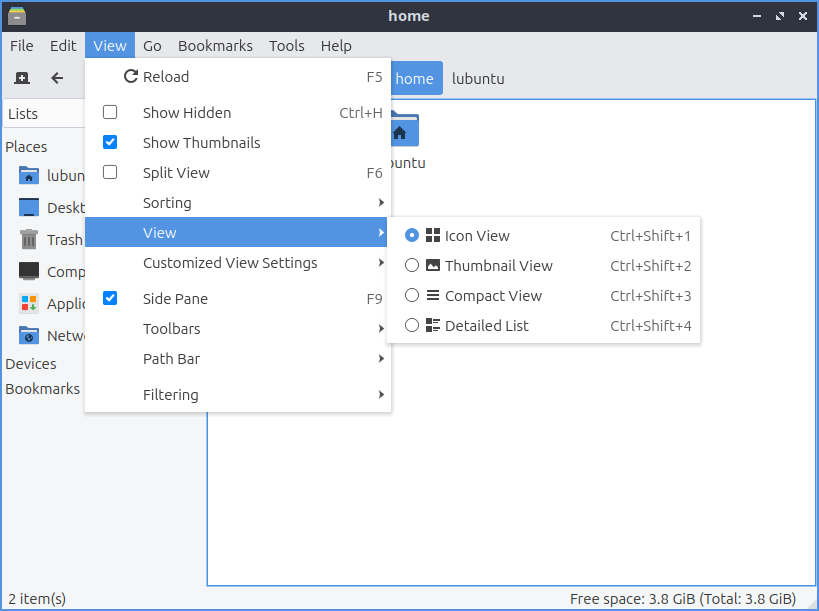
Nothing too severe. And, of course, just like in Lubuntu 25.10, should you enter a folder with a single item (file or folder) by using the keyboard, you can’t select it with Arrow-Up, but only with Space. The developer insisted that “this is standard Qt behavior” and that he “couldn’t care less if KDE broke what Qt defined.” So, once again, some things are different in LXQt than in any other desktop environment!
What really disappointed me was something else. In the Configuration Center, Software Sources doesn’t do anything!
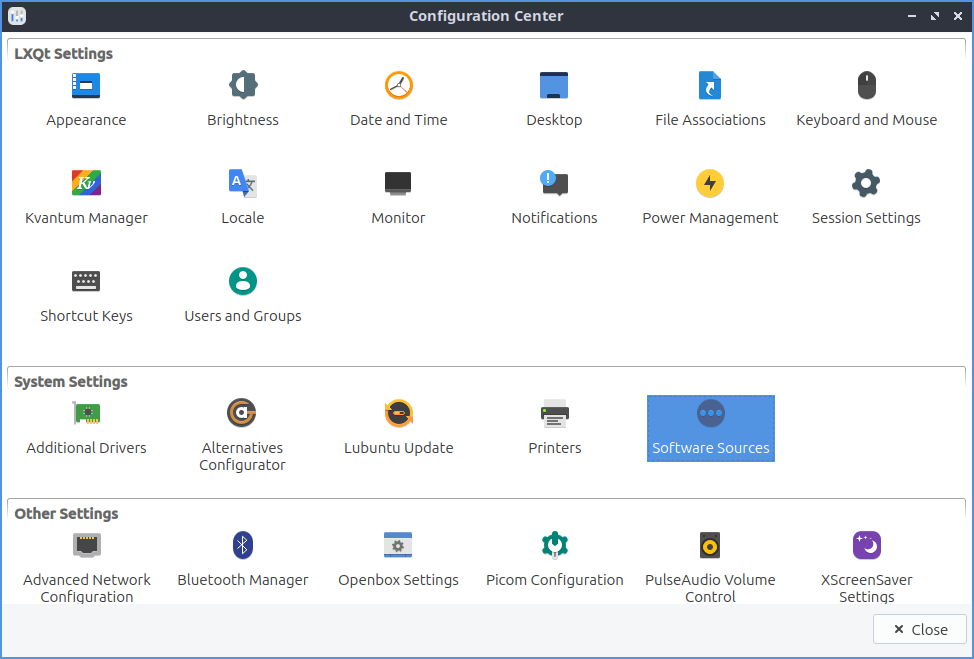
It should have fired software-properties-qt. Instead, it seems to want to launch… “-E”!
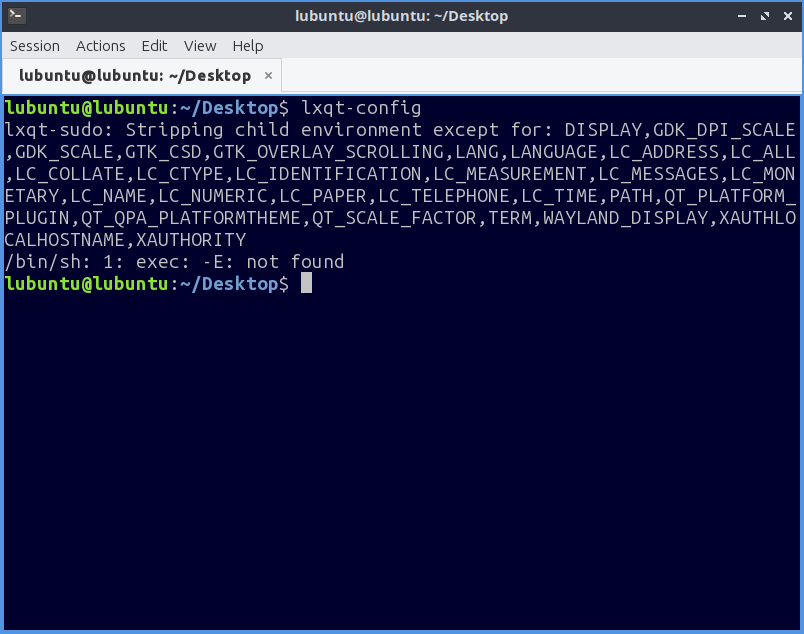
Of course, lxqt-sudo software-properties-qt works:
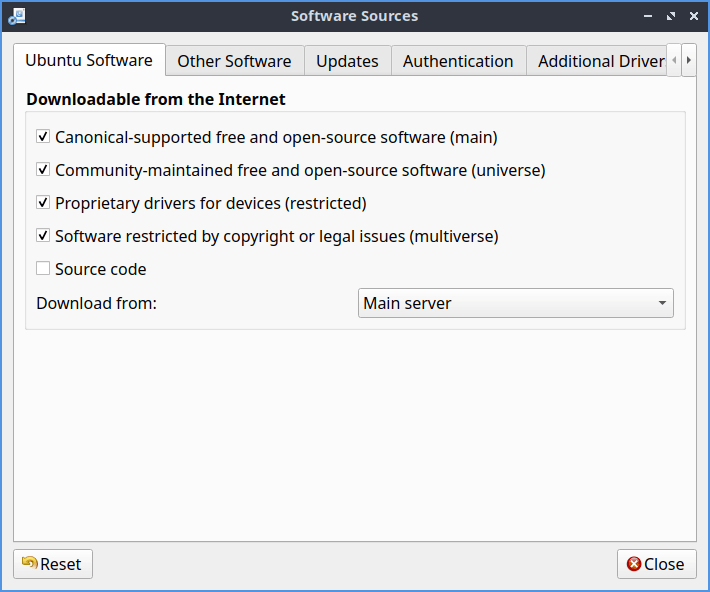
The theming is different (with a better contrast, duh) because the root’s theme is different; only the decoration provided by the window manager are observed.
Note that software-properties-qt does not include the Ubuntu Pro tab; only software-properties-gtk does.
When they didn’t test something as elementary as the functionality of the Configuration Center, why would anyone trust Lubuntu 26.04 as much as to install it?! One more broken software.
⑥ Visual coherence in GNOME
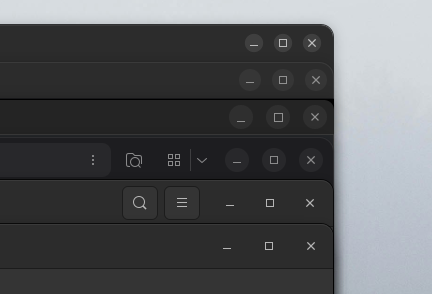
Someone complained on Reddit that Almost every single app I use has a different title bar button layout (under GNOME), and posted this screenshot:
Someone else added another screenshot meant, I guess, to show the opposite, namely, coherence:
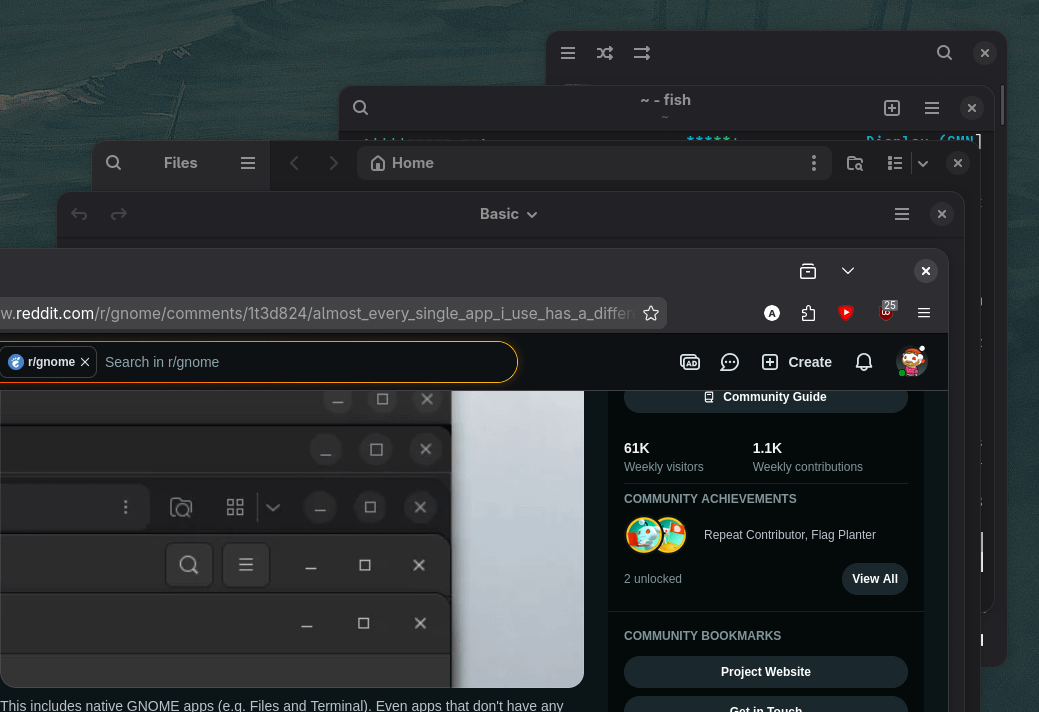
A third person wanted to prove even more coherence: “Latest are some QT apps like transmission, Krita and one Electron based – Proton. Probably problem is in Ubuntu, lol.”

Replies:
● 50 shades of gtk titlebar
● Looks better, but I still see 4 different colors (not counting the selected one at the bottom) and 3 different layouts in your screenshot.
● You can’t fix it. The only way to fix your issue is to stop using Ubuntu and switch to Fedora which is a better distro and better for open source anyways. Stop using Ubuntu and life gets easier. For example, I don’t have this issue at all on endeavourOS Gnome 50. Gnome go BRRRRRR ftw, uwu!!
● Issue exists on Fedora as well, unless you’re exclusively using $current-version GNOME apps.
You get different title/controls for KDE/QT software, electron, GTK4 (without libadwaita), GTK3, anything expecting SSD via X11, etc.
SSD is Server-Side Decoration, as opposed to CSD, Client-Side Decoration.
Now, the really funny “dialog”:
One:
At least the corner radius is consistent. Apple somehow managed to fuck that one up with macos 26.
Two:
Other way around, mate. Apple’s design guidelines are deliberately inconsistent when it comes to corner radius. It’s a frankly baffling decision but the corner radius of a window depends on the type of toolbar and amount of liquid glass being used.
https://developer.apple.com/videos/play/wwdc2025/310/ (skip to 7:20)
They won’t get fixed, because according to Apple nothing is broken.
Quite so:
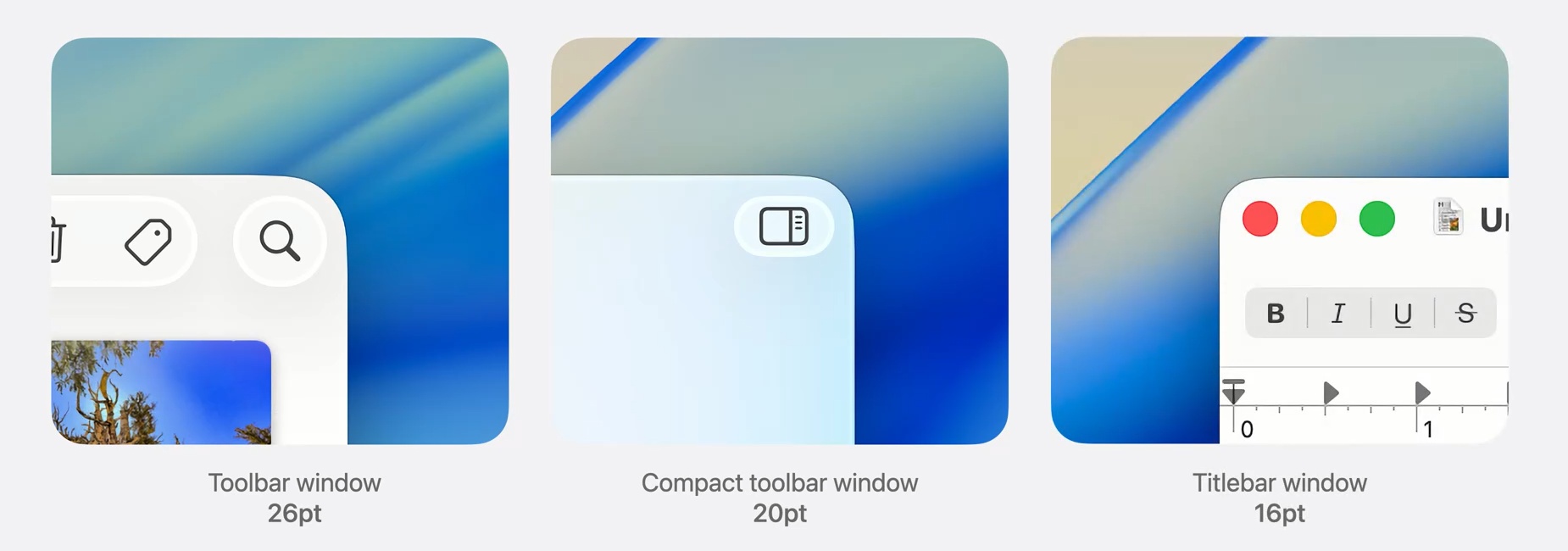
Apple rocks. Not. (Don’t let Dedoimedo realize it.)
⑦ Edge and Chrome are fucked—for different reasons, though
Microsoft first. Did you know that Microsoft Edge Stores Every Saved Password in Cleartext Memory at Startup? I didn’t.
But only a process belonging to Administrator can read the allocated RAM belonging to other users, right? So only Big Brother will know your OnlyFans password 😉
Yeah, but what’s actually needed is what’s called a “compromised Administrator account,” although it technically only needs a specific malware to run with Administrator privileges. And a rogue process “can happen.”
Nice work, Microsoft!
Google has a completely different issue. Some people complained that Chrome silently installs a 4 GB AI model (Gemini Nano) on their device! Alexander Hanff, aka That Privacy Guy (giving as references [1], [2], [3], [4]), then The Verge.
I didn’t even read those texts. Intellectual masturbation. Of course, these are valid points:
- Forced bundling across trust boundaries. …
- Invisible default, no opt-in. …
- More difficult to remove than install. …
- Pre-staging of capability the user has not requested. …
- Scope inflation through generic naming. …
- Registration into resources the user has not configured. …
- Documentation gap. …
- Automatic re-install on every run. …
- Retroactive survival of any future user consent. …
- Code-signed, shipped through the normal release channel. …
Actually, 4 and 5 are added to make the list longer. It’s pomposity. 10 is also just an information.
Invoking “Article 5(3) of Directive 2002/58/EC (the ePrivacy Directive)” is 100% legitimate. But when he started counting GWh, tonnes of CO₂e, and whatnot (“the climate cost of the silent push”), it was too much.
There seems to be crucial information missing, despite the 5300 words. OK, I’m here to provide it to you.
If you just go to chrome://flags and disable Enables Optimization Guide On Device and Prompt API, you’ll not know nor understand much.
I installed Chrome on Win11 specifically to test this shit. As expected, nothing was put into C:\Users\Ludditus\AppData\Local\Google\Chrome\User Data. I mean, OptGuide\OnDeviceModel was missing.
What happens is this. Enables Optimization Guide On Device has 5 possible values, with Default being… the default one:
- Default
- Enabled
- Enabled BypassPerfRequirement
- Enabled Force Small Model
- Disabled
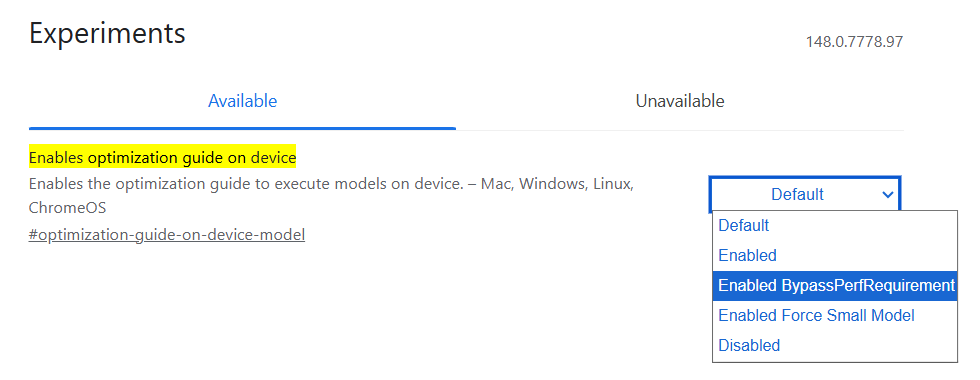
The mechanism goes as follows:
- On Default, Google can remotely toggle the feature “On” (Enabled) at any time via a server-side update. What triggers this push is not documented, but these are some prerequisites:
- You must be signed in with your Google account.
- Your system must have at least 4 GB of VRAM.
- Your system must have at least 16 GB of RAM.
- Your CPU must have at least 4 cores.
- There must be at least 22 GB of free disk space.
- You probably should use Google Search intensively and thus trigger AI Overview frequently.
- In my case, the Win11 test machine had 8 GB RAM and no discrete graphics (Intel video). So nothing would have been triggered, even if I signed in and enabled syncing. But there’s this Enabled BypassPerfRequirement thing, eh?
- On Enabled BypassPerfRequirement, the minimum system requirements are lowered, and Gemini Nano will be downloaded on systems with:
- Integrated graphics.
- At least 8 GB of RAM.
- At least 2 CPU cores.
Amazing. Like fuck.
This can be checked via chrome://components, where the two “Optimization” components can be downloaded or updated:
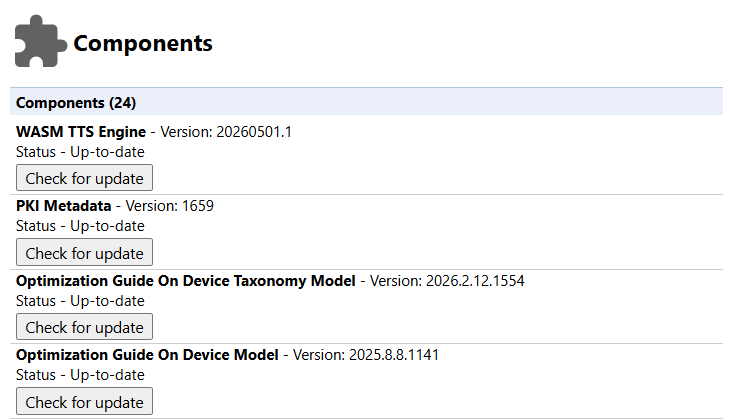
Sure enough, after some time, I got two weights.bin files:
- 120 MB in C:\Users\Ludditus\AppData\Local\Google\Chrome\User Data\OptGuideOnDeviceClassifierModel\2026.2.12.1554
- 4 GB in C:\Users\Ludditus\AppData\Local\Google\Chrome\User Data\OptGuideOnDeviceModel\2025.8.8.1141
On the other hand, if you set Enables Optimization Guide On Device to Disabled, I’m not sure that you also need to disable the Prompt API. Oh, and there are two of them:
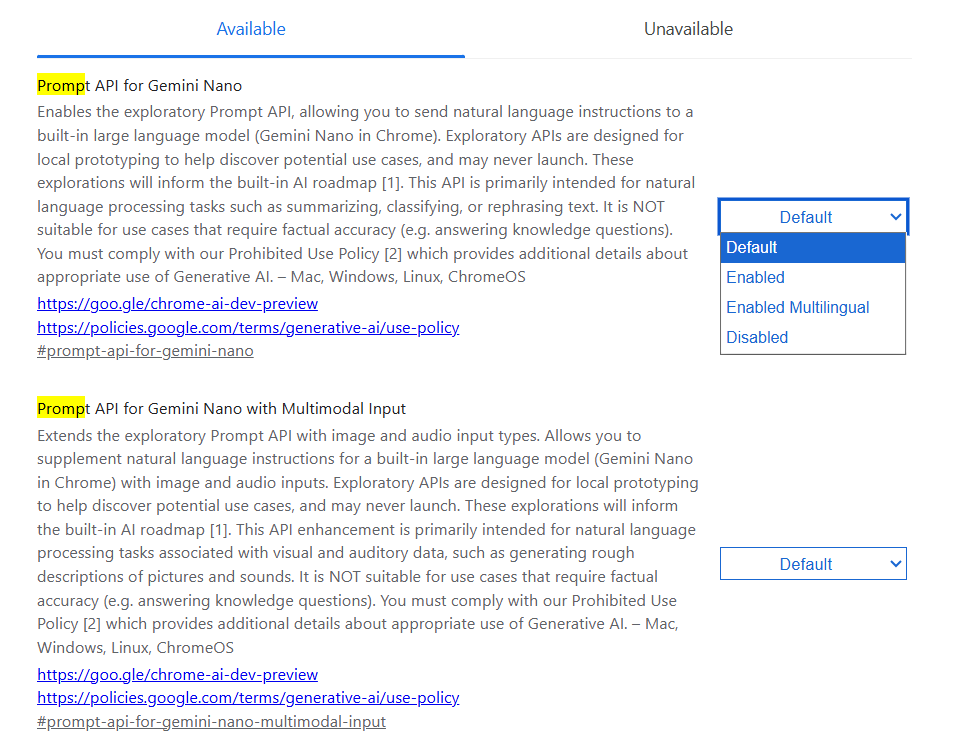
Google sucks big time. But people suck, too.
Bonus: Anthropic sucks, too!
Finally, That Privacy Guy previously complained that Anthropic secretly installs spyware when you install Claude Desktop. What happened is this:
- He had the Brave browser installed on his MacBook.
- He installed Claude Desktop.
- Claude Desktop added an extension integration to Brave (com.anthropic.claude_browser_extension.json).
- Hysteria ensued.
Excerpts:
On the second machine, four of the seven browsers into which Claude Desktop wrote the manifest, Edge, Arc, Vivaldi, and Opera, are not installed. Claude Desktop created the
NativeMessagingHostsparent directories for those four browsers on 19 January 2026 at 08:19:15, the same timestamp cluster as the initial manifests, and the browsers themselves are not present in/Applications. If I ever install any of those four browsers in future, the bridge is already in place, pre-authorised, from the moment of first launch.…
Anthropic’s own documentation states that Claude’s Chrome integration only supports Chrome and Edge, and does not support Brave, Arc, or other Chromium-based browsers. Claude Desktop’s log shows installs into Brave, Arc, Chromium, Vivaldi, and Opera. The documented position and the shipped behaviour diverge.
And:
The honest description of what is on my machine is this: pre-installed spyware capability, silently placed, dormant, waiting for activation. …
Anthropic will argue the binary is not currently doing anything harmful. That argument does not survive contact with the facts. …
That argument also doesn’t save them legally – the mere placing of the binary on the device and the creation of the folders to store it is a direct breach of Article 5(3) of Directive 2002/58/EC and a multitude of computer trespass and misuse laws.
Under Win11, I can confirm that Claude Desktop, when I had it installed, added the same com.anthropic.claude_browser_extension.json into ChromeNativeHost, but nothing more. Nothing specifically for Edge. And I’m not even sure what it was supposed to do.
⑧ On the positive side: Gemini and other LLMs
All hope is not lost. Santa Claus does exist! Here: Gemini technically saved my life:
I figured this story might be worth sharing. Happened last summer.
I have Crohn’s Disease. I was diagnosed in 2019 but it was always extremely mild and not debilitating in any way.
Last August, I started feeling a lot of pain in my butt area. Assumed maybe a hemorrhoid or something. Kept getting worse to the point that I could barely sit still. There were other symptoms too.
I don’t really have friends or family to talk to, so I explained the symptoms to ChatGPT, which kept telling me stuff like “health anxiety is scary, but that’s likely all it is. You’re just worried. It sounds like you’re okay”. Meanwhile, Gemini was like “GET TO THE HOSPITAL NOW. THIS SOUNDS LIKE AN ABSCESS WHICH NEEDS TO BE LOOKED AT, GIVEN YOUR DIAGNOSIS”.
I get to the hospital, and they confirmed an abscess. The doctor was lazy and said “I don’t want to cut into that area, so I’m going to send you home with antibiotics. If it gets worse, come back”.
It got worse.
I told ChatGPT and it said “you need to give the antibiotics time to work”. Gemini says “your abscess is about to burst, and based on the location, you could likely get sepsis which can be fatal.”
I go to a different hospital. They run tests and come back, explaining that I have a fistula (happens to people with Crohn’s) and the abscess is ready to burst. They need to rush me to a hospital that specializes in the type of emergency surgery I need, and that I need it like…NOW”. They rush me off, I get the surgery, and afterwards, the surgeon is like “If you waited any longer, this could’ve ended very badly. Any weird movement would’ve done it”.
I just got reminded of this story because a few days ago I finally got the tubes and stuff removed from me (literally 8-9 months later).
So, while I’m really on the fence about AI due to the slop that people are making with it, and you know, the fear of it taking over the world lol, I believe there are times it can be helpful; or at the very least much more helpful than ChatGPT 😂
Gross negligence from the doctors, and so on. But how about ChatGPT? And what about the legal requirement in the state of New York that chatbots never offer medical or legal advice? 😡
Gemini helped me, too!
Not in a crucial situation, though.
The other day, I needed to diagnose a washing machine that “died” completely for no apparent reason. I had the Control Unit in front of me and my smartphone with the following apps installed: Kimi, Gemini, Qwen, Copilot, and Claude.
I don’t use Kimi and Claude for complex issues, except maybe when I use Kimi to “extract the truth” from a web search.
Naturally, I thought I should use Gemini 3.1 Pro, because I had the right to 2 or 3 free answers.
I entered my question, it started to think, and… it stalled. It stayed like this forever.
Dafuq, I said. Let’s try Copilot instead.
As usual, Copilot answered with numbered lists, bulleted lists, emoticons, and too much confidence.
When I uploaded a picture of the PCB (the rear face, SMD-only), it claimed it could show me where exactly some non-existent components “certainly were.” I suggested they might be on the other side of the board, because there was no “big electrolytic capacitor.” It agreed. I asked if I should remove the dozens of connectors that blocked the PCB. “No, don’t remove anything! This is the mistake everyone makes!”
New picture with the other side of the PCB: “Of course all the connectors have to be removed, you idiot!” Copilot: “Oh, yes, indeed, your specific model requires that.” Retard.
Meanwhile, I returned to Gemini and decided to use Thinking, which means Flash with Thinking.
I started from the beginning. It named right away the suspect components (LNK304PN, R020, and an inductance, which was L003). It said that R020 is a flameproof fusible resistor that typically breaks when LNK304PN short circuits and that the best approach is to purchase a “LNK304PN Whirlpool Repair Kit” that includes everything that could be dead around LNK304PN (diodes, etc.). Above everything, it’s cheap.
Back to Copilot. It started to elaborate on all tensions that I could measure on the board. It was short-sighted: “At the top, near the microcontroller, you can see a blackened area.” Nope. It was a protective coating!
Exasperated, I asked it: “How about R020 și L003? They could be burnt out.” “Oh, yes, they certainly can!” Five scrolls below, after useless bulleted lists within numbered lists: “📌 Practical conclusion: Yes—R020 and L003 are exactly the components that, if they fail, will completely destroy the board. And yes—they are the first two you should test.”
For fuck’s sake, you retard! Why couldn’t you direct me to the most probable burnt components instead of telling me to measure tensions that didn’t exist with all connectors disconnected?
Sure enough, R020 was dead.
In brief:
- Copilot is a logorrheic moron who spits tons of text full of misinformation, misinterpretations of images, and underoptimal recommendations.
- Gemini is much more to the point, with no filling blabber and no hallucinating over photos!
On the other hand, I wanted to check my interpretation of the color code, because the colors were very questionable. But the resistor had a 5% tolerance, so it must have had a value in the E24 range. Quick, dirty question:
- Qwen started to think, and think, and think… just like Gemini Pro, it was stuck thinking.
- Claude answered on the spot!
The only chatbot I didn’t use was Kimi.
Later, on a laptop, Gemini Pro and Qwen were much faster to answer, but on those occasions they were unusable.
Copilot is just like ChatGPT (it uses GPT, alright): crapola.
Life is beautiful.
⑨ UPDATE: Miscellaneous
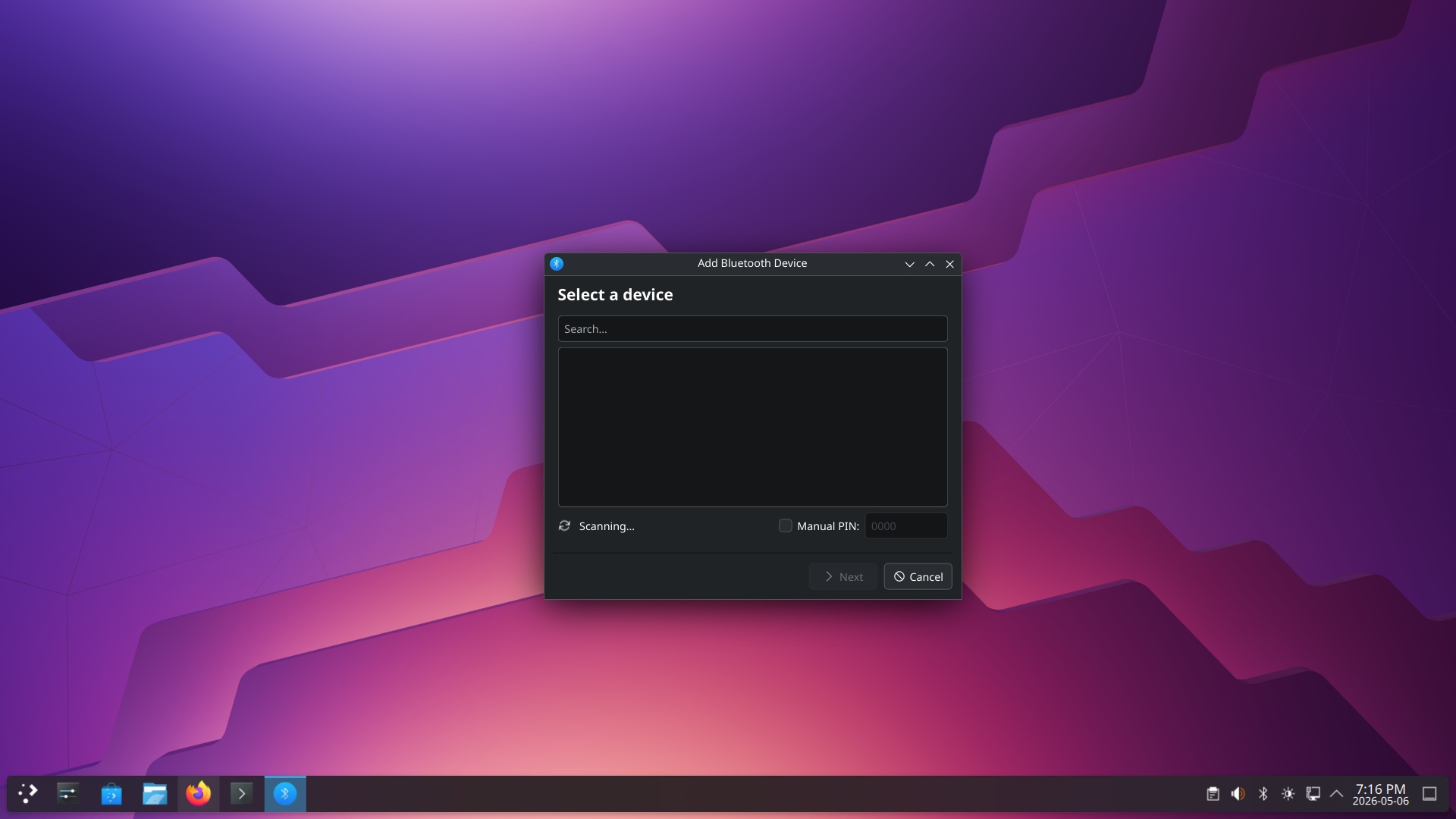
● Remember my predicaments with Bluetooth mice in Kubuntu 26.04? Someone had similar issues under Debian, and he got mental!
- [r/debian] KDE Plasma Issues with Bluetooth not scanning or connecting to devices.
- He filed KDE Bug 519870 – Bluetooth won’t connect to any devices won’t scan NEW install.
● More fun with AI:
- [r/softwaregore] Whatever you say Mr. Translator: automatic translation in a loop.
- [r/GeminiAI] Yeah uh what just happened
- [r/GeminiAI] Really? Seriously? Actually? 😭
- [r/GeminiAI] A fun idea: give Gemini a nonsensical prompt and see how it answers
● [r/Ubuntu] Ubuntu Twitter/X account hacked. This has been fixed meanwhile.
● [r/MacOS] I recently transferred from windows to macos, And couldn’t really wrap my head around file deletion.
Takeaways:
🍎 I think the other answers are not quite explaining why the app bundles work the way they do on macOS.
On macOS, an app bundle (basically a folder with an .app extension following certain layouts) contains all the metadata describing how the app should behave. This includes things like file extensions that it supports, what kind of services it has etc. When you drag the app into the /Applications folder it automatically “installs” it so to speak so that macOS will know how to open .xyz file if it detects that an app in /Applications support this file. Another way it will detect that is if you manually open an app outside of the /Applications folder. When you delete the app, macOS just knows and will stop using the app to open your .xyz files.
Since everything is self-contained within these app bundles, there is no need to set all these up in a separate registry like Windows , which is more fragile as you need dedicated uninstallers to clean them up.
Note that deleting an app will usually leave behind support files in ~/Libraries folders. These are usually safe to leave behind as they are misc cache files, user settings, etc. You can use apps like AppCleaner to clean them up if you want but it’s really not necessary usually. It’s like the user AppData folder in Windows which holds support files for an app.
🍎 A .app file for a program is actually secretly a folder that contains all of the files the app needs to run and just pretends to be an individual file. So when you delete it, it uninstalls the program. Occasionally there are programs that hook deeply into macos systems that come with uninstallers to remove them but these are exclusively programs that used .pkg packages to install so if you didn’t install it with a pkg you don’t need to worry.
If you want you can use a program like appcleaner or the uninstall tool built in to Raycast to completely remove all remnants of an app but this won’t have any effect on your computer. It’s akin to manually deleting Registry entries relating to a program after uninstalling it on Windows.
🍎 For 99% of cases just dragging the application.app to trash is enough.
The reason why it’s like that is that the ‘.app’ is actually a folder bundle – it’s the entire app with everything it needs to work in one place.
When you run an installer on Windows, what it does basically is to take parts of the app and move it into places where Windows expects them to be, which are scattered all over the OS, write into registry, etc… On Mac you don’t need to do it because MacOS simply expects everything to be in Application.app.
🍎 There are a few applications such as Adobe apps that will also include their own uninstalled applications. These are apps that dont completely follow Apple’s guidelines and install all over your drive. For these apps you want to use the uninstaller app. 99% of the apps you just drape to the trash to get rid of it.
Does this mean that Apple’s OS architecture is smarter and better, or is it just hiding folders that might include duplicate libraries, like those Windows apps that come with their duplicate set of various libraries? This “folder mimicking a file” sounds more like an AppImage to me, only extracted.
● I also noticed that Claude now prefers to default to Haiku 4.5 Extended instead of Sonnet 4.6 Adaptive, but this can be changed.
I mentioned Tuxedo OS before, so I don’t want to give the impression I am fully advocating for it, but my kids’ computers (ThinkPads) have been running it for 2 years and never had a single problem.
Then I came to your “Their TUXEDO-OS-202604211002.iso is still based on Kubuntu 24.04”, and not much surprise there. But a question: if Tuxedo regularly updates the Kernel (6.17 now “Optimized for TUXEDO-Hardware” so maybe we should put a flag for that) and regularly updates KDE (6.5.2) is it that much difference that well tested 24.04 vs the shiny 26.04? Genuinely asking?
I think of Tuxedo-Kubuntu as the relationship of MX Linux-Debian.
I still stuck with Tumbleweed (occasionally does not let me log in), so I’m looking into migrating to MX/Debian/Tuxedo/Kubuntu.
6.17 is the default (HWE) kernel in Ubuntu 24.04.4. TUXEDO might have added drivers for their hardware, but other than that, it follows Ubuntu.
You could as well use Mint 😀
As for a newer KDE, I wasn’t aware about it. The problem is that EVERYTHING in *buntu 24.04 is OLD. A newer Plasma won’t fix that. Very few apps have been backported (
noble-backports) because older system libraries prevented that. Flatpaks can help, though.But KDE being a fast-moving thing, a newer version is always better! Most of the time, at least.
Oh, did not know of 6.17 coming with Ubuntu 24.04… at least, with those added drivers I hope they are adding security patches quickly too. But I see your point… +1 for Kubuntu.
Mint? I simply can’t stand Cinnamon… there is no way I can reverse that feeling. However, installed it on my wife’s convertible laptop 3 years ago, and never a single problem (she just browsers though).
Mint with MATE or Xfce never tried, but have a hard time allowing me to invest time on learning environments that likely won’t be here in 7 years. Gosh… I am even looking what desktop environments are popular in Asia (besides deepin (DDE), no discernible ones yet) to see if one day they will come up in distrowatch’s rankings.
I too hoped that China would come up with something, but they didn’t. Deepin tries too much to look like macOS. I hate translucency and shit. And Deepin File Manager (
dde-file-manager) is mimicking the dumbed-down Nautilus, meaning it only has 2 views and no compact list view.I added a couple of small updates.