
Who isn’t on the Big Bad Web?
I’m not a huge fan of Kagi’s products and services. Their web search is not free. Kagi Translate seems to be temporarily free, and it usually performs great translations, except when it hallucinates or when using the app, you give it an image, and instead of returning a verbatim translation, Kagi Translate makes a whole story in reinterpreting and explaining the text, as if you were using Kagi Summarize. There is an explanation for that: Kagi Translate uses a combination of LLMs under the hood.
As a matter of fact, the Ultimate plan offers you, beyond unlimited search, Kagi Assistant with Research mode and access to GLM-5.1, GLM-5.1 (reasoning), Claude 4.5 Haiku, Claude 4.6 Sonnet, Claude 4.7 Opus, Claude 4.6 Sonnet (reasoning), Claude 4.7 Opus (reasoning), Claude 4.5 Haiku (reasoning), GPT 5.5, GPT 5.4 Mini, ChatGPT, DeepSeek V4 Pro, Gemini 2.5 Pro, Gemini 3.1 Pro (Preview), Mistral Medium 3.5. Oh, and Kagi News is free, but even in the app and with customized topics, it offers too little.
But the surprising offer from Kagi is the so-called Kagi Small Web: a curated selection of about 36,000 websites with human-made contents. Introduced in September 2023, it flew, until recently, under my radar. From their announcement made 32 months ago:
To begin with, while there is no single definition, “small web” typically refers to the non-commercial part of the web, crafted by individuals to express themselves or share knowledge without seeking any financial gain. This concept often evokes nostalgia for the early, less commercialized days of the web, before the ad-supported business model took over the internet (and we started fighting back!)
For a deeper understanding, Ben Hoyt’s “The Small Web is Beautiful” serves as an excellent primer. Additionally, our GitHub repository links to several more articles on this topic.
Kagi Small Web offers a fresh approach by promoting recently published content from the “small web.” We gather new content, published within the last week, from a handpicked list of blogs and surface it in multiple ways:
- Directly within Kagi search results for applicable queries (existing Kagi members do not need to do anything, this will be automatic)
- Via the new Kagi Small Web website
- Through the Kagi Small Web RSS feed
- Via our Search API, where results are now part of the news enrichment API
Initially inspired by a vibrant discussion on Hacker News, we began our experiment in late July, highlighting blog posts from HN users within our search results. The positive feedback propelled the initiative forward. Today, our evolving concept boasts a curated list of nearly 6,000 genuine websites featuring people with a wide variety of interests.
Today, Kagi Small Web is using a list of 35,705 websites (the first line of the file is empty), and there is a surprise inside:
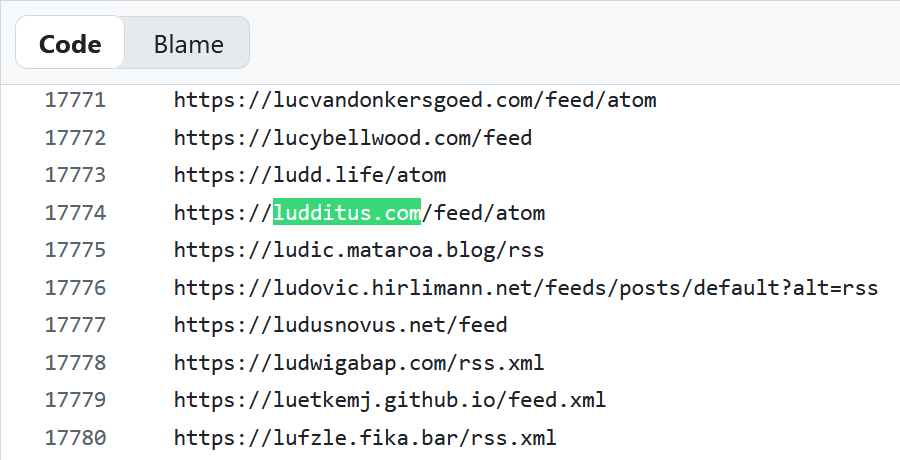
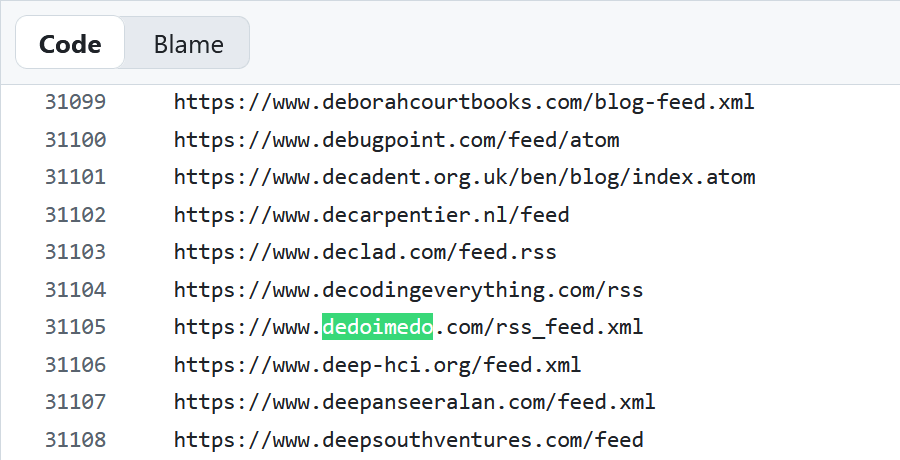
Actually, two surprises, because since the last time I visited that file, a gap has been filled:
The only problem is that in the case of my blog, the RSS feed for comments is sometimes more important than the feed for posts.
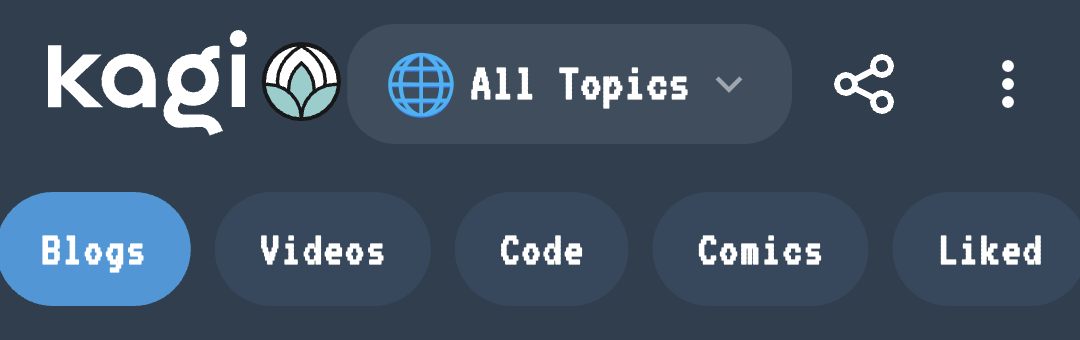
Kagi Small Web gives me a strange feeling. Each time you open it, it shows a random website from that list, and you can always tap on next, next, next… The design of the mobile app is better, with prominent Blogs, Videos, Code, Comics and Liked sections (I only use Blogs), and a filter by topics:
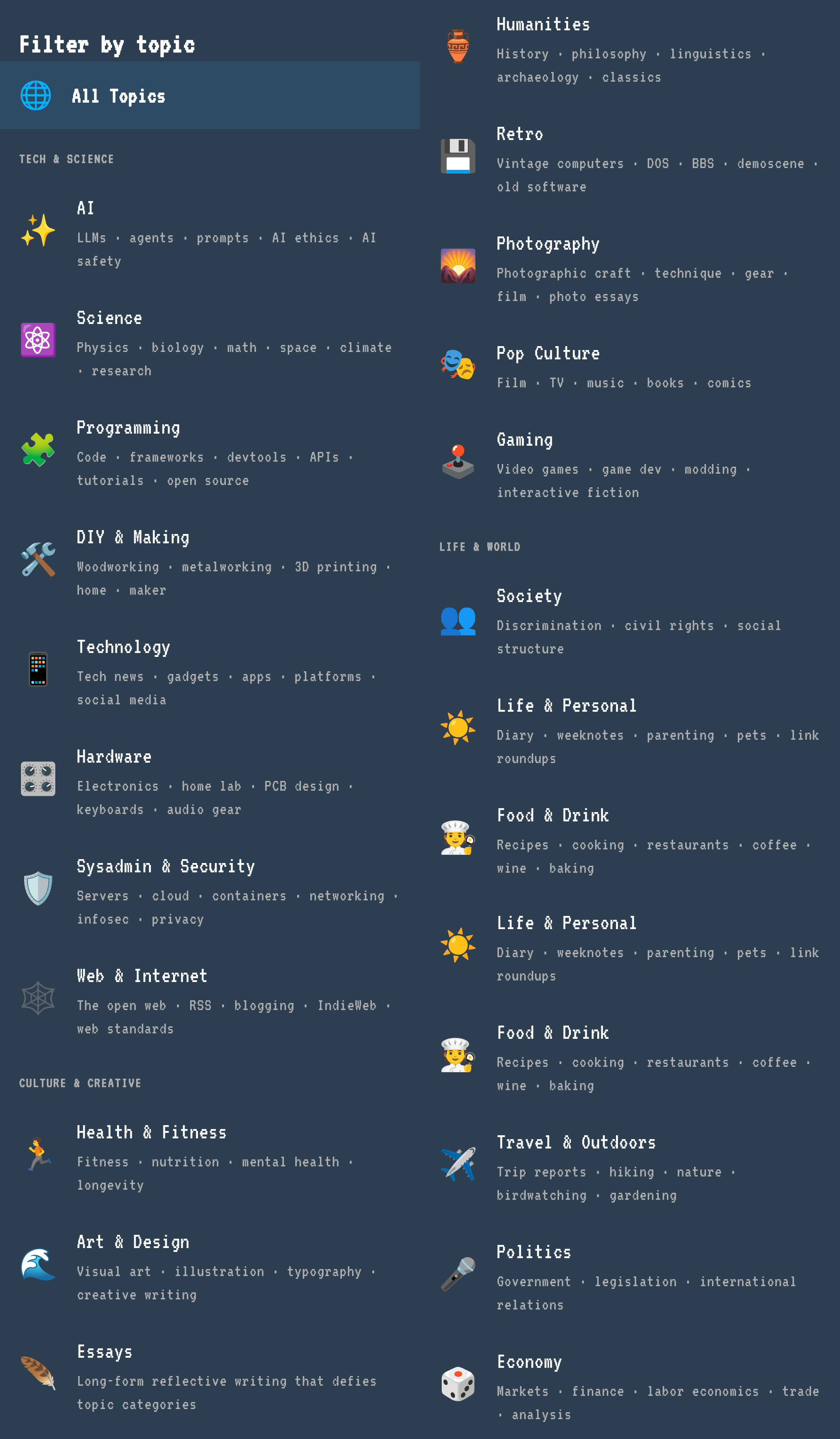
I have no idea which category my blog belongs to!
Now, I got a weird feeling when opening Kagi Small Web. These are not the times of Geocities and AltaVista, when any new site was welcomed. We’re submerged in digital content to the point we crave a digital detox. Sure, in a web full of digital slop, of clickbait, and of the worst possible crap, some genuine blogs can be a breath of fresh air, but I still feel odd. I liken it to using TikTok in the sense that the user is browsing through random content in the hope of finding something worthwhile. At the same time, some of the suggested blogs are grotesquely old-school. Their authors didn’t find out that today, people have Instagram, TikTok, and YouTube channels where they behave like TV stations, with daily streams or videos, as if an entire planet would be interested in their futile and usually idiotic utterances!
That said, how about a quick and dirty random selection of random posts from randomly served sites by Kagi Small Web?
- 🤖 GPT Image 2 Changed My Mind on AI Visuals: I had quietly written ChatGPT off for image generation. Then GPT Image 2 showed me a technical diagram of a washing machine, and I had to revise that judgment.
- 🌐 From random to recommended: exploring the indie web: About Kagi Small Web, Blogosphere, and Bubbles. The last one is nice, and it even has a section in German. OMG, are we creating parallel DMOZes? From Bubbles:
- 🤔 Scams That We Just Accept: Insurance, College, Cars, Warranties, Free Shipping, Online subscriptions.
- 🖥️ Just Fucking Use Go: Hey, dipshit. You know what compiles in two seconds, deploys as a single binary, and doesn’t shit itself when a transitive dependency gets yanked from npm at 3am? Go. … But no. You’re out there gluing together fifteen Node packages, three TypeScript build tools, and a Kubernetes cluster to serve a fucking form. You hired a Platform Team to babysit your Rails monolith. You convinced your CTO that Rust was necessary for a CRUD app that does maybe forty requests a second. … Stop looking for a framework, you absolute walnut. The standard library is the framework. … Rails needs a deploy ritual involving Capistrano, three config files, and a goat. Django wants you to learn its ORM, its admin, its middleware system, and its opinions about everything. Express is held together with npm audit warnings and prayers. Next.js changes its routing conventions every six months and gaslights you about it.
- 🤔 the dumbphone idea is nothing but an idea. Also, my wife and her dumbphone.
- ℹ️ This is why I’m fat.
- ℹ️ ereaders and syncing: About the cheap Xteink X4.
- ℹ️ Why You Take Notes But Never Get Smarter. Oh, no, Zettelkasten!
- 🖥️ CLI for Your Notes in The Archive – Automated Zettelkasten (Usage) for Programmers. FFS!
- 🤖 How a missing quote mark may have caused my Mac to act up: What saved me was Le Chat from Mistral. It showed me how to find the offending file and how to fix it.
- 🤔 Yanis Varoufakis: Palantir and the New Order: Neoliberalism is dead. Say hello to Techlordism: A copy of the article published in The Point (Australia) on April 21, 2026
- 🤖 Building (and Evaluating) a Codebase Onboarding Skill for Claude Code: It’s a Claude Code skill that scans the current working directory, builds a structured summary of the codebase, and caches it so future conversations can skip the discovery phase entirely.
- 🖥️ Quickshell: Build Your Own Desktop on Linux: Quickshell is a modern toolkit built with C++ for creating desktop interface components — bars, widgets, lock screens, launchers, and even complete environments — using QtQuick + QML. It is a foundation for building a custom desktop, running alongside a compositor like Hyprland, Sway, or i3.
- 🤖 Friday link potpourri: Including links to posts by Ed Zitron (on AI), Richard Dawkins (also on AI), Lada Nuzhna (on biotech in China), and Charlie Chaplin’s final speech from The Great Dictator, with transcript.
- 🌐 Thursday links, Nautilus science edition: Among other links, What Your Dream Life Says About You, and How Does Your Brain Know a Cat Is a Cat?
- 🤖 These are your father’s dotfiles: About Claude Code insisting on running stuff like
find . -name "*.py" | xargs grep "function_name"across a fifty-thousand-line codebase, burning tokens like mad, waiting, waiting — whenctagscould have answered in milliseconds. - 🖥️ AltTab: On MacOS, the cmd tab keyboard shortcut only switches between apps, not the individual windows. I use apps like Firefox, where I have multiple windows open and so the MacOS solution does not work for me. Furthermore, I want to see the thumbnails of the windows, not just the app icons. AltTab is a fantastic open-source tool that solves both of these problems on MacOS for me.
- 🤖 A gem of a Gem: I’ve been using Gemini Pro for almost a year now. I pay Google £14 a month and get a single seat on Business Workspace, 2TB of storage and Gemini Pro. Plus some other stuff probably that I don’t use. … But, for now, I want to highlight a very useful Gem I created. Gems are a way to have custom chat with knowledge preloaded about a particular topic. The knowledge can be set as a combination of text instructions, uploaded files, imported code bases and NotebookLM contents.
Life is too short to explore even the Small Web!
A quick note about the link 2E, which is a blog post about syncing the tiny e-reader Xteink X4. It has an even smaller sibling, X3.
I’ve read some reviews and watched almost a dozen of YT videos. I’ll use my favorite qualifier to say that most of them are retarded. The Verge (no link) used this as a lede: “With buttons instead of a touchscreen, the Xteink X4 can be a challenge to use, but a growing community is fixing that.” They failed to understand that this device was specifically created with physical buttons for a reason!
One review revealed that the embedded app supports custom fonts, but no reviewer bothered to upload some fonts and show us how they look. There’s an alternate firmware, CrossPoint Reader, because no other app can be used. Nobody bothered to throw some fonts at it, either.
The original reading app seems to have severe limitations: italic fonts are shown as normal (the embedded font might lack an italic variant, but as long as literally no fucking moron bothered to add some fonts, we can’t know if it’s a general bug); it cannot understand some complex formatting (this is why I’m using 3 ePub-reading Android apps: because some books are rendered differently by different apps); and I’m not sure that it can display images at all.
A stupid feature by design is the magnetic back, because, apparently, you’re supposed to stick it to the back of your phone. Indeed, many reviewers did just that!
I feel that people are grotesquely stupid.
I actually pay for Kagi Professional. Their translation sevice is very good once you tweak it from the settings. It is also surprisingly apt at proofreading, even in Romanian. My only gripe is the fact that the company is US Based. At least the founder is from Europe, I think.
Nope. Their translation is sometimes brilliant, but some other times completely fucked-up. Some LLMs are better at that.
I still believe that all Kagi’s products are nice and interesting, but overvalued.
I haven’t really had any problems with the translation tool; it generally works well. If needed, if you want or if it’s necessary, you can choose “Best” rather than “Standard.” The translation will just take a few seconds longer.
Now, maybe it’s a bit less accurate with certain languages…
“Best” is a paid feature.
Hum, really ? 🤔
It’s curious because in the browser (translate.kagi.com) I have:
Basic
Fast and everyday translations: ideal for understanding the essentials quickly.
Standard
Accurate translations with natural phrasing, delivered quickly.
Best
Professional-level accuracy with nuanced results, ready to be published
Standard being selected by default and there are also other possible settings.
But in the mobile app and the translation extension there is no Basic, only Standard and Best.
In the Android app there’s no way to select any of these levels. It’s just:
– Type: Natural, Literal.
– Formality: Standard, Formal, Informal.
Then gender preferences and speaker’s gender.
In the browser, I remember that Standard and Best had a crown on them, and they were not selectable. I cannot check right now because, although I am connected (as a free user, though), all I get is this:
They refuse to offer any level of service, even Basic.
Yes, I was also referring to the fully featured Kagi translation, which I guess is included in the professional tier I already pay for, for their search service. I had an epiphany when trying to translate French song lyrics such as these: Détroit – Ange de désolation, into English. If you tweak the options gradually you can achieve poetic levels of translation. Which is frankly quite scary.
These are the options I have in the browser: postimg.cc/XpkNHyN5
Kagi is not a translation tool. A translation tool always preserves the original style and register. The only adjustment should refer to the use of the polite version of “you” in some languages. Otherwise:
– A “literal” translation is not a translation. It’s like using a dictionary. The “natural” style is the only option that should have been there.
– The formality, once we decide if “you” is “tu/Du” or “vous/Sie” should match that of the original text. Otherwise, this is not a translation but a rewriting. You cannot translate an official document into street slang (or “le parler wesh”), unless you’re completely retarded.
– Similarly, the only vocabulary and grammar level should be C2, because the resulting translation should match the original style! Nobody wants a Trump-style output, unless they’re translating Trump!
With so many stupid options in Kagi Translate, why would I pay for a translation service that does not offer translations but rephrasings followed by a translation? I can use a chatbot for that!
Yes, I believe you are right. I use it more as an assistant I guess. Those tweaking options are a matter of preference, a sort of A/B testing, if you will. I play around with them until I obtain the desired result. But yes, this is does imply I already know what I want to obtain and it does presuppose the fact that my level of English is already above C1. Also, with the same caveats, the proofreading part, even in Romanian, is more than adequate for my use cases. I admit I am lazy and I prefer paying ten dollars a month, rather than testing chatbots with varying results. Sometimes simplicity trumps absolute precision, I guess.
Personally, I have the Starter Plan for a short while (before it was simply Free). I’ve always left it on “Natural” and even just “Standard” most of the time. I also set it to C2, but even without touching it the translation isn’t bad (it can depend on the type of text to be translated).
In the translation box, I often stay with “Standard”, but occasionally I switch to “Best” which generally makes a difference, more or less significant depending on the text.
Everything is OK here and the tool translates well. 🙂