
Is Debian the Answer?
What I meant is this: Is Debian the Answer to the Ultimate Question of Life, the Universe, and Everything? The context is that of a new Linux local privilege escalation vulnerability: Dirty Frag. 💣💥
The Dirty Frag shit
NOT AGAIN! After Copy Fail, now Dirty Frag!
① Phoronix, May 7: Dirty Frag Vulnerability Made Public Early: Root Privilege On All Distributions:
This time around there are no patches or CVEs yet for this “Dirty Frag” vulnerability as the embargo was broken early and thus the security researcher went ahead and published earlier than anticipated.
…
More details on Dirty Frag via the oss-security posting. This GitHub repository has more details on Dirty Frag.
…
Alma Linux is among the first Linux distributions out with early patches for testing.
② afflicted.sh: copy fail 2: electric boogaloo. Some technical explanations.
③ Bleeping Computer, May 8: New Linux ‘Dirty Frag’ zero-day gives root on all major distros:
“Dirty Frag is a case that extends the bug class to which Dirty Pipe and Copy Fail belong. Because it is a deterministic logic bug that does not depend on a timing window, no race condition is required, the kernel does not panic when the exploit fails, and the success rate is very high.”
This kernel privilege escalation affects a wide range of Linux distros, including Ubuntu, Red Hat Enterprise Linux, CentOS Stream, AlmaLinux, openSUSE Tumbleweed, and Fedora, which have not yet received patches.
Update May 08, 09:58 EDT: The two page-cache write vulnerabilities chained by Dirty Frag are now tracked under the following CVE IDs: the xfrm-ESP one was assigned CVE-2026-43284, and the RxRPC is now CVE-2026-43500.
④ 9to5Linux: Dirty Frag Linux Kernel Flaw Allows Local Privilege Escalation, Patch Now:
Until a patched kernel is available, you can mitigate Dirty Frag by blocking the affected kernel modules with a /etc/modprobe.d/dirty-frag.conf file containing:
echo "install esp4 /bin/false" | sudo tee /etc/modprobe.d/dirty-frag.confecho "install esp6 /bin/false" | sudo tee -a /etc/modprobe.d/dirty-frag.confecho "install rxrpc /bin/false" | sudo tee -a /etc/modprobe.d/dirty-frag.confRegenerate the initramfs images with the
sudo update-initramfs -u -k allcommand to prevent the modules from being loaded during early boot. In the case that the modules are already loaded, unload them with thesudo rmmod esp4 esp6 rxrpc 2>/dev/nullcommand.
Nah, I guess I’m going back to using Windows for Workgroups 3.11.
⑤ Linuxiac: After Copy Fail, Linux Now Faces Dirty Frag Privilege Flaw:
Patch availability varies by distribution. AlmaLinux has released patched kernels for versions 8, 9, and 10 in its testing repository, with production promotion pending. Debian’s tracker lists CVE-2026-43284 as fixed only in Debian sid with Linux kernel 7.0.4-1. As of now, Bullseye, Bookworm, Trixie, and Forky remain vulnerable.
Ubuntu has issued mitigation guidance and lists Ubuntu 14.04 LTS, 16.04 LTS, 18.04 LTS, 20.04 LTS, 22.04 LTS, 24.04 LTS, 25.10, and 26.04 LTS as affected. Canonical’s CVE tracker indicates several Ubuntu kernel packages still require evaluation. The fix will be distributed through Linux kernel image packages when available.
Red Hat confirms that Red Hat Enterprise Linux 8, 9, and 10, as well as OpenShift 4, are affected. The company is expediting fixes and will provide product-specific guidance. The issue remains ongoing in its advisory. openSUSE and SUSE are also tracking Dirty Frag with the then-current Leap 16.0 and Tumbleweed kernels affected.
The recommended fix is to apply a patched kernel and reboot. Temporary mitigation from vendors involves disabling vulnerable modules when not required, including blacklisting
esp4,esp6, andrxrpc. Some guidance also recommends blacklisting related IPsec compression modules such asipcomp4andipcomp6.However, this workaround is not suitable for all systems. Disabling these modules may disrupt machines using IPsec VPNs, strongSwan, Libreswan, AFS, RxRPC, or related networking features. Canonical warns that the mitigation affects IPsec ESP and RxRPC functionality, and that disabling only one component leaves the other exploitable.
⑥ The same Linuxiac: Linux Kernel Killswitch Proposed After Recent Vulnerability Disclosures:
Last week, two critical Linux kernel vulnerabilities were disclosed, prompting significant concern within the community. In response, developers are now reviewing a proposal for an emergency “killswitch” mechanism to reduce exposure following public disclosure of serious vulnerabilities.
Sasha Levin, an NVIDIA engineer and Linux stable kernel co-maintainer, submitted the patch. It allows system administrators to temporarily disable a vulnerable kernel function while awaiting a security update.
The concept is simple: if a dangerous code path is identified, the kernel can be instructed to stop using that function. Instead of executing normally, the function would return an error. While this does not resolve the underlying bug, it can block access to the vulnerable path until a patched kernel is available.
⑦ Funny thing, I couldn’t connect to Canonical’s page about the issue while being connected to ProtonVPN. I had to use my real IP to be able to read this: Dirty Frag Linux kernel local privilege escalation vulnerability mitigations.
Nope, I will do exactly nothing. When a new kernel is available, I’ll update to it.
⑧ OTOH, to see how broken Linux is as a project and as a product, read this on Phoronix: Linux Erroneously Thinks Intel Bartlett Lake CPUs Run At 7GHz.
I’m going under a rock.
⑨ UPDATE: Foss Force: A Simple One-Click Mitigation for ‘Copy Fail’ and ‘Dirty Frag’ for Debian, Ubuntu, Mint, and Other Debian‑Based Distros.
The article tells in detail about the mitigations wrapped into a single .deb file by Daniel Baumann, a long-time Debian developer, but it only links to people.debian.org/~daniel/linux-vulnerability-mitigation, without mentioning the original announcement, which is here.
It gives, however, relatively detailed information about this mitigation via screenshots.
Important notes:
- CVE-2026-31431 only covers Copy Fail, which should already be patched in your Debian kernel: bullseye (security) in 5.10.251-4 and 6.1.170-3~deb11u1, bookworm (security) in 6.1.170-3, trixie (security) in 6.12.86-1, forky/testing in 6.19.14-1, sid in 7.0.4-1. But most Ubuntu versions are still vulnerable to Copy Fail: 25.10 questing, 24.04 LTS noble, 22.04 LTS jammy, 20.04 LTS focal, 18.04 LTS bionic.
- If you need to use a VPN, do not install the mitigations for CVE-2026-43284 and CVE-2026-43500!
Meanwhile…
🎉 Meanwhile, Debian has patched and fixed CVE-2026-43284 and CVE-2026-43500 as follows:
- 11 bullseye (security): in 5.10.251-4
- 13 trixie (security): in 6.12.86-1
- sid: in 7.0.4-1
Debian 12 bookworm is still vulnerable as of Saturday, May 9, 2026, at 1:00 UTC.
UPDATE: Debian 12 received a fixed kernel: bookworm (security): in 6.1.170-3
At the same timestamp, Ubuntu’s CVE-2026-43284 reads, for all supported LTS versions:
Status: Needs evaluation
ARE YOU FUCKING KIDDING ME, CANONICAL?
I’m taking back my recommendation from January 2025 to use Ubuntu LTS, any flavor of it, because of its swiftness in fixing security vulnerabilities. They have changed for the worse.
Maybe Debian is the Answer to the Ultimate Question of Life, the Universe, and Everything.
KDE woes in Kubuntu 26.04 LTS
I didn’t pay much attention to Dedoimedo when he reported this behavior:
I couldn’t log out of the X11 session and then into Wayland. I mean, you could, but then, you get no panel. Everything else works, but no panel. The only way to get a fully functional Wayland session is if you set SDDM to boot into it. Going from Wayland to X11 works just fine.
I also ignored reports on Reddit that Translucency and Wobbly Windows get enabled after an update.
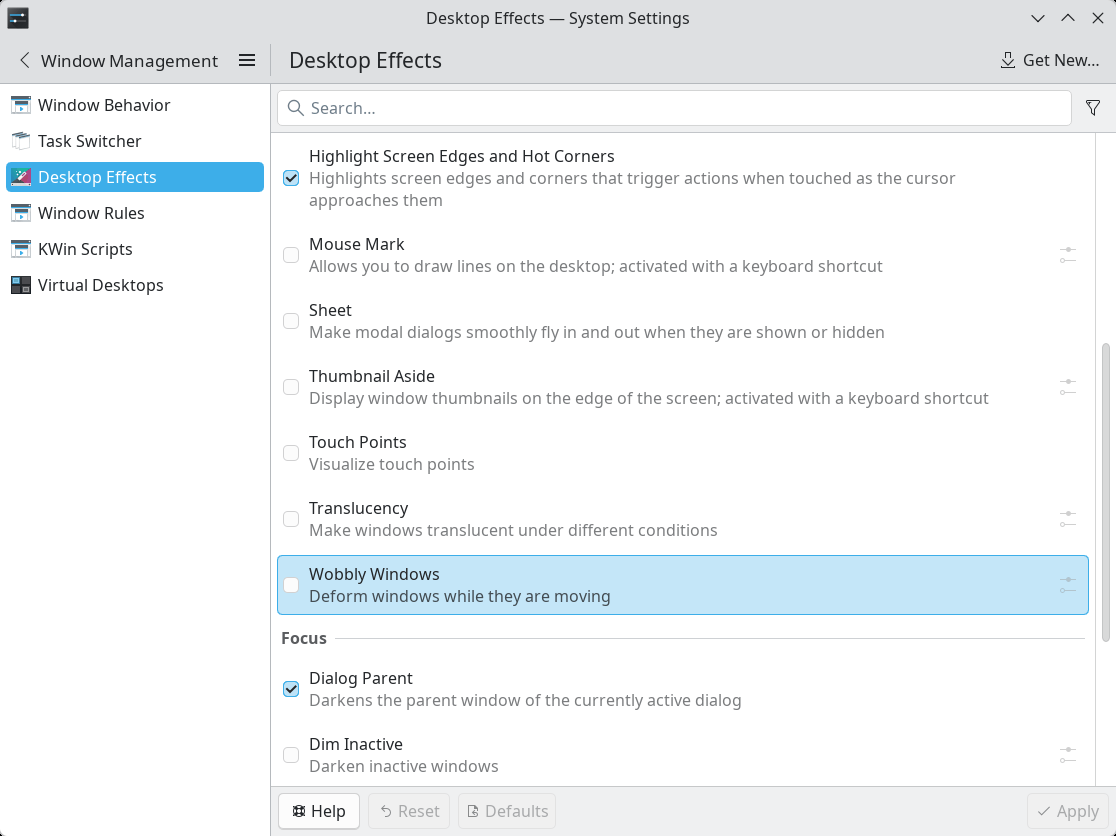
Well, given that I also installed plasma-session-x11 and wanted to use both Wayland and X11, alternatively, I was struck by the following retarded idiocy. Step by step:
Plasma (X11)
- I discover that Translucency and Wobbly Windows are enabled.
- I disable them.
- I log out, or I reboot (the result is identical), in order to select again Plasma (X11).
Plasma (X11) — after Plasma (X11)
- Translucency and Wobbly Windows are enabled, but they are ignored by the system!
- They take effect only after I disable and enable them again.
- I disable them.
- If I log out or reboot, the next Plasma (X11) will lead to the same result: the two settings get automatically enabled in System Settings, Window Management, Desktop Effects, but they are disregarded.
- I log out to select Plasma (Wayland).
Plasma (Wayland) — after Plasma (X11) without reboot
- Breakage:
- It takes an eternity for the desktop to show up.
- No panel.
- Translucency and Wobbly Windows are enabled, and they really work!
- I disable Translucency and Wobbly Windows.
- I reboot in order to select Plasma (X11).
Plasma (X11) — after Plasma (Wayland) with reboot
- Identical to Plasma (X11) — after Plasma (X11):
- Translucency and Wobbly Windows are enabled, but they are ignored by the system!
- I disable them.
- I reboot in order to avoid the breakage after selecting Plasma (Wayland).
Plasma (Wayland) — after Plasma (X11) with reboot
- Except for the presence of the panel, the rest is like in the case of Plasma (Wayland) — after Plasma (X11) without reboot:
- Translucency and Wobbly Windows are enabled, and they really work!
- I disable them.
- I log out, or I reboot (the result is identical), in order to select again Plasma (Wayland).
Plasma (Wayland) — after Plasma (Wayland)
- This is the only case in which Translucency and Wobbly Windows remain disabled!
Bottom line:
- Plasma (Wayland) after Plasma (Wayland) is the only session in which Translucency and Wobbly Windows remain disabled if the user has disabled them.
- Plasma (X11), regardless of the nature of the previous session (X11 or Wayland) re-enables but ignores Translucency and Wobbly Windows every single time!
- Plasma (Wayland) after Plasma (X11) will inherit an automatic re-enabling of Translucency and Wobbly Windows, but this time they work!
- The logical conclusion: on exit and on entry, Plasma (X11) re-enables Translucency and Wobbly Windows, but it will ignore them if not explicitly set by the user. However, a subsequent Plasma (Wayland) session will honor the automatically enabled Translucency and Wobbly Windows!
This is pure madness!
Did I forget a scenario? I can’t tell right now because my brain is wobbly and mad!
I’m too old for this shit
I can’t do this anymore.
I tried to like GNOME 50 (Wayland) in Ubuntu 26.04, and I used it for weeks even before the official release. With further customizations, it worked rather fine, except for a tiny bug by design. Since I cannot stand oligophrenia, and KDE fixed the respective bug, I switched to Kubuntu 26.04.
Now I’m sick of this shit called Wayland, which is “the future of Linux on the desktop.” But in Kubuntu 26.04, even the X11 session has quirks with automagically enabled desktop effects that may or may not work.
While I still can, this is what I’m going to do:
- Decision: Exit Kubuntu.
- Decision: Exit KDE.
- Decision: Exit Ubuntu.
- Reminder: GNOME outside Ubuntu was never a choice.
- Reminder: Xubuntu is catastrophic, so XFCE in Ubuntu is not a practical choice.
- Reminder: Lubuntu isn’t that great, either.
- Reminder: Ubuntu MATE is literally dead.
- Reminder: I hate Cinnamon.
What’s left? From the reasonable XFCE choices (meaning, not Fedora), it’s going to be xebian-trixie-amd64.hybrid.iso:
- It’s Debian stable (despite the main page only mentioning the sid-based ISO).
- It only adds a couple of packages for theming.
- Unlike MX, it doesn’t add its own packages and a gazillion configuration tools that add more bugs and trouble (unreliable repos) than convenience.
- It’s completely bloat-free not only compared to Debian’s XFCE live ISO but even to Debian XFCE as installed from netinst!
- Despite XFCE 4.20 having a regression that’s still not fixed, although it was reported on Jan. 1, 2025, it’s still the best compromise. And it’s familiar because it didn’t change much over time.
Should one day XFCE become unavailable for X11 under Linux or X11 be dead, I guess I’ll have a couple of choices:
- To destroy all the laptops that don’t support whatever Windows will be current then (Windows 13, Windows 2040, or Palantir Windows) and install Windows on the remaining ones.
- To undergo trepanation, then purchase a MacBook. Further medication will be needed (haloperidol, among others).
So far, notwithstanding all the annoyances introduced by MX (its countless tools are such a mess!), Debian 13 XFCE runs pretty nicely. And I see that they were quick to patch whatever was fixable from Dirty Frag.
I was a fool to trust Ubuntu. Or KDE.
But any choice I make, it only delays the software apocalypse.
Oh, this is über-ironic: Microsoft Defender Security Research Team: Active attack: Dirty Frag Linux vulnerability expands post-compromise risk. Yeah, use Microsoft Defender to detect the scripts that might try to exploit this vulnerability!
OTOH, Manjaro’s dictator posted a thread on the matter. We learn that kernel.org has fixed CVE-2026-43284 in the following kernel trees: 7.0.5, 6.18.28, 6.12.87, 6.6.138, 6.1.172, 5.15.206, 5.10.255. Also, patched kernels were released: 6.6.138, 6.12.87, 6.18.28 and 7.0.5.
Meanwhile, 6.1.172, 5.15.206, and 5.10.255 also fixed CVE-2026-43284.
I don’t even know where to find a page tracking CVE-2026-43284 for Fedora Linux. Red Hat’s only covers RHEL. And [email protected] has been archived and is no longer functional. This is beyond ridiculous. What a joke of a distro! “Linux on the desktop,” right? (Also on servers, in containers, in VMs, etc.)
You’re being a bit too critical of Kubuntu (26.04 LTS) now, it seems to me. 🙂
Yes, I also quickly noticed the issue with the wobbly windows setting, but it’s an easy fix, as you likely know:
– Uninstall the corresponding plug-in.
Or, what I did:
kwriteconfig6 --file kwinrc --group Plugins --key wobblywindowsEnabled false=>
qdbus6 org.kde.KWin /KWin reconfigureWayland vs. X11 on Kubuntu 26.04 LTS: Wayland works better for me.
– Fonts are crisper.
– I can apply 135% display scaling, which is mostly propagated pretty decently.
You are occasionally too grumpy. 🙂
Thanks to Dedoimedo, I became a regular reader of your blog.
Thank you!
Absolutely. I’m usually overcritical. Grumpy-level, angry-level critical.
Dedoimedo had some rather severe issues with Kubuntu 22.04 and 24.04, and he’s still using Kubuntu. (But also macOS!)
Now, we have to admit that the most visible aspect of “Linux on the desktop” is the bugs. Windows 11 might be extremely heavy and designed for the mentally challenged, but the most visible bugs in Windows (10 and 11) are the failed updates (when it just cannot install an update!) and the borked systems (fewer than the news reports suggest). But in Linux, the bugs are visible everywhere, and they’re annoying. And they keep reinventing the wheel with new bugs just because “old is boring.”
KDE Plasma being the most complex desktop environment, with System Settings rivaling Windows’ Control Panel, I refuse to accept that I am supposed to:
– Dig and find out which package is responsible for “wobbliness” (via Synaptic or by asking a chatbot).
– Perform CLI incantations.
– Actually uninstall features that are there by default and officially part of the DE.
I know absolutely nothing about KDE’s plugins, KDE’s plasmoids, and KDE’s shitness, and I don’t want to know! I shouldn’t need to know! I never asked for such crap. When Compiz Fusion was “en vogue” in ~2007-2011, it made me sick with its cubes, wiggles, swirls, and whatnot. I literally believed that Linux was meant for the mentally retarded. This is when I started to learn to love Win7, because I used to stick to WinXP SP3 (with the classic 95/98/2k theme) and distro-hopping, otherwise.
The software apocalypse is approaching. Everything becomes increasingly complex and buggy. In the corporate world, there might be other reasons, but in the OSS, it’s because morons with ADHD always want something new, or else they’d die of boredom.
I’ll try to find some peace of mind in Debian 13 with XFCE. On Acer, MX 25 XFCE runs just fine, but I hate MX’s extra tools and repos and everything they added. On the newer Lenovo, I’ll have to test if resuming from sleep can be made to restore Bluetooth with the 6.12 kernel like it worked with the 7.0 kernel.
That said, familiarity and simplicity don’t always guarantee peace of mind. Not for long. They already introduced a regression in
xfdesktop, because they had anal worms and couldn’t just let it be. I don’t believe it had anything to do with the work of porting to Wayland.BTW, indeed, Kubuntu 26.04 LTS seems to work slightly better with Wayland than with X11 on this Lenovo. Except for not restoring windows to their exact positions. But I never use fractional scaling (only in Windows I tolerate 125% on 14-in screens; in Linux it’s always 100%). On small screens, I choose larger fonts, and I let bitmaps be displayed pixel-for-pixel. I like clarity. I also hate colored fringes, and this is why I disable subpixel antialiasing.
Speaking of XFCE: Why couldn’t Clement Lefebvre help advance the development of XFCE, or even of MATE, instead of reinventing an uglier wheel called Cinnamon? Some people really are narcissistic.
Oh, I forgot: How can Canonical use such a status for a CVE, “Needs evaluation”? IT’S FUCKING VULNERABLE, YOU MORONS!
They could have written “In progress” or “In work”; because “Needs evaluation” sounds like “Still scratching our heads”!
Besides, a page for a CVE includes a table with exactly 730 rows in which one needs to search for the status of each kernel available in each version of Ubuntu! They couldn’t add a filter by distro (version or name), but they want to add AI to Ubuntu!
Canonical is becoming more and more of a joke. Which reminds me that Clem refused to rebase on Debian, so LMDE only has a Cinnamon edition.
UPDATE: In the live session of Xebian Trixie, Bluetooth gets correctly restored after sleep by using that tiny script. 👍 And all my Bluetooth devices, including the mouse that was “close to invisible” to KDE in Kubuntu, were instantly detected, and pairing was seamless. 👍
Mission fucking accomplished.
Including
blueman ttf-mscorefonts-installer libavcodec-extra gstreamer1.0-libav gstreamer1.0-plugins-bad gstreamer1.0-plugins-ugly gstreamer1.0-vaapi libdvdcss2 libdvdnav4 libdvdread8 ffmpeg yt-dlp youtubedl-gui nala fortune fsearch yaru-theme-gtk yaru-theme-icon, some fonts, then Flatseal, Warehouse, Vinyl (instead of Gapless), and VS Code. Ouch, andgnome-disk-utility, because Thunar cannot mount ISO images by itself.Oh, this script too, because it works.
Have you tried KDE Plasma on Debian 13? I’ve been running that for a while now and so far it’s been stable. (I suggest 16GB of memory.) It did not come with Wobbly windows enabled, however I do suggest installing the following packages:
xinput libdbus-glib-1-2 libgtk2.0-common xserver-xorg-input-evdev desktop-base plymouth-theme-breeze kde-config-plymouth plymouth–
xinputpackages for configuring input devices on X11 (if you know how to do this/usr/share/X11/xorg.conf.d/)– the
libdbus-glib-1-2andlibgtk2.0-commonare for GTK2 apps–
desktop-baseincludes Debian artwork used by SDDM, screensaver, and bootsplash. (I think this is a default package on install, but might not come included if you’re installing after the fact?)–
plymouthfor cleaner bootup instead of text bootup (will have to enable this after install if you know how.)I haven’t experienced the Bluetooth issues you’ve written about, but my laptop is 100% covered by the Linux Vendor Firmware Service so firmware has never been an issue for me.
I didn’t, but as long as XFCE runs just fine under Debian 13 (including Bluetooth), why bother with something more complex? KDE wasn’t a purpose in itself. I hoped to find more elegance and modernity in Ubuntu (GNOME or KDE), but apparently it wasn’t such a good idea.
Also, I don’t need
plymouth. Let’s stay retro.“why bother with something more complex?” I can’t argue with that! XFCE is what I originally used, but was also hoping to find something with more elegance and modernity. One of the things both KDE and GNOME handle well that I haven’t seen on other desktops (I’ve never used Cinnamon or Budgie so I wouldn’t know), is the automatic handling and recall of external display positions and resolutions. I plug my laptop into different displays between home and office, and I like not having to mess about with display settings. It’ll even re-adapt my tiled application windows depending on the external display resolution when I close my laptop lid; pretty neat!
I’ve noticed that the power manager lid switch handler when closing my laptop lid to suspend it doesn’t give the screen locker enough time to lock before auto-suspending the device. When I wake it back up, I can see my desktop for a moment before it kicks in and locks it. It’s a classic bug; Clem had a pretty interesting post on this when working on a replacement screensaver for the Cinnamon desktop: Monthly News – February 2026.
From my experience with it, it’s usually due to how power management and lid switching never give the desktop enough time to lock the screen before suspending the device. I have a fix for it, which is to disable “HandleLidSwitch” in SystemD logind.conf file, install
acpid, then run my old as the hills lid switch detector service because this goes back decades at the point.I am that much of a Luddite that I strongly believe that the resolution of any external display should match that of the built-in one. No fuss, no hassle. This also pleads for a constant 100% scaling (or 200% for 4K/UHD/UHD+/WQUXGA displays) regardless of the screen size.
Totally classic and annoying in a working environment. Not that much at home, but it’s amazing how frequent this bug is. Or was. But I don’t bother to fix it.
Oh, so you’re back on Debian. Firefox as a Flatpak is a bad idea. This time, I even intend to stay with ESR. I’m not that happy with Firefox 150.
Would you believe me that I never used GNOME Boxes (context)? It might have had to do with the name. I preferred VMware.
Trinity, eh? It has some rough edges because things have changed, but TDE, not very much so. The keyring is one of the most obnoxious stupidities in Linux! Under XFCE there is no
seahorseorkdewalletby default, but one could delete~/.local/share/keyrings/login.keyringand set a blank password next time.GNOME and KDE are only good on machines with 8 GB of RAM or more. For machines with less than 8 GB, I recommend XFCE, LXQt or Cinnamon. I tried XFCE Debian, but it was missing some menus like setting date and time. So I used Cinnamon for a while, and it’s a great experience, especially as the notebook I use only has 4 GB of RAM. I use Debian Cinnamon.
Is Debian the answer?
No, no it is not. They just elected a female DEI hire from India who says fuck all about software. Also, many of their maintainers and packagers are neurotic assholes that chase the latest shiny thing. Removing GTK2, forcing GNOME and Wayland slopware, refusing to fix any breakages from wanting a Systemd-less experience (due to how heavily stuff relies on it nowadays), and so on.
The answer for Aptitude-based distros is Devuan. If you want rolling releases, try either Artix or Gentoo. Slackware is another option to consider. Else, you’ll want to hop over to OpenBSD or NetBSD as a whole.
Computers suck now.
Nope. And I know about the DPL.
You are aware that Devuan could not exist without Debian, right?
Devuan also has a rolling release mode, it’s called Ceres. You’ll have to pay attention whenever you’re updating it, new systemd packages can slip in occasionally before the maintainers can blacklist them properly, as Ceres is tied at the hip with Sid. I’m personally not a fan of constantly updooting, so Excalibur it is until Freya releases and some transitionary bugs get ironed out.
Apparently, Debian was optimistic when it declared CVE-2026-43500 fixed in their kernels 5.10.251-4, 6.1.170-3, 6.12.86-1, and 7.0.4-1.
I’ve read somewhere that this RxRPC vulnerability reported in Dirty Frag and Copy Fail 2 required a second fix, which was provided by Hyunwoo Kim. Subsequently, Greg Kroah-Hartman has released the 7.0.6 and 6.18.29 kernels.
Have you noticed how the standard boilerplate format Greg K-H has used for years is aggressive, possibly inheriting from Linus Torvalds’ abrupt style: “All users of the 7.0 kernel series must upgrade”? And it doesn’t even mention that the release includes a security patch!
A proper way to address people would be to tell them that they should upgrade. Must is Gestapo-style language. Nowadays, they don’t say, “Es ist verboten!” in Germany; they say, “Es ist nicht erlaubt,” “Es ist nicht gestattet,” or “Es ist untersagt.”
Typical wording in FreeBSD: “It is recommended,” “strongly encouraged,” or “Users … should upgrade.”
Even the Windows Update interface on Windows 10/11 is deliberately non-confrontational: “Updates are available.” “Restart to finish installing updates.” “Important updates.” “Recommended.” “Action needed.” But never “You must upgrade.” (In English, “I need you to do this” is softer than “You must do this.”)
I hate Linus Torvalds and his minions.
Nothing about the newest Dirty-Frag-type vulnerability: Fragnesia.
Fragnesia: obviously, not fixed in Debian: CVE-2026-46300.
However, AlmaLinux has some Patched kernels available in testing.
While kernel 7.0.7 is out, Fragnesia is said to have been fixed in kernel 7.0.6, which reached Fedora 44 and Fedora 43, and in kernel 6.19.14 for Fedora 42.
Ubuntu’s CVE-2026-46300: “Needs evaluation.” Yeah, sure.
I always hated that phrasing, “users… must upgrade.” What are they going to do, call the FBI on us if we don’t?
Is this federal jurisdiction? 😉
I just noticed that Arch Linux has become a joke lately. Only the original Copy Fail CVE is tracked on Arch:
security.archlinux.org/CVE-2026-31431
Beyond that, Arch is broken. Compare the non-existent
security.archlinux.org/CVE-2026-43284
security.archlinux.org/CVE-2026-43500
security.archlinux.org/CVE-2026-46300
to
security-tracker.debian.org/tracker/CVE-2026-43284
security-tracker.debian.org/tracker/CVE-2026-43500
security-tracker.debian.org/tracker/CVE-2026-46300
CVE-2026-43284 and CVE-2026-43500 have been fixed by Debian remarkably quickly for Trixie and Sid. About Arch, who the bleep knows, as long as there’s no listed CVE?
I’m glad that Debian is still a solid pillar of the Linux ecosystem (knock on wood!). They might be woke, but they’re functional. Arch, not so much.
OTOH, Debian is a huge bureaucracy. They should have been a European organization. Quick comparison:
– 24 Arch Linux developers, of which 7 members of the security team.
– 1041 members of the Debian project, of which 10 members of the security team.
UPDATE: Arch Linux got these vulnerabilities fixed when it packaged the 7.0.7 kernel, but not as a result of having tracked these CVEs or acted in any way. They’re just passive recipients of the latest kernel.
Unfortunately, Debian is now apathetic with regard to Fragnesia 🙁
In other news, Rocky Linux introduced a security repository but as of May 15, the latest kernel there is 6.12.0-124.56.1, which only fixes CVE-2026-43284 (“Dirty Frag” ESP XFRM).
OTOH, I might be wrong (I’m not an AlmaLinux user anymore), but most AlmaLinux mirrors don’t include the
almalinux-testingrepo, and it’s the exact repo that releases security patches before RHEL.Retards can claim whatever they want, but Debian’s CVE-2026-46300 page asserts that kernel 7.0.7 (currently in Sid but not in forky/testing, so not in trixie-backports either) does not fix Fragnesia!
“A fix for the Fragnesia” is not the same as “the fix for the Fragnesia”!
In other news, Debian is now 13.5. As usual, the live ISOs are rather bloated:
Kernel 7.0.8 and the LTS kernels fix the ssh-keysign-pwn vulnerability (CVE-2026-46333).
In Debian, Daniel Baumann cherry-picked this patch, so Debian’s 7.0.7-1, uploaded to trixie-fastforward-backports as 7.0.7-1~ffwd13+u1, includes this fix.
I still don’t see it in trixie-backports, where the latest kernel is 7.0.4-1~bpo13+1.
As per Debian’s CVE-2026-46333, fixed kernels are available for bullseye, bookworm, trixie (6.12.88-1), and Sid, but not forky/testing.
Ubuntu doesn’t even have a tracker for CVE-2026-46333.
MX Linux offers the kernel 7.0.7-1-liquorix aka 7.0-7~mx25ahs. Being a rebuild based on kernel.org, not on Debian’s Sid or trixie-fastforward-backports, it does not fix CVE-2026-46333, which should automatically arrive with 7.0.8.
Debian’s CVE-2026-46300 tracker still considers that the kernel 7.0.7-1 in sid and forky does not fix Fragnesia. They should pull 7.0.8 or only the relevant patch from it. Note that in many distros, people are complaining that 7.0.7 breaks MediaTek BT (EndeavourOS, and even Debian, despite 7.0.7 being still in signing process in Debian), which is only restored in/by 7.0.8.
But this is not the weirdest thing. I noticed that Debian’s 7.0.7 was not completely released, and this is why it’s not proposed for upgrade from stable-backports (despite the pinning): there is no
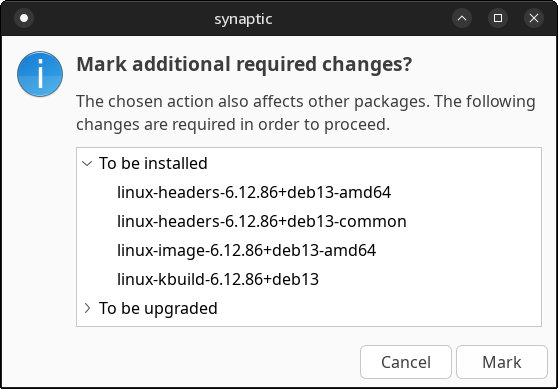
linux-image-7.0.7+deb13-amd64but onlylinux-image-7.0.7+deb13-amd64-dbg! Only debug symbols have been released, but everything else is in place, including the unsigned kernel, but not the signed one:linux-base-7.0.7+deb13-amd64linux-base-7.0.7+deb13-cloud-amd64linux-base-7.0.7+deb13-rt-amd64linux-binary-unsigned-7.0.7+deb13-amd64linux-binary-unsigned-7.0.7+deb13-cloud-amd64linux-binary-unsigned-7.0.7+deb13-rt-amd64linux-headers-7.0.7+deb13-amd64linux-headers-7.0.7+deb13-cloud-amd64linux-headers-7.0.7+deb13-rt-amd64linux-headers-7.0.7+deb13-commonlinux-image-7.0.7+deb13-amd64-dbglinux-image-7.0.7+deb13-cloud-amd64-dbglinux-image-7.0.7+deb13-rt-amd64-dbglinux-kbuild-7.0.7+deb13linux-modules-7.0.7+deb13-amd64linux-modules-7.0.7+deb13-cloud-amd64linux-modules-7.0.7+deb13-rt-amd64Therefore,
linux-image-amd64still points tolinux-image-7.0.4+deb13-amd64.OK, I don’t need a kernel that breaks Bluetooth 🙂
UPDATE: However, 7.0.7 is available for Sid. Both xebian-trixie-amd64.hybrid.iso and xebian-unstable-amd64.hybrid.iso offer, in their builds from May 18, kernels built on May 15:
– “trixie” comes with 6.2.88+deb13 (6.12.88-1)
– “unstable” comes with 7.0.7+deb14 (7.0.7-1)
Note that the 7.0.7 build that’s stuck in signing for backports is
7.0.7+deb13.UPDATE 2: As of 2026-05-22, Debian 13 backports is on
7.0.7+deb13, but nothing newer:Dated 2026-05-19 04:33:
linux-binary-7.0.7+deb13-amd64_7.0.7-1~bpo13+1_amd64.deb
linux-image-7.0.7+deb13-amd64_7.0.7-1~bpo13+1_amd64.deb
Dated 2026-05-18 02:24:
linux-modules-7.0.7+deb13-amd64_7.0.7-1~bpo13+1_amd64.deb
I was too harsh on Kubuntu, right? Here’s a Redditer who has experienced worse annoyances: Its almost a month after release of 26.04 and this release feels most glitched LTS.
Oops.
Have you looked at Butterbian? Claims to be a better Debian setup.
No, because everyone who insists that Btrfs is a better file system is mentally retarded.