
Small polish touches to Debian 13 installed via Xebian
Since the home page of Xebian insists that this Debian blend (not derivative!), “with only a thin layer for artwork and configuration that differs from Debian,” is “based on Debian Unstable/sid,” I have to insist on enlightening the plebeians: Xebian has two editions, and there are periodic “development” builds of them “in the staging area”: xebian-trixie-amd64.hybrid.iso (1.7 GB) and xebian-unstable-amd64.hybrid.iso (2.2 GB). So Xebian can be used to install a bloat-free XFCE edition of Debian stable.

❶ I have known this distro for some time, and those “development” builds are of constant quality. A newer build is meant to include the latest updates.
As a matter of fact, the only way to install the stable version of Debian is via the “trixie” ISO from the pending folder. The “non-development” build only tracks Debian unstable: xebian-unstable-amd64.hybrid.iso. An installation of Debian unstable can be transformed into Debian testing by changing the sources, but it cannot be converted to Debian stable.
❷ Xebian only adds a minimal number of packages necessary for theming and the user’s defaults. 100% harmless:
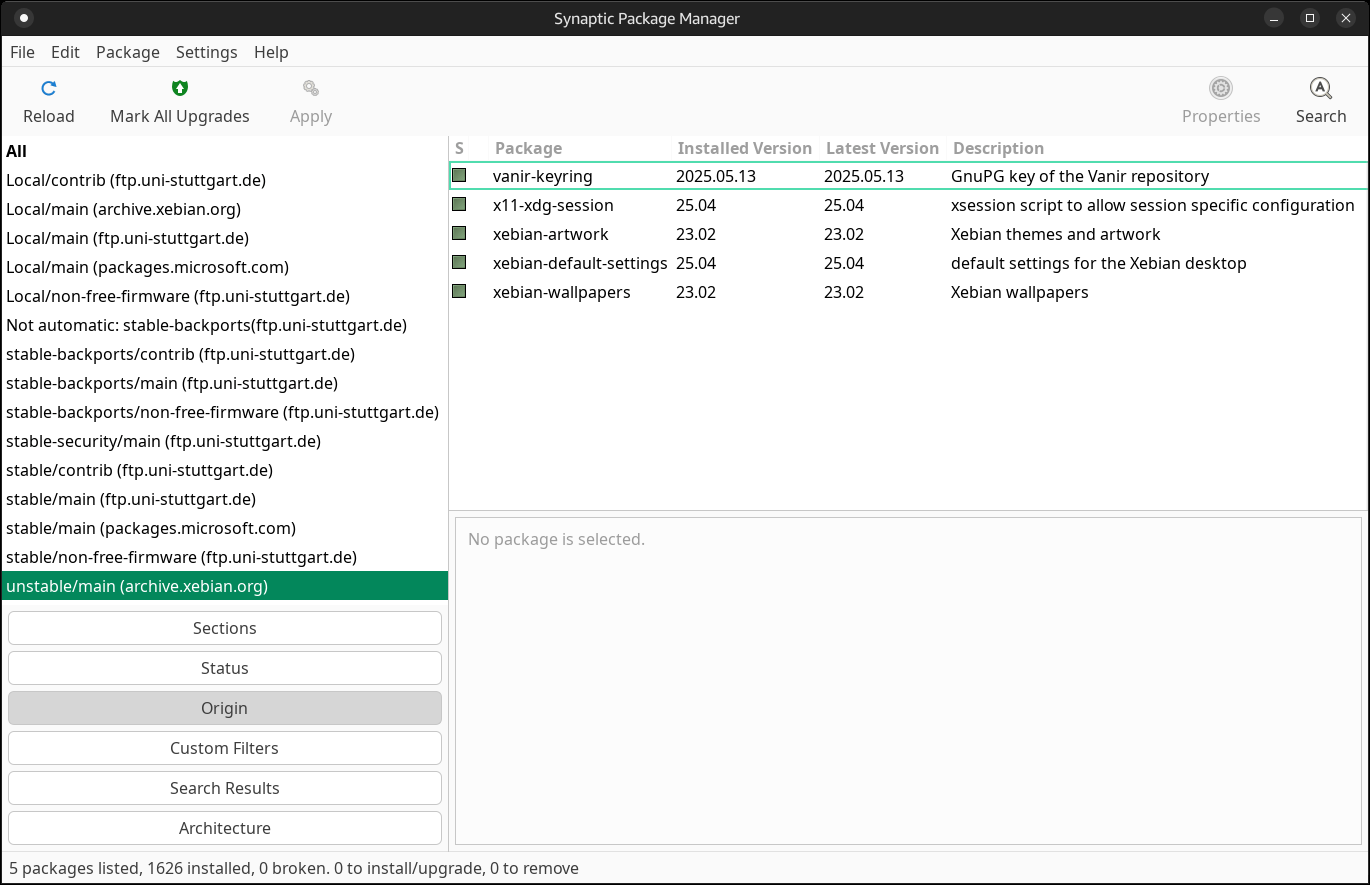
❸ When I installed from the “trixie” ISO, I used the build from May 4. The builds from May 11 already include the kernels that mitigate CVE-2026-43284 and CVE-2026-43500 that are part of Dirty Frag.
- xebian-trixie:
linux-image-6.12.86+deb13-amd64(6.12.86-1) - xebian-unstable:
linux-image-7.0.4+deb14-amd64(7.0.4-1)
❹ As mentioned in my comment from the evening of May 9, I installed Debian 13 by installing xebian-trixie-amd64.hybrid.iso, and then I added a minimal set of packages I deemed necessary, taking inspiration from my notes from an older post that discussed, among others, Debian XFCE and MX:
blueman ttf-mscorefonts-installer libavcodec-extra gstreamer1.0-libav gstreamer1.0-plugins-bad gstreamer1.0-plugins-ugly gstreamer1.0-vaapi libdvdcss2 libdvdnav4 libdvdread8 ffmpeg yt-dlp youtubedl-gui nala gdebi fortunes fsearch mc yaru-theme-gtk yaru-theme-icon
UPDATE 3: Debian 13 includes the package
gstreamer1.0-vaapi, but this package is missing from sid and testing. The oldvaapielements have been replaced by the newervaplugin elements, which were merged directly into thegstreamer1.0-plugins-badpackage. So you should skipgstreamer1.0-vaapion systems installed from the “standard” Xebian ISO.
I could have installed Mozilla’s repo for the “true” Firefox, but I decided against it. I was a long-time user of Firefox ESR, and I intend to resume this tradition. I hate being surprised by changes in Firefox, and I had to disable “Open in Split View” in Firefox 149-150 because I kept accidentally opening links in a split view. Some people might find useful features such as split views and tab groups, but as long as it’s too easy to trigger them accidentally, screw them!
I also enabled Flathub (see ⓱ below) and pulled the very minimum set of Flatpaks: Flatseal, Warehouse, Vinyl (as an alternative to Gapless). I should also add that I always hated the integration of Flathub in KDE Discover and GNOME Software. I prefer to explore Flatpaks on Flathub, then I copy the installation commands from there, and I uninstall them using Warehouse.
UPDATE 1: I forgot to install a Flatpak that I used before under MX: Gear Lever, a utility to manage AppImages: organize them, generate desktop entries, update apps in place, or keep multiple versions side-by-side.
UPDATE 2: In my case, I have an issue with Vinyl, but it wasn’t its fault. Read this comment and this correction.
From the extra fonts suggested in the past here and here, I decided to install Amazon’s fonts, so I could set Amazon Ember in Appearance → Fonts → Default Font and in “Xfwm theme” or Window Manager → Title font. Then, for a monospaced font, a Iosevka font. There are 455 assets per release, so I installed an older version of Iosevka Fixed (33.3.3) but the current version is 34.5.0. Ubuntu 26.04 LTS and Debian Sid have fonts-iosevka in version 34.4.0, but not Debian stable.
After extracting the fonts in ~/.local/share/fonts/, I made sure they’re visible:
sudo fc-cache -fv❺ I also added this script, so my Bluetooth would properly restore from sleep.
❻ From Debian’s mirror list, I opted for ftp.uni-stuttgart.de, an excellent server that I also used with Ubuntu. The file /etc/apt/sources.list being a “non-modernized” one, this made its modification trivial:
deb https://ftp.uni-stuttgart.de/debian/ trixie main contrib non-free-firmware
deb-src https://ftp.uni-stuttgart.de/debian/ trixie main contrib non-free-firmware
deb https://ftp.uni-stuttgart.de/debian-security/ trixie-security main contrib non-free-firmware
deb-src https://ftp.uni-stuttgart.de/debian-security/ trixie-security main contrib non-free-firmware
deb https://ftp.uni-stuttgart.de/debian/ trixie-updates main contrib non-free-firmware
deb-src https://ftp.uni-stuttgart.de/debian/ trixie-updates main contrib non-free-firmware
deb https://ftp.uni-stuttgart.de/debian/ trixie-backports main contrib non-free-firmware
deb-src https://ftp.uni-stuttgart.de/debian/ trixie-backports main contrib non-free-firmware
Xebian’s tiny repo is declared in /etc/apt/sources.list.d/xebian.list:
deb http://archive.xebian.org/debian/ unstable/
# deb-src http://archive.xebian.org/debian/ unstable/
❼ All of a sudden, I decided I’d like to use the 7.0.4 kernel from backports!
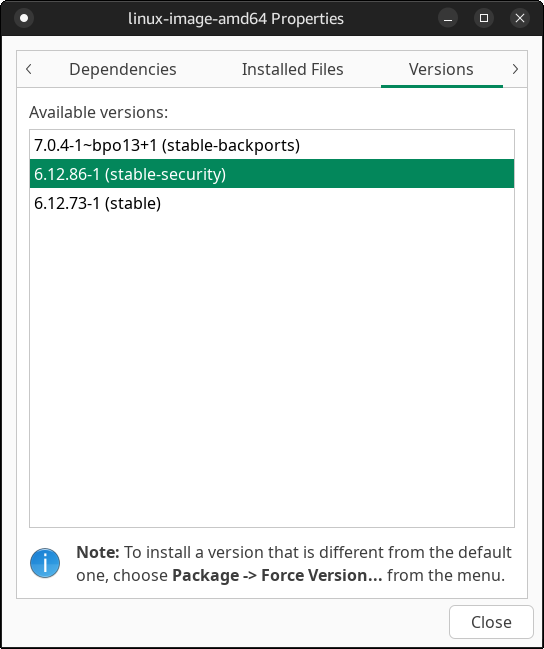
Since this isn’t a one-off event, but I need to have it constantly updated, I had to pin the whole shebang:
sudo nano /etc/apt/preferences.d/linux-image-amd64.prefI added inside:
Package: linux-image-* linux-headers-* linux-base linux-base-* linux-kbuild-* linux-compiler-* firmware-*
Pin: release a=*-backports
Pin-Priority: 500
After a sudo apt update && sudo apt upgrade:
[ludditus@confucius ~]$ uname -a
Linux confucius 7.0.4+deb13-amd64 #1 SMP PREEMPT_DYNAMIC Debian 7.0.4-1~bpo13+1 (2026-05-08) x86_64 GNU/Linux❽ Since the firmware package was split into two dozen packages, the useless firmware can be removed. I gained over 500 MB by purging the firmware I don’t need on this laptop:
sudo apt purge firmware-bnx2 firmware-bnx2x firmware-cavium firmware-cirrus firmware-ipw2x00 firmware-ivtv firmware-libertas firmware-marvell-prestera firmware-mediatek firmware-myricom firmware-netronome firmware-netxen firmware-qlogic firmware-siano firmware-amd-graphics firmware-brcm80211 firmware-nvidia-graphicsNote that you might need one or more of the packages printed in bold.
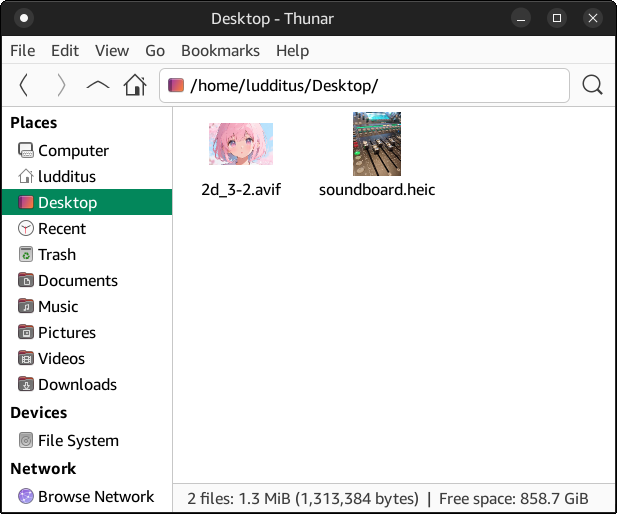
❾ I never encountered an HEIC file (I still curse the AVIF format, and I also hate WEBP), but I happened to read this: Fix HEIC images not loading in Ubuntu 26.04 LTS. Needless to say, HEIC files couldn’t be opened under Debian 13 by either Ristretto or gThumb! Also, Thunar couldn’t display thumbnails of HEIC and AVIF images.
The fix:
sudo apt install heif-gdk-pixbuf heif-thumbnailerHowever, Thunar still couldn’t display the thumbnails! That’s because Tumbler, the background service used by Thunar to generate thumbnails, cached the failures, so it won’t try again until the cache of “broken” records is cleared:
rm -rf ~/.cache/thumbnails/failThen, of course, I restarted Thunar:
❿ Obviously, I installed some other small packages: ristretto was preinstalled, but I added gthumb and, just to have choices for when I’m moody, both gedit and featherpad.
Then, VS Code. I’ll surely install more apps as needs arise. I’m still undecided about the office suite, which will be from upstream: onlyoffice-desktopeditors_amd64.deb or LibreOffice_26.2.3_Linux_x86-64_deb?
Finally, I tried, without believing much in success, hibernation. Guess what? Hibernation worked, with superb waking up! Yay! 🎉🥳
It’s been quite some time since hibernation worked on Linux on one of my laptops!
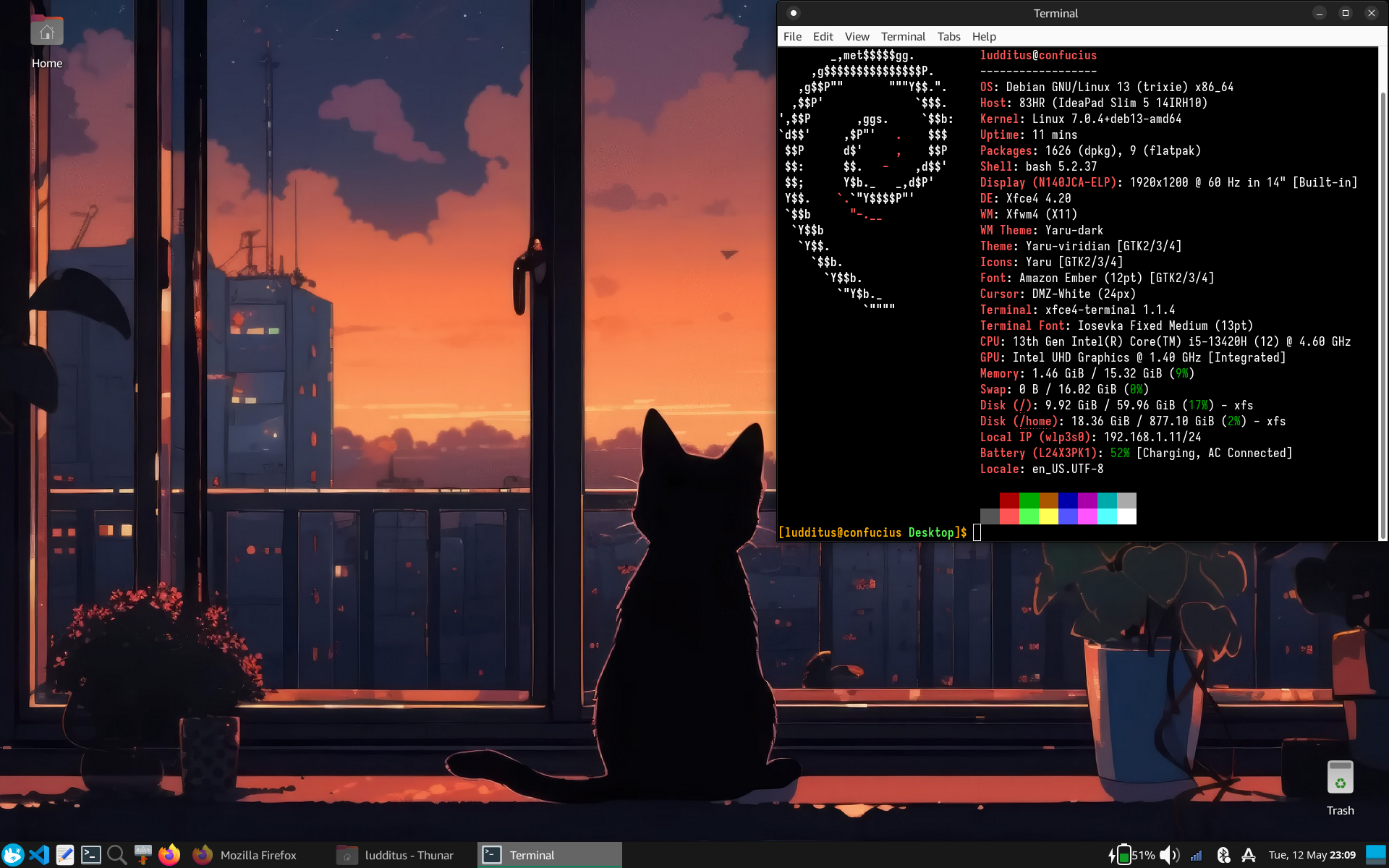
⓫ UPDATE: Remapping the Copilot key!
The same way I did under KDE/Wayland, I needed to map the Copilot key to behave like the right Control key, which is the normal key at that position.
The Copilot key is issuing a sequence of 3 codes that can be represented in several equivalent ways, depending on the environment, the display server, and the tool:
- Super_L + Shift_L + XF86Assistant
- Super_L + Shift_L + F13
- Meta + Shift + F23
- Super_L + Shift_L + TouchpadOff
This is what’s needed:
sudo apt install input-remapper-gtkIf under KDE/Wayland this combination was detected as Super_L + Shift_L + F13, under XFCE/X11 it was detected as Super_L + Shift_L + TouchpadOff:
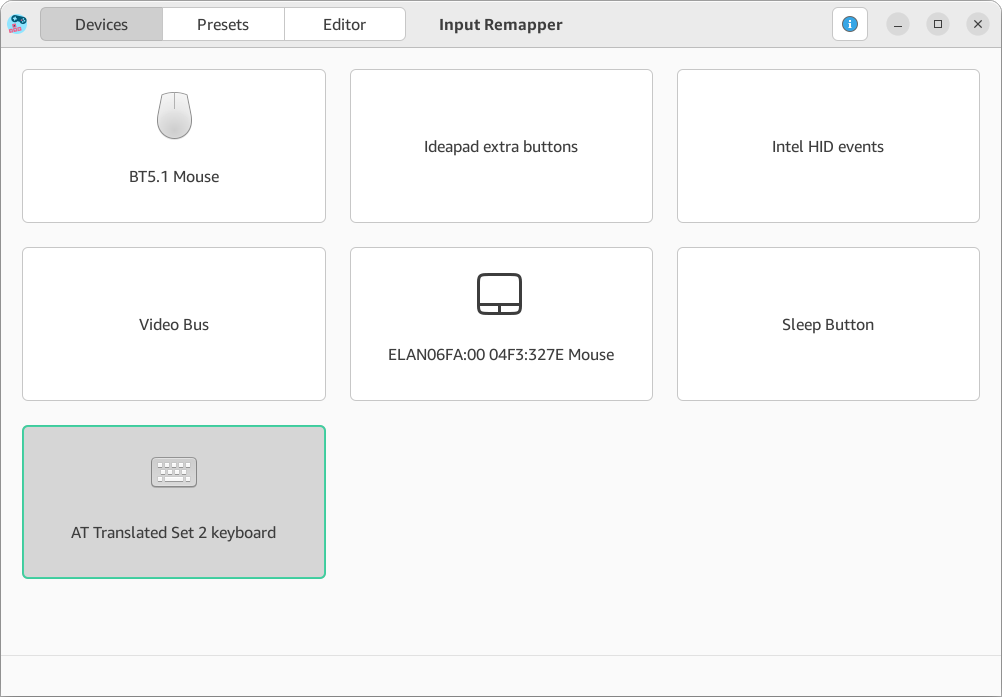
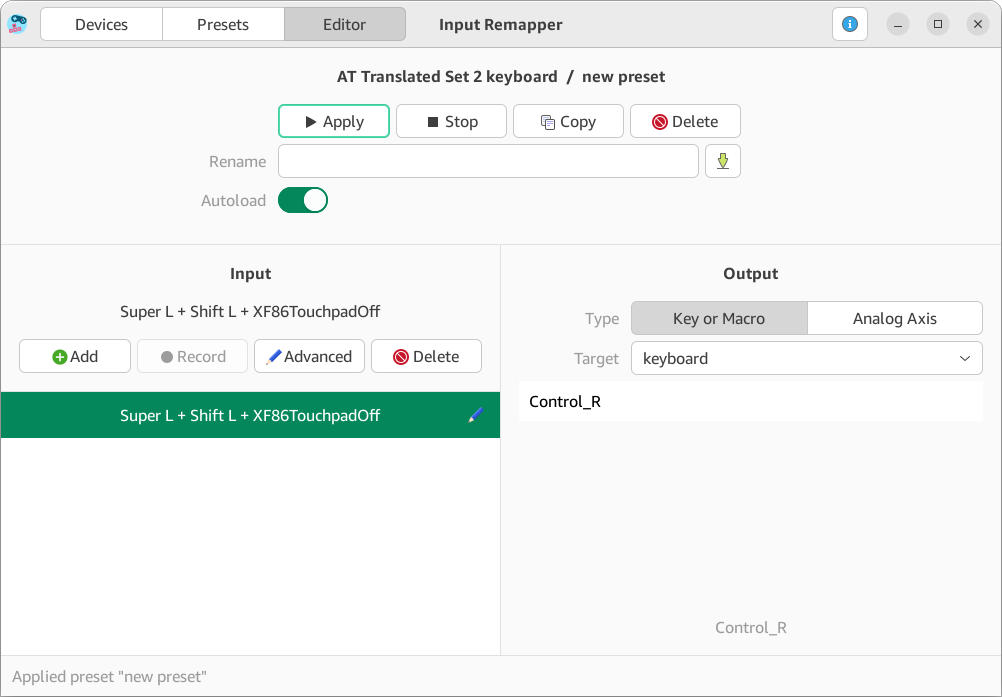
⓬ UPDATE 2: Using several keyboard layouts
Coming from MX, I forgot how minimalistic Xebian is. Once I needed to add several keyboard layouts and to know which one is active at any time, I noticed that the XFCE Keyboard Layouts panel plugin wasn’t installed, so I needed to fix this:
sudo apt install xfce4-xkb-plugin⓭ UPDATE 4: I forgot about the System Monitor!
Just like I did with Lubuntu, in XFCE I eventually replaced XFCE’s Task Manager (xfce4-taskmanager) with MATE System Monitor (mate-system-monitor):
sudo apt update
sudo apt install mate-system-monitor
sudo mousepad /usr/share/applications/mate-system-monitor.desktop
Delete the line that contains OnlyShowIn, and save the file.
sudo update-desktop-database /usr/share/applicationsMATE System Monitor will show up in the System menu. But you need an easy way to invoke it.
Run xfce4-keyboard-settings or Settings, Keyboard. Go to the Application Shortcuts tab. Look for xfce4-taskmanager (which has Shift+Ctrl+Escape as a shortcut), and replace the command with mate-system-monitor. Press again the shortcut combination and confirm the replacement. (Why couldn’t they just accept the replacement command without asking again for a shortcut? Who was the moron who designed this shortcut editor?)
⓮ UPDATE 5: I forgot about the Whisker Menu!
While revisiting an older take on Customizing Debian XFCE or Xebian, I noticed I missed a couple of other small customizations.
Instead of the built-in Application Menu, I prefer the Whisker Menu.
Add the Whisker Menu applet, move it to the left, then remove the Application Menu.
Now, go to Settings Manager, Keyboard (or run xfce4-keyboard-settings), Application Shortcuts. Add or Edit xfce4-popup-whiskermenu, then press the Win key.
⓯ Thunar cannot mount ISO images by itself, so you need to help it by installing Disks (gnome-disks):
sudo apt install gnome-disk-utility⓰ External repos the easy way: I also forgot about extrepo!
sudo apt update
sudo apt install extrepo
Here’s a selective list of repos from the 300+ that can be found here (for Trixie):
1password, anthropic-claude-code, antigravity, brave_beta, brave_nightly, brave_release, dotnet, edge, librewolf, mozilla, node_18.x, node_20.x, node_22.x, node_23.x, node_24.x, node_25.x, ollama-rc, ollama, onlyoffice-desktopeditors, openvpn, opera_stable, protonvpn, signal, slack, spotify, steam, stremio, sublime_dev, sublime_stable, virtualbox, vscode, vscodium, waydroid, windsurf, winehq.Once you install the package, you need to enable the desired repository, which in most cases has the same name as the package you want to install:
sudo extrepo enable onlyoffice-desktopeditors
sudo apt update
sudo apt install onlyoffice-desktopeditors
One notable exception:
sudo extrepo enable mozilla
sudo apt update
sudo apt install firefox
But I still prefer firefox-esr. There is too much “innovation” in Firefox lately.
⓱ UPDATE 6: At ❹ I only gave a link to another post about how to configure Flatpaks. Full details follow.
Just as was the case with Lubuntu, I recommend configuring Flatpaks under Debian XFCE in two steps.
First, add Flatpak support and Flathub:
sudo apt install flatpak
flatpak remote-add --if-not-exists flathub https://flathub.org/repo/flathub.flatpakrepoThen, ensure that newly installed Flatpaks will show up in the menus:
echo 'export XDG_DATA_DIRS="/var/lib/flatpak/exports/share:/home/$USER/.local/share/flatpak/exports/share:$XDG_DATA_DIRS"' >> ~/.bashrcYou should log out and log back in once. You do not need to log out again for every subsequent Flatpak installation.
Two Flappaks to start with: Flatseal, a graphical utility to review and modify permissions from your Flatpak applications; Warehouse, a graphical utility to manage other aspects of them or to uninstall them.
flatpak install flathub com.github.tchx84.Flatseal
flatpak install flathub io.github.flattool.Warehouse
I recommend exploring Flathub for Flatpaks and using the commands shown there to install them, because this is a great place to discover new apps, including screenshots of them and links to the source repositories or home pages.
Tip: If you decide to use the WinAmp-like Kalorite instead of more modern music players (Gapless, Vinyl), you need to install papirus-icon-theme or any theme derived from it, and to select it as the current icon theme. Otherwise, the player won’t display its buttons properly (Bug #10).
⓲ Theming Qt6 and Qt5 apps under XFCE (or any other GTK-based desktop environment) might be desired if such apps are used.
First things first. If you only use Qt6 apps (or KDE apps):
sudo apt install qt6ctIf you also use Qt5 apps:
sudo apt install qt5ctNow, since Debian 13 XFCE and Xebian use LightDM, all the usual places where you might be used to set or export QT_QPA_PLATFORMTHEME will be ignored. When logging in via LightDM, the display manager uses Xsession, which sources the shell scripts inside /etc/X11/Xsession.d/ in alphanumeric order.
You need a script that’s parsed before 99x11-common_start and preferably after 90qt-a11y, so I recommend the name 99qt-x11-theme, which is self-explanatory.
The final quirk: as there is a unique QT_QPA_PLATFORMTHEME variable, one cannot set it to both qt5 and qt6, but the smart thing is that setting it to qt5 will make it work for both Qt5 and Qt6, whereas qt6 will only affect Qt6 apps!
Therefore, if you only need Qt6 apps, run this:
echo "export QT_QPA_PLATFORMTHEME=qt6ct" | sudo tee /etc/X11/Xsession.d/99qt-x11-themeIf you plan to use both Qt6 and Qt5 apps, run this instead:
echo "export QT_QPA_PLATFORMTHEME=qt5ct" | sudo tee /etc/X11/Xsession.d/99qt-x11-themeFinally, run qt6ct (Qt6 Configuration Tool, which is Qt6 Settings in the menus) to select a theme for Qt6/KDE apps, and qt5ct (Qt5 Configuration Tool, which is Qt5 Settings in the menus) to select a theme for Qt5 apps.
UPDATE: I rescinded my advice on theming Qt5 and Qt6 apps under XFCE: do not install qt5ct or qt6ct unless you specifically want independent styling!
In fact, Qt6 can read the GTK3 theming, so it can honor the light/dark theme and match the default font configured in the GTK-based desktop environment it runs in.
Having QT_QPA_PLATFORMTHEME=qt5ct or QT_QPA_PLATFORMTHEME=qt6ct disconnects Qt apps from the theme changes made by the GTK-based desktop environment. I was particularly annoyed that Qt6 apps weren’t matching the typefaces configured in XFCE, and this was the reason.
Therefore, leaving QT_QPA_PLATFORMTHEME unset or explicitly setting it to gtk3 ensures Qt apps respect your desktop font configuration and the light/dark theme choice. But gtk2 won’t break anything.
- On an XFCE system installed from Debian Live (say, debian-live-13.6.0-amd64-xfce.iso),
QT_QPA_PLATFORMTHEMEis not set. - On an XFCE system installed from Xebian (xebian-trixie-amd64.hybrid.iso or xebian-unstable-amd64.hybrid.iso),
QT_QPA_PLATFORMTHEMEis set togtk2in/etc/X11/Xsession.d/56xebian-session:
# Set default environment vars in Xebian
if [ "$DESKTOP_SESSION" = xebian ]; then
    # Disable GTK 3.16 overlay scrollbars
    export GTK_OVERLAY_SCROLLING=0
    # Qt5 apps to use GTK style
    export QT_QPA_PLATFORMTHEME=gtk2
    if [ -n "$DBUS_SESSION_BUS_ADDRESS" ] && \
        command -v dbus-update-activation-environment >/dev/null; then
            dbus-update-activation-environment --verbose --systemd GTK_OVERLAY_SCROLLING QT_QPA_PLATFORMTHEME
    fi
fi
This is literally useless, but it was added to the rarely updated package xebian-default-settings on Feb. 21, 2017 (version 17.02). The current version of the package is 25.04 from April 1, 2025, and the previous one was 22.07 from July 31, 2022.
Debian XFCE itself doesn’t care. And yet, Qt6 apps work just fine in both Debian XFCE and Xebian. For instance, Kate honors the light/dark theme change; FeatherPad doesn’t, but FeatherPad doesn’t use dark controls even under KDE (the titlebar background is drawn by the window manager).
Traditionally, it was recommended to set QT_QPA_PLATFORMTHEME to gtk3, so it could use libqgtk3.so if qt6-gtk-platformtheme is installed. In Debian 13, though, this isn’t necessary.
Qt deprecated GTK2 support in Qt 5.7 and removed it completely in Qt6. Qt6 cannot read GTK2 themes or settings under any circumstances. When a Qt6 application starts, it reads QT_QPA_PLATFORMTHEME, finds gtk2, fails to find libqgtk2.so, and silently falls back to the default XCB theme. Through the Qt Platform Abstraction (QPA) layer, it reaches xdg-desktop-portal-gtk and loads libqgtk3.so, which, beyond honoring the theme, ensures better integration by spawning a native GTK3 file chooser window instead of the Qt file chooser.
So, regardless of what you read, rest assured that, as long as QT_QPA_PLATFORMTHEME is not set to either qt5ct or qt6ct, Qt6 apps will match the GTK3 settings they can.
⓳ XnConvert and XnView MP as IrfanView replacements!
As I once recommended here, to replicate the batch processing capabilities that IrfanView has in Windows, XnConvert is a great tool. Install XnConvert-linux-x64.deb. For the image viewing capabilities, XnView MP could be added. Install XnViewMP-linux-x64.deb.
They are Qt5 apps, so you might want to theme them as described above 🙂
Note that there are also Flatpaks for XnConvert and XnView MP.
⓴ The strange case of ProtonVPN: it installs in Debian 13, but not in Debian forky/sid!
In Debian 13, I do not recommend you use the extrepo way to install ProtonVPN, but the official way:
wget https://repo.protonvpn.com/debian/dists/stable/main/binary-all/protonvpn-stable-release_1.0.8_all.deb
echo "0b14e71586b22e498eb20926c48c7b434b751149b1f2af9902ef1cfe6b03e180 protonvpn-stable-release_1.0.8_all.deb" | sha256sum --check -
sudo dpkg -i ./protonvpn-stable-release_1.0.8_all.deb && sudo apt update
sudo apt install proton-vpn-gnome-desktop
sudo apt install gir1.2-ayatanaappindicator3-0.1Ignore everything else they wrote there.
Tip: The ProtonVPN-specific icons are only available in papirus-icon-theme or any theme derived from it. You need to have such a theme as the current icon theme.
In Debian forky/sid (which I ended up installing on my oldest of the three laptops, as explained here), ProtonVPN couldn’t be installed because of unmet dependencies.
Following the official path failed because proton-vpn-gnome-desktop couldn’t be installed.
Also proton-vpn-gtk-app failed to install. But when even proton-vpn-cli refused to install, that was the end of it!
I also tried this:
sudo extrepo enable protonvpnBut protonvpn-gui was not installable. Dependencies, what else?
However, protonvpn-stable-release was installable, but after installing it, I got this error that locked me out of using apt or Synaptic:
E: Conflicting values set for option Signed-By regarding source https://repo.protonvpn.com/debian/ stable: /var/lib/extrepo/keys/protonvpn.asc != /usr/share/keyrings/protonvpn-stable-archive-keyring.gpgTherefore, the extrepo for ProtonVPN cannot be recommended regardless of the distro version (Stable or Testing/Sid) because the upstream signature and the extrepo one are conflicting.
I can only hope that, by the time Debian 14 is released, Proton AG will build packages compatible with it. If not, I might as well switch for a second time to Private Internet Access (PIA). It has a universal Linux installer that might be less sensitive to distro-provided packages.
Oh, the unofficial Flatpak Proton VPN works just fine in all versions of Debian!
🚀 Taking inspiration from MX: noatime,lazytime!
I decided to take inspiration from MX Linux 25.3, which generated the following /etc/fstab configuration on a test system:
# Pluggable devices are handled by uDev, they are not in fstab
UUID=2e1b6dea-6e95-4073-a887-e93ae5afdb3a / ext4 noatime,lazytime 1 1
UUID=0884-FB53 /boot/efi vfat noatime,lazytime,dmask=0002,fmask=0113 0 0
UUID=6855e0b3-15ff-4369-bc4f-54aacef81910 /home xfs noatime,lazytime 1 2Notice the use of noatime,lazytime instead of the standard defaults.
On a desktop system, practically no process cares about a file’s last access timestamp. Cutting out such unnecessary read-triggered writes greatly benefits SSDs. Because of this, using noatime (or defaults,noatime) has long been best practice in many desktop-oriented distros—just not natively in Xebian.
In practice, defaults (which is an alias for rw,suid,dev,exec,auto,nouser,async) is redundant, as the kernel already defaults to these exact options unless explicitly forbidden.
Combining noatime and lazytime is slightly less common, primarily because noatime alone disables atime completely, eliminating 90–95% of unnecessary disk writes. However, adding lazytime provides an extra layer of efficiency: it caches the remaining mtime (content modification) and ctime (metadata change) updates in RAM, batching them together rather than writing them to disk for every single file operation.
Historically, another option, relatime, was created as a halfway compromise for legacy apps that strictly required POSIX atime, but it’s useless now because since 2009 it’s implicit!
I highly recommend replacing defaults with noatime,lazytime for all relevant local partitions, especially ext4 and xfs ones.
But for Copy-on-Write (CoW) filesystems like Btrfs, these flags are even more critical. On Btrfs, modifying any metadata block forces the filesystem to allocate a brand-new metadata leaf block, update the B-tree pointers all the way to the root tree, and commit the new blocks. Furthermore, every atime update on a Btrfs snapshot (think Timeshift) prevents older snapshot metadata from being freed, causing snapshot sizes to inflate unnecessarily.
Make the recommended changes to /etc/fstab. Then, to remain on the safe side, run sudo mount -a before you restart. If you botch the file, you will get an error, so you’ll have a chance to fix it before it locks you out of your computer!
Cool. Xebian isn’t very well known to begin with, but almost no one seems to know that there’s a Stable release. It makes you wonder why they’re hiding it and don’t mention it anywhere.
They are the Xubuntu versions of Debian.
“The goal of this project is to make an Xfce Debian based system that is much like Xubuntu.”
“Modified default configuration, inspired by Xubuntu, to give you a traditional desktop look and feel.
With Greybird and Elementary Xfce icon theme from the Shimmer Project for Xfce integration.”
Yeah. I don’t care about their theming and I dislike the top panel (which I move to the bottom), but they are minimalistic, yet functional. Only Bluetooth needs to be added. A great starting point.
Update to Vinyl vs. Gapless: Tambourine Music Player is another Flatpak that runs perfectly. But the window cannot be maximized or minimized; it can only be resized.
Apparently, it has to do with JetBrains Compose Multiplatform’s windowing layer on Linux, which is incomplete and buggy. Bugs in Compose Desktop seem to never be fixed: #3620: Maximized windows do not restore to non-maximized sizes correctly on Linux. But once the developer has opted for Kotlin as a language, Compose Multiplatform is the easiest and most rational choice. Fucking Kotlin. Outside Android.
Update: Remapping the Copilot key under XFCE.
💡 I just discovered that running Haruna under Debian 13 XFCE is not as simple as
sudo apt install haruna.It won’t do anything when launched, except for spitting this when launched from a terminal:
unknown() : QQmlApplicationEngine failed to load componentunknown() : qrc:/qt/qml/org/kde/haruna/qml/Main.qml: module "org.kde.desktop" is not installedThis also manifests under LMDE 7, so under a customized Debian 13 Cinnamon.
That’s because
harunadoesn’t have all dependencies declared. It does install 137 packages (Download size: 25.4 MB, Space needed: 140 MB), but it needs more.The fix:
sudo apt install qml6-module-org-kde-desktopThis should bring 8 more packages (Download size: 1,050 kB, Space needed: 5,278 kB):
libhfstospell11 libkf6qqc2desktopstyle-data libkf6sonnet-data libkf6sonnetcore6 libvoikko1 qml6-module-org-kde-desktop qml6-module-org-kde-sonnet sonnet6-plugins.I should report this bug to Debian. I won’t do that. I’m just sickened by how everyone seems to be a moron. Didn’t any Debian user of XFCE, MATE, Cinnamon, GNOME, or any other non-KDE desktop ever try to install and use Haruna? Also, how are Debian’s maintainers determining a package’s dependencies? By hand?
💡 Of course, I could have installed Haruna as a Flatpak, and I’d have had the latest version and no fuss. But I don’t need the very latest version.
Things happened when using both FSearch and Vinyl. (UPDATE: see the correction below!) I’m not sure whether this was a bug in FSearch or in Xebian’s defaults, or if installing Vinyl screwed it, but I encountered this situation: FSearch, on Open Folder, instead of opening Thunar (which was correctly set as the default file manager), opened Vinyl!
Apparently, Vinyl’s
.desktopdeclared that it can handle theinode/directoryMIME type (so it can be used to open a folder as a music library). I don’t know if it hijacked or merely registered this XDG type, but it was wrong.This is how I fixed it:
xdg-mime default thunar.desktop inode/directoryTo check that the system registered the change correctly:
xdg-mime query default inode/directoryThis should return
thunar.desktop.Here, in MX with Vinyl:
$ xdg-mime query default inode/directoryxfce4-file-manager.desktopIs it okay, doctor?
It’s perfect.
xfce4-file-manager.desktopis the generic file manager used by default, whereasthunar.desktopis a specific one, especially as in my case I had to reconfigure it manually.I could have used this command instead:
xdg-mime default xfce4-file-manager.desktop inode/directorySo FSearch opens exactly what it should here, without needing to touch anything. A Xebian bug then? Curious.
It might have to do with Vinyl being installed locally vs. globally. Or something else somehow screwed it
I also installed it locally, for the user, not globally. I did it that way for both users on this machine, so on each of the two sessions.
And yet, no problems here in either session.
inode/directoryassociation withxfce4-file-manager.desktop! I tried it on a different system and nothing broke.The most likely culprit is Dolphin, who stole the association. After having uninstalled Dolphin, the `inode/directory` type was orphaned, and somehow XFCE “guessed” a wrong association.
In XFCE, specifying the default file manager in Deffault Applications does not fix the breakage (should it happen) of the
inode/directoryassociation, which needs to be fixed separately. This can also be performed in the same GUI:One more update with 3 more Debian customizations (14 to 16).
Strangely, in MX, I don’t see this entry, or any concerning the menu, and yet it opens fine when I press the Win key.
Well, MX does some settings in non-standard ways. I wrote somewhere how I added several keyboard layouts in
xfce4-keyboard-settings, and MX’s duplicate tool couldn’t see them. MX and Mint are noxious. They should be boycotted.A last batch of updates: 17 to 20. Flatpaks in more detail, theming Qt6 and Qt5 apps under XFCE, XnConvert and XnView MP, and ProtonVPN.
I rescinded my advice on theming Qt5 and Qt6 apps under XFCE: do not install
qt5ctorqt6ctunless you specifically want independent styling!Taking inspiration from MX:
noatime,lazytime!sudo apt install menulibreafterwards if you want the Whisker Menu to be editable on right-click, “Edit Applications” (you will need toxfce4-panel -ror log out and log back in).