
Dumbo goes on: 26.04 Beta is solid, but not Kubuntu
This is a very short follow-up to How I chose to become Dumbo. What happened is that I installed Ubuntu 26.04 LTS pre-release (Daily Build from March 16) on the new Lenovo, and I kept updating it. Still nothing broke. Alright, I customized it to look more like a “classic” Windows with “icons with windows’ titles” on the taskbar, and I made Thunar the default file manager. But the way Ubuntu customizes GNOME 50 makes it already much, much more usable than the stock experience.
🤡
So the big news is that they released Ubuntu 26.04 LTS (Resolute Raccoon) Beta. All the good places relayed the news, including OMG! Ubuntu, 9to5 Linux, and Phoronix.
The default desktop is the same huge 6.5 GB ubuntu-26.04-beta-desktop-amd64.iso (Kubuntu only has 4.8 GB), and using ubuntu-26.04-beta-desktop-amd64.iso.torrent is recommended.
Officially recommended links:
- Ubuntu, Ubuntu Server, WSL, Cloud Images: releases.ubuntu.com/26.04/
- Kubuntu: cdimage.ubuntu.com/kubuntu/releases/26.04/beta/
- Lubuntu: cdimage.ubuntu.com/lubuntu/releases/26.04/beta/
- Ubuntu Budgie: cdimage.ubuntu.com/ubuntu-budgie/releases/26.04/beta/
- Ubuntu Studio: cdimage.ubuntu.com/ubuntustudio/releases/26.04/beta/
- Ubuntu Unity: cdimage.ubuntu.com/ubuntu-unity/releases/26.04/beta/
- Xubuntu: cdimage.ubuntu.com/xubuntu/releases/26.04/beta/
Not listed in the announcement, but well alive:
- Edubuntu: cdimage.ubuntu.com/edubuntu/releases/26.04/beta/
- Ubuntu Cinnamon: cdimage.ubuntu.com/ubuntucinnamon/releases/26.04/beta/
- Ubuntu Unity: cdimage.ubuntu.com/ubuntu-unity/releases/26.04/beta/ — I thought they were dead! (They skipped 25.10 and made a comeback for 26.04, but the Unity flavor lost the LTS status.)
What does not exist as a Beta ISO is Ubuntu MATE, which is not only MIA but clearly a project without a direction (is Wimpy still alive?): look into cdimage.ubuntu.com/ubuntu-mate/releases/26.04/, and you’ll find no beta whatsoever.
On the other hand, there are newer Daily Live builds, such as:
- cdimage.ubuntu.com/daily-live/current/
- cdimage.ubuntu.com/kubuntu/daily-live/current/
- cdimage.ubuntu.com/xubuntu/daily-live/current/
- cdimage.ubuntu.com/ubuntu-mate/daily-live/current/ — the last build is from March 4 😱⚰️
I told you that Ubuntu MATE is as good as dead, didn’t I?
🤡🤡
So I kept the installed 26.04 updated on my Lenovo. Just before the release of the Beta, I noticed that the logo that was missing in the About screen has been restored. Cool! Four weeks before the release date, it feels solid.
I nonetheless downloaded the Beta for the main edition and for Kubuntu, to give them a spin as Live-only on the Acer that still runs MX XFCE while awaiting a Windows installation of some kind (Win11 IoT LTSC 24H2, Win10 IoT LTSC 2021, Windows Server 2022 LTSC).
The Canonical-tweaked GNOME ISO worked perfectly as a live desktop. I played with it for a while, even installing a few things (in RAM, right?), and nothing crashed.
I even thought of reconsidering my grouchy, inflexible stance about those for whom “Linux means Ubuntu, i.e., its main flavor.” How are they worse than those to whom “a computer means a MacBook”?
Besides, not everyone has my usability requirements. Apparently, I’m needier than Linus Torvalds! People who don’t manage so many files manually might be happy with the dumbified file manager. If you make the detailed list view more compact (CTRL+scroll), it would satisfy some needs:
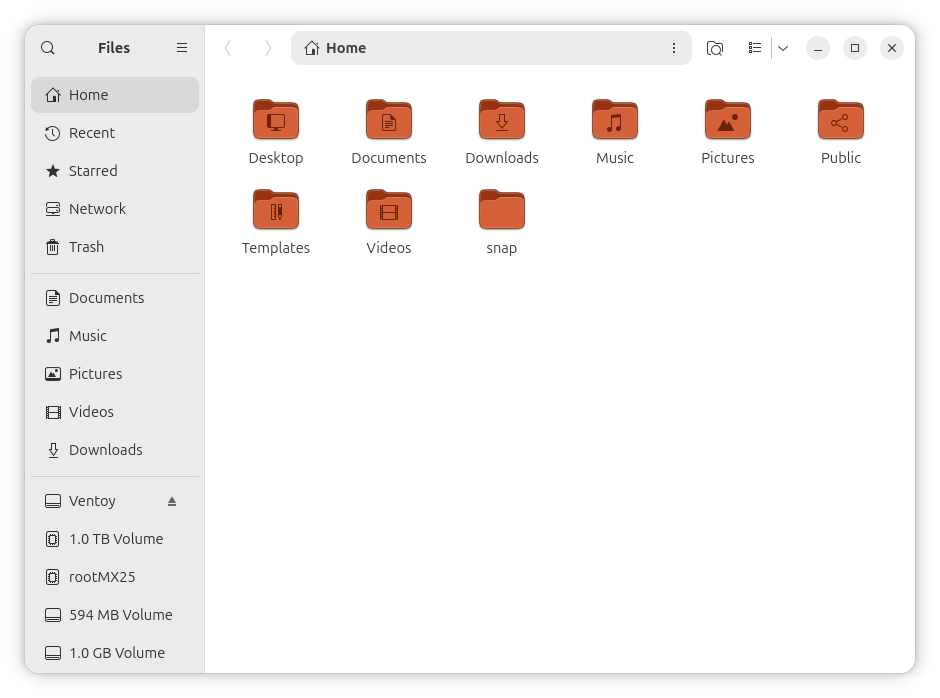
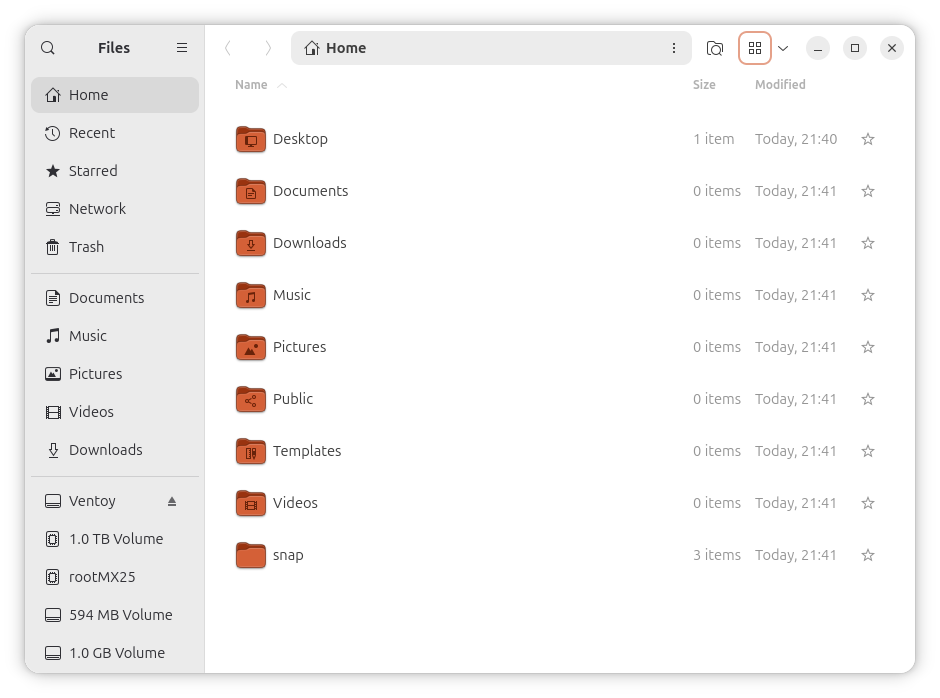
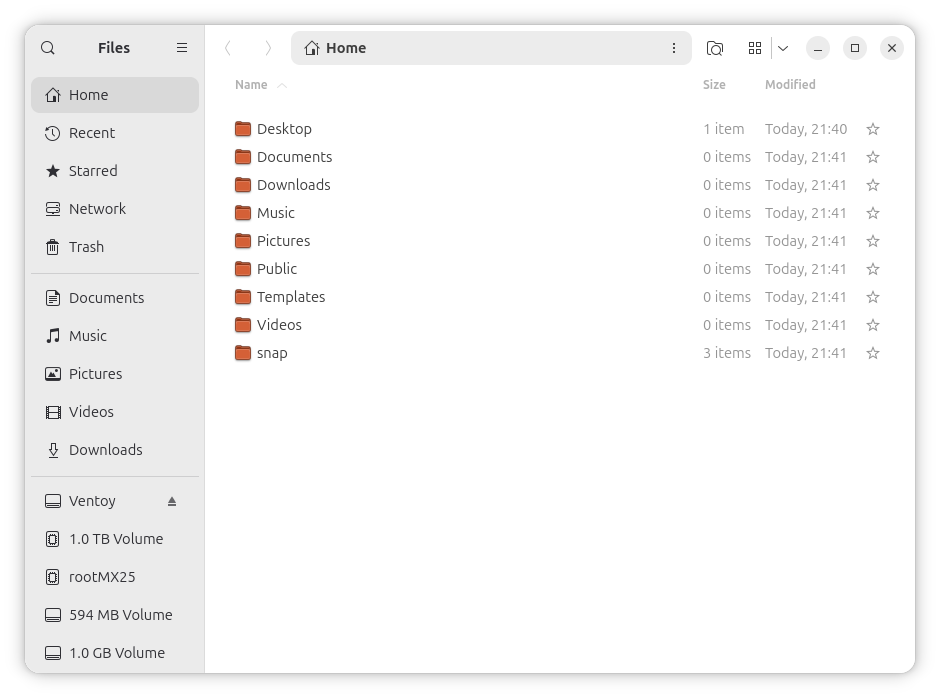
I’m not willing to try using the default layout (left vertical dock) and Files as the default file manager, but I shouldn’t recoil in horror as I used to. Becoming Dumbo is rejuvenating in a way and, additionally, an exercise in tolerance.
🤡🤡🤡
Kubuntu, whose KDE is rather stock, felt strangely “not modern enough,” subjectively uglier than what a modern desktop should look like. But maybe I was merely annoyed that in Dolphin one has to zoom out the icons even in the compact list view mode. Also, the Breeze icon theme is possibly the ugliest icon theme in the known Universe.
The good part is that it came with KDE Plasma 6.6.3 (Wayland), and Spectacle didn’t crash upon exit as it was the case under Plasma 6.6.2 in both Fedora 43 and 44-20260311.
There’s one more change regarding Spectacle under Plasma 6.6.3. If in 6.6.2 (Fedora, Wayland) it created 36+ .qmlc files under ~/.cache/spectacle/ (but only 9 files in EndeavourOS with X11), in 6.6.3 (Kubuntu, Wayland) it didn’t create any .qmlc files! Instead, it created a unique ~/.cache/spectacle/qtpipelinecache-x86_64-little_endian-lp64/qqpc_opengl file (80 KiB)! Looking around, I noticed the folder ~/.cache/qtshadercache-x86_64-little_endian-lp64/ with a random number of files with random names and sizes between 6.6 and 14.8 KiB!
Why does KDE Plasma create such garbage?
I kept the surprise for the end:
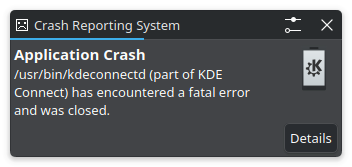
Yeah. Plasma will always be Plasma 4. How could I believe otherwise?
🤡🤡🤡🤡
In lieu of a conclusion, if Ubuntu 26.04 LTE is going to be a solid distro, it won’t be in its Kubuntu flavor, and much, much less in Ubuntu MATE (if it’s ever released). Minimalists should be able to enjoy Xubuntu if they wish to, but let’s face it: not everyone comes from the CP/M era like I do, so to them, it should look somewhat “vintage.” A top panel and a dock can’t make it look like a pre-Tahoe macOS. It looks more like a scam. Gen Z and Gen Alpha have macOS and Windows 11 as references, and they are touchscreen-centric and brain-damaged, so a more human GNOME, like the one offered by Ubuntu, might be just the thing they need.
Not Zorin. Zorin is shite.
Not Mint. Mint is shite.
Not CachyOS. CachyOS is shite.
My openness has its limits.
As for the “I use Arch btw” with one of the twenty tiling window managers herd, they are not humans. As I said before, I’d rather use Windows 3.1, but I can’t (16-bit, not supporting any modern hardware, not counting the RAM and disk limitations). If I could, it would have the speed of light and, believe it or not, it can tile windows (on demand).
BTW, I like aubergines, both as in Canonical’s color palette and as in the edible eggplant.
🤡🤡🤡🤡🤡
Quick Saturday updates after having read more from Phoronix
● Gedit Aims For More Frequent Releases, Bans AI / LLM Contributions:
Following the release of GNOME 50, Gedit 50 was released on Friday as the newest version of this graphical text editor aligned with the GNOME desktop. Moving forward the Gedit developers are banning AI / large language model (LLM) driven developments and aim to ship more releases faster.
While many Linux distributions have switched over to the GNOME Text Editor as the default general purpose text editor for the GNOME desktop, Gedit continues to be developed. Gedit continues working out well for some use-cases and preferred by some longtime GNOME users. I, for example, still prefer Gedit due to its much faster performance than GNOME Text Editor when it comes to loading large XML files and Gedit’s find/replace window working across tabs/documents unlike the newer editor.
Indeed, it’s a shame that gedit is no more part of GNOME. In Ubuntu, it’s in universe, meaning it’s probably going to be stuck at version 48.1.
Oh, well, there’s a Flatpack for it, just in case. Already in version 50.0.
● KDE Plasma 6.6 Showing Frequent Performance Advantage Over GNOME 50 With NVIDIA R595 Driver. Oh my, they tested the latest Ubuntu and Kubuntu (GNOME Shell 50.0 and KDE Plasma 6.6.3) with kernel 7.0.0-10-generic and the GeForce RTX 5080 (Blackwell) graphics card, using the new NVIDIA 595.58.03 Linux driver.
Oh, the fun!
While the Radeon tests featured KDE Plasma with both the Wayland and X11 sessions, for this NVIDIA testing only the Plasma 6.6.3 Wayland session was tested. Logging into the KDE Plasma X11 session on this NVIDIA system was just immediately crashing on start-up.
So, it’s Wayland or no fucking NVIDIA land even in KDE land, eh?
Back to the topic, it can’t be “GNOME vs. KDE,” but rather Mutter vs. KWin.
I’m not a gamer, so I wouldn’t fucking know the relevance of the so-called tests, and the geometric mean of all tests (KWin doing 20.68% better than Mutter) might be rubbish if real graphics needs (not games!) are considered. Besides, the two compositors are having the exact same performance in Counter-Strike 2, and a 1% performance difference in Cyberpunk 2077!
What I’d be more interested in is a battery life test in KDE vs. GNOME in Ubuntu 26.04 LTS. With plain Intel video. Wayland, but no fries, thank you.
This guy might be right:
If Wayland were a client-server architecture like Xorg was, such a serious discrepancy in performance would be extremely unlikely to exist.
Lies on top of lies of top of lies.
- Different Wayland implementations have different featuresets and your workloads may not necessarily be supported by a particular implementation due to missing features. How about watching HDR or playing games with HDR? How about global shortcuts? How about screencasting? How about something as simple as switching the keyboard layout? Can you imagine there are people, like me, who use two or even more. This feature was supported system-wide by Xorg. It worked even for the graphical login manager. Ta-dam, now with Wayland not only your compositor has to implement it. Your login manager also has to implement it as well. And what about IME? Some people use … emojies as their password just for fun. Or, wait, even login managers for Wayland must implement a helluva lot of its features without sharing them with the compositor they … spawn 20 seconds later. LOL. LMAO. What an idiocy. Xorg fully solved it. Your login manager simply shown a full screen window with a login prompt, dropped your privileges via
pam.d, and spawned the DE launcher. That’s it.- Different Wayland implementations have been confirmed to provide different performances.
You also cannot read. With Xorg there was a single display server and dozens of window managers/DEs.
With Wayland every goddamn window manager has to implement a display server. An extremely complex process because in 2026, we have just two more or less complete implementations, Mutter and KWin and everything else is trailing behind by a large margin and most Xorg window managers have decided not to support Wayland at all.
God, I’ve had this stupid argument at least a hundred of times over the past decade. It’s the last message on this topic here. It’s so asinine to repeat the same arguments over and over.
Isn’t Linux beautiful? The Second Great Schism: Xorg vs. Wayland.
Hum, GNOME 🤔 Quelle est l’empreinte sur le système, par défaut sans après l’installation. sans toucher, et aussi une fois customisé ?
Une fois customisé à fond, RAM 2 Go, disque 18 Go.
Ah, ouai, 2 Go… Ouch, ça pique.
Apparently, if you have an expensive (probably slightly north of €2,000) ASUS Vivobook Pro 15 N6506MV with Intel® Core™ Ultra 9 185H (16 cores, 22 threads), 24 GB RAM, NVIDIA GeForce RTX 4060 8GB GDDR6, 120 Hz OLED 3K screen, 2TB NVMe SSD, there is no way to run Linux on it without getting random freezes.
Ubuntu GNOME, Fedora KDE, CachyOS KDE, and EndeavourOS (KDE 6.6.3 Wayland), both with the latest Arch kernel and with 6.18.20 LTS, fail: when it freezes, it can last from 1 sec up to about 45 seconds.
Great, who said Windows 11 is useless? It’s the future! Linux is meant for cheapos.
https://forum.endeavouros.com/t/freezing-and-unfreezing/78825
Oh, I didn’t know that GNOME 50 dropped support for accessing Google Drive files. I couldn’t have known, as I am not using Google Drive. But don’t blame GNOME, blame the “lack of passion” of open-source developers:
Don’t take anything for granted in the open-source world. Anything can be discontinued.