
Nothing compares to Beyond Compare for… backups
There aren’t many kinds of software I’m willing to pay for. VPNs are one such category. Dictionary apps (or online subscriptions to dictionaries) might be a second one. And Beyond Compare is beyond any category: it’s my one and only comparison and backup tool on both Windows and Linux!
There are many other file comparison (“diff”) utilities that can be used for syncing. Under Windows, WinMerge is free, ExamDiff Pro is not, and there are some ports of Linux tools, such as KDiff3 or the venerable Meld. Not bad.
Backing up is a whole different story. For my personal backups, I need to be in full control and also space-efficient because I need multiple copies. Therefore:
- I can’t use any automatic backup tool.
- I can’t use incremental backups that only save the differences.
- I can’t use most specialized backup apps because it’s never clear what they sync with and how they’re doing it!
For the last assertion, I’ll show you below how Beyond Compare gives me the choice of the five possible backup scenarios, with the possibility to further customize what happens when:
- The file on the left side is newer.
- The file on the right side is newer.
- A file only exists in the left-side location.
- A file only exists in the right-side location.
- Files are different in content.
The five possible syncing scenarios are, if you never thought about them:
- Update left.
- Update right.
- Update both.
- Mirror to left.
- Mirror to right.
What’s the “normal” backup scenario? What are most backup tools doing by default? I don’t know, and I don’t care, because I’m not using any. My computer, my kingdom.
In most cases, my need is “Mirror to right”: the backup copy should be an exact copy of what I have on my local device. Another usual scenario is “Update both” (add or update, but don’t delete from either place), especially when the remote location is used collaboratively. And I suppose that the most popular scenario is “Update right”: just upload the changed and new files, but don’t delete anything from the remote location!
Some backup tools had the strange idea that they should mirror remotely what I had locally, and that meant they deleted from the backup each file that I deleted from the local filesystem. Since then, I never considered automatic backups. Oh, and other syncing tools are equally dumb, such as MEGA’s. There is no way to configure them from “Mirror” to “Update”! (Or, if such a possibility exists, it’s well hidden.)
Now, there’s a quirk in Beyond Compare: the most important settings are not under Tools, Options, but under Session, Session Settings (once you open a session).
Also, bear in mind that the session settings I’m talking about are for the Folder Sync session type, not for Folder Compare, Text Compare, Hex Compare, etc.! You can merge and sync from a compare view, but it requires more attention and judgment.
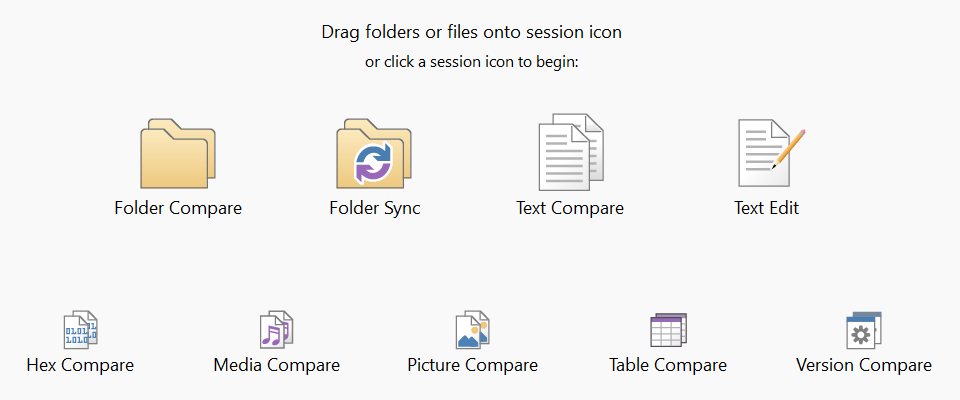
Another important note: whatever you change under Session, Session Settings, make sure you select “Also update session defaults” at the bottom of the dialog screen!

The aforementioned preconfigured syncing types:
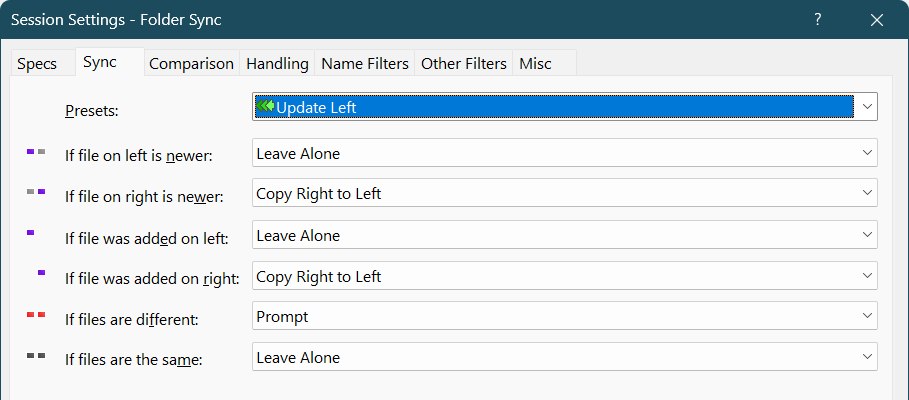
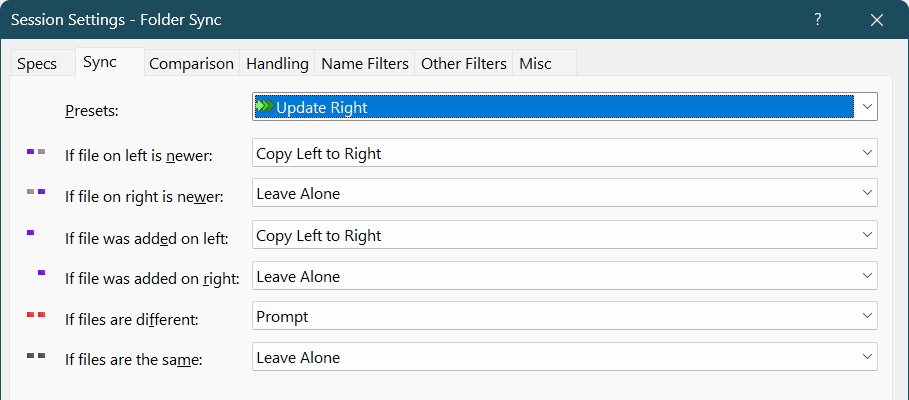
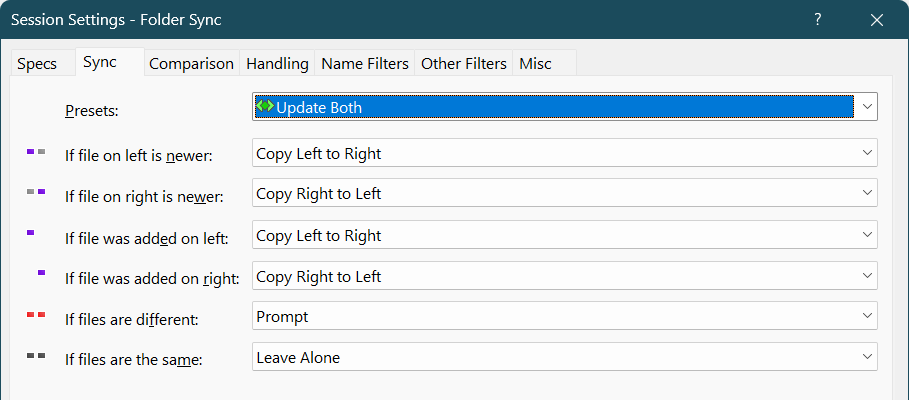
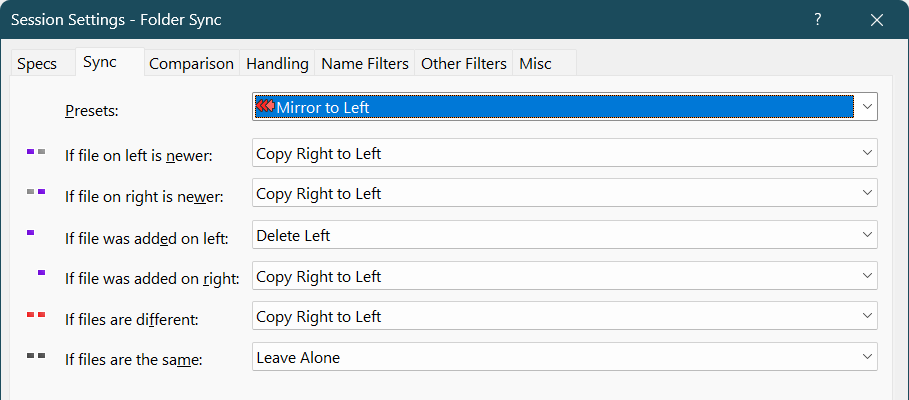
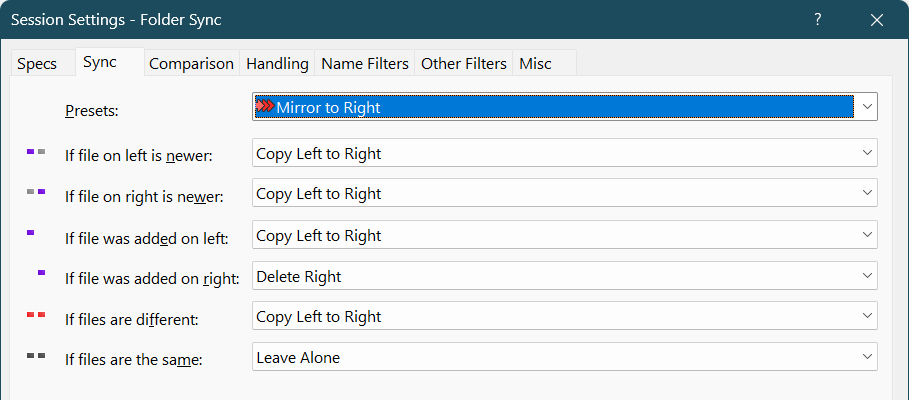
My settings for folder syncing:
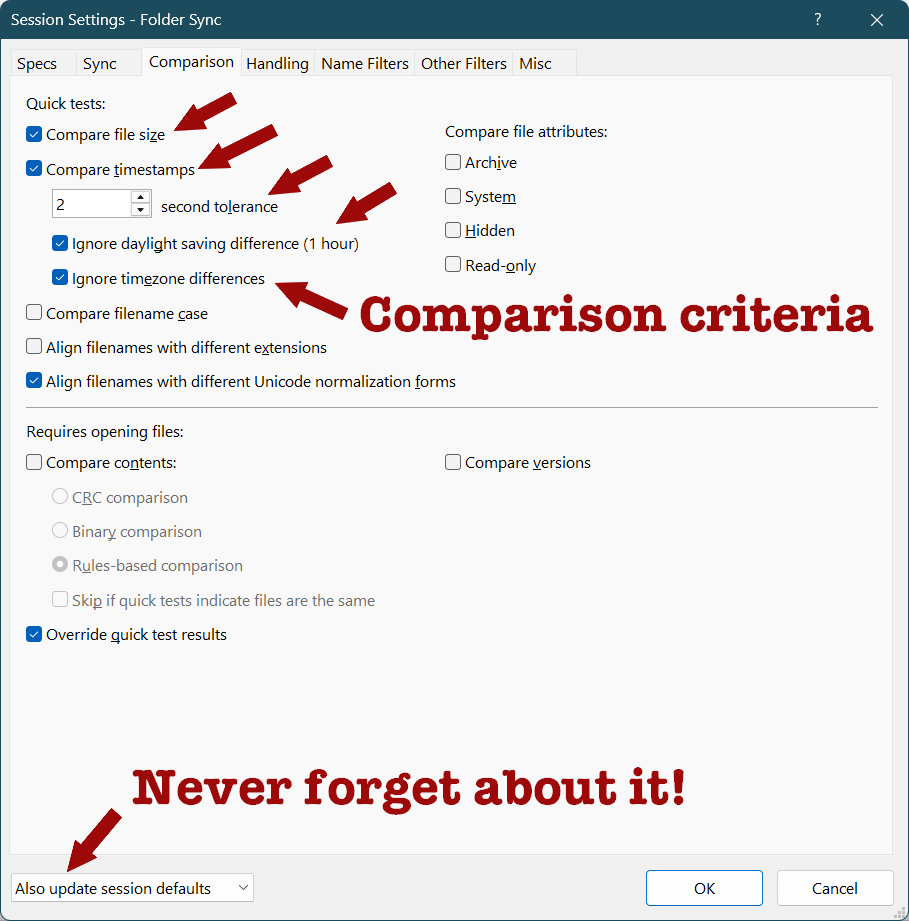
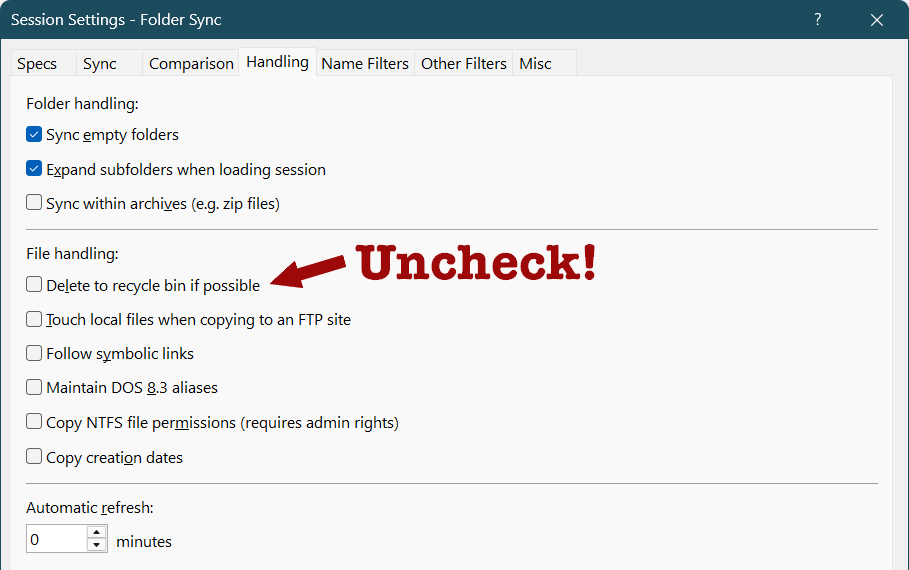
Other session types have different settings whose defaults might not be entirely to my taste or to your taste, but the syncing was my main focus and the reason I purchased a license for Beyond Compare (Standard Edition). Occasionally, there are discount coupons. In December, they had a 20% off one. As I am writing this, ILIKECHUCKIE gives you 10% off any edition. Various coupon sites should suggest better deals, but most such coupons usually don’t work. Either way, I never purchase anything at list price!
Oh, if you can’t afford Beyond Compare, then you can use WinMerge under Windows, but I can’t recommend anything else under Linux. Not for syncing for backup purposes.
How about FreeFileSync? May not have such detailed settings, but it should be able to do all those mirror/update/left/right scenarios well.
Indeed, its 3 predefined sync modes, “Two-way,” “Mirror to right,” and “Update right,” should cover everything. Obviously, actions can be overridden per file or per folder.
But I never liked their UI: it feels busy, too complex, and somewhat non-standard. Bad juju.
Their site, too, kind of sucks. Instead of video tutorials, I’d have preferred text + images.
But the most offending “feature” revealed in one of their tutorials is that this tool creates a
sync.ffs_dbfile in both (root) folders, to be used for the 2-way sync. This is a no-go for me.OTOH, Beyond Compare can also be used as a
difftool.But, of course, it’s not free.
manual backups? geez. how about rclone or rsync plus a bash script plus cron plus a 5$ vps?
You are completely retarded. I want COMPLETE CONTROL WITH MY OWN BRAIN’S SUPERVISION over my backups of:
– e-books
– MP3s
– movies
– comics
– personal documents
ON MY OFFLINE STORAGE.
About 12.5 TB of data.
When I decide to store new books, music, movies, I need to save the new ones on the appropriate backup devices, to remove the duplicates or the copies of lower quality, and so on.
As if an AUTOMATED script could MANUALLY connect and disconnect 20 external devices. As if an AUTOMATED script could take decisions that require HUMAN intelligence. Even an AI agent couldn’t do that. But script kiddies are brainwashed. “Oh, you have to do things yourself!”
Beyond Compare is indeed a great tool. Thank you for sharing how you use it! Those details will definitely help me.
My choice has been GoodSync (personal license) for synchronization and backup (both cloud and local) for quite some time now, years actually. I’m generally quite happy with it. Do you have any thoughts on it, if you have past experience?
Macrium Reflect for all other backup scenarios.
Greetings from Bulgaria! Dedoimedo brought me here.
Unfortunately, I never used GoodSync, so I can’t have an opinion about it.