
On public demand: quick RAM figures
I’ve been asked how memory-hungry Ubuntu 26.04 LTS is on my customized installation. The lazy way, gnome-system-monitor (for which I needed to add the CTRL+SHIFT+ESC shortcut because there wasn’t any) shows 2.0 GB after a reboot, when no app is active and the system doesn’t check for updates (manually check for updates, apply them if available, then reboot):
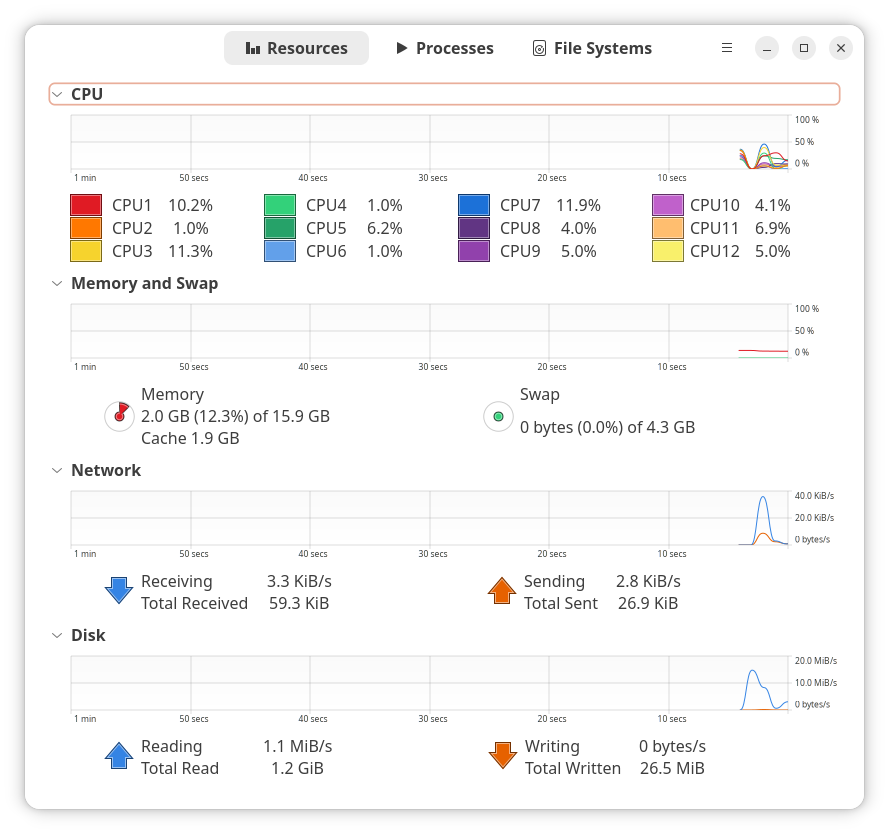
With or without customization (Ubuntu already customizes it to some degree), GNOME surely isn’t the desktop environment of choice for systems with less than 8 GB of RAM. To compare it against KDE and XFCE as live sessions from ISO files launched from Ventoy, I chose the following procedure:
- I launched the live session on the 2023 Acer that has 16 GB RAM (shared with the Intel video).
- After the Xorg or Wayland session was up, I did not connect to the Wi-Fi to avoid having it check for updates. I also avoided any attempt at an automatic initial configuration in Ubuntu and Kubuntu.
- To avoid the extra RAM taken by a GUI terminal, I switched to another virtual terminal using CTRL+ALT+F2/F3, then I logged in using
ubuntu/kubuntu/xubuntu(no password) ordemo/demo in MX. - Finally, I used
free -h(andfreefor more precise values) for a quick estimate on RAM usage. (I didn’t need details such as those offered byvmstat -s.)
Some notes:
- Different distros have different RAM policies regarding the allocation of
shared,buffer, andcache. When RAM is ample, having largerbuff/cachevalues actually makes the system more responsive. - Therefore, I considered that the
usedfield is the only relevant value to be considered. Thefreeandavailablefields bear little practical relevance.
The updated ISOs that I used:
- xebian.org/download/pending/xebian-trixie-amd64.hybrid.iso dated 2026-03-30.
- cdimage.debian.org/debian-cd/13.4.0-live/amd64/iso-hybrid/debian-live-13.4.0-amd64-xfce.iso dated 2026-03-14.
- sourceforge.net/projects/mx-linux/files/Snapshots/MX-25.1_March_Xfce.iso dated 2026-03-16
- sourceforge.net/projects/mx-linux/files/Snapshots/MX-25.1_March_KDE.iso dated 2026-03-16
- cdimage.ubuntu.com/xubuntu/daily-live/current/resolute-desktop-amd64.iso dated 2026-03-31
- cdimage.ubuntu.com/kubuntu/daily-live/current/resolute-desktop-amd64.iso dated 2026-03-31
- cdimage.ubuntu.com/ubuntu/daily-live/current/resolute-desktop-amd64.iso dated 2026-03-31
The results:
| Distro | used | used (KiB) | shared | buff/cache |
|---|---|---|---|---|
| Debian Live XFCE | 1.0 GiB | 1,062,572 | 125 MiB | 1.1 GiB |
| Xebian (stable) | 1.1 GiB | 1,144,108 | 141 MiB | 1.1 GiB |
MX XFCE sysvinit | 1.2 GiB | 1,245,128 | 134 MiB | 1.1 GiB |
MX XFCE systemd | 1.3 GiB | 1,354,468 | 146 MiB | 1.3 GiB |
MX KDE sysvinit | 1.4 GiB | 1,458,000 | 253 MiB | 1.1 GiB |
MX KDE systemd | 1.5 GiB | 1,524,992 | 251 MiB | 1.5 GiB |
| Kubuntu (Wayland) | 1.5 GiB | 1,635,736 | 338 MiB | 6.9 GiB |
| Xubuntu (Xorg) | 1.6 GiB | 1,706,192 | 244 MiB | 7.1 GiB |
| Ubuntu (Wayland) | 1.9 GiB | 2,036,848 | 466 MiB | 9.1 GiB |
Surprise findings:
- Xubuntu is far less optimized than Kubuntu!
- GNOME in Ubuntu isn’t that bad, after all, and it tends to use the RAM for kernel buffers and disk cache. But you need at least 16 GB of RAM (seen as 15 GB if shared with the video) to really benefit of such huge buffers and page cache.
- MX doesn’t change its RAM policy on systems with plenty of RAM, remaining optimized for 4 GB.


◄ Dafuq: Claude Code appears to have leaked! 😱 ◄ [newer] | [older ] ► La musique n’existe plus. L’IA l’a tuée ! ►
Added MX KDE to the comparison. (Previously, only MX XFCE was tested, but the D/L link was given for the KDE ISO.)
Liam Proven, who loves XFCE for its keyboard shortcuts from the IBM/CUA era (and who’s using it with a left vertical panel), in Ubuntu 26.04 beta arrives packing GNOME 50, which no longer supports Google Drive:
He got challenged in the comments:
He answered:
He didn’t seem to have noticed how heavy XFCE is in Xubuntu compared to, say, MX!
Added Debian XFCE and Xebian stable to the comparison.