Gemini: In a nutshell, the reason these projects exist—and have to perform complex gymnastics to make portable Linux applications—comes down to a fundamental difference in how Linux and Windows designed their executable formats and dynamic linkers.
The short answer is yes, this is primarily a Linux (and Unix-like) restriction. Windows handles dynamic linking completely differently, which makes true “portable apps” natively trivial on Windows but highly complex on Linux.
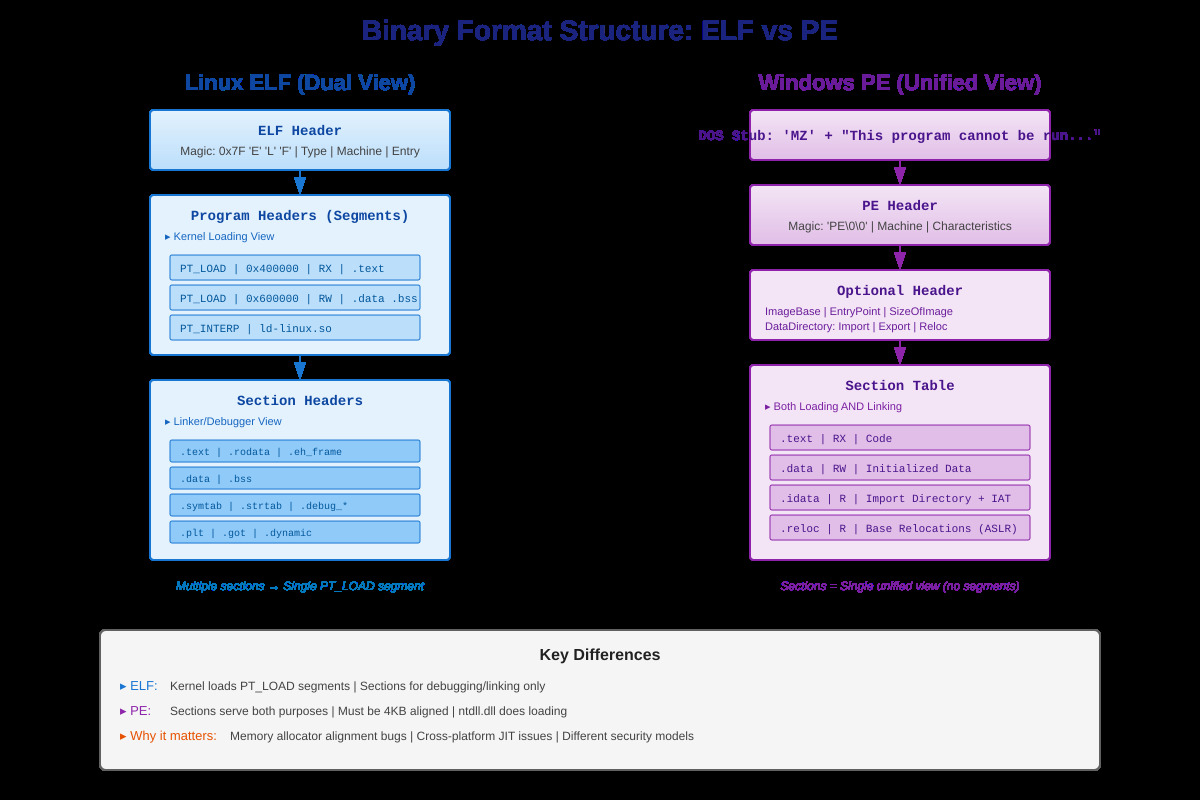
On Linux, executables are compiled into the ELF (Executable and Linkable Format). When you run an ELF binary, the Linux kernel itself does very little. Instead, it looks inside a specific section of the binary (the .interp section) to find the dynamic linker/interpreter.
The Hardcoded Interpreter: The path to this interpreter is physically hardcoded into the binary—usually something like /lib64/ld-linux-x86-64.so.2.
System-wide Dependencies: Once the kernel hands control to ld-linux.so, that linker looks for shared libraries (.so files) in global system directories like /lib and /usr/lib.
The result: If you move that binary to a system that doesn’t have the interpreter at that exact absolute path (like NixOS or a system using musl instead of glibc), the kernel throws a confusing “No such file or directory” error—even though the executable file is sitting right in front of you.
How Windows Does It (The Contrast)
Windows uses the PE (Portable Executable) format. It handles loading dependencies fundamentally differently:
No External Interpreter: Windows doesn’t hardcode a path to an external userspace program to load dependencies. The OS loader is built deeply into the Windows kernel and system libraries (ntdll.dll). It inherently knows how to parse and load an .exe.
Local Directory First: When a Windows .exe asks for a .dll, the Windows loader follows a strict search order. It always searches the application’s own directory first before falling back to system folders (System32) or the PATH environment variable.
The result: On Windows, you can just dump an .exe and all its required .dll files into a single folder, move that folder to any Windows machine, and it will run perfectly.
What Anylinux-AppImages and Brioche Actually Do
Because Linux doesn’t natively support this “just put everything in a folder” philosophy, projects like Brioche and Anylinux-AppImage have to hack around the ELF format limitations. To make an app truly portable across any Linux distro, they must:
Bundle the Linker: They bundle a copy of the ld-linux.so dynamic linker inside the package alongside all the .so dependencies.
Bypass the Hardcoded Path: Because they can’t rely on the host system’s interpreter path, they write wrapper scripts that execute their bundled dynamic linker first, passing the target executable as an argument (e.g., executing exec ./ld-linux.so ./my_app instead of ./my_app).
Force Local Search: They pass specific flags (like --library-path) or use RPATH/$ORIGIN to force the bundled dynamic linker to load dependencies from the local folder rather than the host system’s /usr/lib.
Fix the Quirks: Running an app via an explicit linker introduces weird bugs. For example, if the app asks the OS “what is my filepath?” (by reading /proc/self/exe), the OS will reply with the path to the linker, not the app. Both projects have to include elaborate hooks and hacks to trick the application into seeing its correct identity and namespace.
Ultimately, these tools are recreating the native Windows “Application Directory” behavior in userspace on Linux, dragging along their own standard C library (glibc) to ensure they aren’t tripped up by the host operating system.
Ludditus: So, even if today’s Windows 11 is bloated and many people hate it, it still includes some smart, practical design decisions that probably date from the Win95 or even Win3.1 era?
Gemini: Underneath the modern layers of AppX packages, telemetry, and forced Edge integrations, the core execution model of Windows 11 relies on pragmatic architectural decisions forged during the MS-DOS and Windows 3.1 eras. That “app directory first” loading order is a direct evolutionary descendant of how early software had to be distributed.
Back in the early 1990s, compiling C/C++ applications for Win16 meant dealing with strict memory segments and limited hardware, but deployment was remarkably straightforward. Because software shipped on floppy disks without a centralized package repository, an application had to be entirely self-contained. The OS was explicitly designed to check the .exe‘s immediate directory for custom .dll files before falling back to C:\WINDOWS\SYSTEM. This philosophy of local isolation survived the transition to Win32 and remains the reason why portable apps work seamlessly on Windows today.
Beyond the DLL search order, modern Windows retains several other brilliant design choices from that era:
Ruthless API Stability: The Win32 API is one of the most stable interfaces in computing history. An application compiled for Windows 95 will very likely execute perfectly on Windows 11 today. The OS goes to extreme lengths to spoof older environments for legacy applications rather than breaking their execution.
WoW64 Subsystem: When transitioning to 64-bit architecture, Microsoft built “Windows 32-bit on Windows 64-bit.” Instead of forcing users to manually manage multi-architecture libraries (a common headache when maintaining lean Linux desktop environments), WoW64 silently catches 32-bit system calls and translates them to 64-bit equivalents. The user never notices.
WinSxS (Side-by-Side Assemblies): When the “app directory first” rule was ignored by developers who greedily dumped shared libraries into the global System32 folder, it caused “DLL Hell” (where installing one app broke another by overwriting a shared dependency). Microsoft solved this by doubling down on isolation, allowing multiple versions of the exact same DLL to live on the disk simultaneously, with applications declaring exactly which version they need via XML manifests.
While the modern Windows user space has grown heavy, the foundational NT kernel and the PE binary loader are masterclasses in backward compatibility and deployment simplicity.
santosh -September 16th, 2026 at 7:39 AMnone
Comment author #117248 on Anylinux AppImages—or why Windows is superior to Linux by Homo Ludditus
True. I run ClockX (analog desktop clock) on Windows which was apparently last recompiled ages back and still runs on latest Windows without an issue. Something like that is impossible on Linux, even for a static binary independent of glibc I suspect.
Another huge handicap of Linux (self-imposed) is its lack of stable internal kernel ABI. So proprietary drivers (Nvidia is the notable culprit) need to constantly recompiled every time there’s even a minor kernel update. Half the support requests on forums are from newbies who suddenly cant boot their system after a minor kernel update coz their display driver broke. This kind of silliness never happened in Windows after the 9x era.
Samueru-sama -September 17th, 2026 at 10:08 AMnone
Comment author #117251 on Anylinux AppImages—or why Windows is superior to Linux by Homo Ludditus
Hi, I’m the creator of Anylinux-AppImages and I want to leave some corrections:
Reading all this can be overwhelming
It is really not, if you understand how the shebang in shell scripts works this problem is not that different.
they write wrapper scripts that execute their bundled dynamic linker first
We don’t write such scripts.
For example, if the app asks the OS “what is my filepath?” (by reading /proc/self/exe), the OS will reply with the path to the linker, not the app. Both projects have to include elaborate hooks and hacks to trick the application into seeing its correct identity and namespace.
It’s not hooks and hacks, this implies there are several workarounds, all that needs to be done is perform the execvein userland and this way /proc/self/exe points at the desired location.
Béranger -September 17th, 2026 at 12:52 PMnone
Comment author #117252 on Anylinux AppImages—or why Windows is superior to Linux by Homo Ludditus
Thanks. If a chatbot that read documents on several solutions to this problem conflated what others did with what you did (or didn’t), it only shows how complex this is. Don’t try to pretend it isn’t. If it weren’t, it would have “just worked.”
This is actually dumb and, to me, even sickening. I am literally disgusted by some design choices made in the UNIX world.
I learned more than 30 years ago that in any UNIX-related OS, the current working directory isn’t in the path. I was told that this is a security feature, and I feigned understanding. But this choice is a “pain by choice” decision, and it created more problems than it solved.
If the CWD isn’t in the path, even if there are distinct path variables for binaries and libraries, you cannot fix the “DLL hell” by automatically preferring the libraries present in the CWD. You just can’t.
Then, if even the dynamic linker’s path is hardcoded, how is this architecture not designed by mentally retarded people?
The fact that a portable app in Linux needs “special fixes” is the supreme proof that this is blatantly bad design.
Samueru-sama -September 17th, 2026 at 2:09 PMnone
Comment author #117253 on Anylinux AppImages—or why Windows is superior to Linux by Homo Ludditus
Thanks. If a chatbot that read documents on several solutions to this problem conflated what others did with what you did (or didn’t), it only shows how complex this is.
No… AI is very bad at this because it has been poisoned by the appimage docs lol.
In other words, if Linux fixed the relative PT_INTERP issue you would still need to use our deployment tools and wouldn’t notice any change, the change would internal in sharun dropping the userland-execve library xd.
Béranger -September 17th, 2026 at 2:16 PMnone
Comment author #117254 on Anylinux AppImages—or why Windows is superior to Linux by Homo Ludditus
Is windows binary compat actually that good?
Will a binary built in windows 11 actually work on windows 8 always for example?
Sorry, but this was a retarded question. This is not how compatibility works. It’s always forward, not backward. “Backward compatibility” means that a future OS will support an older binary, not the other way around.
I have software from 1999, built for Win95, that runs perfectly under Win11. And I literally purchased it on CD-ROM, so I should have the fucking right to still use it.
In Linux, nothing works if the tiniest required library has changed the version.
Samueru-sama -September 17th, 2026 at 2:56 PMnone
Comment author #117255 on Anylinux AppImages—or why Windows is superior to Linux by Homo Ludditus
Sorry, but this was a retarded question. This is not how compatibility works. It’s always forward, not backward. “Backward compatibility” means that a future OS will support an older binary, not the other way around.
Then you totally got Anylinux-AppImages wrong.
We deploy on archlinux and guarantee the applications will work with both newer and older systems.
Anyways, I’m updating the FAQ with a better explanation shows that the problem we are fixing is really not that complicated… It is just one issue where the fix is doing execve in userland instead of the kernel.
Béranger -September 17th, 2026 at 3:06 PMnone
Comment author #117256 on Anylinux AppImages—or why Windows is superior to Linux by Homo Ludditus
For some reason I can’t reply to your comment so I will write again here.
The reason is that you don’t understand that I could configure WordPress to accept any level of indentation, but a reply to a reply to a reply to a reply to a reply to a reply to a reply to a reply to a reply to a reply would lead to a grotesque and unreadable comments section. I used to allow 9 levels of indentation; now only 4.
You could have replied to your first comment instead of replying to the root level. Oh, boy, Linux is simple, but commenting is rocket science.
Then you totally got Anylinux-AppImages wrong.
I did not, because I never intended to “get” anything. I normally avoid AppImages, if that was not obvious.
We deploy on archlinux and guarantee the applications will work with both newer and older systems.
No. Stop saying nonsense. Your AppImages will work with SOME DEGREE of compatibility with older Linux systems. They WOULD NOT WORK ON A VERY OLD DISTRO for several reasons, mainly because some libraries would literally not work with a very old kernel, no matter what you’d try.
You did not invent magic, because magic cannot exist.
Béranger -September 17th, 2026 at 3:17 PMnone
Comment author #117258 on Anylinux AppImages—or why Windows is superior to Linux by Homo Ludditus
2014 is not old enough. Try 2006-2008. Try Debian 4.0. Try Slackware 96.
You LITERALLY CANNOT PATCH EVERYTHING, dammit! Stop pretending you’re God! (Again, because there cannot be any God.)
Samueru-sama -September 18th, 2026 at 1:34 PMnone
Comment author #117259 on Anylinux AppImages—or why Windows is superior to Linux by Homo Ludditus
Hi @Béranger I just added support for even older kernels, just like we already implement execve in userland to fix the binary compat issue, we just need to emulate the missing syscalls of older kernels (no library patching needed).
Kernel 2.6.17 is the minimum we can go, which is Ubuntu 6.10 – 2006, anything older lacks openat and makes the appimage totally unable to start, this would a feature request for dwarfs to drop the hard dependency on openat to allow work on supporting systems older than that.
Have a nice day, we try our best to improve AppImage, I will personally make sure xorg will keep working in the future, even on GTK5 which will drop support for it.
This blog uses technologies like cookies to store and/or access device information. Consenting to these technologies will allow us to process data such as browsing behavior or unique IDs on this site. Not consenting or withdrawing consent will adversely affect certain features and functions.
Functional
Always active
The technical storage or access is strictly necessary for the legitimate purpose of enabling the use of a specific service explicitly requested by the subscriber or user, or for the sole purpose of carrying out the transmission of a communication over an electronic communications network.
Preferences
The technical storage or access is necessary for the legitimate purpose of storing preferences that are not requested by the subscriber or user.
Statistics
The technical storage or access that is used exclusively for statistical purposes.The technical storage or access that is used exclusively for anonymous statistical purposes. Without a subpoena, voluntary compliance on the part of your Internet Service Provider, or additional records from a third party, information stored or retrieved for this purpose alone cannot usually be used to identify you.
Marketing
The technical storage or access is required to create user profiles to send advertising, or to track the user on a website or across several websites for similar marketing purposes.

True. I run ClockX (analog desktop clock) on Windows which was apparently last recompiled ages back and still runs on latest Windows without an issue. Something like that is impossible on Linux, even for a static binary independent of glibc I suspect.
Another huge handicap of Linux (self-imposed) is its lack of stable internal kernel ABI. So proprietary drivers (Nvidia is the notable culprit) need to constantly recompiled every time there’s even a minor kernel update. Half the support requests on forums are from newbies who suddenly cant boot their system after a minor kernel update coz their display driver broke. This kind of silliness never happened in Windows after the 9x era.
Hi, I’m the creator of Anylinux-AppImages and I want to leave some corrections:
It is really not, if you understand how the shebang in shell scripts works this problem is not that different.
We don’t write such scripts.
It’s not hooks and hacks, this implies there are several workarounds, all that needs to be done is perform the
execvein userland and this way/proc/self/exepoints at the desired location.Thanks. If a chatbot that read documents on several solutions to this problem conflated what others did with what you did (or didn’t), it only shows how complex this is. Don’t try to pretend it isn’t. If it weren’t, it would have “just worked.”
This is actually dumb and, to me, even sickening. I am literally disgusted by some design choices made in the UNIX world.
I learned more than 30 years ago that in any UNIX-related OS, the current working directory isn’t in the path. I was told that this is a security feature, and I feigned understanding. But this choice is a “pain by choice” decision, and it created more problems than it solved.
If the CWD isn’t in the path, even if there are distinct path variables for binaries and libraries, you cannot fix the “DLL hell” by automatically preferring the libraries present in the CWD. You just can’t.
Then, if even the dynamic linker’s path is hardcoded, how is this architecture not designed by mentally retarded people?
The fact that a portable app in Linux needs “special fixes” is the supreme proof that this is blatantly bad design.
No… AI is very bad at this because it has been poisoned by the appimage docs lol.
I actually had to add this to `quick-sharun` after I saw some project doing some horrible stuff with AI: https://github.com/pkgforge-dev/Anylinux-AppImages/blob/35921702c1e99bf2e1c15f8aafd58699493b2984/useful-tools/quick-sharun.sh#L15-L29
Is windows binary compat actually that good?
Will a binary built in windows 11 actually work on windows 8 always for example?
Because the way we build our appimages that is the case.
See this example: https://github.com/PixelGuys/Cubyz/issues/2975#issuecomment-4315191567
The Cubyz developer thought they could get away by using zig to build a binary that would work in older glibc, which it does technically.
However distros using such old glibc also have versions of MESA that do not support OpenGL4.6 which this app needs, meaning it is still broken.
With appimage we can just ship the Mesa drivers, See our vkcube+glxgears demos here: https://github.com/pkgforge-dev/Anylinux-AppImages/releases/tag/demo
In other words, if Linux fixed the relative PT_INTERP issue you would still need to use our deployment tools and wouldn’t notice any change, the change would internal in
sharundropping the userland-execvelibrary xd.Sorry, but this was a retarded question. This is not how compatibility works. It’s always forward, not backward. “Backward compatibility” means that a future OS will support an older binary, not the other way around.
I have software from 1999, built for Win95, that runs perfectly under Win11. And I literally purchased it on CD-ROM, so I should have the fucking right to still use it.
In Linux, nothing works if the tiniest required library has changed the version.
As for why building for Win7 under Win10 has been made close to impossible by Microsoft, read The little DLL that broke Windows 7 (on purpose).
Then you totally got Anylinux-AppImages wrong.
We deploy on archlinux and guarantee the applications will work with both newer and older systems.
Anyways, I’m updating the FAQ with a better explanation shows that the problem we are fixing is really not that complicated… It is just one issue where the fix is doing execve in userland instead of the kernel.
https://github.com/pkgforge-dev/Anylinux-AppImages/pull/888
The reason is that you don’t understand that I could configure WordPress to accept any level of indentation, but a reply to a reply to a reply to a reply to a reply to a reply to a reply to a reply to a reply to a reply would lead to a grotesque and unreadable comments section. I used to allow 9 levels of indentation; now only 4.
You could have replied to your first comment instead of replying to the root level. Oh, boy, Linux is simple, but commenting is rocket science.
I did not, because I never intended to “get” anything. I normally avoid AppImages, if that was not obvious.
No. Stop saying nonsense. Your AppImages will work with SOME DEGREE of compatibility with older Linux systems. They WOULD NOT WORK ON A VERY OLD DISTRO for several reasons, mainly because some libraries would literally not work with a very old kernel, no matter what you’d try.
You did not invent magic, because magic cannot exist.
The FAQ already has several examples showing this.
When new apps get PRed to the list I test them in an Ubuntu 14.04 VM.
😁 https://github.com/pkgforge-dev/Anylinux-AppImages/issues/640#issuecomment-4699732238
We go as far as patching libraries to make sure they work in older kernels.
2014 is not old enough. Try 2006-2008. Try Debian 4.0. Try Slackware 96.
You LITERALLY CANNOT PATCH EVERYTHING, dammit! Stop pretending you’re God! (Again, because there cannot be any God.)
Hi @Béranger I just added support for even older kernels, just like we already implement
execvein userland to fix the binary compat issue, we just need to emulate the missing syscalls of older kernels (no library patching needed).https://github.com/pkgforge-dev/Anylinux-AppImages/pull/890
Kernel 2.6.17 is the minimum we can go, which is Ubuntu 6.10 – 2006, anything older lacks
openatand makes the appimage totally unable to start, this would a feature request for dwarfs to drop the hard dependency onopenatto allow work on supporting systems older than that.Have a nice day, we try our best to improve AppImage, I will personally make sure xorg will keep working in the future, even on GTK5 which will drop support for it.
Great news! However, the above assertion seems a bit too presumptuous, or maybe a tad too optimistic.