
The most practical keyboards are… not the mechanical ones!
“You’ll never guess which keyboards prove to be the best for me!” I was about to use such a clickbait-style title because it would have been true. When reality contradicted the myth, I was surprised myself!
Almost a month ago, I wrote a rant about keyboards on my experimental secondary site, Quick Luddite Notes. It includes some aspects relevant to my approach to keyboards, so I’ll reproduce below the rant-like part:
I no longer believe in good keyboards because they no longer exist.
Keyboards for writing, not for gaming.
Keyboards without RGB lighting and without pulsating white lighting, either.
Keyboards that, if they have normal, static lighting, don’t require it to be on for the lettering to be clearly visible. That means that the letters need to be painted, not shine-through areas for the light.
Keyboards that aren’t too mushy or too clicky.
Keyboards that aren’t full-height, because we’re not in 1981 anymore. We’ve been using laptops for more than 25 years. The myth of the fabulous IBM Model M keyboard is just overhyped nostalgia. Yes, I have used it back in the day. No, I didn’t write that many words a day back then.
Today’s keyboards are 100% crap.
If they’re office membrane keyboards, most of them are unusable. The few acceptable ones might only come in US ANSI layouts, and I really need DE-ISO. The famous Microsoft Wired 600 keyboard was surprisingly productive, except for the fucked-up F1-F12 keys. But the retards stopped making it, and the Incase Wired 600 successor only has a US ANSI layout. How can such morons survive in capitalism? Oh, the Logitech K120 is quite usable for a cheap keyboard, but I’m sick of it.
Most low-profile scissor-switch keyboards are also crappy, sometimes even crappier than the actual laptop keyboards. For instance, the Cherry Stream TKL (I prefer TKL or even 75% keyboards as long as they include Home, End, PgUp, PgDn, and decent arrow keys) does have scissor-switch keys, but the actuation force is 65 g. This might not sound excessive, and the 2.8 mm travel seems fine, but writing a lot on it becomes painfully unpleasant. Most likely, the actuation point is very late, so you need to press with 65 g for a long time, only to be abruptly stopped by a metal plate. How could some people say that Cherry Stream is a great keyboard, or at least a “4 out of 5” one? Why couldn’t they make a keyboard much more like a good laptop keyboard? The best keyboard your fingers could dance on was the Logitech K740 Illuminated. Everything Logitech made after it was garbage, and nobody did anything better.
All mechanical keyboards are now made for retarded gamers, not for coders, writers, or decent people.
Normal people don’t need to press 6+ keys in the same millisecond. Normal people don’t need a 2 ms response time. Normal people don’t need flashing rainbow colors.
Most gaming keyboards have only about 12 useful keys, because the rest aren’t used in games. But there is a multi-billion-dollar industry of grotesque “esport” keyboards and mice.
I loved my Keychron K3 with low-profile tactile brown optical switches until I started to hate it with all my guts. The tactile feel is still fine, but surprisingly, my speed and accuracy are lower than on either the Microsoft Wired 600 or the Logitech K740. I’m not sure why this happens, but I have other annoyances with Keychron’s keyboards.
Like most gaming keyboards, the F1-F12 keys are stupidly aligned with the top row of keys. This is not the standard keyboard layout, you fucking morons! I keep hitting F1 instead of ESC because of such idiots. Also, there should be a vertical space between the top row and the F row; there isn’t one.
Some other idiot came up with the idea of a “lightbulb” key in the top-right corner of the keyboard. So, instead of DEL or PgUp (I would have preferred a Home key there), I accidentally hit this orange key, and one of the 16 or 17 (I couldn’t even count them!) light-dancing motifs starts and drives me mad! The fucktards couldn’t switch between 1 or 2 levels of lighting and no lighting. Nope. If I don’t turn off the lighting altogether, I have to live with the risk of needing to hit a key 15 or 16 times until the lighting goes steady—or until I can barely stop myself from smashing the keyboard against a wall!
The lettering on the “A” key is partially gone—the same thing happened to my 2016 Acer laptop. I’m surprised no other key suffered the same damage (I expected the left CTRL to be affected too). But one key began to get stuck (I don’t remember which), so I had to switch it with the useless orange “lightbulb” key.
As it has a German layout (what a miracle that they bothered to manufacture keyboards with a large ISO ENTER key!), some keys have 3 levels. But the placement of some symbols isn’t intuitive: it’s not obvious which ones require SHIFT and which require AltGr. The
+*~key even has the wrong printing:+~*. Yes, the 3 levels are on a horizontal line. How helpful! Not.Finally, the rechargeable battery is almost dead (no way it had 1550 mAh!), so who cares that it’s a Bluetooth keyboard if it needs to stay connected via USB almost all the time?
I’m cured of mechanical keyboards. Full-height ones are even worse. Blue switches aren’t just clicky; they’re maddeningly clicky. Red switches feel unnatural. Brown should be the fix, but low-profile, and preferably not on a full-width keyboard, and not US ANSI, and not with dancing lights, and this, and that…
Membrane gaming keyboards? Garbage. I can’t use them. (In most cases, I can’t even see what’s written on the key without the lighting on.)
Mecha-membrane? Even worse.
Why can’t they make a very good laptop keyboard in an external casing? How is this capitalism? Is the world so much of an Idiocracy that an entire industry exists only to manufacture expensive gaming keyboards for generations of retards?
From the same quick notes site, it might be worth understanding why I can very well live with TKL keyboards, or rather, why I even prefer them!
I followed up with quick Monkeytype tests, and I wrote this post to add more to them. I wanted to talk more about operating force, actuation force, pre-travel, and total travel, but I decided it’s not worth the time. I’ll succinctly describe each keyboard, then post the speed and accuracy results.
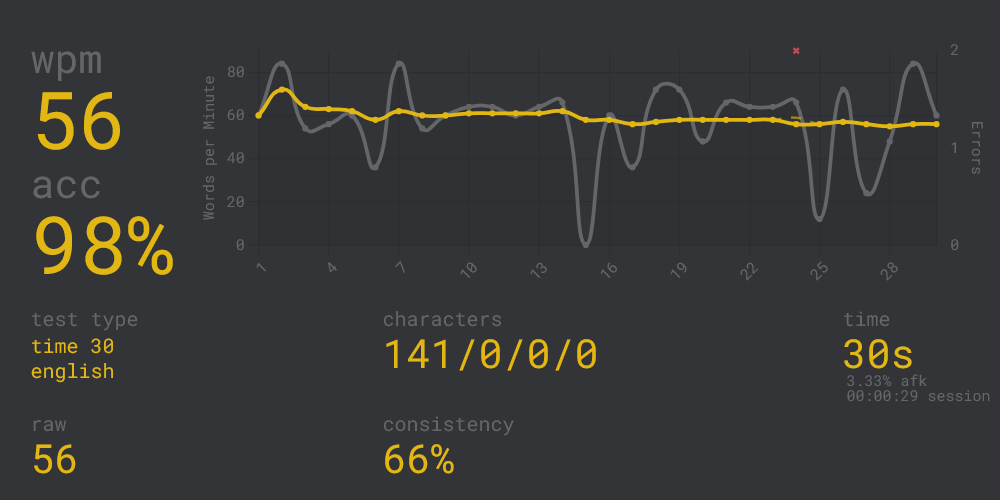
1 ● Cherry Stream TKL (also available full-size, and wireless)
Cherry Stream is tiring for heavy typists—it can literally kill your hand! While some reviewers found it to offer a “fantastic typing experience,” and I don’t deny that its actuation force is decent at 65g and the total travel is not too short at 2.8mm, the “comfortable, precise scissor-switch mechanism” is so comfortable that your fingers hit a metal plate without any cushioning and without having had the chance to decelerate enough!
The paradox is that Cherry Stream lets me write with great precision!
2 ● Keychron K3 (low-profile brown optical keys)
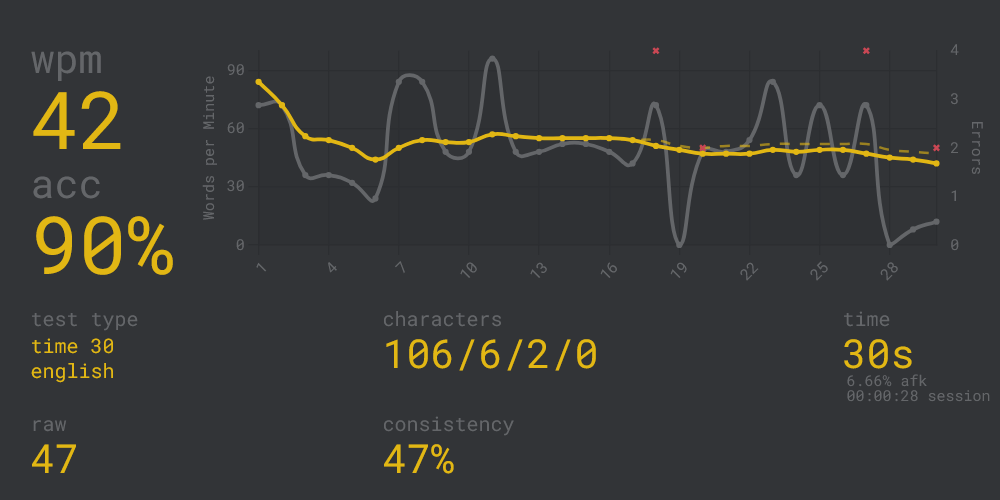
Despite other design flaws, the Keychron K3 has all the attributes of an ideal keyboard for me: low-profile, tactile, 57g actuation force, 1.1mm pre-travel, and 2.5mm total travel. The typing feel is just great!
But I make a lot of mistakes when I type on it. I kid you not!
3 ● Logitech POP Icon Keys (not the original POP!)
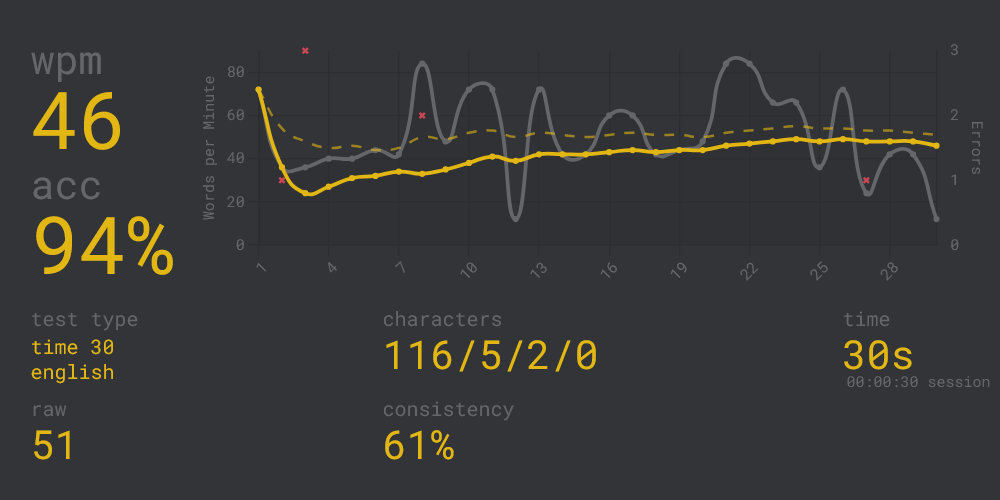
While Logitech Pebble Keys 2 K380s sucks, Logitech POP Icon Keys has a much better typing experience—7.8/10 according to some testers. It’s very laptop-ish, fully Bluetooth, and it uses 2 AA batteries. The sexiest colors to me are the off-white & orange variant.
It requires 56g of force, provides a tactile bump at only ~0.5mm into the keypress, and has a total travel of ~1.8mm. Alas, it does not feel like “a laptop keyboard, only external”! I can vouch that it can cause hand fatigue pretty quickly! I’m not sure I understand the enthusiastic reviews—it’s as if those people have never used a good laptop keyboard before.
I then decided to test the keyboards on my laptops—older and newer!
4 ● Acer TravelMate P645 (2016)
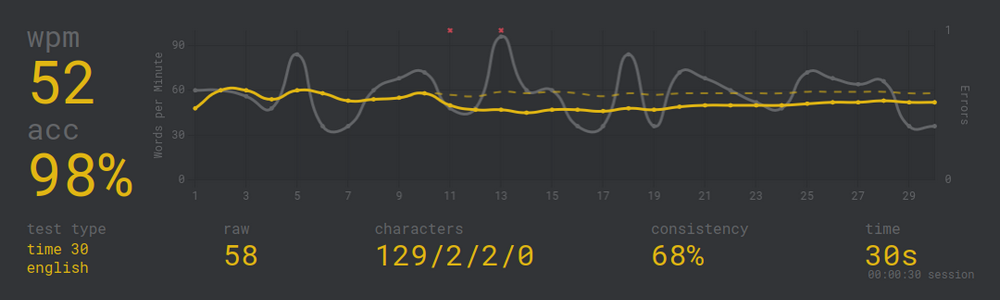
Old and very slow for anything newer than Windows 7 because of its i5-5200U, that laptop was a premium one in its heyday—not performance-wise, but regarding the build quality. It uses a magnesium-aluminum alloy cage with a carbon fiber shell, and its illuminated keyboard, while not necessarily spectacular, was (and still is!) unusually good for an Acer. No fatigue whatsoever! Oh, and the 14” screen is also atypically great for an Acer!
I was not really surprised by the results:
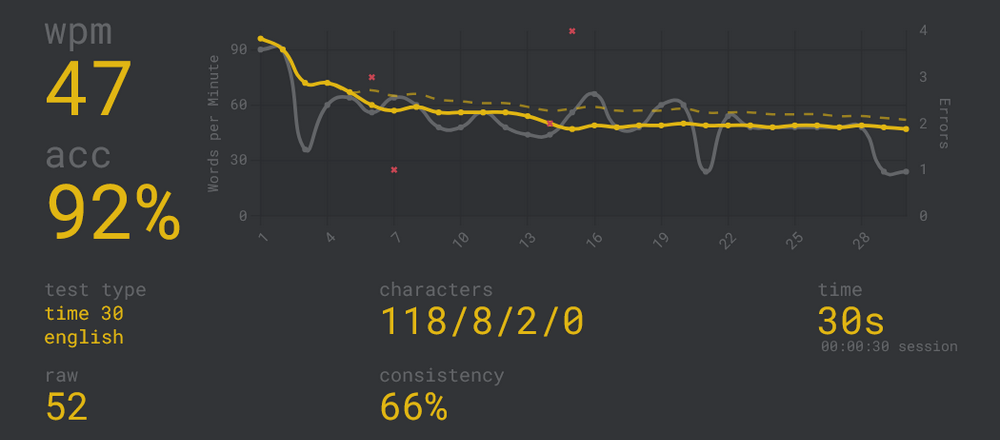
5 ● Acer Aspire 3 A315 (2023)
One of the worst laptop keyboards, honestly. If not for the typing itself, its retarded modern design is beyond stupid: the most important navigation keys beyond the arrows (Home, End, PgUp, PgDn) are missing, but not the numeric pad. Except the retards left no space between the numpad and the Backspace/Enter/Shift column, so you accidentally press a numeric key more often than not! I literally bought this laptop to be used, most of the time, with an external keyboard!
That said, the typing results are not that bad, as long as you don’t need to hit Enter:
6 ● Lenovo IdeaPad Slim 5 14IRH10 (2026)
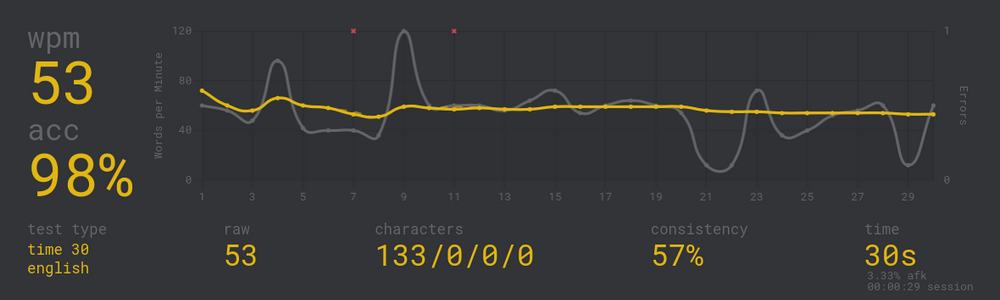
The “Slim 5” line is much more premium than the “Slim 3” line: full aluminum with anodizing and sandblasting, MIL-STD-810H-passed, and a 2-level backlight keyboard that’s quite comfortable for something that is not a ThinkPad. Great value for the price (and I am stingy, not only grumpy!)
The results are very good for a laptop, IMO:
📈 ● Summary of the results—the moment of truth!
Sorted by accuracy, then by speed:
| Keyboard | wpm | accuracy | consistency |
|---|---|---|---|
| 🥇 Cherry Stream | 56 | 98% | 66% |
| 🥈 Lenovo IdeaPad Slim 5 (2026) | 53 | 98% | 57% |
| 🥉 Acer TravelMate P645 (2016) | 52 | 98% | 68% |
| Logitech POP Icon | 46 | 94% | 61% |
| Acer Aspire 3 (2023) | 47 | 92% | 66% |
| Keychron K3 | 42 | 90% | 47% |
Oh, the shock! 😮
- The best overall keyboard is the Cherry Stream (TKL in my case), the very one that kills your hands in the long run!
- In 2nd and 3rd place, but shoulder-to-shoulder, two laptop keyboards! Lenovo happened to be slightly faster, but with lower consistency, most likely because it’s still new to me and it has a US layout—I’ve been using the premium Acer keyboard for more than ten years, and its DE layout is what I prefer these days. So, in the long run, I’m sure the Lenovo IdeaPad Slim 5 will give me higher speeds and better consistency, outclassing the Cherry Stream!
- As cute as it is, Logitech POP Icon disappoints. And it’s not even pleasant to press—it’s almost as disagreeable as the Cherry Stream!
- The fact that the cheap Acer Aspire 3 keyboard was even worse didn’t surprise me. Acer’s standard laptop keyboards have been sucking for years!
- What surprised me was that the mechanical, low-profile, tactile Keychron K3, the most expensive of all, came in last!
So let me ask again, rhetorically, all those motherfuckers who manufacture external keyboards: why don’t you just pack a decent laptop keyboard with batteries and Bluetooth (or wireless) and sell it instead of the stupid crap you sell?
Because you’re fucking retards, that’s why.
And they call this “capitalism.” It’s plain Idiocracy.
Leave a Reply