
Debian XFCE: stop blanking my screen and stop locking it!
In three types of Debian XFCE installations, I had different variations on the topics of (1) the screen going blank after 10 minutes, despite the XFCE Power Manager having “Display power management” set to 60 minutes and the screensaver being disabled or not installed at all, and (2) the screen being locked upon resuming from hibernation in spite of “Lock screen when system is going to sleep” being disabled and the computer being set to autologin without a password!
The three different setups:
- Debian 13 XFCE installed from xebian-trixie-amd64.hybrid.iso
- Debian Forky/Sid XFCE installed from xebian-unstable-amd64.hybrid.iso
- Debian 13 XFCE installed from debian-live-13.7.0-amd64-xfce.iso
It sounds like monomania, but it isn’t. The 3rd installation replaced the 2nd one on the test laptop, whereas the 1st one is the actual Linux distro I count on.
A few quirks:
xfce4-screensaveris preinstalled in Xebian, but not in Debian.light-lockeris preinstalled in Debian, but not in Xebian (both are usinglightdm).- While a cold boot honors the automatic login in all cases, resuming from hibernation does so only in my original Xebian Trixie installation.
None of the above really matters, because the culprit is another one: /usr/bin/xdg-screensaver from xdg-utils, which is a mandatory package:
$ xset q | grep -A3 'Screen Saver'
Screen Saver:
  prefer blanking:  yes    allow exposures:  yes
  timeout:  600    cycle:  600
Colors:To get rid of the undesired screen blanking and the undesired screen locking, there are two things to do.
1. Make sure nothing else interferes
First, uninstall xfce4-screensaver if it’s installed.
Then, prevent light-locker from misbehaving. For this, there are two ways: the CLI way and the GUI way. The CLI way:
gsettings set org.freedesktop.light-locker lock-on-suspend false
gsettings set org.freedesktop.light-locker lock-after-screensaver 0
gsettings set org.freedesktop.light-locker late-locking falseFor the GUI way, install dconf-editor and disable the obvious (in my case, late-locking was already off):
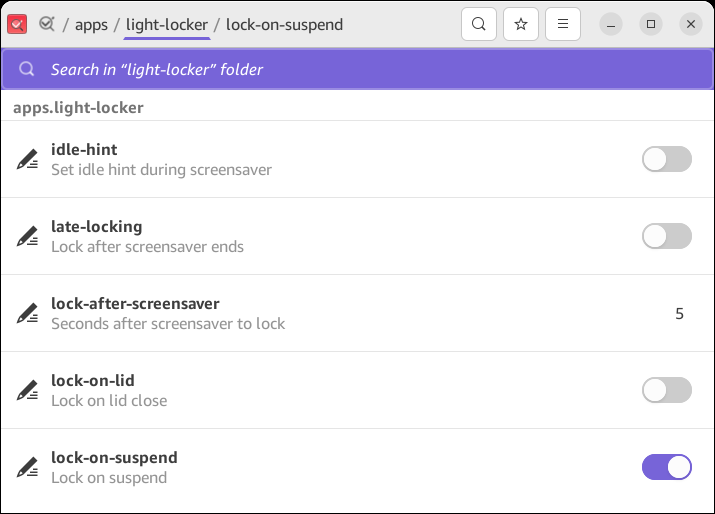
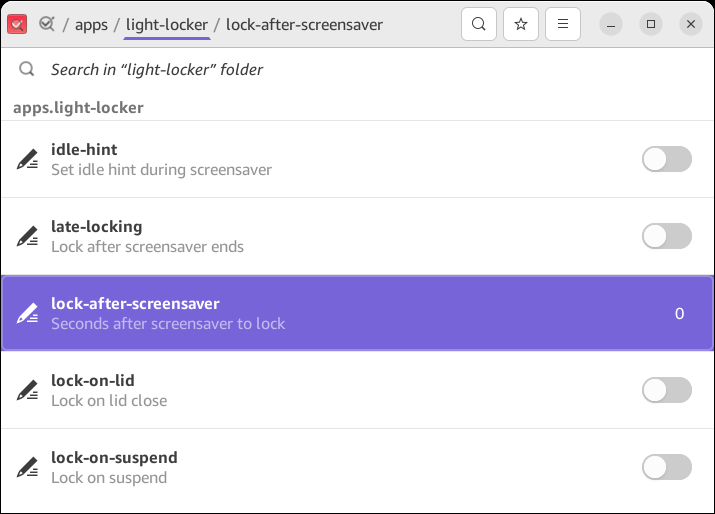
2. Castrate the xdg-screensaver that cannot be uninstalled
For immediate but temporary effect:
xset s offNow, make it persistent. You can do it for your user only, or system-wide.
For your user only:
echo 'xset s off' >> ~/.xsessionrcFor everyone (XFCE uses X11):
sudo mkdir -p /etc/X11/xorg.conf.d
printf 'Section "ServerFlags"\n Option "BlankTime" "0"\nEndSection\n' | sudo tee /etc/X11/xorg.conf.d/10-no-blank.confThis fixed my issues.
That said, if you want to lock the screen using the padlock icon in the Whisker Menu, which launches xflock4, you need to have either xfce4-screensaver or light-locker installed.
Leave a Reply