
The Big Font Mystery—Solved?
Sometimes, to make me attempt to investigate something that bothers me but does not intrigue me to the point of really awakening my interest, a chain of events needs to happen.
The trigger
In this case, these were the steps that triggered it:
- On May 12, I posted Small polish touches to Debian 13 installed via Xebian, to which I added updates and made corrections.
- At some point, Dino read it, but I was not aware of the fact.
- On Oct. 16, Dino posted How to make Debian Xfce shine. I was not aware of this fact either.
- On Oct. 25, I posted Debian XFCE: stop blanking my screen and stop locking it!
- The same day, Dino added a comment to it.
- Since his name links to his website, I went there and, within ten minutes, I discovered the aforementioned post about Debian. I even found something in it I wasn’t aware of, namely a fix regarding LightDM “forgetting” the username, so I mentioned it in a reply to his comment.
- In the process, though, I noticed something else in his post about Debian:
I changed the theme to Adwaita-dark and the icon theme to Qogir-dark, then adjusted the fonts (Adwaita Sans, size 13) and RGB rendering, and I was golden. The system suddenly became easy and logical to use, and it looks exactly the way I like it.
What I know
I know for a fact that Adwaita Sans and Inter look great under GNOME, but their rendering is quite shitty in any other desktop environment, XFCE included. I used to take this as is and never ask any questions until I decided that I needed to know more about it.
Now I regret this decision. Ignorance is bliss.
What I want to add
- I love the look of Inter more than Adwaita Sans, which isn’t bad either.
- Adwaita Sans is supposed to be a better choice than Inter. That is, for GNOME users.
- Adwaita Mono is based on Iosevka, but I never used it. Iosevka itself is a PITA because each release has 455 assets, and it’s difficult to find your way in such a mess. The relevant info is that Iosekva Term has ligatures (which I hate!), whereas Iosevka Fixed doesn’t (which makes it predictable: a character is a character is a character). Back when I was using AlmaLinux KDE, I suggested some download links; when I had Lubuntu 25.10, I offered other links; for Debian XFCE, I provided yet another set of links (for versions 33.3.3 and 34.5.0 of Iosevka Fixed). I also noted that Debian 13 lacks these fonts. Today, I’d say that the easiest way is to retrieve and install a package for Debian Sid (
fonts-iosevka). - Adwaita Sans is also missing from Debian 13, so grabbing a Sid package is also the easy fix (
fonts-adwaita). Inter, being an older font, does exist in Debian 13 (fonts-inter).
What Gemini told me
❶ Ludditus: I have my reservations regarding Adwaita Sans. While not as catastrophically bad as in the case of Inter, Adwaita Sans seems to render much worse under XFCE than under GNOME. I have no idea why.
Gemini: You are not imagining it, and the connection you drew to Inter hits the nail right on the head: Adwaita Sans is a customized build of Inter.
The reason it renders well in GNOME and falls apart in XFCE comes down to a fundamental clash between how Inter/Adwaita Sans was designed and how GTK3 (XFCE) vs. GTK4 (GNOME) put pixels on your screen.
1. The GTK3 vs. GTK4 Rendering Engine Divide
- XFCE runs on GTK3 (Cairo): GTK3 uses the legacy Cairo text pipeline, which strictly obeys your desktop’s Fontconfig settings. By default in XFCE, this means Slight or Medium Hinting combined with RGB Subpixel Antialiasing. Cairo aggressively snaps the tops, bottoms, and stems of letters to the physical pixel grid to make them sharp.
- GNOME runs on GTK4: Modern GNOME apps use GTK4’s GPU-accelerated rendering pipeline (NGL/Vulkan), which completely ignores vertical and horizontal grid-snapping by default (
gtk-font-rendering=automatic) and drops subpixel RGB rendering in favor of unhinted grayscale antialiasing with fractional glyph positioning.2. Why Inter and Adwaita Sans Hate Hinting
Inter (and by extension Adwaita Sans) was designed with Apple’s macOS/iOS rendering philosophy in mind—meaning it expects to be rendered smoothly across fractional pixel boundaries without being forced onto a rigid grid.
When XFCE’s GTK3 engine forces hinting and RGB subpixel rendering onto Adwaita Sans at standard non-HiDPI resolutions (like 1080p at 96 DPI), three things go wrong:
- Uneven stem weights: Because Adwaita Sans isn’t manually tuned with traditional TrueType bytecode hinting instructions for low-DPI grids, FreeType’s auto-hinter has to guess. One vertical stem gets snapped to 1 pixel wide, and the next gets snapped to 2 pixels wide.
- Kerning collisions: GTK3 snaps the starting position of every single letter to a whole integer pixel. Because Inter has very tight default tracking (letter-spacing), rounding a letter’s position by even 0.4 pixels causes random letters to smash together while others look drifted apart.
- Why Adwaita Sans is slightly better than stock Inter: Stock Inter frequently ships or gets installed as a Variable Font (
InterVariable.ttf), and FreeType’s auto-hinter in GTK3 is notorious for mangling variable font outlines (making them look blotchy, overly bold, or ragged). GNOME compiles Adwaita Sans as static tables with tweaked metrics, saving it from the worst of the variable-font bug—which is why it looks merely “bad” in XFCE rather than “catastrophically bad.”How to Test (or Fix) It in XFCE
If you want to see Adwaita Sans in XFCE look closer to how GNOME renders it—or at least stop the auto-hinter from deforming the glyphs—you can test changing XFCE’s Appearance settings:
- Open Settings -> Appearance -> Fonts.
- Change Hinting from Slight/Medium to None.
- Change Sub-pixel order from RGB to None (switches to grayscale antialiasing).
The Catch: Turning off hinting and subpixel rendering in XFCE will make Adwaita Sans much more proportional and even, but because GTK3 still lacks GTK4’s linear-light gamma correction and fractional subpixel positioning, unhinted text on a 1080p monitor in XFCE may look slightly too soft or blurry for your taste.
If you are on a standard-DPI monitor in XFCE, fonts specifically engineered around FreeType’s pixel-grid auto-hinter—like Noto Sans, Ubuntu Sans, Cantarell, or DejaVu Sans—will almost always outperform Inter derivatives in GTK3.
❷ Ludditus: However, I never use RGB Subpixel Antialiasing, but only grayscale antialiasing, and Adwaita Sans still has broken hinting. Should I switch from Full Hinting to Medium Hinting? How is this supposed to be better?
Gemini: Yes—switching away from Full Hinting will make an immediate difference, though moving all the way down to Slight Hinting (
hintslight) is usually the real sweet spot for modern fonts like Adwaita Sans.In Fact, Full Hinting is the exact culprit mangling your glyphs right now.
Why “Full Hinting” Breaks Adwaita Sans
To understand why lowering hinting makes a font look better, it helps to look at how the FreeType engine in Linux handles the three hinting modes (
hintfull,hintmedium,hintslight):
- Full Hinting (
hintfull): Forces the outlines of every letter to snap rigidly to the pixel grid on both the X-axis (horizontal) and Y-axis (vertical).- Why this was great in 2005: Fonts like DejaVu Sans, Liberation Sans, or Microsoft’s Tahoma/Verdana had painstaking, hand-written TrueType bytecode instructions inside the font file telling the renderer exactly which pixels to turn on at 9pt, 10pt, 11pt, etc.
- Why it ruins Adwaita Sans: Adwaita Sans (like Inter and almost all modern open-source fonts) has no manual X-axis bytecode. When you select “Full Hinting” in XFCE, FreeType aggressively shoves the vertical stems of letters left or right to fit whole pixels. Because it’s doing this mathematically without human guidance, a lowercase
mmight have its first leg stretched wide and its second leg squished narrow, while horizontal spacing (kerning) gets completely wrecked.- Medium Hinting (
hintmedium): Still attempts to snap vertical stems to the horizontal X-axis grid, just with slightly less aggressive distortion than Full. However, on modern unhinted/auto-hinted fonts, Medium Hinting often behaves almost identically to Full Hinting in FreeType, or only marginally reduces the uneven stem thickness.- Slight Hinting (
hintslight): This is the magic switch.hintslightforces FreeType’s auto-hinter to only snap the Y-axis (vertical).- The baselines and the tops of letters (
x-height and cap-height) are snapped cleanly to horizontal pixel rows so your lines of text stay razor-sharp and don’t look blurry vertically.- The X-axis (horizontal) is left completely untouched. Grayscale antialiasing handles the vertical stems naturally, preserving the exact letter shapes, stem weights, and kerning that the font designer intended.
Comparison of Hinting Levels with Grayscale Antialiasing
Hinting Level Y-Axis (Tops & Baselines) X-Axis (Vertical Stems & Spacing) Visual Result on Adwaita Sans Full Snapped to grid Aggressively snapped to grid Uneven stem thickness, deformed curves, broken kerning (“ransom note” effect). Medium Snapped to grid Moderately snapped to grid Slightly softer than Full, but still suffers from uneven vertical stems and pinched letters. Slight Snapped to grid Untouched (Proportional) Sharp horizontal alignment, uniform stem thickness, and natural spacing. None Untouched Untouched Perfectly proportional, but tops and bottoms of letters look fuzzy on standard DPI monitors. What You Should Try Right Now
In XFCE (Settings -> Appearance -> Fonts), keep your Sub-pixel order set to None (Grayscale), and test switching Hinting from Full:
- Try “Medium” first: See if it relaxes the horizontal grid-snapping enough for your eyes while keeping the crispness you’re used to from Full.
- Try “Slight” next: For Adwaita Sans (and Inter, Roboto, or Noto Sans), Slight is how the font was actually engineered to be rendered on Linux. You keep the crisp horizontal baseline alignment, but all the distorted vertical stems and weird spacing issues vanish overnight.
❸ Ludditus: How do I write a local
~/.config/fontconfig/fonts.confrule that keeps Full Hinting for all my system fonts, but forces Slight Hinting specifically for Adwaita Sans?
Gemini: To override XFCE’s global Full Hinting setting specifically for Adwaita Sans, you need to use
target="font"in your Fontconfig rule and set thebinding="strong"attribute.Why
target="font"andbinding="strong"MatterIn XFCE, the Appearance daemon (
xfsettingsd) injects your GUI font settings via XSettings at the pattern stage with a high priority. If you write a standardtarget="pattern"rule infonts.conf, XFCE’s global “Full Hinting” setting will often overwrite your rule before the font reaches FreeType.By using
target="font"(which runs after Fontconfig matches the font file) alongsidebinding="strong", your rule has the final word right before FreeType rasterizes the glyphs.1. Create or Edit
~/.config/fontconfig/fonts.confEnsure the directory exists (
mkdir -p ~/.config/fontconfig) and add the following block to~/.config/fontconfig/fonts.conf:<?xml version="1.0"?> <!DOCTYPE fontconfig SYSTEM "urn:fontconfig:fonts.dtd"> <fontconfig> <!-- Force Slight Hinting specifically for Adwaita Sans --> <match target="font"> <test name="family" compare="eq" ignore-blanks="true"> <string>Adwaita Sans</string> </test> <edit name="hinting" mode="assign" binding="strong"> <bool>true</bool> </edit> <edit name="hintstyle" mode="assign" binding="strong"> <const>hintslight</const> </edit> <edit name="autohint" mode="assign" binding="strong"> <bool>false</bool> </edit> </match> </fontconfig>Note: If you also want to apply this to raw Inter whenever a webpage or app calls for it, you can duplicate the
<match target="font">...</match>block and change<string>Adwaita Sans</string>to<string>Inter</string>.2. Verify and Apply the Rule
Fontconfig rules take effect immediately for newly launched applications, though running apps will need a restart to pick up the change.
You can verify that your rule is actively overriding the system defaults by running
fc-matchwith the verbose flag in your terminal:fc-match -v "Adwaita Sans" | grep -E "hintstyle|hinting|autohint"Expected Output:
hintstyle: 1(i)(s)— The1corresponds tohintslight(0ishintnone,1ishintslight,2ishintmedium,3ishintfull). The(s)confirms the strong binding took effect.- Contrast this by running
fc-match -v "DejaVu Sans" | grep hintstyle, which should still returnhintstyle: 3(i)(w)(Full Hinting).
How I misled Gemini
When I ran the suggested command, I didn’t have Adwaita Sans installed, so the output reflected the default settings, not the customized ones. My bad. I told Gemini that “it doesn’t work,” and it started to list possible culprits. In the process, it suggested a “stronger” custom configuration that also covers Adwaita Mono!
Gemini: Replace your
~/.config/fontconfig/fonts.confwith this version, which omitsignore-blanksand locks bothtarget="pattern"andtarget="font":<?xml version="1.0"?> <!DOCTYPE fontconfig SYSTEM "urn:fontconfig:fonts.dtd"> <fontconfig> <!-- 1. Lock the request pattern --> <match target="pattern"> <test name="family" compare="contains"> <string>Adwaita</string> </test> <edit name="hinting" mode="assign" binding="strong"> <bool>true</bool> </edit> <edit name="hintstyle" mode="assign" binding="strong"> <const>hintslight</const> </edit> <edit name="autohint" mode="assign" binding="strong"> <bool>false</bool> </edit> </match> <!-- 2. Lock the resolved font output --> <match target="font"> <test name="family" compare="contains"> <string>Adwaita</string> </test> <edit name="hinting" mode="assign" binding="strong"> <bool>true</bool> </edit> <edit name="hintstyle" mode="assign" binding="strong"> <const>hintslight</const> </edit> <edit name="autohint" mode="assign" binding="strong"> <bool>false</bool> </edit> </match> </fontconfig>Side Note: Why Using
<string>Adwaita</string>Also Fixes Adwaita Mono
- While Adwaita Sans is a customized build of Inter, Adwaita Mono is a customized build of Iosevka.
- Just like Inter, Iosevka is generated algorithmically from modern vector outlines and relies on FreeType’s auto-hinter rather than hand-tuned TrueType bytecode for Full Hinting. Under Full Hinting in XFCE, Adwaita Mono suffers from uneven crossbar heights (like on
e,f, andt) and cramped horizontal metrics in terminals and code editors.- By matching
<string>Adwaita</string>withcompare="contains"in the XML above, it automatically catches both Adwaita Sans and Adwaita Mono and forceshintslighton both.
What I tried
I didn’t try the “enhanced” configuration, but only the initial one.
Before:
$ fc-match -v "Adwaita Sans" | grep -E "hintstyle|hinting|autohint"
	hintstyle: 3(i)(w)
	hinting: True(w)
autohint: False(s)After:
$ fc-match -v "Adwaita Sans" | grep -E "hintstyle|hinting|autohint"
	hintstyle: 1(i)(s)
	hinting: True(s)
autohint: False(s)I also added a similar rule for Inter.
What happened
The before vs. after comparison is, however, disappointing:
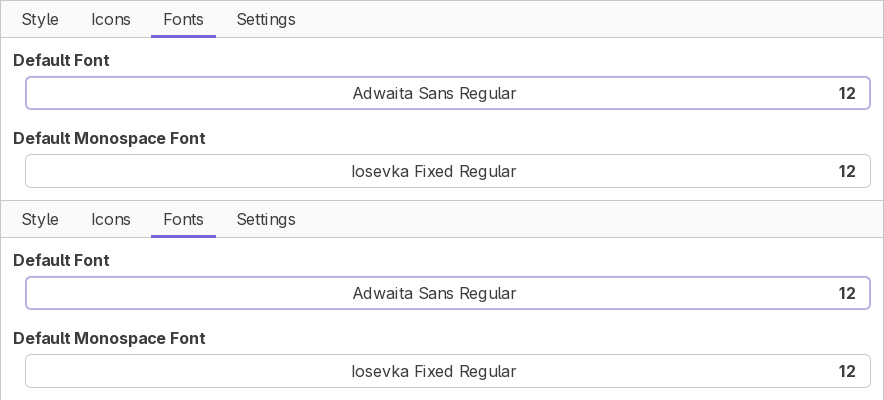
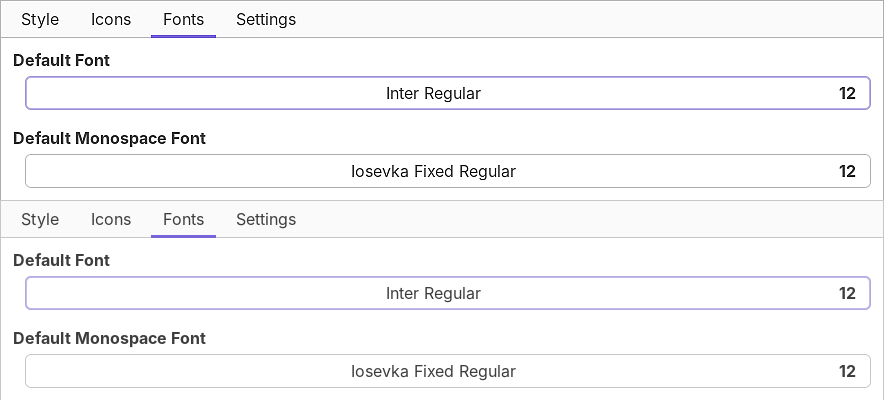
Text written in Adwaita Sans changed almost imperceptibly. Text written in Inter became blurrier, but this didn’t improve anything. Actually, Inter has more visible issues with some letters or sequences of letters that don’t appear in the above screenshots.
I eventually tried the second configuration, with identical results. 🤷♂️
IMPORTANT! As ~/.config/fontconfig/fonts.conf already exists, it’s self-evident that the beginning of the above code snippets, up to and including <fontconfig>, as well as the final </fontconfig>, should not be added!
Final remarks
I didn’t test Adwaita Sans under Windows, but Inter, as seen in Grammarly’s web app, looks just perfect in Firefox. However, if you download it from Google Fonts, you’ll get the usual two variable font files, whereas for the standard, static fonts, this is one of those cases where Google offers you several sets of fonts, each optimized for a specific size: 18pt, 24pt, and 28pt. I never understood this shit. They do the same for Literata, but in this case, beyond the 18pt, 24pt, 36pt, and 60pt (this is grotesque!), there’s also a “universal” Literata. Again, I don’t understand TrueType fonts that need such tricks; WTF, these are not bitmap fonts!
I was afraid to ask what it means that “GNOME compiles Adwaita Sans as static tables with tweaked metrics,” because this is also suggestive of the era of bitmap fonts, which is absurd.
As far as fonts are concerned, everything seems broken under Linux. FreeType shouldn’t be hindered by any patent these days, yet it’s still such a broken technology! GTK4 seems to cheat; GTK3 is broken; Qt6 is broken: what isn’t? Windows, with its ClearType cheating machine, or macOS?
I also don’t want to know what this is supposed to mean: “with Apple’s macOS/iOS rendering philosophy in mind—meaning it expects to be rendered smoothly across fractional pixel boundaries without being forced onto a rigid grid.” YOU CANNOT RENDER ANYTHING ON FRACTIONS OF A PIXEL. If they mean that something “blends” into adjacent pixels ONLY ON SOME BUT NOT ALL COLORS (R, G, or B), this is beyond retarded, because I always specifically disable the subpixel RGB rendering! I do so BECAUSE I AM NOT BLIND AND I CAN SEE THE COLORED FRINGES THAT SHOULDN’T BE THERE ON MONOCHROME TEXT!
How do you even display black text on a white background if you have to use “subpixels” (read: individual colors!) from neighboring pixels? Are most people really color-blind? Are they unable to focus? Is their brain working like a CRT that blends and blurs everything?
If a 4K display or a “retina display” is needed to stop seeing such color aberrations, then we’re completely fucked-up. This planet is so full of retards.
And they can’t even design fonts properly. Still, some fonts are rendering pretty fine—just not Adwaita and Inter.
Leave a Reply