
LibreOffice and ONLYOFFICE vs. Markdown: FAIL!
There was some enthusiasm lately regarding the newly added Markdown capabilities in LibreOffice. Oh, Markdown will bring peace on Earth! (LaTeX failed at that task long ago.) Examples:
- Liam Proven in The Reg: LibreOffice learns to speak Markdown in version 26.2.
- Whoever maintains the I Write Like Blog: LibreOffice Writer now supports Markdown.
We learn that:
Specifically, LibreOffice 26.2 supports the version called CommonMark.
Therefore:
Now the latest LibreOffice 26.2.1 can also turn a Word document into clean simple Markdown – or turn Markdown into a clean, formatted Word document – in just a couple of clicks.
On the other hand, ONLYOFFICE has quietly been supporting Markdown (I don’t know the flavor) for quite some time:
- April 26, 2024: How to edit .md files in ONLYOFFICE: “Starting from version 9.0, ONLYOFFICE Docs supports
.mdfiles natively, without the need for additional plugins.” - June 23, 2025: From concept to release: a deep dive into ONLYOFFICE Docs 9.0 with the dev team.
I therefore wanted to give a very cursory try of the Markdown capabilities of the latest LibreOffice 26.2.1.2 and ONLYOFFICE 9.3.1.8.


LibreOffice
I started by creating a native .odt document which I saved for reference. It looked like this:

I then saved it as .md and got this content:
This is a **quick test** regarding the Markdown capabilities of *LibreOffice 26.2.1.2*.


| ~~***Cat type** | ~~***Positives** | ~~***Negatives** | ~~***Rating** |
| - | - | - | - |
| ~~***Tuxedo** | ~~***Intelligent, affectionate** | ~~***Sassy** | ~~***\*\*\*\*\*** |
| ~~***Garfield** | ~~***Social, friendly** | ~~***Gluttonous, lazy, crazy** | ~~***\*\*\*** |
| ~~***Black** | ~~***Calm, affectionate** | ~~***?** | ~~***\*** |
| ~~***Tabby** | ~~***Friendly, intelligent, vocal** | ~~***Adventurous** | ~~***\*\*** |
Here’s the saved .md file as displayed by Typora:

You have most definitely noticed the errors made by LibreOffice Writer in converting to Markdown:
- It inserted
~~*at the beginning of each table cell. - It made the content in each table cell bold.
- It escaped inconsistently the stars in the last column.
But maybe LibreOffice can display it properly upon reopening?!

Nope. There is no such thing as magic!
LibreOffice: FAIL to save correct Markdown!
ONLYOFFICE
I started by creating a native .docx document which I saved for reference. It looked like this:

I then saved it as .md and got this content:
This is a **quick test** regarding the Markdown capabilities of ONLYOFFICE* 9.3.1.8*.

| | | | |
|-|-|-|-|
| **Cat type** | **Positives** | **Negatives** | **Rating** |
| Tuxedo | Intelligent, affectionate | Sassy | ***** |
| Garfield | Social, friendly | Gluttonous, lazy, crazy | *** |
| Black | Calm, affectionate | ? | * |
| Tabby | Friendly, intelligent, vocal | Adventurous | ** |
Here’s the saved .md file as displayed by Typora:

I hope you noticed the errors in the created Markdown:
- In this case, I only italicized the version number, but somehow a space also got italicized. This usually doesn’t work in Markdown, so the asterisk should have been moved past the space, adjacent to a non-space character.
- The definition of the table is strange. It has an empty header above the header.
- Asterisks have not been escaped! Typora made a mess of them: instead of 5, 3, 1, 2 it displayed 1 (bold), 3, 1, 2. I’d expected it to interpret them as 1 (bold), 1 (italic), 1, 2 asterisks.
And here’s the saved .md file as displayed by ONLYOFFICE after reopening:

It even failed to recognize its own table! 😱
ONLYOFFICE: FAIL to save correct Markdown! FAIL to interpret its own tables!
Doing it by hand is always better
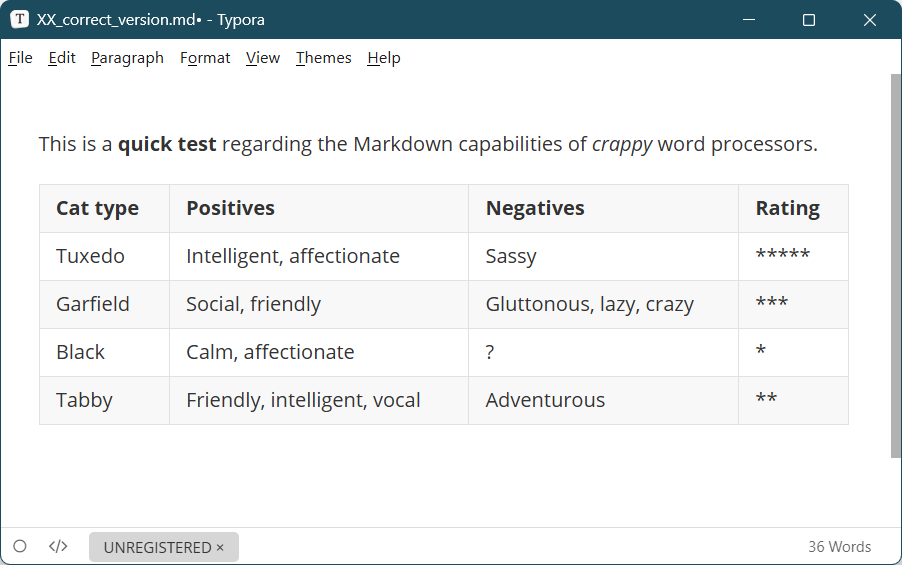
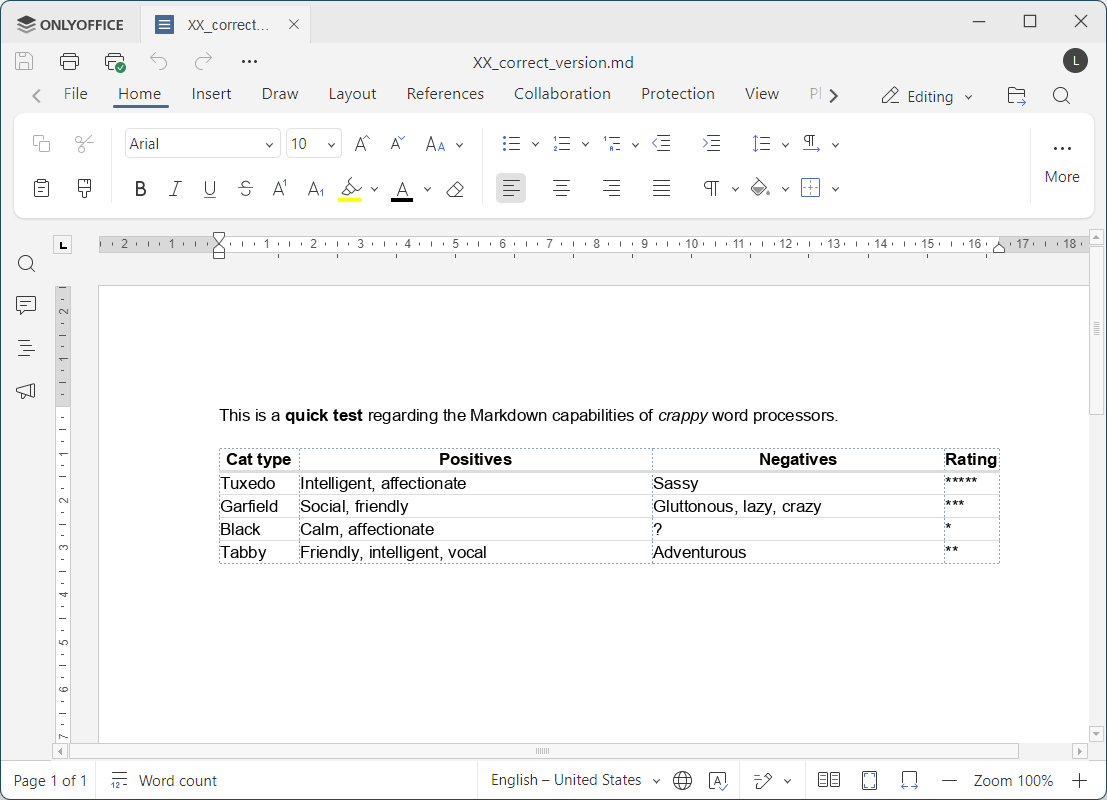
To assess the ability to open correct Markdown files, I created this one by hand:
This is a **quick test** regarding the Markdown capabilities of *crappy* word processors.

| **Cat type** | **Positives** | **Negatives** | **Rating** |
|-|-|-|-|
| Tuxedo | Intelligent, affectionate | Sassy | \*\*\*\*\* |
| Garfield | Social, friendly | Gluttonous, lazy, crazy | \*\*\* |
| Black | Calm, affectionate | ? | \* |
| Tabby | Friendly, intelligent, vocal | Adventurous | \*\* |It displayed as expected in Typora:
In LibreOffice:

In ONLYOFFICE:
Conclusions
- Both LibreOffice and ONLYOFFICE are unable to create correct Markdown files from .ODT and .DOCX documents.
- Specifically, LibreOffice breaks the formatting of each and every table cell!
- Additionally, ONLYOFFICE fails to recognize the tables that have been wrongly generated by itself!
- Both LibreOffice and ONLYOFFICE can open correct Markdown files created externally. They might be able to save them correctly after editing, but I didn’t test that.
How the fuck are they testing the software these days?!
They keep creating more and more shit under the name of “software,” but it never ever works right!
This is just too funny at this point 😀