
KDE Bug 342056: Thunar is still a great file manager
Phoronix, yesterday:
KDE Developer Fixing Long-Standing Bug Over Very Long Small-File Copy Times:
Since 2014 there has been a KDE bug report titled Ridiculously slow file copy (multiple small files). With the Dolphin file manager or other KIO-based KDE programs, copying many small files can be much slower than using the
cpcommand directly or other copying programs likersync. Finally, that issue is in the process of being resolved for addressing very slow copy times when dealing with many small files on the KDE Plasma desktop.KDE developer Méven Car recently took to addressing this long-standing defect in the KIO code of copying many small files being painfully slow. Long story short, Car worked on KIO to remove in-memory transport and batch-copy folding a whole run of files into a single command.
The code has yet to be merged but is expected for a post-6.29 release.
Méven Car remarked in his blog post:
The small-files case is the story. KIO 6.28 was about 20x slower than
cp, which is exactly the ratio the 2014 report complained about. Removing the socket for in-process workers, together with no longer probing the destination filesystem once per file, takes it from about 1.6 s to 0.4 s (roughly 4x). Batching the copy takes it to 88 ms, essentiallycpspeed and about 18x faster than 6.28. That “I usecpinstead of dolphin” line finally has an answer.Those interested in this significant improvement to KDE’s KIO can learn more via this blog post.
Oh, my. Batching the copy, who would have thought of that? It’s not like we didn’t have in MS-DOS the copy vs. xcopy story. From what I recall, copy was tremendously slower than xcopy when dealing with several small files because:
copyonly processed one file at a time; it read and wrote in 64 KB chunks, and after each file was copied, it closed it, and the OS wrote the corresponding information in the FAT.xcopyread file after file using as much as it could from the available memory (north of 256 KB but less than 640 KB), then it wrote the entire batch of files in one go, and the FAT was updated once an entire batch was successfully written, or once the limit specified by theBUFFERS=statement inCONFIG.SYSwas exceeded. If 100 files were written, the FDD’s/HDD’s head did not go 100 times to update the FAT! Incopy’s case, it did.
Readers commented on Phoronix:
Danny3 thought of another bug:
Great job!
Hopefully some KDE developer also looks at what is happening with large file transfers over MTP as they never complete (finish) even though the files are completely copied.
the_text_writer claimed XFCE is also affected:
XFCE suffers from the same problem. A few months ago I was restoring a Firefox profile folder with Thunar, about ~2 GB of small files. Copying from one drive to another. I just started it, and went on my business. But 20 minutes later I noticed that it is using 100% CPU, and is still only at ~30%. Then I cancelled it and used
cp, to finish under 10s 😑
I guess it’s just the way it is.
alpha_one_x86 mentioned Ultracopier. What a fucked-up site! The author must be brain-damaged. Go for GitHub instead.
Anux was skeptical regarding XFCE Thunar’s slowness:
Thunar is definitely slower than
cp, but that much? I would have said maybe 20% difference. Was there a Windows file system involved?
plandream complained about Samba:
Another bug is watching let’s say a series with samba. It never progresses to the next file, at least in mpv. KIO does need a lot of work and unfortunately I am not that good of a programmer to help ☹️
V1tol exposed a paradox:
I wonder if anyone can fix Midnight Commanders slow VFS implementation. If I have a ZIP archive with lots of small files inside, unpacking through
mcdrops speeds down to tens of kb/s. Unpacking manually withunzipor7zI hit storage speed limits.
aufkrawall tried to play down the issue:
If KIO was ridiculously slow with copying many small files, then what is Windows? It’s like several dozen times slower with some copy operations.
the_text_writer explained how he performed a test:
Nope, no Windows FS involved. That was from an
ext4USB HDD drive to whatever OpenSUSE is using nowadays as default (after writing this sentence I checked my laptop: it’sbtrfs).Edit: just to confirm that I remember well, I started a “quick” test. I generated about 2GB data on a 4TB external HDD (on my desktop system).
Then I copied it on my OpenSUSE laptop. First with
cp, it finished in 245 seconds. After that I dropped caches. As I’m writing this, Thunar has been copying the same data for 250s, but is still only at 25% 😳 It still says 14 minutes remaining (and it looks about right). But maybe I misremembered about the CPU usage, currently it is not high.
Note that he corrected his initial statement: he was using the shittiest filesystem in the known universe, Btrfs. Many people religiously love this crap.
mSparks, from the Church of Clem/Cinnamon/Mint (it must be a Trinity, right?):
Switch to Nemo from Thunar, by far the best of all of them.
caligula added:
XFCE suffers from the same problem
And Gnome too.
Doomer is keen to justify his moniker:
I move TBs of data around regularly, I can’t use GUI file explorers for this, they all hang/crash/whatever randomly, even File Pilot.
Only CLI toolscp,rsyncandrobocopyhave worked reliably (others probably work too, but I haven’t tried them). It’s crazy how unreliable GUI software actually are, whenever you need to do something critical you’ll end up in a terminal emulator using tools written in C that just work because of this, I’ve had GNOME and KDE partition tools crash on me while resizing partitions, this is INSANE,fdiskandpartedhave been reliable and rock solid for decades, how come it’s impossible to have reliable GUI tools no matter the operating system?
But Doomer missed the memo: this is many small files, not about huge ones!
mSparks is unabated:
I move tens of thousands of files daily with Nemo. Of course only the USB drives really copy/move the data, which is weekly.
Mint are the only team I know of that had developer resources to get the job done, and didn’t waste all their developer resources on Wayland. And it shows.
bug77 is results-oriented:
I solved this years ago. I installed Krusader.
That thing is old and barely maintained. But it gets stuff done.
caligula is Ludditus-like:
The mundane end user GUI tools are written by totally incompetent losers. Of course if you call them losers, they get hurt and angry, but it’s the truth. If they had any pro level skills, they would develop a) more complex end user tools (e.g. commercial ones) b) complex middleware or server side software c) kernel drivers d) games e) some special domain software like real-time audio and video.
A more toxic combination is the lack of skills + arrogant attitude. E.g. if you notice that file operations are 20x slower than they should be, they start calling you with names or claim that it doesn’t need to be fast (e.g. “how often do you format your hard drive, really?”). The worst offenders maintain some strict community guidelines and CoC shit so that nobody can even file relevant bugs. So, there you have it.
plandream agrees with bug77:
Krusader is amazing.
Ludditus investigates! 🔎
I needed to know how the facts stand! I’m not that keen to believe that an 18x-20x loss of speed compared to cp is so frequent a situation: who’s copying that many 4 KB files?
Not related to this KIO bug, I’d like to add that, contrary to the claims in this Ubuntu thread, I usually don’t encounter any “Preparing to copy” stage with Thunar or Nemo; this is what Windows does (Win7, Win10, Win11).
Preparing for the tests
The storage device used for these tests was an old 256 GB external SSD that I just formatted as ext4. Not the shitty Btrfs, nor exFAT or NTFS!
First, I needed to generate 2 GiB worth of small files:
#!/bin/bash
for i in `seq 50000`; do
   dd if=/dev/urandom of=./${i}.data bs=42k count=1;
doneThen, the scenario was as follows:
- To time
cpoperations,timewas just perfect. - To time Thunar, Nemo, and Dolphin, compromises had to be made. I just couldn’t use drag-and-drop and measure the time required to copy! The only feasible automation (while keeping it simple) was to adopt this process:
- I copy the folder with those 50k files from the contextual menu or using CTRL+C.
- I start a script that would trigger the paste operation (CTRL+V), then will measure the time the copying window is visible.
This is the script I used:
#!/bin/bash
# Usage:
#   time-gui-copy.sh thunar
#   time-gui-copy.sh nemo
#   time-gui-copy.sh dolphin

set -euo pipefail

case "${1,,}" in
    thunar)
        TITLE="File Operation Progress"
        ;;
    nemo)
        TITLE=" of "
        ;;
    dolphin)
        TITLE="Copying"
        ;;
esac

echo "Paste will be triggered in 3 seconds..."
sleep 3

start=$(date +%s.%N)

xdotool key --clearmodifiers ctrl+v

while ! xdotool search --onlyvisible --name "$TITLE" >/dev/null 2>&1; do
    sleep 0.1
done

while xdotool search --onlyvisible --name "$TITLE" >/dev/null 2>&1; do
    sleep 0.2
done

end=$(date +%s.%N)

awk -v s="$start" -v e="$end" '
BEGIN {
    printf "\nStart : %.6f\n", s
    printf "End   : %.6f\n", e
    printf "Total : %.3f seconds\n", e-s
}'I also needed to flush the caches before each copy operation. Each time, I closed the respective file manager, and I ran this before launching it again:
sudo sync && echo 3 | sudo tee /proc/sys/vm/drop_cachesI’m not confident that this was enough, because subsequent operations were usually slightly faster. This is why I take the first measurement as a reference, not the average of the six measurements performed per file manager. I considered rebooting between measurements, but it would have been too much of a fuss.
The computer used for tests was the slowest laptop that I still own, using an i5-5200U and 8 GB of RAM and running Debian XFCE Testing. The file managers I used:
- Dolphin 26.04.0, using
kio66.26.0 - Thunar 4.20.9, using
gvfs1.60.0 - Nemo 6.6.4, using
gvfs1.60.0
The results
cp | thunar | nemo | dolphin |
|---|---|---|---|
| 47.274 s | 94.873 s | 134.236 s | 187.431 s |
| 39.162 s | 82.073 s | 123.684 s | 187.525 s |
| 39.517 s | 82.781 s | 131.109 s | 178.190 s |
| 48.403 s | 90.653 s | 131.805 s | 186.585 s |
| 39.517 s | 82.591 s | 122.541 s | 186.298 s |
| 42.387 s | 85.747 s | 131.439 s | 177.659 s |
KIO definitely needed to be fixed. But wasn’t Nemo supposed to be “da best shit”? Look, even when using the same gvfs as Thunar, it’s slower than it!
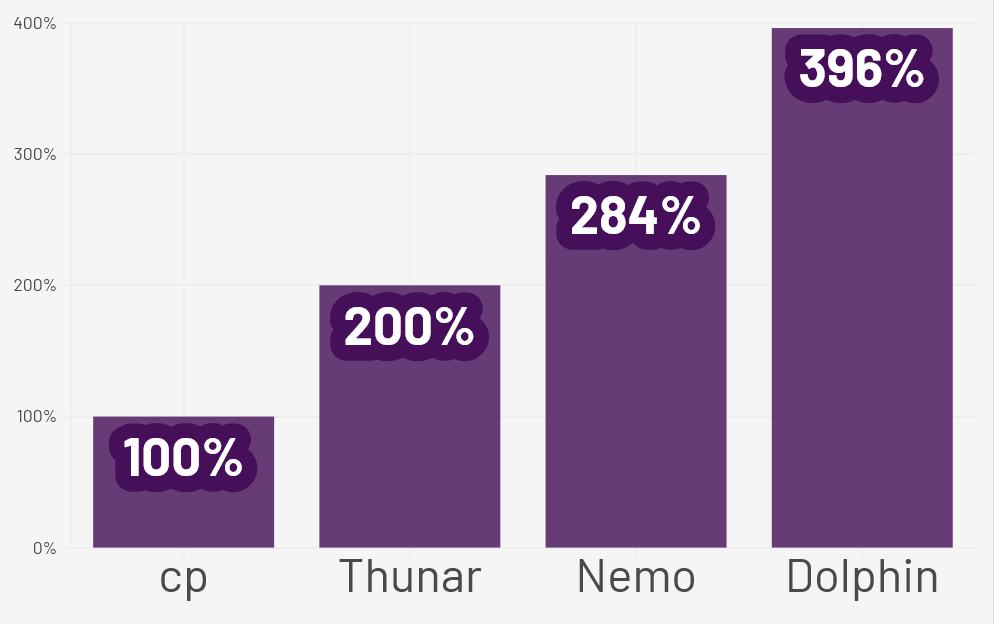
In my tests, using 42 KB files, Dolphin was 4 times slower than cp, not 18 times slower!
But Thunar was the second-best option, and the first option among the GUI file managers. (I did not test PCManFM and PCManFM-Qt, though.)

Nautilus ROCKS!
(perfect words to ragebait Ludditus)