
Now I am even more perplexed!
In my previous post, in a nutshell, I expressed my disappointment with Gemini (especially for coding, but also as an all-purpose chatbot) and, among other things, my surprise that ChatGPT’s free tier sometimes gives unexpectedly great answers. A reader shared a positive experience with SuperGrok Lite for both coding and general chat, including deep research. So, yes, I need to reevaluate Grok, even if the free tier only has Fast answers and no access to Expert and Heavy.
One more trouble
Now, there is one more reason for me to scratch my head. It appears that Perplexity, which I used in only 209 sessions between March 6, 2024 and January 13, 2026, isn’t as bad as I thought!
Perplexity never overwhelmed me, but in its early days, it was a decent option for searching the web with an LLM, especially since few chatbots could do that back then. Later, like many other LLMs, it had its ups and downs; it changed, for better or worse, what it could do for free or for subscribers. It rarely helped me find information that no other chatbot or search engine found, but I kept using it occasionally until its founders’ ambitions became ludicrously intrusive—from the Comet browser to whatever else they announced they were planning. I literally stopped caring about Perplexity—until yesterday.
Perplexity was born for search and search alone, but now it attempts to do everything AI can do. Still, free accounts can only access a default, unnamed LLM. Ten LLMs from third parties are available to paying customers—7 for Pro plans and 3 only for Max plans.
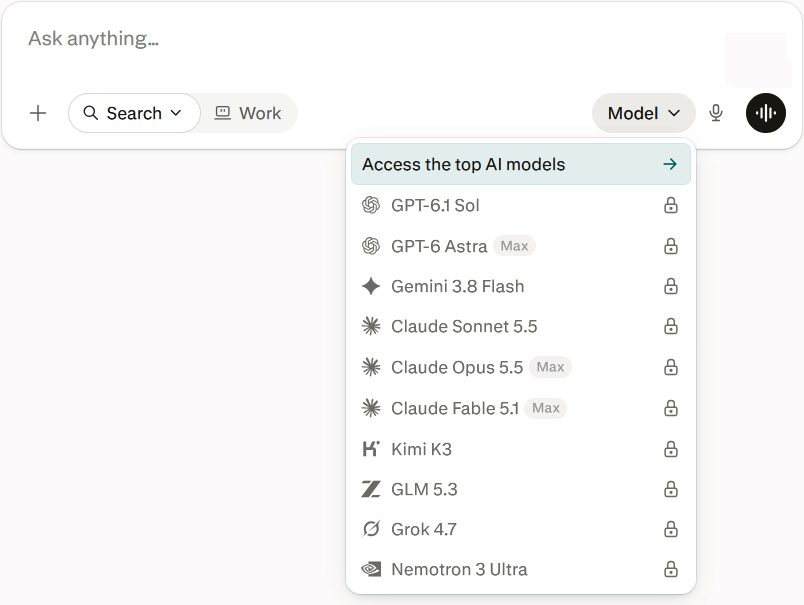
But I have a first-hand account of Perplexity returning answers based on excellent search results when the topic was niche, the relevant documents were hard to find, and all the provided links were real and correct! A free account was used.
This literally stunned me. So I started investigating.
Grok answers
❶ Ludditus: What LLM does Perplexity use in free mode (where you cannot choose any agent/model)?
Grok: In Perplexity’s free mode (where you cannot manually select any model/agent), it uses Perplexity’s default model — Sonar (or Sonar 2), their own in-house model optimized for quick searches and web browsing.
Details:
- Free users get access to basic searches (practically unlimited) and a very limited number of Pro Searches per day.
- There is no advanced model selector (GPT, Claude, Gemini, etc.). The system automatically uses the Best option, which in practice for free users is Sonar (Perplexity’s internal model, fine-tuned for fast, factual answers with citations).
- Advanced models (e.g. GPT-5.x, Claude Sonnet/Opus, Gemini, etc.) are only available on paid plans (Pro/Max), where you can choose them manually.
This is the situation according to official Perplexity Help Center documentation and recent 2026 sources. The exact model can vary slightly depending on the type of query (standard vs. limited Pro Search), but the base remains Sonar.
❷ Ludditus: Is Sonar better at search than ChatGPT free, Qwen free, and Kimi free?
Grok: Yes, for pure search, Sonar (Perplexity’s free default model) is generally better than ChatGPT free, Qwen free, and Kimi free.
Why Sonar excels at search
Sonar is a search-specialized model, fine-tuned by Perplexity (based on Llama) specifically for:
- Always-on real-time web search.
- Factual answers with numbered inline citations for nearly every claim.
- Good speed, relevance, and source consistency.
Independent tests from 2025–2026 show:
- Significantly more sources per answer (often 15–20+ vs. 3–8 for others).
- Lower citation error rates (e.g. Tow Center: ~37% errors for Perplexity vs. ~67% for ChatGPT Search).
- Strong performance on grounded factuality benchmarks (SimpleQA and similar).
- High consistency when asking the same question twice.
Perplexity’s free tier offers practically unlimited basic searches on Sonar + a small number of Pro Searches per day.
Quick comparison
Aspect Sonar (Perplexity free) ChatGPT free Qwen free Kimi free Web search Always on, native Available, but not always / less deep Available Available Citations Inline, numbered, almost everywhere Fewer, less consistent Variable Variable Number of sources Very good Weak–medium Medium Medium Search factuality Very good Good, but more citation errors Good Good Search speed Fast Variable Good Good Best at Research, current facts, verification General chat, creativity, coding Multilingual, coding, multimodal Long context, documents, agents Free limits Generous for basic search More restrictive on search Generous Generous (long context) When Sonar is not the best
- General chat, creativity, complex coding, deep reasoning without search → ChatGPT free or the larger models from Qwen/Kimi are often better.
- Very long documents / file analysis → Kimi (large context) or Qwen perform excellently.
- Multilingual needs (including Chinese) → Qwen and Kimi have an advantage.
Practical summary: If you want fast, up-to-date answers that are easy to verify with sources (news, facts, daily research), free Sonar on Perplexity clearly wins. For everything else (free-form conversation, code, creativity), combine it with ChatGPT free / Qwen / Kimi. Many people use both in parallel.
❸ Ludditus: Lately, I’ve been disappointed by Gemini Pro as an all-purpose LLM, and by Gemini 3.8 Flash as a coding agent. Gemini being by Google, how reliable is it for web searching?
Grok: Gemini (via Google AI Mode / AI Overviews / Gemini apps with grounding) is reasonably reliable for web search thanks to Google’s index, but it is not the most trustworthy option for high-stakes or citation-heavy research. It sits in the middle of the pack: strong on freshness and coverage, weaker on precise grounding and citation fidelity compared to dedicated search-first tools.
Strengths (why Google helps)
- Access to Google’s index — Extremely fresh data, excellent for recent events, local results, news, product info, and anything that benefits from Google’s crawl scale and ranking signals.
- Real-time grounding is available (the model decides when to search and pulls live results).
- Independent tests (e.g., SimpleQA-style evaluations of AI Overviews) show ~89–91% of verifiable claims supported by the cited sources in recent 2026 analyses. That is solid for a generative overview system.
- Good at synthesizing broad, everyday queries quickly.
Weaknesses (where reliability slips)
- Citation and grounding quality is uneven. Studies (Tow Center, BBC/EBU, WashU analyses of AI Overviews) show higher rates of unsupported claims, partial grounding, or sourcing issues than the best competitors. One analysis found only ~42% of overviews fully grounded (every claim supported by the cited text). Another put Gemini among the weaker performers on sourcing problems (significant-issue rates around 76% in one multi-assistant test, driven largely by sourcing).
- Can still inject parametric (pre-trained) knowledge that is outdated or imprecise, then attach citations that only partially support the claim.
- User reports specifically about Gemini 3.8 Flash (and related models) note frequent high-confidence outdated answers or hallucinations even when search should be available.
- Citations are often fewer and less consistently linked at the claim level than Perplexity’s numbered inline style. Some answers cite sources that do not fully back the text.
- Consistency across repeated queries can be lower than specialized search engines.
Practical takeaway
Because it is Google, Gemini is better than a pure non-search LLM and competitive for casual or time-sensitive lookups. However, the same issues that disappointed you with Gemini Pro (general quality) and 3.8 Flash (coding agent) appear in search mode as occasional overconfidence, incomplete grounding, and sourcing slips.
Recommendation:
- Use Gemini for quick overviews, local/recency-sensitive queries, or when you already live in the Google ecosystem.
- Prefer Perplexity (or similar citation-first tools) when you need dense, checkable sources and higher confidence that claims are tightly tied to the web results.
- Always click through and verify important facts—none of the major AI search systems are error-free.
❹ Ludditus: Can you make a comparative table with Perplexity, Gemini, ChatGPT, to which you should add Claude, Qwen, Kimi, Grok, all in their free versions?
Grok: Here’s a comparison table focused on web search reliability for the free versions (as of late 2026):
Tool Freshness Citation density & transparency Grounding accuracy Best for (free tier) Perplexity (Sonar) Very good Excellent (dense numbered cites) Often highest in controlled tests Verifiable research, fact-checking Gemini / Google AI Mode Excellent (Google index) Medium Good (~89–91% claim support) Everyday, local, recent events ChatGPT Search Good Medium–low Variable Conversational research inside chat Claude free Good Good (direct citations + links) Solid, careful synthesis Thoughtful answers with sources; limited by daily usage quotas Qwen free Good–Very good Good (citations + Deep Research reports) Competitive Free deep research reports, multilingual work Kimi free Good Medium–Good Solid, especially on longer tasks Long-context research, agentic searches Grok free Excellent (web + live X) Medium (partial / variable) Mixed (strong real-time, weaker on precise citation accuracy in some tests) Breaking news, social/real-time discussion Quick notes on the free tiers
- Claude free: Web search is available and produces citations, but it counts toward your usage limits (which reset every few hours). Deeper “Research” mode is paid-only.
- Qwen free: One of the most generous free options — includes web search with citations and a capable Deep Research agent at no cost.
- Kimi free: Strong free access with search + excellent long-context handling, useful for multi-step research.
- Grok free: Best-in-class for real-time information (especially anything happening on X), but citation precision has lagged behind the leaders in independent tests.
Bottom line for search reliability on free plans:
Perplexity still leads for clean, checkable sources. Qwen is a strong free contender if you want deeper research reports without paying. Claude is careful and well-cited but usage-capped. Grok wins on pure real-time/social freshness. Gemini remains excellent for everyday Google-style queries.Would you like me to expand any of these further (e.g., limits, strengths/weaknesses, or specific use-case recommendations)?
❺ Ludditus: Expand all of these further.
Grok: Here’s a deeper expansion of all seven free-tier options for web search reliability (as of October 2026). I’ve covered practical limits, real strengths/weaknesses, and clear use-case recommendations for each.
1. Perplexity (Sonar) – Free
Limits: Practically unlimited basic/Quick searches. Very limited Pro Searches per day (usually 3–5). No advanced model selection.
Strengths:
- Best-in-class citation density and transparency (numbered inline sources on almost every claim).
- High consistency when you ask the same question twice.
- Strong grounding — independent tests often rank it highest or near-highest for citation accuracy and source fidelity.
- Clean, research-oriented interface designed for verification.
Weaknesses:
- Free Pro Search quota is low.
- Less conversational depth than pure chat models.
- Can still occasionally over-summarize or miss nuance on highly specialized topics.
Best for: Everyday research, fact-checking, news, academic-style queries, anything you need to verify later. The default recommendation when accuracy and sources matter most on a free plan.
2. Gemini / Google AI Mode – Free
Limits: Very generous for standard queries. Advanced features (Deep Research, higher limits) often require Google AI Pro/Ultra.
Strengths:
- Access to Google’s massive, extremely fresh index → excellent real-time and local results.
- Good overall claim support rates (~89–91% in recent studies).
- Seamless integration with Google ecosystem (Search, Maps, etc.).
- Fast for broad, everyday questions.
Weaknesses:
- Citation density and transparency are only medium — sources are present but not as tightly linked claim-by-claim as Perplexity.
- Higher rate of partially grounded or unsupported claims in some audits.
- Can blend parametric knowledge with search results imperfectly, leading to confident but slightly outdated or imprecise answers.
- User reports of Gemini 3.x Flash models sometimes ignoring fresher search data.
Best for: Quick everyday lookups, local/business info, recent events, product comparisons, and anyone already living in the Google ecosystem. Less ideal when you need dense, auditable citations.
3. ChatGPT Search – Free
Limits: Web search is available but subject to free-tier message and tool-use limits (can feel restrictive during heavy use).
Strengths:
- Natural conversational follow-ups.
- Decent synthesis when search is triggered.
- Integrated into a very polished chat experience.
Weaknesses:
- Citations are inconsistent and usually less dense/transparent than Perplexity or Claude.
- Search is not always-on; the model decides when to use it.
- Grounding quality is variable — sometimes excellent, sometimes thin.
Best for: Research that happens inside a longer conversation or creative workflow. Convenient if you already use ChatGPT daily, but not the strongest pure search tool on free tier.
4. Claude free
Limits: Web search is available but counts toward the free usage quota (resets every ~5 hours). Long page fetches consume quota quickly. Deep Research mode is paid-only.
Strengths:
- High-quality, careful synthesis with direct citations and source links.
- Tends to be more measured and less overconfident than many competitors.
- Excellent at turning search results into clear, well-structured answers.
- Good instruction-following when you specify source preferences.
Weaknesses:
- Usage limits make heavy research sessions impractical on free.
- Not as search-native or source-dense as Perplexity.
- Can be more conservative (sometimes refuses or hedges more than needed).
Best for: Thoughtful, high-quality answers on moderately complex topics when you want careful reasoning + sources and don’t need dozens of queries in a short window.
5. Qwen free
Limits: Extremely generous — one of the most unrestricted free tiers. Includes web search and a full Deep Research agent at no cost.
Strengths:
- Free Deep Research that produces structured, multi-source reports with citations.
- Strong multilingual capability (especially Chinese–English).
- Competitive agentic research performance for a free tool.
- Citations are present and useful.
Weaknesses:
- Citation density and claim-level linking are good but usually not quite at Perplexity’s level.
- Interface and English polish can feel slightly less refined than Western leaders.
- Occasional regional/content differences due to Chinese origin.
Best for: Free deep research reports, multilingual queries, and users who want agentic multi-step research without paying. One of the strongest pure free options overall.
6. Kimi free
Limits: Free tier is quite usable with search enabled. Long-context strength is a major advantage even on free.
Strengths:
- Excellent long-context handling — great when you need to research across many sources or long documents.
- Capable agentic/search behavior.
- Solid overall quality for free.
Weaknesses:
- Citation transparency and density sit in the medium–good range (not class-leading).
- Less specialized for pure search than Perplexity.
- Can vary more in consistency across runs.
Best for: Research that involves long documents, multi-hop questions, or agent-style exploration. Strong free alternative when context length matters.
7. Grok free
Limits: Free tier has usage limits (exact numbers fluctuate). Higher-tier features (full frontier models, heavier generation) require SuperGrok or X Premium+.
Strengths:
- Best real-time freshness, especially anything involving X/Twitter or rapidly evolving events.
- Direct access to live social signal that other tools lack.
- Useful for news, trends, and public sentiment.
Weaknesses:
- Citation accuracy has historically been among the weaker performers in independent tests (high error rates on precise source identification in some studies).
- Citations exist but are often less dense or precise.
- Can be more opinionated/blunt, which is a feature or bug depending on the use case.
Best for: Breaking news, social trends, real-time events, and anything where X data is uniquely valuable. Less ideal when you need tightly verifiable, academic-style citations.
Quick recommendation matrix (free tier only)
Your priority Top free choice Strong runner-up Highest citation reliability Perplexity (Sonar) Claude free Deep multi-step research reports Qwen free Kimi free Real-time / social / breaking news Grok free Gemini Everyday + local queries Gemini Perplexity Careful, high-quality synthesis Claude free Perplexity Long documents + research Kimi free Qwen free Conversational research flow ChatGPT Search Claude free
Food for thought, eh? 🤔
Agentic Perplexity
On the other hand, even if Perplexity entraps me (I’m still half-skeptical, because I don’t need academic-style citations, and I know I always need to follow links to check if they’re not outdated or hallucinated), I won’t fall for its attempt to sell me its agentic “computer mode”!
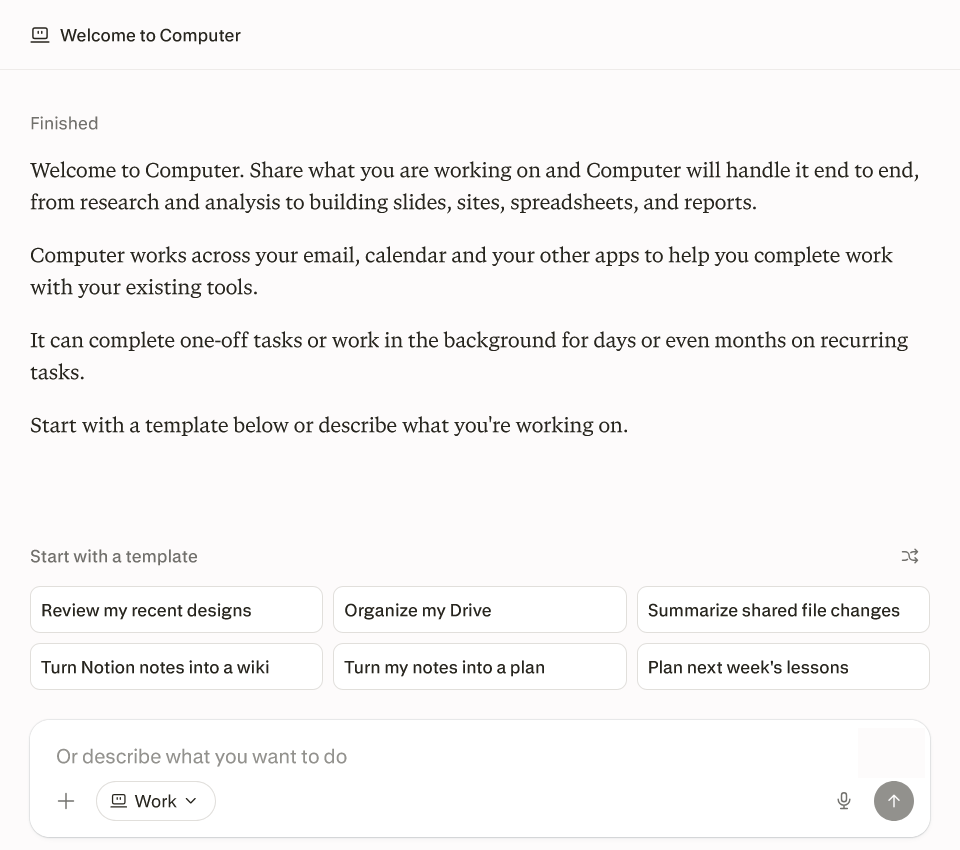
Ludditus: Perplexity proposed that I try their Computer mode, which looks like agentic stuff. But it would only use their free model, so how useful is it, and how quickly would it eat up my free token allowance?
Grok: Perplexity Computer is not meaningfully available on the free plan.
Access reality
Official Perplexity documentation states that Computer requires an active paid subscription (Pro, Max, or Enterprise). The free plan is limited to normal Search (with the default Sonar model) plus a very small number of Pro Searches per day.
Some onboarding screens currently show a limited-time promo like “+$40 free Computer credits,” but this is promotional and not a permanent free-tier feature. Even if you receive a small promotional credit grant as a new user, it is one-time and tiny.
How useful is it on free?
Essentially not useful for real work:
- You cannot run proper multi-step agentic workflows.
- You stay stuck with the free Sonar model for ordinary searches.
- Any promotional credits (if granted) are only enough for a couple of very light tests at best.
Computer shines when it can orchestrate multiple stronger models, use connectors (email, Drive, Notion, etc.), run for longer periods, and create finished deliverables (slides, spreadsheets, reports, sites). None of that is realistically accessible on free.
Credit consumption (if you somehow have any)
Credits are the metering system for Computer:
- 100 credits ≈ $1
- Light tasks (simple research + summary): roughly 100–350 credits
- Medium multi-step work: several hundred credits
- Heavier projects (research + analysis + slides/spreadsheet/report): easily 1,000–several thousand credits
Even a modest promotional grant of a few hundred credits would be consumed by 1–3 light tasks. A single moderately complex request can wipe it out.
Bottom line for you
On free, Computer is basically a teaser. It will not replace doing the work yourself or using stronger free alternatives (Qwen’s free Deep Research, Kimi’s agentic features, etc.).
If you want to try real agentic workflows with Perplexity:
- Pro ($20/mo) gives access + a one-time 4,000-credit bonus (enough to experiment meaningfully for a short period).
- Max ($200/mo) is the only consumer plan with a recurring monthly credit allocation (10,000 + bigger bonus).
Perplexity, here I come?
Here’s my 210th conversation with Perplexity. The answer includes 75 references. However, I do have some complaints:
- The in-page (as opposed to in-Markdown) links lead to a single URL by default, unless you navigate, e.g., from 1/5 to 2/5 and so on.
- The “Links” tab lists the links, with no back references to the answer. You have to click “More” to see all the links, and after the 75 referenced links, there’s an extra “More Results” section with 10 links, one of which goes to my blog!
- The Markdown copied to the clipboard is pathetic, with unnumbered references and only one reference in places where there are more grouped references.
- To get a complete and correct Markdown with all referenced URLs embedded as “reference-style URLs” (in Markdown’s meaning of “references”), you need to use the “Export as Markdown” function, which can be found in the “…” menu (other export formats: PDF, DOCX).
It can definitely be worse (Qwen and Kimi, for instance, don’t include any URLs in the Markdown copied to the clipboard!), but if Markdown is rocket science for them, then how much can I trust such AI offerings?
In the spring of this year, I bought an annual Pro subscription to Perplexity for less than 5 euros on a grey market (can you guess which one? :)). It sticks to date as Pro, and these models are currently available in their respective versions: https://justpaste.it/perplexity-06-Oct-2026.
I haven’t really explored Perplexity much, but it did a decent job recently of helping me choose a wall recuperator. :).
I don’t know what this “nemotron 3 ultra” could be useful for, have to check. 🙂
Cheers – thank you for the article!
Five months ago, Gemini helped me repair a washing machine!
And I didn’t know what Nemotron 3 is, either!
I’m not sure I’d pay for Perplexity (I’m almost sure I wouldn’t). On u7buy, I’ve noticed ChatGPT Plus (Private) for €11.60/month (because shared is a no-go with LLMs).