
Why didn’t I know this about Fedora’s KDE?
This occurred in a talk about KDE, and since Gemini Neon mentioned Fedora, I had to vent about an obvious idiocy:
Ludditus: Fedora has this thing that it updates on reboot even if the updated packages are not system packages. It’s ridiculous to have to reboot for every single shit.
Gemini: That Windows-style reboot-for-everything behavior is strictly a Discover / GNOME Software (PackageKit) default on Fedora, not a requirement of RPM or
dnf.Because PackageKit treats every native RPM as an OS package rather than distinguishing between a kernel update and a leaf app, the GUI updater blindly stages the whole transaction into
systemdoffline updates (only Flatpaks update live in Discover). Fedora defaults to this to protect casual desktop users from mid-session crashes when shared libraries like Qt, Mesa, or WebKit get swapped out under running GUI apps.If you want normal live updates on Fedora, you can bypass or kill that behavior in seconds:
- Use
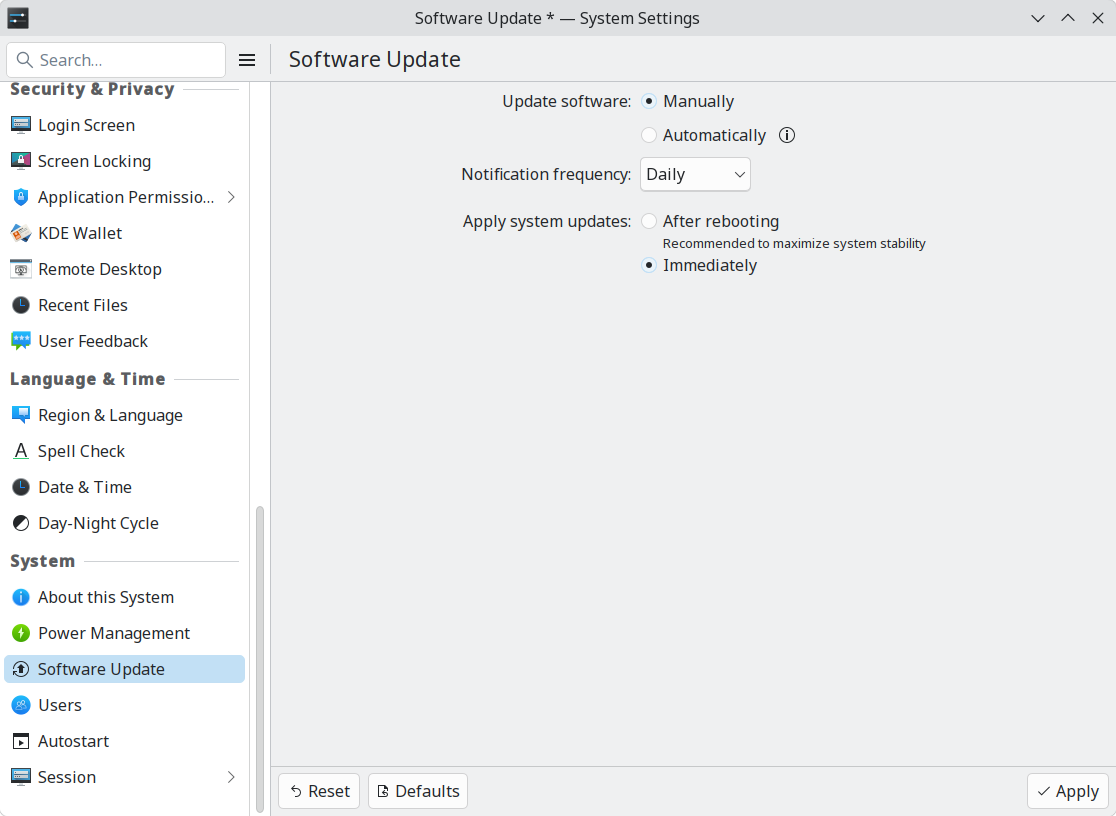
dnfdirectly: Runningsudo dnf upgradeupdates everything live on the running system, just likeapton Debian—no staging, no forced reboot. Offline updates indnf5are strictly opt-in (--offline). If you actually want to check whether a kernel,systemd, or core library update warrants a reboot afterward, rundnf needs-restarting(ordnf needs-restarting -sfor individual services).- 😮 Flip the switch in Plasma: Open System Settings → Software Update and change Apply system updates from After rebooting to Immediately.
- Remove the GUI updater entirely: You can uninstall
plasma-discover-notifier(or remove Discover and PackageKit altogether) without breaking KDE, which also gets rid of PackageKit maintaining a separate metadata cache alongsidednf.
Ludditus: Why use “System Settings → Software Update” in KDE’s settings when this is not a DE but an OS setting? Why not in Discover?
Gemini: The irony cuts both ways: Software Update (
kcm_updates) isn’t really an OS setting either—it is a Discover plugin hosted inside System Settings.1. What it actually is under the hood
Despite sitting in System Settings,
kcm_updateslives in theplasma/discoversource repository and only appears if Discover is installed. All it does is write a per-user config file (~/.config/PlasmaDiscoverUpdates) telling Discover and its tray notifier how to drive PackageKit. It does not touch your distro’s actual package manager configuration (dnf,apt,unattended-upgrades, or system-wide systemd timers).2. Why KDE put it in System Settings instead of Discover
- The “Settings” mental model from Windows and macOS: KDE stopped treating System Settings as strictly DE-only years ago—it already wraps OS-level plumbing like NetworkManager, firewalls, user accounts, display managers, and firmware. Because mainstream users look for update behavior under System Settings → Software Update (not inside an “app store”), KDE moved the KCM there so it sits alongside other machine-wide controls.
- 🤦♂️ Discover’s own “Settings” page is misnamed: In Discover, the sidebar entry labeled Settings is really just a Software Sources list (RPM/APT repos, Flathub, fwupd, KDE Store). Rather than cramming update-policy controls on top of the repository list—or maintaining duplicate UIs—KDE buried a link to the KCM inside Discover under Settings →
⋮(More Actions) → Configure Updates, which simply launches that same System Settings module.- KDE’s long-term push toward an integrated OS: With projects like KDE Linux, KDE increasingly designs Plasma as a full vertical OS shell rather than a modular desktop layered over someone else’s package manager.
On a traditional Linux distro, that creates an awkward architectural seam: a per-user app-store preference dressed up as an OS control panel, sitting on top of a distro package manager that ignores it completely whenever you use the terminal.
😤
My original frustration was that, while Fedora 45 has plasma-desktop-6.8.3, Debian Sid only has plasma-desktop_6.7.4, and Debian 13 is stuck with plasma-desktop_6.3.6. Debian 14 would likely have KDE 6.9, but you never know.
Few people know that Norbert Preining, the guy who used to provide newer KDE builds for Debian stable, was the maintainer of Cinnamon on Debian. Norbert switched from GNOME 3 to Cinnamon, then to KDE:
Since my switch to KDE/Plasma, I haven’t used Cinnamon in months. Only occasionally I tested new releases, but never gave them a real-world test. Having left Gnome3 for it’s complete lack of usability for pro-users, I escaped to Cinnamon and found a good home there for quite some time – using modern technology but keeping user interface changes conservative. For long time I haven’t even contemplated using KDE, having been burned during the bad days of KDE3/4 when bloat-as-bloat-can-be was the best description.
What revelation it was that KDE/Plasma was more lightweight, faster, responsive, integrated, customizable, all in all simple great. Since my switch to KDE/Plasma I think not for a second I have missed anything from the Gnome3 or Cinnamon world.
While I’m still happy with XFCE, I have to admit it’s so passé and something between legacy and vintage. Even after it becomes fully Wayland-compatible, XFCE won’t be much more than “a less-dead MATE.” XFCE is familiar in the same way that Win95 is familiar, but it is not really evolving.
On the other hand, there are a few nice touches in KDE 6.8 and 6.9.
➡️ 6.8: Phoronix used the most retarded title for the (already old) news: KDE Fixes 15-Year-Old Bug Over Inaccurate Notifications When Copying Files To USB Drives. This has absolutely not a KDE bug, but the “normal” behavior in all Linux desktop environments: the copy or move operation is declared completed even if the data is still in the OS’ buffers. Only when you try to “safely remove” the device do you notice that you have to wait for the buffers to be completely flushed to the device. As I could witness in F45’s KDE 6.8.3, now Dolphin forces this flush and only considers the copy or move completed when it really is.
This KDE fix essentially brings Dolphin’s behavior in line with what Windows has done by default with the “Optimize for quick removal” (Windows XP) or “Quick removal” (since Windows 7) policy for decades. However, in Windows, this is not a global policy. You have to have a removable device inserted to change the policy in Device Manager! What KDE did was to change this policy for all future removable devices! Moreover, KDE’s fix doesn’t disable the Linux kernel’s write cache but forces the flush at the end of the operation and waits, ensuring the UI accurately reflects reality.
➡️ 6.9: Phoronix (again): KDE Plasma 6.9 Will Stop Leaking Memory When Right Clicking Files/Folders On Desktop. It wasn’t much (“kB scope”), but it happened on every right-click on files or folders on the desktop.
Maybe 2027 will be the KDE year. We’ll see. Unless Ubuntu’s AI-powered launcher on steroids to be released in January mesmerizes you.
Ouch, wait, should I fear KDE Plasma 7.0? Will it ever be an XFCE 5.0 worth of such a version number?
🤔
Bonus! Dedoimedo, formerly a promoter of the snap format, acknowledges that “the snap format is restrictive by design,” yet he insisted on installing VLC as a snap. To his merit, there’s something worth quoting from his reported experience:
Remember, dear nerds, the Linux desktop today is half-broken, but you can at least debug it and make changes of your own to compensate for the missing stuff. Tomorrow, your Linux desktop will be read-only. It will still be half-broken, but you won’t be able to fix anything on the system level. And let me not get started on Linux stores and unverified apps, please. I don’t want more Google-like solutions in my life, thank you.
…
Basically, it comes down to this:
- Today, Linux desktop, half-broken, but you can manually fix things.
- Tomorrow, Linux desktop, half-broken, but you may not be able or won’t be able to fix things.
- And Linux desktop will never be not half-broken. After thirty years, we have enough data that proves that.
That’s all there is to it really. Sad and about to become a lot sadder.
Leave a Reply