
AI and the new FOMO—Fear of Murdering Oneself
I have the feeling that the AI Revolution—bubble or not, it’s undeniably extremely disruptive—will lead to so much mental depression that the suicide figures might go through the roof.
It won’t be a result of the massive loss of jobs, although this will also generate a lot of pain and misery. It’s already affecting China, too. I’m also not counting the morons who ask a chatbot whether they should commit suicide and receive instructions on how to take their lives—which they apply!
In my recent visit to the Japanese Note blogging platform, I mentioned an article by a certified psychiatrist and occupational physician. In his analysis of why we are so tired despite the conveniences brought by AI, he mentioned several factors, but I want to highlight one in particular: the constant pressure to be better than others, master AI, be useful, and continually prove one’s worth.
But what if you’re overwhelmed by the abundance of information? What if you find it difficult to keep up with the rapid pace of innovation today? If I were to visit daily X, Reddit, Hacker News, YouTube, and a few sites specialized in the AI hype, I’d discover hundreds and hundreds of new projects, products, frameworks, quantized models, studies, articles, tutorials, videos, and whatnot, all showing me that I don’t know shit. Every single day I’d learn how little I know, even as I learn more. But it’s even impossible to know what to learn—there is way too much that looks like it needs to be studied!
Then, of course, atop the “I’m ignorant, I’m stupid, I’m useless, I’m not competitive” thoughts, one reads (as I mentioned in the same blog post), such reports: “I quit my job, and now I earn my own living. I can’t write a single line of code. I just give instructions … and my AI (Claude Code) handles over 200 tasks every day.”
How not to feel stupid? How not to throw oneself under an incoming train?
Technological revolutions happened before. We also experienced an inflation of products and technologies during the dot-com bubble. But nothing as disruptive as the AI bubble has ever taken place, and especially nothing that could lead to such an avalanche effect. This planet is overheating due to the enthusiasm of brainwashed AI fans who develop the 2 millionth agentic framework, quantize the 3 millionth model, and create the 10 millionth AI project on GitHub. Even if 1% of the AI bubble were useful, it’s still too much for a human mind to comprehend. And navigation in such a slop is close to impossible.
Before the AI bubble, software developers experienced this phenomenon: a 2-year-old technology they just became familiar with was declared obsolete, alongside its architectural metaphor, and they had to learn something else. Now, it’s even worse: everything you knew 2 months ago is surpassed by hundreds and thousands of new concepts, not to mention the countless projects and commercial offerings. There are even so many new names and words that didn’t exist two months ago! When is this crazy race going to end or at least slow down? And how many of us will survive until then?
The pressure is real
If last year I wrote about a post-Christmas depression, this time I experience a pre-Christmas depression.
I cannot even keep pace with the number of keywords I’d like to learn more about. Literally. So I just don’t.
I plan to ask AI about some learning paths I could take to improve my knowledge and expertise in AI, but I find this situation to be an absurd one! Should you think of some project that would be an interesting challenge or that could become a useful product, one or more of the following happens:
- You discover there are 1,000 similar already working projects, of which 200 are commercial products that seem to be selling (or, at least, they look attractive, so you could yourself be lured to subscribe to and use them).
- You find out that you need to invest quite a lot of money in hardware, in subscriptions and tokens, or both.
- You learn that… you need to learn a lot, and I mean a lot! In the process, you make a list of 500 names you never encountered before, and they’re all AI-related.
In a nutshell: you’re a loser. Yeah, it’s that time of the year.
Of course, you and I aren’t the only idiots out there. With AI solutions swarming right and left, FreeBSD still cannot have an installer that offers KDE. Initially aimed for FreeBSD 15.0 (December 2, 2025), it was postponed the umpteenth time for FreeBSD 15.3 in mid-2027. Maybe, as 18 extra months might not be enough. Any decent LLM could do it in two days, tops. But not FreeBSD! BTW, Slackware offered KDE in its curses-based installer for the first time in Slackware 4.0, released on May 17, 1999. That’s 28 years before mid-2027. And don’t start me on Arch.
Sample set number one
From the hundreds of links encountered but not collected, here’s a tiny sampler. It goes well in the continuation of my previous “The AI bubble keeps growing,” in which, from DaisyRose-27B, I ended up discussing Apple’s unified memory and which models could run on Apple Silicon. Sans Nvidia.
A note on Nvidia first.
A commenter wrote: “My RTX 3060 12 GB runs a lot of acceptable models locally without issue. Upgrading to a 3090 is what I’ll eventually do.” RTX 3090 means 24 GB GDDR6X.
My wife’s 2021 HP Pavilion Gaming Desktop TG01-1209ng, which was never used for gaming, came with a GeForce GTX 1650 that has 4 GB of GDDR5, and I can tell you that this video card is crap. For everyday use, the GeForce makes no visible difference compared to Intel integrated graphics using standard RAM, and it cannot handle any serious tasks involving CUDA, tensors, or similar shit.
Her several work laptops have had 6 and 8 GB VRAM, and they were used for engineering. Yet, most gaming PCs have much more powerful video cards and GPUs. For fuck’s sake, what are those games needing so much power for?!
The most powerful laptop she got for work now features an RTX PRO 4000 Blackwell 16 GB GDDR7. Still, only 16 GB, right? Intel Core Ultra 9 285HX, 64 GB DDR5-6400, is extremely powerful for a laptop, but not very much so for unquantized models. Any models that do not fit in the GDDR7 will “spill” into the DDR5, drastically reducing the speed of token output. If properly configured, Qwen3.8-27B (Q4) could fit in 16 GB VRAM (if the KV cache is 8-bit), but only with a modest context and if the OS is made to use the Intel integrated GPU for the display and hardware acceleration is disabled in browsers and so on! Even so, I’m told that some VRAM will be used by the Nvidia driver even if the RTX is “headless,” i.e., it’s not used to display anything.
It’s hilarious how a Mac with 48 GB of unified memory would run larger models in a higher precision, although it’s not clear at which token speed. As a rule of thumb, if GDDR7 leads to a certain token speed, M3/M4 Max with unified RAM would offer 40-60% of the speed, whereas “spilling” into DDR5-6400 on this Intel would offer only 10-15% of the speed.
I project increasing sales for Apple (even if it lacks CUDA), a company I hate!
As a traditional Nvidia hater, I never understood the need for an ultrapotent GPU and tons of VRAM. An Intel-only system that “borrows” VRAM from the RAM is the cheapest form of “unified memory,” and it works well as long as there is no need for tensors and shit, making the video card essentially a double (or triple) buffer. No video encoding, no engineering, or games that would use the GPU for computations. Currently, my Windows allocated 0.5 GB for GPU, which is too much. For a 1080p display, triple buffering plus some additional surfaces shouldn’t take more than a couple of tens of MB! I remember when the BIOS/UEFI allowed you to limit the RAM used by the GPU to 64 or 128 MB. It was always sufficient for me.
Remember that most people purchased powerful Nvidia cards for stupid games, not for serious tasks. But they can now run local LLMs. It’s always the most retarded and the smartest one to benefit the most—with normal people being losers.
OK, so here’s a guy, Oscar Molnar, who graduated in 2018 from Birmingham City University. A “normal” software developer, right? But an enthusiastic one. Nothing wrong with that, mind you.
But I’m a grumpy Luddite, so I started counting and summing up.
I started reading his blog from “My Monitor Was Cutting My Download Speed by 75%.” And no, it wasn’t his display. It was his UGREEN USB-C to 2.5G Ethernet adapter, plugged into the display. You see, the MacBook Pro M3 Pro doesn’t come with Ethernet, because Apple.
Pushed into the stack:
- MacBook Pro M3 Pro: launch price, depending on configuration, $1,999…$2,899 (+tax), or £2,099…£2,999 (VAT-inclusive).
- 2026 Studio Display XDR: $2,899 or £2,999, but the nano-texture glass version is about 10% more expensive. Read “The Things I Wanted to Know Before Buying Apple’s Studio Display XDR.” Why on Earth would a 27-inch monitor require two fans?
- A 2.5 Gbps symmetrical Internet connection.
The last one isn’t “owned,” but it’s a luxury nonetheless.
He obviously also owns a Windows PC with an Nvidia RTX 4080 and 16 GB of VRAM. From “I Put a Datacenter GPU in My Gaming PC for £200” (Tesla V100), we learn that, with a lot of technical ingenuity, he now has 32GB VRAM across two GPUs, so he can run Qwen3.6-27B-MTP quantized at Q5_K_M (19GB) with 128k tokens of context.
Oh, and he uses NixOS. This is the first sign of mental derangement.
He’s a true technologist. Read “I Designed A Custom PCB To Avoid Pressing A Button Three Times” and “How To Quiet A Ugreen 4800 Plus Without Sacrificing Drive Temps.” We also learn that “I recently got a new 3D printer.”
Push to stack:
- Ugreen 4800 Plus NAS (less than $700) + HDDs or SSDs up to 144 TB of storage, but we don’t know how much he settled for.
- Bambu Lab P1S 3D printer. Cheap, actually (about €499).
On the technological enthusiasm, “Do Wavy Walls Really Use Fewer Bricks? I Tested It in Blender” is nice, but is Blender really a pertinent way to test a wall’s resistance against lateral impact? This is not CAE/FEA software! He could have as well used a video game to test car crash safety! No material data, no mortar modeling, no boundary conditions, no distributed loads… Only “serpentine walls use 55% as many bricks” as a straight wall is accurate.
OK, he also uses an iPhone and an iPhone watch. All the above technological contraptions represent a non-negligible investment, don’t you think so?
I’m a frugalist, a Luddite, and a cheapskate. (Also, with the exception of my wife, I tend to hate people who seem smarter than I am. And NixOS fans. Then, Discord servers are a completely retarded concept.)
Oh, that post about that NAS is a nice example of how to use Debian in a Docker container to compile something when your OS isn’t Debian Linux.
Sample set number two
Let’s go to real AI-related technology, shall we?
I was stunned when I read “Ctrl+F Finds Words. I Wanted It to Find Answers.” The idea behind it (which is semantic search made cheaply) is fabulous, but, but, but…
As he says, Jev seems a great invention at first: Introducing System One Models & Jev. Maybe at a second sight, too.
But it’s (sorry for the term), retarded!
Well, the way you use Jev is you give it four things:
- State, which is the context of the question. For example, a piece of code.
- Type, which is how Jev should answer. For example, “yes or no”, and I’ll go into this in a bit.
- Question, which it should answer with the type, based on the context provided. For example, given the piece of code, is this efficient?
- Criteria. For example, for “no”: the code is deeply nested in loops.
Interesting, right? Well, let’s take a look at the types of answers Jev can give.
No, it’s not interesting. It’s stupid. Go read those JSON snippets!
Then, read how it works and also about its horrendous limitations:
Jev has an incredibly small context size. Just to give you an example, some LLMs have a context window of a million tokens, some have two million. For Jev it’s:
- 64k tokens for the state plus all the questions together.
- 32k tokens for the state plus the longest single question.
That’s absolutely nothing, which meant that I had to chunk up the page. There was no way for me to send the whole page, especially on a massive page, which is exactly where you’d want to use my extension. So I basically grouped the paragraphs into chunks as big as the limits allow, sent those over, and then when they came back I could show which paragraphs are or aren’t an answer to your query.
It’s then a surprise that it works!
Here you can see me searching for “remote install” on the NixOS manual, and it found me a block with 86% confidence, which was actually exactly what I was looking for.
The browser extension is at github.com/tymscar/hunch. A quick description from the README:
Powered by TypeSafe AI. Jev is not an LLM. It does not generate text. When you use this extension you send a question to the API along the lines of: Does this element on the page describe X. Jev then goes through every element on that page and answers that questions with yes/no and a probability. The extension then highlights the elements with the highest probability of being the answer.
But what if the context required to understand a page and find an answer is larger? Meh.
How big pages are handled
One annoying thing about Jev today is the very small context window: 64k tokens. That means both the state and the questions. Now I’m sure that’s going to grow substantially in the future, but for right now my way around the issue when it comes to massive pages (say for example the curl man page), is to chunk the request into 160 blocks each, and send them all in parallel. Results get drawn as soon as they come back. Normal pages will fit into one request most of the time.
My honest bewilderment is, how could anyone use such a half-baked thing as Jev and be enthusiastic about it? A great idea, but implemented as a stupid decision machine that answers dumb questions and can process tiny contexts!
Funny thing, I also encountered Jev in the WordPress plugin SpamLens. BTW, that’s another way of paying one more subscription. In the age of AI bots, people pay AI bots to detect comments that are AI spam. Or to perform semantic search!
🤖
Now, just a few random reasons to become depressed because I cannot use such technologies!
● github.com/mjwsolo/localcode and mjwsolo.github.io/localcode: “Agentic coding. Local models. On your Mac.”
To run Qwen 3.8 27B (Q4), which is 18 GB in size, you need 48 GB of unified RAM.
● Also on Apple silicon: github.com/ShinMegamiBoson/lookatmyquant and LookAtMyQuant, LookAtMyQuant 2: “A quantization compiler that delivers 12× lower KL than Q4_K_M at the same file size.”
Qwen3.5-4B in 1.2 GB, Qwen3.8-27B in 7.2 GB! Why is this Apple-centric?!
● Introducing Inkling 2 Mini (for Mac):
Inkling 2 Mini is a looped transformer, running the middle layers of the model three times for every token. This allows the model to apply more reasoning and reach the right answer with fewer tokens, especially on tasks such as agentic coding that depend on reasoning quality. Inkling 2 Mini leads every open-weights model with less than 100B total parameters on benchmarks such as DeepSWE v1.1 (48.2%) and Vals Index v2.2 (46.5%). It runs faster than similarly performing models as well.
Inkling 2 Mini is a Mixture-of-Experts model with 26.4B total parameters, 3.4B active, and 5.4B weight activations per token to account for looping. Looping allows the model to reason longer without writing its reasoning down, which matters for monitoring: our ability to oversee and understand what the model does by reading its chain of thought (CoT).
…
At launch we support Inkling 2 Mini running on any Mac system (MacBook, Mac Mini) with at least 32GB RAM via Ollama. With native NVFP4 training and inference precision, Inkling 2 Mini runs efficiently on NVIDIA’s DGX Spark desktop AI computer. Quantized GGUF versions are available via Unsloth and llama.cpp for local inference.
Inkling 2 Mini is available for inference and fine-tuning on Tinker, and for chat on the Tinker Playground. Open source inference is available on SGLang, vLLM, Ollama, Unsloth, NVIDIA Dynamo, TokenSpeed, and Llama App, with RL fine-tuning support on SkyRL, Miles, and NVIDIA AutoModel. The full weights of Inkling 2 Mini and the variable-looped variant are available on Hugging Face.
This is making me crazy!
● github.com/FMXExpress/PasClaw and pasclaw.dev: “PasClaw is an ultra-lightweight personal AI agent written in Delphi Object Pascal. It is a Delphi/FPC port inspired by picoclaw, with a command-line assistant, tool calling, MCP integration, an HTTP gateway, an OpenAI-compatible API surface, a small embedded web UI, scheduled tasks, skills, and channel integrations.” “An AI Agent forged in Embarcadero Delphi — a single native binary, a tool-using LLM loop, and the raw speed of compiled Object Pascal.”
Some people really get passionate about anything and everything! Here’s more:
● github.com/Ricapar/ClawDOS and ricapar.net/ClawDOS: “An AI chat and coding harness for DOS.”
Type
CLAWDOSat theC:\>prompt and talk to Claude. It reads and edits the files on your disk, writes programs, compiles them with Turbo C, runs them and looks at what they draw on the screen. It keeps notes between conversations and picks up where it left off.The whole harness runs on the PC.
HARNESS.EXEis a 176 KB DOS program that speaks the Claude Messages API itself: it writes the requests, parses the streamed reply, runs the tools and keeps every conversation on its own disk. The 8088 does everything but TLS.Every screen below comes from a 5160 at 4.77 MHz, emulated in 86Box. The conversations are with the live API.
I’m dead, and I don’t know it!
● Equally useless, but someone did it! Ankit Gupta: Vibecoding an inference chip. “Or rather, I vibe-coded an FPGA into running an LLM. And it… just worked.”
Comments on Hacker News:
- It seems implementing transformers is the new “hello world” of AI-assisted coding.
- It only cost them $10,000 in Claude API usage. 🙂
- You get that much usage in a monthly $200 subscription.
- I routinely spend the API-price equivalent of $14,000/mo on my $200/mo subscription.
That’s another story: how to start with an expensive monthly subscription and only use API keys when your quota is exhausted. Cost engineering.
● Only for the leaderboard ranking of LLMs, because there isn’t anything actionable: SimpleBench. “We introduce SimpleBench, a multiple-choice text benchmark for LLMs where individuals with unspecialized (high school) knowledge outperform SOTA models. SimpleBench includes over 200 questions covering spatio-temporal reasoning, social intelligence, and what we call linguistic adversarial robustness (or trick questions). For the vast majority of text-based benchmarks LLMs outperform a non-specialized human, and increasingly, exceed expert human performance.”
● Language Models Can Rewrite Their Own Weights.
Comments on Hacker News:
- It’s worth noting that the only modification the model made to improve itself was to reduce the length of its reasoning traces to avoid hitting the token limit. This is basically the same as the result from the recent weight-space programming article rikiyat.github.io/blog/weight-space-programming/, which found that even Astra wasn’t able to improve the performance of a model without this kind of obvious flaw.
- Author here. Yes, that is the edit: the model found that its answers that run out of tokens and the ones that finish differ along one direction of its hidden states, and it removed a small part of that direction from two matrices in layer 8. The point is that it found and made this change itself, from its own activations, with no larger model and no human pointing it there. In the same family, the 2B model makes no edit and the 4B and 9B models break themselves. The paper’s edits table puts this edit next to the repair.
Finale
To avoid a headache, I probably ignored ~200 links. AI is worse than the bubonic pest.
I need to build a learning and using strategy, but models would obviously run in the cloud, and they’ll have a cost. Gemini 3.8 Flash in Antigravity is peanuts and almost a joke, although it works.
Bonus: Pangram test!
Here’s what Pangram thought about this blog post:
It identified the PasClaw description as mostly AI-generated…
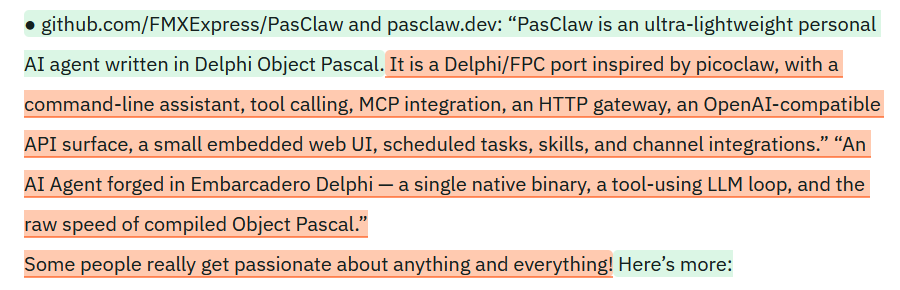
…but “Some people really get passionate about anything and everything!” is my sentence, and this is how I write! Boo, Pangram!
ClawDOS also has an AI-generated description, although, for the life of me, I can’t understand how “Every screen below comes from a 5160 at 4.77 MHz, emulated in 86Box” is not human!
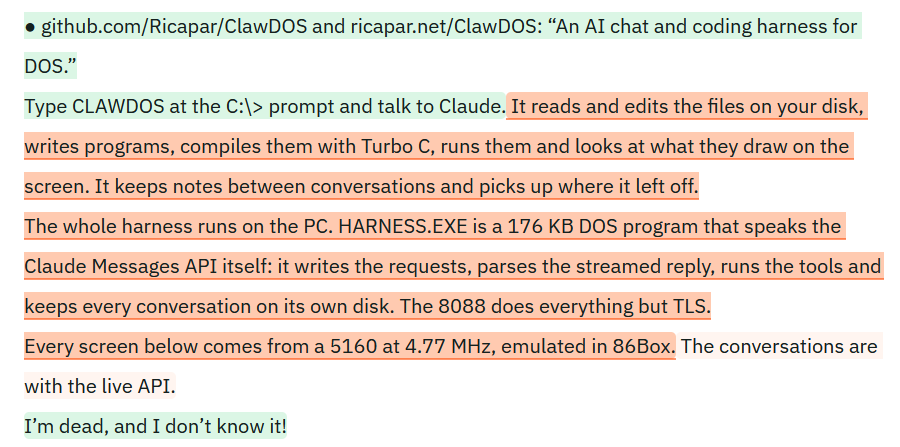
“The conversations are with the live API” is only “likely AI.” Duh.
Leave a Reply